

Are you looking to boost your sales and marketing efforts without juggling multiple tools? The ActiveCampaign Pipedrive integration could be exactly what you need.
By connecting these two powerful platforms, you gain seamless contact syncing, smarter lead management, and automated workflows that save you time and close deals faster. Imagine having your CRM and marketing automation working together effortlessly—helping you focus on what matters most: growing your business. Ready to see how this integration can transform your strategy? Dive in and discover the game-changing benefits of combining ActiveCampaign with Pipedrive. Get started with ActiveCampaign today: ActiveCampaign

Credit: www.pipedrive.com
Introduction To Activecampaign And Pipedrive Integration
The integration of ActiveCampaign and Pipedrive enhances how businesses handle sales and marketing. Combining these tools creates a smoother flow of information between marketing automation and customer relationship management (CRM). This connection helps teams save time and improve customer engagement through coordinated actions.
Overview Of Activecampaign And Pipedrive As Crm Solutions
ActiveCampaign is more than a CRM. It blends sales automation, marketing automation, and AI-driven insights. This platform supports businesses in nurturing leads and closing deals by acting on data rather than just storing it.
Pipedrive is a user-friendly CRM focusing on visual sales pipelines. It helps sales teams track deals, manage contacts, and forecast sales with clear, actionable views.
| Feature | ActiveCampaign | Pipedrive |
|---|---|---|
| Core Function | Marketing Automation & CRM | Sales Pipeline Management |
| Lead Management | Lead Scoring and Nurturing | Deal Tracking and Contact Management |
| Automation | Advanced Marketing and Sales Automation | Basic Workflow Automation |
| AI Features | AI-Driven Insights and Recommendations | None |
Purpose And Benefits Of Integrating Activecampaign With Pipedrive
The integration connects contact data and sales actions between both platforms. This ensures marketing campaigns and sales pipelines stay updated automatically.
- Unified Contact Sync: Contacts update in real-time across both systems.
- Improved Lead Nurturing: Marketing automation triggers based on sales stages.
- Enhanced Sales Insights: AI insights from ActiveCampaign inform Pipedrive actions.
- Time Savings: Reduces manual data entry and prevents errors.
- Better Customer Experience: Timely and personalized communication.
Users can choose to sync contacts to ActiveCampaign or to Pipedrive, or both. This flexibility helps tailor workflows to specific business needs.
Key Features Of The Activecampaign Pipedrive Integration
The ActiveCampaign Pipedrive Integration connects two powerful platforms to enhance your sales and marketing efforts. It ensures smooth communication between your sales pipeline and marketing automation. The integration offers several key features designed to keep your data consistent, automate workflows, and improve lead management.
Two-way Contact Sync: Keeping Your Data Consistent
This integration supports two-way contact synchronization between ActiveCampaign and Pipedrive. Contacts added or updated in one system automatically update in the other. This keeps your data accurate and up to date across both platforms.
- Eliminates duplicate contacts
- Ensures sales and marketing teams work with the same data
- Saves time by avoiding manual data entry
By syncing contacts both ways, you maintain a single source of truth for customer information.
Automation Triggers Between Platforms: Streamlining Workflows
The integration allows setting automation triggers based on actions in either platform. For example, a new deal in Pipedrive can trigger an email sequence in ActiveCampaign. Likewise, a contact’s behavior in ActiveCampaign can update deal stages in Pipedrive.
- Create automated follow-ups after a deal is won
- Trigger lead nurturing campaigns from Pipedrive activities
- Update sales stages based on marketing engagement
This reduces manual work and speeds up response times.
Lead Management And Behavior Tracking Across Crms
Track leads and their behavior across both platforms for better insight. The integration shares lead activity such as email opens, link clicks, and website visits between ActiveCampaign and Pipedrive.
| Feature | Benefit |
|---|---|
| Lead Activity Sync | Sales teams see marketing engagement details |
| Deal and Contact Linking | Connect lead behavior to sales pipeline progress |
| Behavior-Based Scoring | Prioritize leads based on real-time actions |
This combined data helps teams focus on the most promising leads.
Flexible Sync Options: Tailoring Integration To Your Needs
The integration offers flexible sync options. You can choose to sync contacts from Pipedrive to ActiveCampaign, from ActiveCampaign to Pipedrive, or both ways. This flexibility helps customize the flow of information based on your team’s workflow.
- Sync only new contacts or all contacts
- Select which fields to sync between platforms
- Use automation actions to trigger selective syncing
This customization ensures the integration fits your business processes.
Pricing And Affordability Breakdown
Understanding the costs involved with the ActiveCampaign Pipedrive integration helps plan your budget well. This section breaks down the subscription prices and extra fees. It also compares costs with the benefits you receive. Clear insights support smart decisions.
Activecampaign And Pipedrive Subscription Costs
ActiveCampaign offers plans starting at a moderate price, tailored to business size and features:
| Plan | Monthly Cost (Billed Annually) | Main Features |
|---|---|---|
| Lite | $15 | Email marketing, automation, and limited CRM features |
| Plus | $70 | CRM, lead scoring, integrations, and more advanced automation |
| Professional | $159 | Advanced automation, attribution, and predictive content |
Pipedrive charges vary by plan and user count:
| Plan | Monthly Cost per User (Billed Annually) | Main Features |
|---|---|---|
| Essential | $14.90 | Core sales pipeline and basic CRM tools |
| Advanced | $24.90 | Email integration, automation, and workflow customization |
| Professional | $49.90 | Full CRM capabilities, reporting, and team management |
Additional Expenses For Integration Tools Like Zapier Or Leadsbridge
Direct integration between ActiveCampaign and Pipedrive is limited. Many users rely on third-party tools.
- Zapier offers automation workflows starting at
$19.99/monthfor basic plans. - LeadsBridge pricing depends on contact volume and features, starting around
$29/month.
These tools add monthly costs but simplify syncing data between platforms.
Cost-benefit Analysis: Is The Integration Worth The Investment?
Costs add up with subscriptions and integration tools. Weigh these against key benefits:
- Improved sales and marketing alignment to save time and avoid manual work.
- Better lead tracking and nurturing with synced contact data.
- Automated workflows reduce errors and speed follow-ups.
For many businesses, the integration pays off by boosting efficiency and revenue.
Small teams may start with basic plans and Zapier’s free tier to test value.
Larger teams with high sales volume benefit from advanced plans and reliable automation tools.
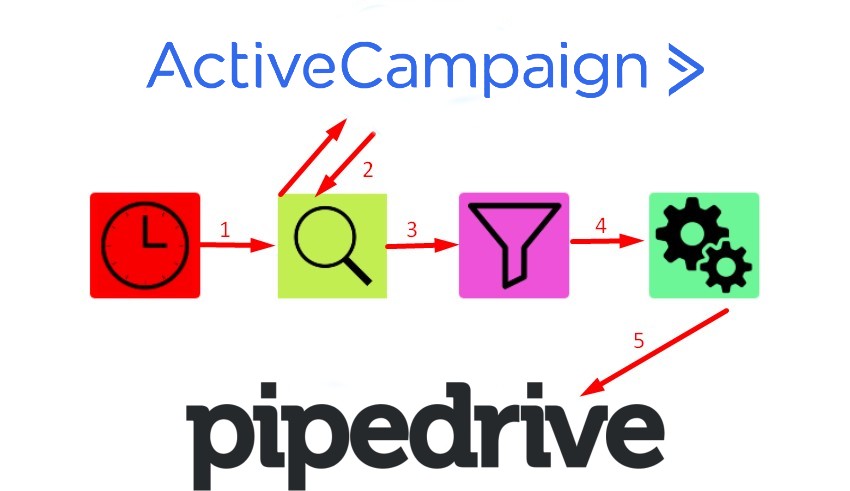
Credit: firebearstudio.com
Pros And Cons Based On Real-world Usage
The ActiveCampaign Pipedrive integration blends marketing automation with sales pipeline management. Users gain tools to sync contacts and automate workflows across both platforms. Real-world use reveals clear benefits along with some challenges. Understanding these helps users decide if this integration suits their business needs.
Advantages: Enhanced Sales Efficiency And Data Accuracy
This integration boosts sales efficiency by automating lead and contact syncing. Sales teams see updated customer information instantly without manual entry. Marketing and sales data stay aligned, reducing errors and duplicated efforts.
- Automated contact sync: Contacts move seamlessly between ActiveCampaign and Pipedrive.
- Improved lead tracking: Leads are scored and nurtured using combined CRM and marketing data.
- Streamlined workflows: Automation triggers in one platform launch actions in the other.
- Real-time updates: Data changes reflect quickly, keeping teams informed.
These factors contribute to faster deal closures and more accurate sales forecasting.
Challenges: Setup Complexity And Potential Sync Limitations
Setting up the integration requires several steps that can confuse new users. Mapping fields correctly is essential to avoid data mismatches. Users must choose between syncing contacts to ActiveCampaign or Pipedrive, or both, which adds complexity.
Some sync limitations include:
- Delayed sync times during high data volume.
- Occasional loss of custom field data.
- Restricted syncing of certain activity types.
- Manual intervention needed for error resolution.
These issues may slow down processes if not managed carefully.
User Feedback And Common Issues Encountered
Users appreciate the integration’s ability to connect sales and marketing efforts. Many highlight the time saved from reduced manual data entry. Yet, some report challenges such as:
- Confusing initial setup steps.
- Sync errors requiring troubleshooting.
- Inconsistent updates for complex workflows.
- Limited support for custom automation triggers.
Regular monitoring and occasional adjustments help maintain smooth operation. Community forums and support channels offer useful solutions for common problems.
Ideal Users And Use Cases For The Integration
The ActiveCampaign Pipedrive integration fits users who want smooth data flow between sales and marketing tools. It helps teams connect sales pipelines with automated marketing actions. This integration suits businesses aiming to manage leads and customer journeys efficiently. Understanding the ideal users and scenarios ensures better results.
Best Fit For Sales Teams Seeking Seamless Crm Synchronization
Sales teams gain from real-time syncing of contacts and deals between Pipedrive and ActiveCampaign. This eliminates manual data entry and avoids data mismatches.
- Sync contacts: Automatically update contact details across both platforms.
- Track deals: Align sales progress with marketing campaigns.
- Automate follow-ups: Trigger emails based on deal stages.
This integration boosts collaboration between sales and marketing, improving lead conversion and pipeline visibility.
Suitable Scenarios For Small To Medium-sized Businesses
Small and medium businesses (SMBs) benefit from this integration by combining affordable CRM with powerful automation.
| Scenario | Benefit |
|---|---|
| Growing sales team managing multiple leads | Keeps data synchronized without extra staff |
| Marketing teams needing targeted email campaigns | Uses sales data to personalize messages |
| Businesses aiming for better customer tracking | Offers clear view of customer journey stages |
The integration supports SMBs in saving time and improving customer engagement.
When To Consider Alternative Crm Or Integration Solutions
This integration may not fit all businesses. Consider alternatives if:
- Your business needs complex custom workflows beyond available automation.
- You require integration with other specialized tools not supported here.
- Your team prefers a single platform with built-in sales and marketing features.
- Data volume is very large, needing enterprise-grade syncing capabilities.
Evaluate your specific needs carefully before choosing this integration.
How To Set Up And Optimize The Activecampaign Pipedrive Integration
The ActiveCampaign Pipedrive integration connects your sales and marketing efforts. It syncs contacts and automates workflows between both platforms. Setting up this integration correctly saves time and improves lead management. Optimizing it boosts sales efficiency and marketing impact.
Step-by-step Guide To Connecting Both Platforms
- Log in to your ActiveCampaign and Pipedrive accounts.
- Navigate to the Integrations section in ActiveCampaign.
- Select Pipedrive from the list of available integrations.
- Click Connect and authorize ActiveCampaign to access your Pipedrive data.
- Choose your sync options:
- Sync contacts from Pipedrive to ActiveCampaign.
- Sync contacts from ActiveCampaign to Pipedrive.
- Enable automation actions based on contact updates.
- Map fields between both systems to ensure data consistency.
- Save settings and run a test sync to check connectivity.
Tips For Maximizing Automation And Workflow Efficiency
- Use lead scoring in ActiveCampaign to prioritize contacts from Pipedrive.
- Set up triggered email campaigns based on pipeline stages.
- Automate task creation in Pipedrive when a lead takes action in ActiveCampaign.
- Regularly update custom fields to keep data accurate and actionable.
- Leverage ActiveCampaign’s AI-driven insights to adjust sales follow-ups.
- Schedule regular syncs to avoid data delays and keep pipelines current.
Common Setup Pitfalls And How To Avoid Them
| Common Pitfall | How to Avoid |
|---|---|
| Incorrect field mapping causing data errors | Carefully map fields and test syncs before full use |
| Syncing duplicate contacts | Use unique identifiers like email addresses to prevent duplicates |
| Ignoring automation triggers | Define clear automation rules aligned with your sales process |
| Not syncing regularly, causing outdated info | Set up automatic sync intervals to keep data fresh |
| Overcomplicating workflows | Keep automations simple and focused on key tasks |
Conclusion: Boosting Sales With Seamless Crm Sync
Integrating ActiveCampaign with Pipedrive creates a seamless flow of information between marketing and sales teams. This integration reduces manual tasks and keeps customer data updated in both systems. Sales teams get real-time insights, and marketers can automate personalized campaigns based on sales activity. The result is a smoother sales process and improved customer engagement.
Syncing these two platforms helps businesses respond quickly to leads and close deals faster. It ensures no lead falls through the cracks and every opportunity is nurtured efficiently. The integration supports goal-setting and tracking, enabling teams to focus on what matters most: growing revenue.
Summarizing The Value Of Activecampaign Pipedrive Integration
- Automatic Contact Sync: Keeps contacts updated in both ActiveCampaign and Pipedrive without manual entry.
- Improved Lead Nurturing: Marketing automation sends targeted messages based on sales pipeline stages.
- Sales Pipeline Visibility: Sales teams get instant updates on customer interactions and marketing activities.
- Time-Saving Automation: Reduces repetitive tasks by automating follow-ups and data syncing.
- Data-Driven Decisions: Combines sales and marketing data for better insights and forecasting.
Final Recommendations For Businesses Looking To Enhance Sales Processes
- Define Clear Goals: Set specific sales and marketing objectives before integrating.
- Choose Sync Options Wisely: Use contact sync or automation actions based on your workflow.
- Train Teams: Ensure sales and marketing teams understand how to use both platforms effectively.
- Monitor and Adjust: Regularly check integration performance and refine automation rules.
- Leverage AI Insights: Use ActiveCampaign’s AI to identify high-potential leads and optimize campaigns.

Credit: journeysthroughsearch.com
Frequently Asked Questions
Does Pipedrive Integrate With Activecampaign?
Yes, Pipedrive integrates with ActiveCampaign. It syncs contacts both ways and supports automation to streamline sales and marketing efforts.
Does Activecampaign Have A Crm?
Yes, ActiveCampaign includes a CRM with sales automation, lead scoring, and AI insights to help manage and close deals effectively.
Is Activecampaign A Good Crm?
ActiveCampaign is a good CRM with powerful sales automation, lead scoring, and AI-driven insights. It helps nurture leads and close deals efficiently.
How Do I Connect My Email To Pipedrive?
To connect your email to Pipedrive, click the Sales Inbox icon, enter your email, select your account, then click Continue to sync.
Conclusion
Integrating ActiveCampaign with Pipedrive streamlines your sales and marketing efforts. You can sync contacts both ways, keeping data consistent and up to date. This connection helps you automate tasks and focus on closing deals. ActiveCampaign’s CRM adds smart features like lead scoring and automation. It supports small and large teams alike. Explore how this integration fits your workflow. Start enhancing your strategy with ActiveCampaign’s tools today. Learn more about ActiveCampaign here.

