

When you’re managing your sales and marketing efforts, knowing the right tools to use can make all the difference. If you’re using HubSpot, you’ve probably come across two powerful features: Sequences and Workflows.
But which one should you lean on for your business? Understanding the difference between HubSpot Sequences and Workflows is key to turning your leads into loyal customers without wasting time or effort. You want a system that fits your style—whether it’s sending personalized follow-ups or automating large marketing campaigns. HubSpot Sequences let you engage with prospects one-on-one, making your outreach feel personal and timely. On the other hand, Workflows automate broader tasks, helping you nurture leads and manage your contacts efficiently on a larger scale. Ready to take control of your customer relationships and boost your sales? Learn how to choose between Sequences and Workflows to maximize your impact. And if you haven’t tried HubSpot yet, check out this free CRM platform designed for startups and small businesses that will transform how you manage your contacts and sales pipeline—no expiration, no hassle. Keep reading to find out which tool fits your needs perfectly.
Credit: makewebbetter.com
Introduction To Hubspot Sequences And Workflows
HubSpot offers powerful tools to automate sales and marketing tasks. Sequences and Workflows help businesses save time and improve customer engagement. Understanding their roles helps teams choose the right tool. Both tools aim to streamline communication but serve different purposes.
Understanding The Purpose Of Sequences And Workflows
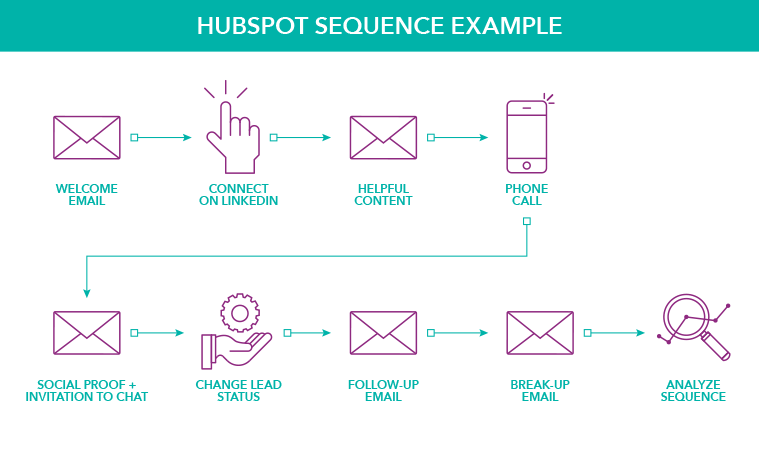
Sequences are designed for personalized, one-on-one sales follow-ups. They send a series of timed emails to nurture leads. Sequences keep communication timely and relevant, helping sales teams build relationships. They work best for guiding prospects through the sales pipeline.
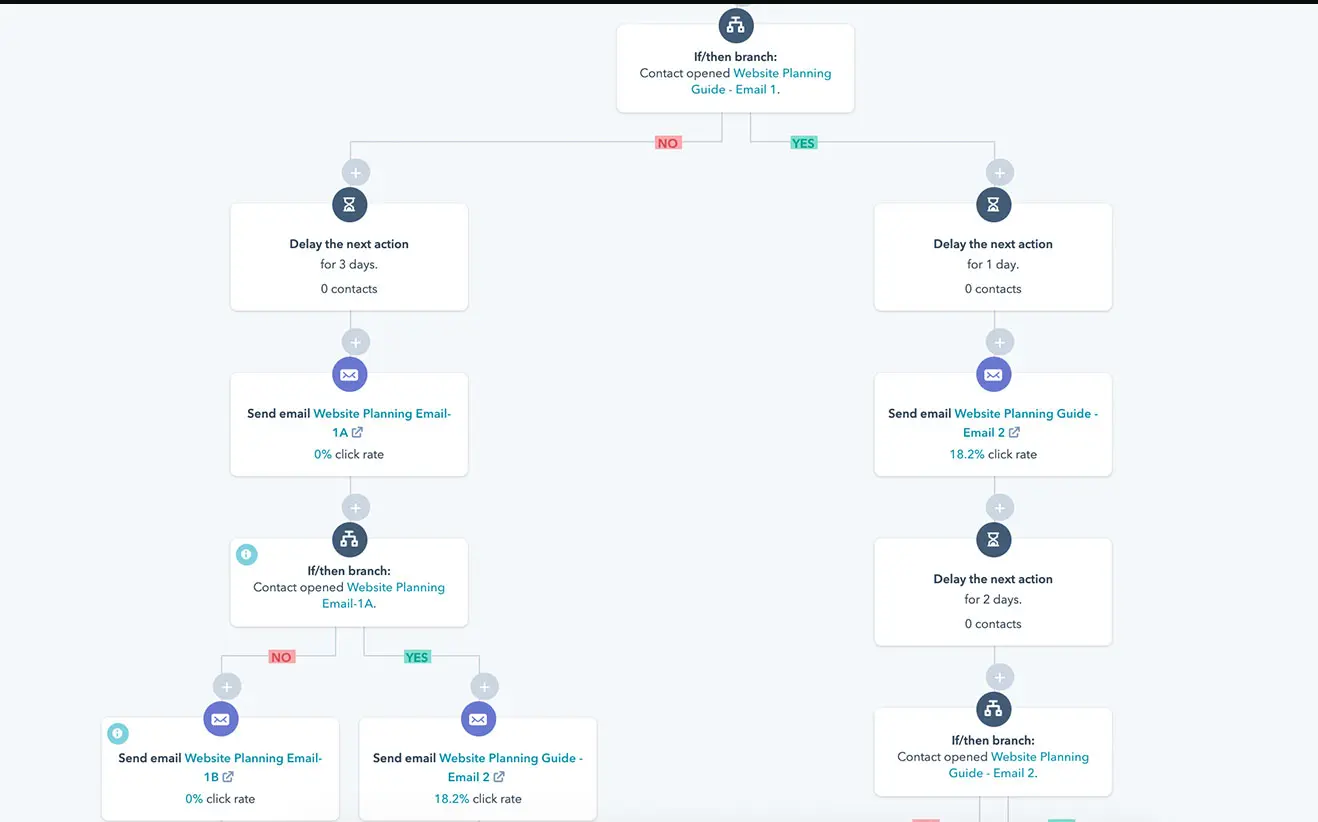
Workflows automate broader processes beyond emails. They can trigger actions like updating contact properties, assigning tasks, or sending internal notifications. Workflows support both marketing and sales teams by automating complex sequences of events based on rules and conditions.
| Feature | Sequences | Workflows |
|---|---|---|
| Purpose | Personalized sales follow-up emails | Automate multi-step processes across teams |
| Scope | Individual contacts or small groups | Large lists or entire segments |
| Actions | Send emails, schedule tasks | Send emails, update properties, assign tasks |
| Best Use | Nurturing leads in sales pipeline | Lead nurturing, marketing automation, internal workflows |
Overview Of Automation In Sales And Marketing
Automation helps reduce manual work. It ensures timely communication and consistent follow-ups. Sales teams can focus on closing deals while automation handles routine tasks. Marketing teams use automation to deliver targeted campaigns and track engagement.
- Automate repetitive emails and tasks
- Trigger actions based on customer behavior
- Improve lead nurturing and scoring
- Align sales and marketing efforts
- Save time and increase productivity
HubSpot’s CRM platform unifies customer data in one place. This data powers both sequences and workflows. Teams get clear insights to tailor their automation strategies. The platform is easy to use and free to start, making it ideal for startups and small businesses.
Key Features Of Hubspot Sequences
HubSpot Sequences simplify personalized sales outreach. They help sales teams send timely, automated emails that feel one-on-one. This tool builds strong customer relationships and moves leads closer to a sale.
Sequences focus on individual interactions rather than bulk messaging. They guide prospects through the sales process with planned follow-ups. This keeps communication personal and relevant.
Personalized One-on-one Sales Engagement
Sequences allow sales reps to send customized emails to each prospect. Each message can include personal details to fit the recipient’s needs. This approach improves response rates and builds trust.
The system automates follow-up emails but keeps the tone personal. It avoids generic mass emails, making prospects feel valued.
Manual Enrollment For Targeted Outreach
Sales reps manually add contacts to sequences. This selective process ensures only qualified leads receive emails. It targets specific prospects based on sales strategy.
Manual enrollment gives control over who enters the sequence. It prevents spamming and keeps the outreach focused.
Sending Sales Emails From The Sales Rep’s Inbox
Emails in sequences send directly from each rep’s email address. Replies return straight to the rep, not an automated system. This keeps conversations natural and immediate.
This feature helps maintain a personal connection. Prospects see a real person behind the messages.
Ideal Use Cases: Scheduling Demos And Follow-ups
- Booking product demos with prospects
- Sending reminders and follow-up emails
- Nurturing leads after initial contact
- Guiding prospects through the sales funnel
Sequences work best for tasks requiring timely, personal contact. They keep sales reps organized and efficient.
Key Features Of Hubspot Workflows
HubSpot Workflows automate marketing and sales processes to save time and boost efficiency. They help businesses manage leads and customer interactions with minimal manual effort. Workflows are flexible and powerful tools that adapt to different business needs.
Using workflows, companies can create smooth, automated journeys for their contacts. This improves engagement and helps convert leads into customers faster.
Automated And Scalable Lead Nurturing
Workflows allow automated lead nurturing by sending timely emails and follow-ups without manual input. They scale easily, handling hundreds or thousands of contacts simultaneously.
- Send personalized emails based on contact behavior
- Trigger follow-ups at the right moment
- Score leads to prioritize sales efforts
This automation frees teams to focus on high-value tasks instead of routine outreach.
Automatic Triggers Based On User Actions
Workflows start automatically based on user actions or specific conditions. Triggers include:
- Form submissions
- Page visits
- Email opens or clicks
- Custom property changes
These triggers ensure contacts receive relevant messages tailored to their behavior and stage in the funnel.
Branded Marketing Emails Sent From Hubspot Servers
Emails sent through workflows come directly from HubSpot’s servers. This ensures high deliverability and consistent branding.
- Use custom templates with company logos and colors
- Track email performance with built-in analytics
- Maintain a professional look that builds trust
HubSpot handles technical details so marketers can focus on content and strategy.
Handling Complex Tasks: Branching Logic, Task Creation, And Notifications
Workflows manage complex processes using branching logic and automation tools. Features include:
| Feature | Description |
|---|---|
| Branching Logic | Direct contacts down different paths based on their properties or actions. |
| Task Creation | Automatically assign tasks to sales or support teams at key moments. |
| Notifications | Send alerts to team members about important events or lead status changes. |
This functionality allows workflows to support complex sales cycles and customer journeys with ease.
Hubspot Sequences Vs. Workflows: Core Differences
HubSpot offers two powerful tools to automate communication: Sequences and Workflows. Both help businesses engage prospects and customers but serve very different purposes. Understanding their core differences can help startups and small businesses choose the right tool for sales or marketing goals.
Sender Source: Sales Rep Inbox Vs. Hubspot Email Server
Sequences send emails directly from the sales rep’s personal inbox. This keeps communication personal and builds trust with prospects.
On the other hand, Workflows send emails through the HubSpot email server. This method suits bulk emails and maintains consistent branding.
Enrollment Method: Manual Vs. Automatic
Sequencesmanual enrollment. Sales reps add contacts individually or in small batches to start personalized follow-ups.
Workflowsautomatic enrollment based on triggers like form submissions, list memberships, or deal stages. This supports large-scale automation without manual effort.
Primary Goal: Individual Sales Outreach Vs. Large-scale Marketing Automation
| Aspect | Sequences | Workflows |
|---|---|---|
| Goal | Personalized, one-on-one sales follow-ups | Automate marketing tasks and campaigns at scale |
| Focus | Engage prospects personally to close deals | Send targeted content and nurture leads broadly |
Funnel Stage Focus: Bottom-of-funnel Sales Vs. Top And Mid-funnel Marketing
- Sequences excel at the bottom of the sales funnel. They help sales reps nurture leads close to buying.
- Workflows target the top and mid-funnel. They nurture early-stage leads and educate prospects over time.
Pricing And Affordability Breakdown
Understanding the costs of HubSpot Sequences and Workflows helps businesses choose wisely. Both tools offer distinct pricing structures suited to different needs. This section breaks down their pricing models and helps evaluate return on investment (ROI) by business size.
Cost Structure For Using Sequences
HubSpot Sequences are part of the Sales Hub and focus on personal sales follow-ups. Pricing depends on the Sales Hub subscription tier.
| Sales Hub Plan | Monthly Cost (Starting) | Sequences Included |
|---|---|---|
| Starter | $45 per user | Basic sequence features |
| Professional | $450 per month | Advanced automation and personalization |
| Enterprise | $1,200 per month | Full sequence capabilities with customizations |
Sequences cost scales with user count and plan features. It suits teams needing one-on-one email automation.
Pricing Model For Workflows
Workflows are included mainly in the Marketing Hub and Sales Hub Professional and above.
| HubSpot Plan | Monthly Cost (Starting) | Workflow Features |
|---|---|---|
| Starter Marketing Hub | $50 per month | Basic workflows with simple triggers |
| Professional Marketing Hub | $800 per month | Complex, multi-step workflows with branching |
| Enterprise Marketing Hub | $3,200 per month | Advanced workflows with custom logic |
Workflow pricing depends on contact volume and complexity. It fits businesses automating broad marketing or sales processes.
Evaluating Roi Based On Business Size And Needs
Small businesses or startups with limited budgets benefit most from Sequences. They provide personal engagement at a lower cost.
Larger companies with high contact volumes and complex automation needs gain more from Workflows. The higher price supports extensive automation and segmentation.
- Startups: Sequences offer affordable, targeted sales follow-ups.
- Small teams: Starter plans balance cost and automation features.
- Growing businesses: Professional plans for workflows enable scalable marketing.
- Enterprises: Enterprise plans unlock full automation power.
Choosing depends on your sales process, automation needs, and budget constraints. Consider the time saved and improved customer engagement to measure ROI.

Credit: community.hubspot.com
Pros And Cons Based On Real-world Usage
HubSpot offers two powerful automation tools: Sequences and Workflows. Each serves distinct business needs. Understanding their pros and cons helps teams choose the right tool. This section explores key advantages and limitations of both based on practical experience.
Advantages Of Using Sequences For Sales Teams
- Personalized Outreach: Sequences enable tailored, one-on-one email follow-ups.
- Timely Engagement: Automated emails are sent at optimal intervals to nurture leads effectively.
- Simple Setup: Easy to create and manage without complex configurations.
- Improved Relationship Building: Sales reps can add personal touches and monitor replies closely.
- Guides Leads Down the Pipeline: Helps move prospects toward closing deals with consistent contact.
Limitations And Challenges Of Sequences
- Limited Automation Scope: Mainly designed for email follow-ups, not full process automation.
- Manual Intervention Needed: Sales reps must manage contacts actively and remove them if needed.
- Not Ideal for Large Campaigns: Less efficient for mass outreach or complex multi-step processes.
- Lacks Advanced Logic: No branching or condition-based actions within sequences.
Benefits Of Workflows For Marketing Automation
- Full Process Automation: Automates entire marketing and sales processes beyond emails.
- Complex Logic and Branching: Supports conditional triggers and multi-step sequences.
- Scalable for Large Campaigns: Efficiently manages thousands of contacts at once.
- Integrates with Multiple Tools: Connects with CRM, forms, and other HubSpot features.
- Customizable Actions: Automates tasks like lead scoring, notifications, and list segmentation.
Potential Drawbacks And Considerations With Workflows
- Complex Setup: Requires more time and expertise to configure properly.
- Risk of Over-Automation: Can feel impersonal if not designed carefully.
- Monitoring Needed: Needs regular checks to ensure workflows run as intended.
- Higher Learning Curve: New users may find workflows harder to master than sequences.
Recommendations For Ideal Users And Scenarios
Choosing between HubSpot Sequences and Workflows depends on user needs and business goals. Each tool suits different tasks and users. Understanding when to use each helps improve efficiency and results.
When To Choose Sequences For Sales Outreach
Sequences fit well for personalized, one-on-one sales follow-ups. They help sales teams nurture leads with timely, semi-automated emails. Use Sequences to:
- Send a series of tailored emails to prospects
- Maintain personal engagement with potential customers
- Guide leads through the sales pipeline step-by-step
- Automate follow-up reminders for sales reps
Ideal users are sales representatives who want to keep conversations personal yet efficient. Sequences increase response rates by mimicking human follow-ups.
Best Situations To Implement Workflows
Workflows serve broader automation needs beyond sales emails. They automate tasks across marketing, sales, and service teams. Use Workflows to:
- Trigger actions based on contact behavior or properties
- Send bulk emails and nurture campaigns automatically
- Update contact records or assign tasks to teams
- Manage lead scoring and lifecycle stages
Workflows are ideal for marketing teams and operations needing complex, multi-step automation. They reduce manual work and keep customer data updated.
Combining Both Tools For Maximum Automation Impact
Using Sequences and Workflows together boosts automation power. Here’s how:
- Workflows can enroll contacts into Sequences based on specific triggers.
- Sales teams get personalized follow-ups via Sequences, while marketing handles broader automation through Workflows.
- Data from Sequences feeds back into Workflows for advanced segmentation and nurturing.
This approach ensures personal touch in sales and scalable automation in marketing. It creates a seamless, efficient customer journey.
Credit: simplestrat.com
Conclusion: Boosting Automation With Hubspot Sequences And Workflows
HubSpot offers two powerful automation tools: Sequences and Workflows. Both help save time and increase efficiency. Understanding how to use each tool can improve sales and marketing efforts. Combining their strengths creates a smoother, more effective process.
Summary Of Key Insights
- Sequences focus on personalized, one-on-one sales follow-ups.
- They send timely, semi-automated emails to nurture leads personally.
- Workflows automate broader processes using triggers and rules.
- Workflows manage tasks in order or based on events and conditions.
- Sequences help build relationships; workflows handle complex, multi-step tasks.
Tips For Integrating Both Tools Seamlessly
- Use Sequences for direct engagement with individual leads.
- Apply Workflows to automate internal processes and lead routing.
- Start leads with workflows to qualify and segment them automatically.
- Enroll qualified leads into sequences for personalized follow-up emails.
- Monitor performance of both tools and adjust timing and content regularly.
Final Thoughts On Enhancing Sales And Marketing Efficiency
HubSpot’s combined use of Sequences and Workflows streamlines automation. Sales teams stay focused on meaningful conversations. Marketing teams manage campaigns and lead nurturing without manual effort.
Automation frees time and helps deliver the right message at the right moment. This leads to better lead engagement and higher chances of closing deals. Smart use of both tools drives growth for startups and small businesses.
Frequently Asked Questions
What Are Sequences Used For In Hubspot?
HubSpot sequences automate personalized, one-on-one sales emails to nurture leads and guide them toward closing deals. Sales reps manually enroll contacts, improving timely follow-ups and relationship-building. Sequences focus on bottom-funnel engagement, enhancing sales outreach with semi-automated, targeted communication.
What Are The Three Types Of Workflows?
The three types of workflows are sequential, state machine, and rules-driven. Sequential follows a set order. State machine moves between states based on conditions. Rules-driven uses logic and triggers to guide tasks.
How Do I Add A Sequence To A Workflow In Hubspot?
To add a sequence to a HubSpot workflow, go to Automation > Workflows. Edit a workflow, click the plus icon, then select “Enroll in a sequence” from actions. Choose the desired sequence to include it in your workflow automation.
What Is The Sequence Of A Workflow?
The sequence of a workflow is the ordered series of tasks completed one after another. Each task starts only after the previous finishes. This ensures no task overlaps, maintaining a clear, step-by-step process flow for efficient task management.
Conclusion
Choosing between HubSpot Sequences and Workflows depends on your business needs. Sequences suit personal, one-on-one sales follow-ups. Workflows automate complex processes across marketing, sales, and service teams. Both tools save time and improve customer engagement. Use Sequences for nurturing leads with timely emails. Use Workflows to handle multi-step tasks automatically. Explore how HubSpot’s CRM helps startups manage contacts easily. Your data stays organized and accessible in one place. Discover more about HubSpot’s features and benefits here.

