
Choosing the right CRM can feel overwhelming, especially when you’re trying to boost your sales and keep your business organized. If you’re stuck deciding between Pipedrive and Odoo, you’re not alone.
Both offer powerful tools, but they work very differently. What if you could find the CRM that simplifies your sales pipeline, helps you close deals faster, and automates tedious tasks—all without a steep learning curve? That’s exactly what Pipedrive promises. Ready to see if it’s the right fit for your business? Dive in and discover how Pipedrive stacks up against Odoo, so you can make a confident choice that drives your sales forward. Start exploring Pipedrive here: Pipedrive – The easy and effective CRM for closing deals

Credit: www.youtube.com
Introduction To Pipedrive And Odoo
Pipedrive and Odoo are popular tools in business management. Both help companies organize tasks and improve customer relations. Each platform has unique strengths and fits different business needs. Understanding these tools helps choose the right one for your company.
Overview Of Pipedrive As A Crm Tool
Pipedrive is a simple and effective CRM designed to help sales teams close deals faster. It focuses mainly on managing sales pipelines and tracking leads. The tool uses AI to optimize deal management and automates sales tasks.
- Visual sales pipeline for clear deal tracking
- Lead and contact management
- AI-powered sales automation
- Easy integration with other sales tools
Pipedrive’s interface is user-friendly, making it ideal for small to medium sales teams. It helps salespeople focus on selling, not on complex software.
Overview Of Odoo As A Crm And Erp Solution
Odoo is a comprehensive platform combining CRM with ERP features. It covers sales, inventory, accounting, project management, and more. Odoo offers a modular design, letting companies add apps as they grow.
- CRM for managing customer relationships and sales
- ERP modules for finance, inventory, and manufacturing
- Customization and integration options
- Suitable for a wide range of business functions
Odoo serves businesses that need an all-in-one system to manage multiple departments. It suits companies wanting a unified platform beyond just sales.
Purpose And Target Audience Of Both Platforms
| Aspect | Pipedrive | Odoo |
|---|---|---|
| Primary Purpose | Simple CRM focused on sales pipeline and deal closing | Full business management with CRM and ERP capabilities |
| Target Audience |
|
|
| Ease of Use | Very user-friendly, minimal setup | More complex, requires configuration |
Choosing between these platforms depends on business size and needs. Pipedrive suits those focused on sales efficiency. Odoo fits companies wanting a broad management solution.
Key Features Of Pipedrive
Pipedrive focuses on simplifying sales management for teams. It offers tools to track deals, manage contacts, and automate tasks. These features help salespeople stay organized and close more deals efficiently.
Intuitive Sales Pipeline Management For Streamlined Workflows
Pipedrive provides a clear visual sales pipeline. Users can see deals at different stages with simple drag-and-drop functionality.
- Track every deal from lead to close
- Customize pipeline stages to fit your sales process
- Get real-time updates on deal progress
This design reduces confusion and keeps the sales process smooth.
Automation Capabilities That Save Time And Reduce Manual Tasks
Automation in Pipedrive cuts repetitive work. It lets users set rules to trigger actions automatically.
- Send follow-up emails without manual input
- Create tasks based on deal movements
- Receive notifications for important updates
These features free up time to focus on selling, not admin work.
Integration With Popular Business Tools To Enhance Productivity
Pipedrive connects with many tools used daily by sales teams. This helps keep all data synced and workflows connected.
| Category | Examples of Integrations |
|---|---|
| Gmail, Outlook | |
| Communication | Slack, Zoom |
| Marketing | Mailchimp, ActiveCampaign |
| Productivity | Google Calendar, Trello |
Integration boosts teamwork and cuts down data entry mistakes.
User-friendly Interface Designed For Sales Teams
The Pipedrive interface is simple and clean. It focuses on salespeople’s needs to reduce learning time.
- Easy navigation with clear menus
- Visual pipeline that shows deal status at a glance
- Mobile app for managing sales on the go
This design helps sales teams adopt the tool quickly and work efficiently.
Key Features Of Odoo
Odoo offers a rich set of features designed to manage various business functions from one platform. It combines customer relationship management with enterprise resource planning to streamline workflows. The platform suits companies that want a unified system for sales, inventory, and operations. Odoo’s modular design lets businesses adapt tools to their specific needs.
Comprehensive Crm Integrated With Erp For End-to-end Business Management
Odoo’s CRM is tightly connected to its ERP system, creating a seamless flow across departments. This integration helps track customer interactions, sales orders, and financial data in one place. Teams gain real-time insights, improving coordination and decision-making.
- Manage leads, opportunities, and customer communications efficiently
- Sync sales data with accounting and invoicing automatically
- Monitor customer support and service requests
The combined CRM and ERP system supports every step from prospecting to delivery, reducing errors and delays.
Highly Customizable Modules Tailored To Unique Business Needs
Odoo offers a wide range of modules that businesses can choose and customize. Each module serves a specific function, such as sales, marketing, inventory, or manufacturing. Users can activate only needed modules, keeping the system simple and relevant.
| Module | Purpose | Customization Options |
|---|---|---|
| Sales | Manage quotes, orders, and invoicing | Custom workflows, templates, and automation |
| Inventory | Track stock levels and warehouse operations | Multiple warehouses, batch tracking, barcode scanning |
| Manufacturing | Plan and control production processes | Custom bill of materials, work orders |
This flexibility ensures the platform fits businesses across industries and sizes.
Robust Inventory And Order Management To Support Sales Operations
Odoo provides strong tools for managing inventory and orders. It helps businesses avoid stockouts and delays by automating key tasks.
- Real-time inventory updates reduce manual errors.
- Automated reorder points keep stock levels optimal.
- Order tracking from purchase to delivery ensures transparency.
- Integration with sales and invoicing speeds up order processing.
These features improve customer satisfaction and operational efficiency.
Open-source Framework Allowing Flexibility And Extensibility
Odoo’s open-source nature gives users full control over the software. Developers can modify the source code or create new modules to meet unique needs.
- Access to a large community for support and shared modules
- Ability to integrate with third-party apps and APIs
- Freedom to customize user interface and workflows
This openness makes Odoo adaptable as businesses grow or change.
Pricing And Affordability Breakdown
Understanding the pricing of Pipedrive and Odoo helps choose the right CRM. Both offer flexible plans tailored to different business sizes. This section breaks down their costs, licensing, and extra fees.
Pipedrive Pricing Plans And What They Include
| Plan | Price (per user/month) | Key Features |
|---|---|---|
| Standard | $14 |
|
| Professional | $23 |
|
| Enterprise | $40 |
|
Pipedrive offers clear pricing with essential CRM tools. Each plan builds on the last, adding features for growing teams.
Odoo Pricing Structure And Licensing Options
Odoo uses a modular pricing model based on apps and users. The base price starts low, but costs grow with added features.
| Component | Price | Description |
|---|---|---|
| Base Fee | $20/month | Includes one user and essential platform access |
| Additional Users | $8/user/month | Price per extra user added |
| Apps | Varies | Add-ons like CRM, inventory, accounting priced separately |
Odoo’s flexibility suits businesses needing tailored solutions. Pricing depends on chosen apps and number of users.
Cost-effectiveness For Small Businesses Vs. Enterprises
Small businesses benefit from Pipedrive’s fixed plans and simple pricing. It requires less setup and fewer extras.
Enterprises may prefer Odoo for its customizable apps and scalable options. It supports complex operations but needs more management.
- Pipedrive: Easy to start, predictable monthly cost.
- Odoo: Flexible but variable costs based on usage.
Choosing depends on budget size and feature needs.
Hidden Costs: Customization And Implementation Considerations
Both platforms may require extra spending beyond base price.
- Pipedrive: Custom workflows or integrations might need paid add-ons.
- Odoo: Custom app development and setup can increase costs substantially.
Implementation support, training, and data migration add to expenses. These factors affect total affordability.
Plan for these costs before final decisions.
Pros And Cons Based On Real-world Usage
Choosing between Pipedrive and Odoo depends on your business needs and team structure. Each platform offers unique strengths and faces specific challenges in daily use. Here’s a detailed look at their advantages and limitations from actual users.
Advantages Of Using Pipedrive For Sales-centric Teams
Pipedrive is designed specifically for sales teams focused on closing deals efficiently. It offers:
- Visual sales pipeline: Easy tracking of leads and deals in progress.
- AI-powered insights: Helps prioritize leads and improve sales strategies.
- Automation features: Streamlines repetitive sales tasks to save time.
- User-friendly interface: Simple setup with minimal learning curve.
- Mobile access: Manage sales on the go with full mobile functionality.
These features make Pipedrive ideal for teams that want to focus on selling rather than managing complex tools.
Limitations And Challenges Of Pipedrive
Despite its strengths, Pipedrive has some drawbacks users often mention:
- Limited beyond sales: It lacks robust tools for other business functions.
- Basic reporting: Advanced analytics features are somewhat limited.
- Integration needs: Some integrations require third-party apps or custom work.
- Scaling issues: May not suit very large or complex sales organizations.
These challenges can restrict Pipedrive’s use for businesses requiring more than just sales CRM.
Benefits Of Odoo’s All-in-one Platform For Business Operations
Odoo offers a full suite of applications that cover multiple business areas:
- Comprehensive modules: Sales, inventory, accounting, HR, and more in one platform.
- Customizable workflows: Adaptable to fit unique business processes.
- Centralized data: Keeps all departments connected with shared information.
- Cost-effective: Reduces need for multiple software subscriptions.
- Community and support: Large user base with many available extensions.
Odoo suits businesses wanting an integrated system for all operations beyond just sales.
Potential Drawbacks Of Odoo, Including Complexity And Setup Time
Odoo’s power comes with complexity that can pose challenges:
- Steep learning curve: Users often need training to use it effectively.
- Longer setup: Initial configuration and customization can be time-consuming.
- Resource demands: May require dedicated IT support for maintenance.
- Overwhelming features: Some small teams find the platform too complex.
These factors can delay deployment and require extra effort from teams new to Odoo.
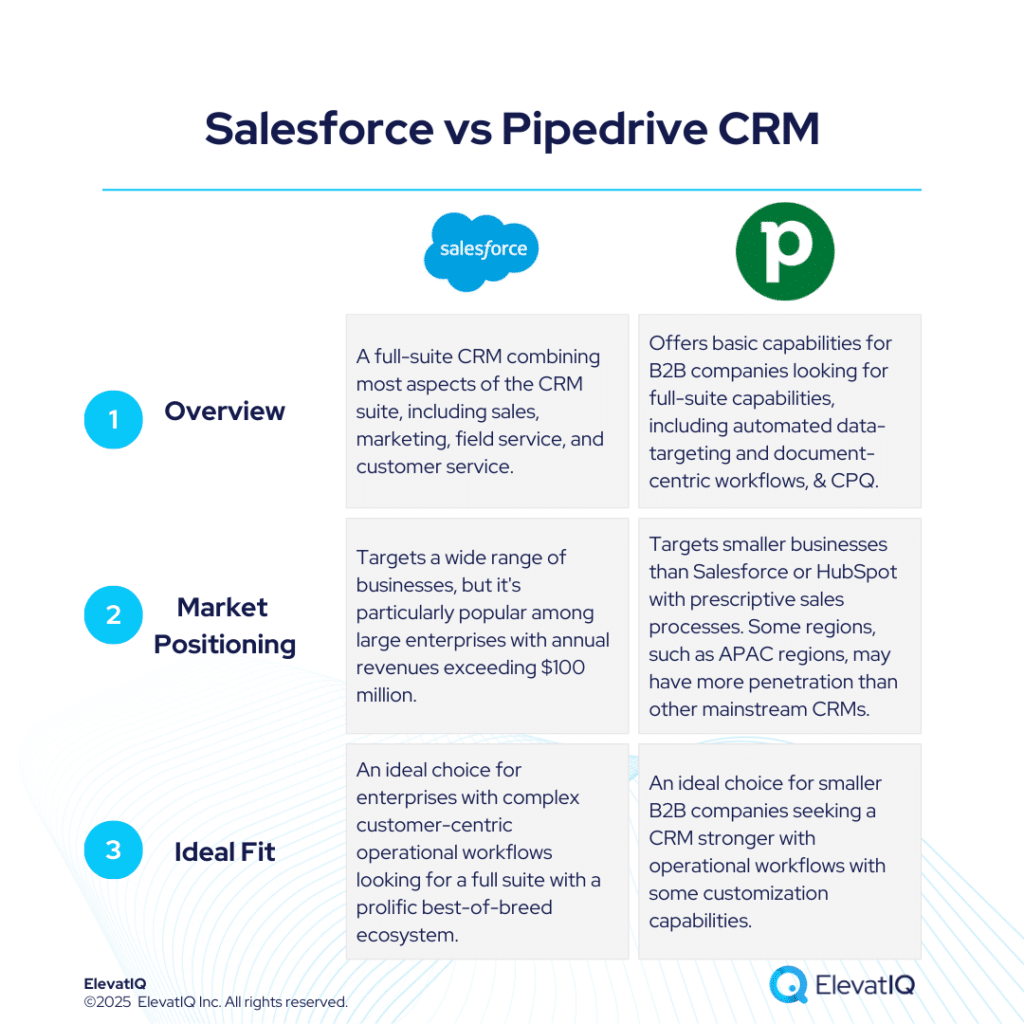
Credit: www.elevatiq.com
Ideal User Recommendations And Use Cases
The choice between Pipedrive and Odoo depends on business size, goals, and required features. Each platform excels in distinct areas and suits different users. Understanding ideal users and use cases helps pick the best fit for your needs.
Who Should Choose Pipedrive: Sales-driven Smbs And Startups
Pipedrive is perfect for small to medium-sized businesses (SMBs) and startups focused on sales growth. It offers:
- Simple, visual sales pipeline management
- Lead tracking and deal automation using AI
- Easy setup with minimal training required
- Focus on closing deals efficiently
Sales teams needing a lightweight CRM without complex features find Pipedrive ideal. It helps improve sales productivity and keeps the sales process clear.
Ideal Scenarios For Implementing Odoo: Growing Businesses Needing Erp Integration
Odoo suits growing businesses that want more than a CRM. It is a full ERP system offering:
- CRM plus inventory, accounting, and project management
- Customizable modules to fit diverse business needs
- End-to-end business process integration
- Scalability for expanding operations
Companies requiring integrated solutions across departments benefit from Odoo’s all-in-one platform. It supports industries with complex workflows.
Industry-specific Recommendations For Both Platforms
| Industry | Pipedrive | Odoo |
|---|---|---|
| Retail & E-commerce | Sales pipeline focus, quick deal closures | Inventory, sales, and accounting integration |
| Manufacturing | Limited use, mainly sales tracking | Comprehensive ERP for production and supply chain |
| Professional Services | Lead and deal management for SMBs | Project management and invoicing modules |
| Startups | Fast setup, sales-centric CRM | Flexible but requires customization |
When To Consider Combining Both Tools For Maximum Efficiency
Some businesses gain from using Pipedrive and Odoo together. This works well when:
- Sales teams prefer Pipedrive’s simple CRM interface
- Operations and finance teams rely on Odoo’s ERP modules
- Integration bridges sales data with inventory and accounting
- Need to maintain sales focus without losing backend control
Integrating both tools enhances workflow without overwhelming users. It balances ease of use and operational depth.
Conclusion: Making The Right Crm Choice
Choosing the right CRM shapes how a business manages sales and customer relationships. Both Pipedrive and Odoo offer valuable tools but differ in focus and features. Understanding these differences helps pick a CRM that fits business needs and goals.
Summary Of Key Differences And Strengths
| Feature | Pipedrive | Odoo |
|---|---|---|
| Core Focus | Sales pipeline management and deal closing | All-in-one business management including CRM, ERP, and inventory |
| Ease of Use | Intuitive interface designed for sales teams | More complex, requires setup and customization |
| Automation & AI | AI-driven lead optimization and sales automation | Automation across multiple business functions, but less sales-focused AI |
| Customization | Limited to sales process customization | Highly customizable to fit various business processes |
| Pricing | Simple pricing tiers focused on sales teams | Modular pricing based on selected apps and services |
Final Thoughts On Aligning Crm Selection With Business Goals
Match CRM capabilities to your business priorities.
If your main goal is to improve sales efficiency, Pipedrive’s focused tools help track and close deals faster. For businesses needing an integrated system for sales, operations, and inventory, Odoo offers a broad solution.
Consider team size, technical resources, and growth plans. A simple, easy-to-use system suits small teams. Larger or more complex businesses benefit from Odoo’s customization and wide feature set.
Tips For Evaluating Crm Platforms Before Commitment
- List must-have features: Identify core functions your business needs.
- Test usability: Use free trials to assess ease of use and workflow fit.
- Check integration: Confirm compatibility with your existing tools.
- Evaluate scalability: Ensure the CRM grows with your business.
- Consider support and training: Look for resources that help your team adapt quickly.
Taking time to evaluate helps avoid costly switches and ensures better user adoption.

Credit: silentinfotech.com
Frequently Asked Questions
What Is The Disadvantage Of Using Odoo?
Odoo’s main disadvantage is its complex customization, which often requires expert skills and raises implementation costs.
Is Odoo A Chinese Company?
Odoo is not a Chinese company. It is a Belgian software firm specializing in business management solutions.
Who Is The Competitor Of Odoo?
Odoo competitors include Acumatica, ERPNext, Sage Intacct, Zoho One, Infor, and Workday. Oracle NetSuite also competes in enterprise ERP. For CRM, Salesforce, HubSpot, and Zoho CRM serve as alternatives. Dolibarr offers an open-source option for small businesses.
Is Odoo The Best Erp?
Odoo is a popular, flexible ERP with extensive features for various industries. Its customization suits many businesses but may need expert skills. While strong, the “best” ERP depends on your specific needs, budget, and company size. Evaluate alternatives like ERPNext or NetSuite before deciding.
Conclusion
Choosing between Pipedrive and Odoo depends on your business needs. Pipedrive offers an easy way to manage sales pipelines and close deals faster. Odoo provides a broad set of tools but may need technical skills to customize. For sales-focused teams wanting simplicity, Pipedrive stands out. It helps track leads, manage deals, and automate sales tasks. Explore how Pipedrive can fit your workflow by visiting Pipedrive. Make your CRM choice based on what suits your team best.

