

When it comes to managing your sales and projects, choosing the right tool can make all the difference. You might be wondering whether Pipedrive or Monday.com fits your needs better.
If your focus is closing deals efficiently and keeping your sales pipeline crystal clear, Pipedrive is designed just for that. It helps you track leads, automate your sales process with AI, and stay on top of every opportunity without getting lost in complex setups. On the other hand, if you want a flexible platform that handles everything from sales to project management and team collaboration, Monday.com offers a versatile workspace — though it might take more time to tailor it exactly to your sales process. Curious to find out which one suits your business goals and daily workflow better? Dive into our full comparison to see how Pipedrive and Monday.com stack up — and how choosing the right CRM can boost your productivity and sales success. If you want to explore Pipedrive right away, check it out here: Pipedrive.

Credit: zapier.com
Introduction To Pipedrive And Monday.com
Both Pipedrive and Monday.com are popular tools for managing work and sales. Each has a unique approach to help teams stay organized and productive. Understanding their core strengths is key to choosing the right platform for 2025 success.
Overview Of Pipedrive As A Sales-centric Crm
Pipedrive is a CRM designed specifically for sales teams. It helps track deals and manage leads easily. The interface focuses on the sales pipeline, showing stages of each deal clearly. This visual layout helps salespeople prioritize their work.
Key features include:
- Pipeline tracking with clear stages
- Deal rotting alerts to spot inactive opportunities
- AI-powered insights to optimize sales efforts
- Automation of repetitive sales tasks
Pipedrive lets sales teams focus on closing deals by simplifying the sales process and reducing manual work.
Overview Of Monday.com As A Flexible Work Operating System
Monday.com is a work operating system that fits many types of teams. It is not just a CRM but a platform for managing projects, workflows, and daily tasks. Its flexibility allows users to create custom workflows suited for their needs.
Features that stand out:
- Customizable boards for projects and tasks
- Automation tools to reduce manual work
- Visual timelines, calendars, and dashboards
- Collaboration features for team communication
This makes Monday.com useful beyond sales, supporting marketing, HR, and operations teams.
Purpose And Scope Of The Comparison For 2025 Success
This comparison highlights the strengths and focus areas of Pipedrive and Monday.com. The goal is to help businesses pick the right tool based on their needs for 2025.
Topics covered include:
- Sales process management
- Flexibility for different teams
- User experience and ease of use
- Automation and AI features
- Collaboration capabilities
Choosing the right platform can improve team efficiency and sales outcomes. This guide provides clear insights to support that choice.
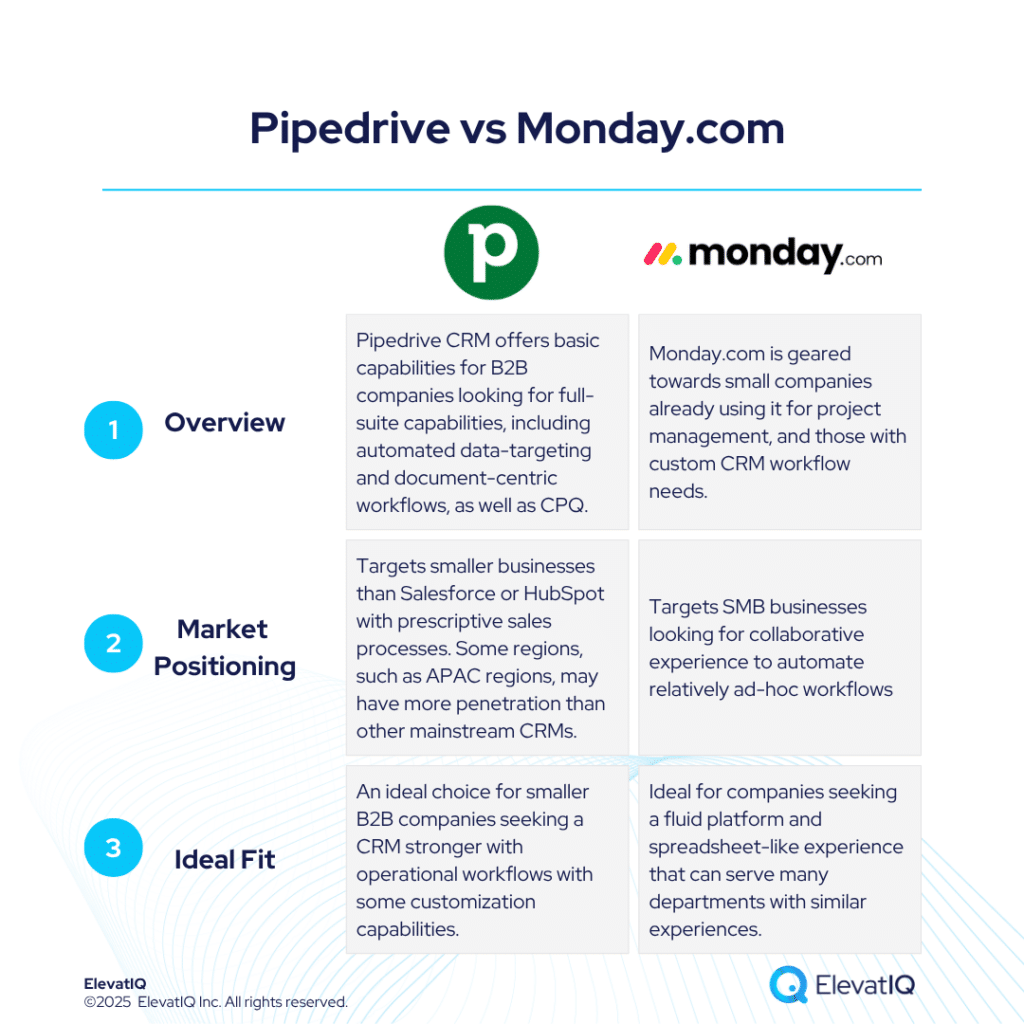
Credit: www.elevatiq.com
Key Features Of Pipedrive
Pipedrive is designed to help sales teams stay organized and close deals effectively. Its features focus on simplifying sales processes and improving productivity. The platform offers tools that track leads, manage deals, and automate tasks. Each feature helps salespeople focus on selling rather than managing the system.
Visual Pipeline Management For Sales Teams
Pipedrive offers a visual pipeline that shows all sales stages clearly. Users can drag and drop deals between stages to update progress quickly. This view helps sales teams spot bottlenecks and prioritize work. It makes managing multiple deals easy and intuitive.
- Clear stages for each deal
- Drag-and-drop interface
- Real-time updates on deal status
Lead Tracking And Deal Management
The platform tracks leads from the first contact to closing the deal. Users can add detailed information about each lead and deal. This data helps sales teams follow up promptly and close more deals. Pipedrive stores all communication in one place for easy access.
- Central database for leads and deals
- Contact history and notes
- Custom fields to fit sales processes
Sales Automation And Forecasting Capabilities
Pipedrive automates repetitive tasks like sending follow-up emails and setting reminders. This saves time and reduces errors. The platform also provides forecasting tools that predict future sales. These insights help teams plan and set realistic targets.
| Feature | Benefit |
|---|---|
| Automated email sequences | Saves time and keeps leads engaged |
| Task reminders | Prevents missed follow-ups |
| Sales forecasting | Helps plan and set targets |
Deal Rotting Feature To Prevent Lost Opportunities
The deal rotting feature highlights deals that have not moved in the pipeline for a set time. These deals appear with red shading in the pipeline view. This visual alert helps sales teams act before opportunities slip away. It keeps the pipeline active and focused.
- Visual cue for inactive deals
- Customizable time thresholds
- Prevents lost sales opportunities
Key Features Of Monday.com
Monday.com offers a versatile platform designed to fit various business needs. Its features help teams organize work clearly and stay productive. The platform supports many departments with tools that simplify daily tasks. Each feature focuses on making project and task management easier and faster.
Highly Customizable Workflows Across Departments
Monday.com allows users to create custom workflows tailored to specific team needs. Workflows can be adjusted for marketing, sales, HR, and more. This flexibility helps teams follow their own processes without limits.
- Drag-and-drop interface for easy setup
- Custom fields and status labels
- Multiple views like Kanban, calendar, and timeline
- Integration with other tools for smooth data flow
These features ensure that every department can work in a way that suits them best.
Robust Project And Task Management Templates
Monday.com provides many ready-made templates to jumpstart projects quickly. Templates cover:
| Template Type | Purpose |
|---|---|
| Project Planning | Set milestones and deadlines |
| Task Tracking | Monitor daily work progress |
| Resource Management | Assign and balance workloads |
| Marketing Campaigns | Organize content and schedules |
Templates save time and reduce setup errors. Teams can customize templates to fit their exact needs.
Advanced Automation For Streamlining Operations
Automation in Monday.com cuts down repetitive tasks. Users set rules that trigger actions automatically. Examples include:
- Sending notifications when deadlines approach
- Assigning tasks based on status changes
- Creating recurring tasks without manual input
- Syncing data between boards and apps
Automation reduces errors and speeds up workflows. It helps teams focus on important work.
Collaboration Tools For Cross-functional Teams
Monday.com supports strong teamwork with built-in collaboration features:
- Real-time updates and comments on tasks
- File sharing within boards and tasks
- Tagging team members for quick attention
- Shared dashboards for clear visibility
These tools keep everyone connected and informed. Cross-functional teams can work smoothly without confusion.
Pricing And Affordability Breakdown
Choosing the right CRM depends heavily on pricing and what you get for your money. Both Pipedrive and Monday.com offer tiered pricing plans that suit different business sizes. This section compares their costs and features to help you decide which platform fits your budget and needs.
Pipedrive Pricing Tiers And Add-ons
Pipedrive offers simple pricing with four main plans. Each plan adds more features and user capabilities. The pricing is transparent and designed for sales teams focused on deal management.
| Plan | Monthly Cost (billed annually) | Key Features |
|---|---|---|
| Essential | $14.90 per user | Basic sales pipeline, email integration, mobile apps |
| Advanced | $24.90 per user | Workflow automation, email tracking, templates |
| Professional | $49.90 per user | Revenue forecasting, team management, goal setting |
| Enterprise | Custom pricing | Advanced security, onboarding, dedicated support |
Add-ons: Pipedrive offers add-ons like AI sales assistant and additional workflow automation for extra fees.
Monday.com Pricing Structure And Scaling Costs
Monday.com uses a tiered pricing model based on features and user count. It suits teams needing a customizable platform beyond CRM.
| Plan | Monthly Cost (billed annually) | Key Features |
|---|---|---|
| Basic | $8 per user | Unlimited boards, 5 GB storage, basic integrations |
| Standard | $10 per user | Timeline views, automation (250 actions), integrations (250 actions) |
| Pro | $16 per user | Time tracking, formula column, automation (25,000 actions) |
| Enterprise | Custom pricing | Advanced analytics, enterprise-grade security, onboarding |
Scaling costs: Automation and integration limits increase with higher plans. Larger teams may face rising costs.
Value For Money In Relation To Features Offered
Pipedrive targets sales teams needing focused CRM tools. Its pricing aligns well with sales pipeline management and automation.
The plans provide solid core features with clear upgrades at each tier. Add-ons help customize without complexity.
Monday.com offers broader project management features. Its CRM functions are part of a larger, flexible platform.
The pricing is competitive but can rise quickly with automation and integration needs. It suits teams needing customization and workflow variety.
- Pipedrive is cost-effective for sales-focused users.
- Monday.com fits teams wanting all-in-one work management. <liboth and="" enterprise="" li="" offer="" plans="" platforms="" pricing="" support.
Pros And Cons Based On Real-world Usage
Users of Pipedrive and Monday.com share varied experiences. These insights highlight the strengths and weaknesses of each tool. Understanding these points helps in choosing the right CRM or project management software.
Strengths And Weaknesses Of Pipedrive
Pipedrive is known for its clear focus on sales and deal management. It offers a visual pipeline that makes tracking deals simple and effective. The rotting feature is especially useful, showing deals that haven’t moved for some time by highlighting them in red. This helps sales teams avoid losing important opportunities.
- Strengths:
- Easy-to-use sales pipeline visualization
- Effective deal tracking with rotting feature
- AI-powered lead and deal management
- Automation to streamline sales processes
- Weaknesses:
- Limited project management features
- Less flexible customization outside sales workflows
- May lack advanced reporting for complex analytics
Strengths And Weaknesses Of Monday.com
Monday.com serves as a versatile platform, strong in project management and CRM customization. It handles heavy workloads well and offers unlimited possibilities to build a CRM tailored to specific needs.
- Strengths:
- Highly customizable workflows and dashboards
- Stable performance even with large data sets
- Supports complex project and team collaboration
- Flexible CRM building options for varied industries
- Weaknesses:
- Steeper learning curve for new users
- Can be overwhelming with too many features
- Pricing may be higher for smaller teams
Comparative Insights From User Experiences
| Aspect | Pipedrive | Monday.com |
|---|---|---|
| Ease of Use | Simple and intuitive for sales teams | More complex due to extensive features |
| Customization | Limited to sales processes | Highly customizable for various workflows |
| Sales Focus | Strong focus on closing deals | Good but part of a broader project tool |
| Project Management | Basic capabilities | Advanced tools for managing projects |
| Performance | Optimized for sales pipelines | Handles large, complex data well |
| Pricing | Affordable for small to medium teams | Can be costly for smaller teams |
Ideal Users And Use Case Recommendations
Choosing the right tool depends on your business needs and team goals. Both Pipedrive and Monday.com offer unique strengths. Understanding who benefits most from each helps in making an informed choice. Below, we explore ideal users and use cases for these platforms.
Who Should Choose Pipedrive For Sales Success
Pipedrive is perfect for teams focused on sales and deal management. It simplifies tracking sales pipelines and automates routine tasks. Its AI-powered tools help optimize leads and close deals faster.
- Sales teams aiming to improve deal tracking and forecasting
- Businesses needing clear visual pipelines and deal rotting alerts
- Companies looking to automate sales workflows without complexity
- Small to medium-sized businesses focused on growing sales efficiently
Pipedrive’s user-friendly interface suits sales reps with minimal CRM experience. It keeps the sales process clear and manageable.
Who Benefits Most From Monday.com’s Versatility
Monday.com suits teams requiring a flexible platform beyond just sales. Its customizable workflows support project management, marketing, HR, and more. The tool adapts well to complex and varied business processes.
- Businesses needing a multi-purpose work management system
- Teams managing projects, tasks, and collaboration in one place
- Organizations wanting to build custom CRM solutions tailored to unique needs
- Larger companies with diverse departments requiring integration
Monday.com offers robust stability and scalability, making it ideal for heavy workloads and extensive collaboration.
Scenario-based Recommendations For Business Types
| Business Type | Recommended Platform | Reason |
|---|---|---|
| Sales-focused startups | Pipedrive | Simple sales pipeline, easy deal tracking, AI lead optimization |
| Marketing agencies | Monday.com | Custom workflows, project management, team collaboration |
| SMBs with mixed needs | Depends on priority | If sales-driven, choose Pipedrive; if diverse projects, choose Monday.com |
| Large enterprises | Monday.com | Scalable, supports complex workflows and multiple departments |
| Freelancers and solo sales reps | Pipedrive | Lightweight, focused on sales automation and pipeline visibility |
Conclusion: Choosing The Right Crm For 2025
Choosing a CRM that fits your needs is vital for business success in 2025. Both Pipedrive and Monday offer strong tools but serve different purposes. Understanding their strengths helps pick the best match for your company’s goals and growth plans.
Summarizing Key Differences And Strengths
| Feature | Pipedrive | Monday |
|---|---|---|
| Primary Use | Sales-focused CRM for deal tracking and pipeline management | Flexible platform for CRM and complex project management |
| User Interface | Simple and intuitive, designed for sales teams | Customizable dashboards with wide application options |
| Automation & AI | Automates sales processes and uses AI to optimize leads | Offers automation but focused on workflow management |
| Unique Features | Deal rotting highlights inactive deals to prevent losses | Highly stable platform with unlimited customization |
| Best For | Small to mid-sized sales teams focused on closing deals | Teams needing a versatile tool for CRM and project tracking |
Aligning Crm Choice With Business Goals
Define your business priorities first. If closing deals quickly and managing sales pipelines matter most, Pipedrive fits well.
For businesses needing a broad tool to manage projects, workflows, and CRM, Monday offers flexibility and customization.
- Sales-driven teams benefit from Pipedrive’s focused features.
- Project-heavy teams gain value from Monday’s adaptable platform.
- Consider team size and technical skill when choosing.
- Automation needs should also guide your decision.
Final Thoughts On Pipedrive Vs Monday For Future Growth
Pipedrive helps sales teams stay organized and close deals faster. Its deal rotting feature ensures no opportunity is ignored.
Monday provides a scalable platform that grows with your business needs. Its stability suits complex environments well.
Choosing between them depends on whether you want a specialized sales CRM or an all-in-one work management system.
Both platforms continue evolving, so pick the one that matches your 2025 vision best.

Credit: monday.com
Frequently Asked Questions
Who Is Monday.com’s Biggest Competitor?
Monday. com’s biggest competitor is Asana, known for strong project management and team collaboration features. Other rivals include Wrike and Pipedrive.
What Is Deal Rotting In Pipedrive?
Deal rotting in Pipedrive visually highlights deals inactive for a set number of days. It helps identify stalled opportunities quickly.
Is Monday The Best Crm?
Monday. com is a top CRM with strong customization and workflow automation. It suits versatile business needs but requires setup. For pure sales focus, Pipedrive may be better. Monday. com excels in integrating sales with broader operations and team collaboration.
Can Monday Be Used As A Crm?
Yes, Monday. com can be used as a CRM. It offers customizable sales pipelines and automates sales processes. It suits teams needing an all-in-one platform for sales, marketing, and project management.
Conclusion
Pipedrive and Monday serve different needs in sales and project management. Pipedrive focuses on simple, effective sales tracking and closing deals quickly. Monday.com offers broad customization for workflows and team collaboration beyond sales. Your choice depends on whether you want a focused sales tool or a versatile work platform. Explore how Pipedrive can help your sales team by visiting Pipedrive. Keep your sales process clear and organized with the right CRM for you.

