
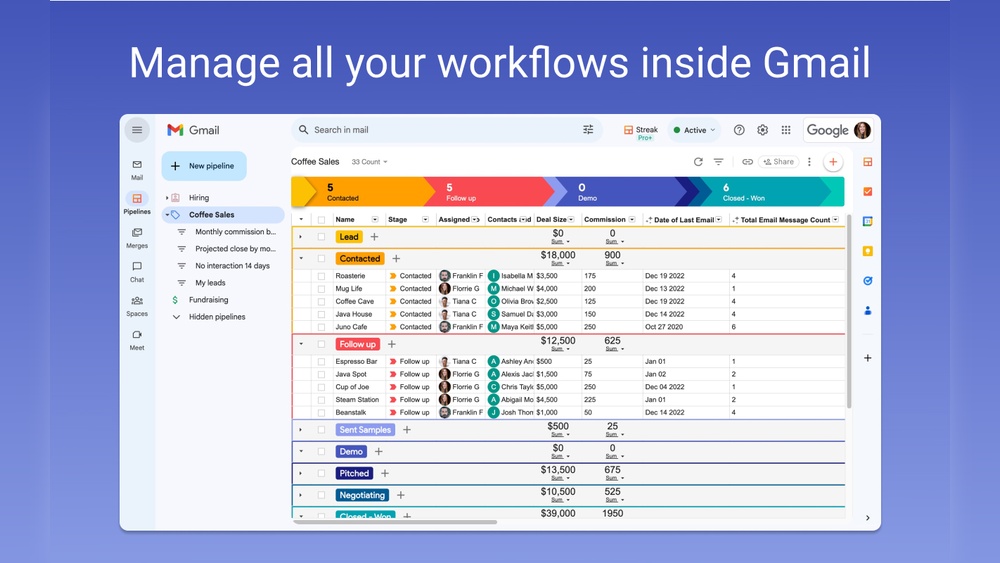
If you spend a lot of time in your Gmail inbox, managing contacts, deals, and customer conversations, you know how quickly things can get messy. What if you could turn your Gmail into a powerful tool that not only organizes your emails but also helps you track your sales, support requests, and projects—all without leaving your inbox?
That’s exactly what Streak CRM offers. Designed to fit seamlessly inside Gmail, Streak helps you manage your entire workflow effortlessly, saving you time and keeping everything in one place. Curious how this Gmail CRM can transform your daily routine and boost your productivity? Keep reading to discover why Streak might be the perfect solution for you. Ready to see Streak CRM in action? Check it out here: Streak CRM.

Credit: chromewebstore.google.com
Introduction To Streak Crm
Streak CRM is a customer relationship management tool built directly inside Gmail. It helps users manage contacts, track emails, and organize workflows without leaving their inbox. This makes it easier to handle sales, support, and project management tasks in one place.
Streak simplifies managing client relationships by combining email and CRM features. Its seamless integration saves time and keeps everything organized in a familiar environment.
What Is Streak Crm And Its Core Purpose
Streak CRM is a software tool that works inside Gmail to help manage customer interactions. Its main goal is to bring CRM functions to your email inbox. This reduces the need to switch between different apps or software.
Core purposes include:
- Tracking emails and conversations
- Organizing contacts and deals
- Managing pipelines and workflows
- Collaborating with team members
Streak helps users keep all relevant information in one place for quick access.
How Streak Integrates Seamlessly With Gmail
Streak is fully embedded inside Gmail. This means it works as part of your email interface. You do not need to open another app or log in separately.
Key integration features:
| Feature | Benefit |
|---|---|
| Email Tracking | Know when emails are opened or replied to |
| Pipeline Management | Visualize and move deals directly from Gmail |
| Contact Management | Store and access client info without leaving inbox |
| Shared Workflows | Collaborate with team members inside Gmail |
This tight integration makes work faster and more efficient.
Who Can Benefit Most From Using Streak
Streak suits many professionals who rely on email for communication. It fits best for:
- Sales teams tracking leads and deals
- Support teams managing customer requests
- Project managers organizing tasks and progress
- Small businesses needing simple CRM inside Gmail
- Fundraising teams handling donor communication
Users who want to reduce app switching and keep workflows in one place find Streak very helpful.
Unique Features Of Streak Crm
Streak CRM stands out by integrating powerful tools directly within Gmail. It helps users manage sales, support, and projects without leaving their inbox. The unique features simplify daily tasks, improve communication, and boost team productivity. Below are the key features that make Streak CRM a practical choice for managing client relationships.
Email Tracking: Enhancing Sales Communication
Streak CRM offers real-time email tracking. You see when recipients open your emails or click links. This insight helps you follow up at the right moment.
- Get notifications for email opens
- Track link clicks inside emails
- Understand recipient engagement easily
This feature improves communication and helps close deals faster.
Pipeline Management Directly Within Your Inbox
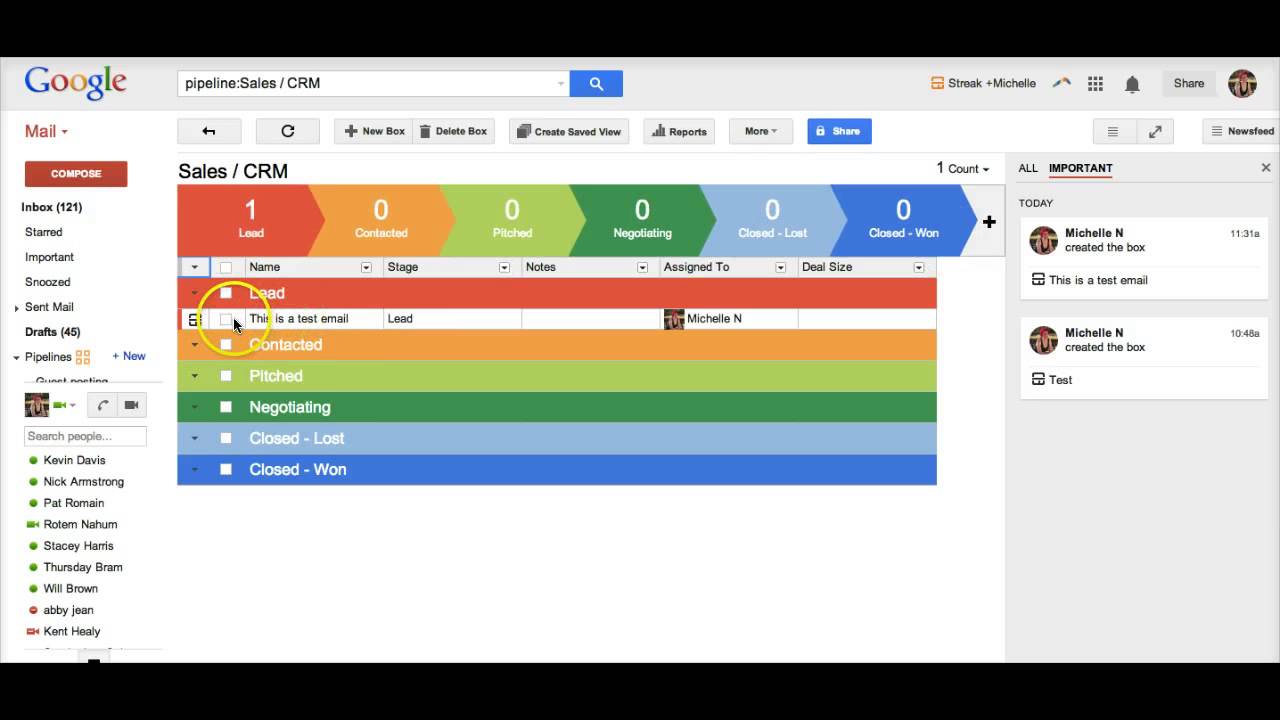
Manage your sales pipelines without leaving Gmail. Streak places pipelines inside your inbox for easy access.
- Create custom pipelines for sales, support, or projects
- Drag and drop emails into pipeline stages
- Visualize progress with clear pipeline views
This keeps your workflow organized and saves time switching apps.
Automated Workflow Tools For Increased Productivity
Streak CRM automates repetitive tasks with simple workflows. Set rules to handle emails, assign tasks, and update pipelines.
- Auto-assign emails to team members
- Send follow-up reminders automatically
- Trigger actions based on email status changes
Automation reduces manual work and lets you focus on important tasks.
Team Collaboration Features And Shared Pipelines
Streak enables teams to work together inside Gmail. Share pipelines, notes, and contacts with your team.
| Feature | Benefit |
|---|---|
| Shared Pipelines | Keep all team members updated on deals and projects |
| Shared Notes | Collaborate on customer information and strategies |
| Task Assignment | Delegate work and track progress seamlessly |
Teams stay aligned and improve overall efficiency.
Mobile Integration: Managing Crm On The Go
Streak CRM offers mobile apps for iOS and Android. Manage your pipelines and emails anytime, anywhere.
- Access customer data on the move
- Update pipelines from your phone
- Receive notifications and stay responsive
Mobile integration ensures you never miss important updates.
Pricing And Affordability Of Streak Crm
Streak CRM offers pricing plans designed to fit various business needs. Its structure ranges from a free plan for basic use to paid tiers for more advanced features. This setup makes Streak accessible and scalable for small teams and larger organizations alike.
Overview Of Free And Paid Plans
Streak provides a Free plan ideal for individuals or small teams starting with CRM. It includes basic email tracking and pipeline management.
The Paid plans offer enhanced tools and increased limits. These plans cater to businesses requiring more automation, collaboration, and advanced support.
- Free Plan: Basic CRM features, limited storage, and essential email tracking.
- Paid Plans: Include Pro, Pro+, and Enterprise tiers with varying levels of features and usage limits.
Comparison Of Pro, Pro+, And Enterprise Pricing Tiers
| Plan | Billed Monthly (USD/User) | Billed Annually (USD/User) | Key Features |
|---|---|---|---|
| Pro | $59 | $49 | Advanced email tracking, more pipelines, priority support |
| Pro+ | $89 | $69 | All Pro features, plus enhanced automation and analytics |
| Enterprise | $159 | $129 | Full feature set, custom integrations, dedicated support |
Value For Money: Features Included In Each Plan
Each Streak plan offers specific tools that match its price point. The Free plan suits users needing basic CRM inside Gmail without extra cost.
Pro plan adds more pipelines and advanced email tools. It helps teams manage more contacts and sales processes smoothly.
The Pro+ plan enhances automation and reporting. This level benefits teams requiring detailed insights and workflow efficiency.
Enterprise targets large businesses. It includes custom support and integration options to meet complex needs.
- Free: Basic pipelines, email tracking, limited storage.
- Pro: Extra pipelines, advanced tracking, priority support.
- Pro+: Automation features, analytics, higher limits.
- Enterprise: Custom integrations, dedicated support, full access.

Credit: www.folk.app
Pros And Cons Based On Real-world Usage
Streak CRM integrates directly within Gmail, making it a popular choice for teams that want to manage clients and projects without leaving their inbox. Users often praise its ability to simplify workflows but also note some challenges. Here is a detailed look at its advantages and limitations based on actual user experience.
Advantages: Streamlined Workflow And Gmail Integration
Streak CRM works seamlessly inside Gmail, allowing users to handle emails and CRM tasks in one place. This integration saves time and reduces the need to switch apps.
- Easy email tracking: Users can see when recipients open emails, improving follow-up timing.
- Customizable pipelines: Teams can organize workflows visually within Gmail.
- Collaboration features: Sharing pipelines and notes helps teams stay aligned.
- Automation tools: Simple rules and reminders speed up routine tasks.
The interface is clean and intuitive, which suits sales, support, and project management roles. Overall, this integration streamlines daily work by combining email and CRM in one platform.
Limitations: Features Missing In Free Plan And Learning Curve
The free plan offers basic CRM features but lacks some powerful tools found in paid tiers. Users often find:
| Feature | Free Plan | Paid Plans |
|---|---|---|
| Email tracking limits | Restricted number of tracked emails | Unlimited tracking |
| Advanced automation | Not available | Available |
| Priority support | No | Yes |
New users may face a learning curve due to the many customization options. Setting up pipelines and automation rules requires some time to master. This can slow adoption in teams without CRM experience.
User Feedback Highlights And Common Pain Points
Users appreciate Streak CRM’s ability to keep everything inside Gmail. Many report improved workflow efficiency and better client management.
- Positive feedback: Easy collaboration, good email tracking, and clear pipeline views.
- Common pain points: Limited features on the free plan, occasional bugs, and the initial setup complexity.
- Suggestions from users: More tutorials for beginners and expanded free features.
Overall, Streak CRM suits teams that want a simple, integrated CRM but expect to upgrade for full functionality.
Who Should Use Streak Crm?
Streak CRM fits users who want to manage customer relationships directly inside Gmail. It is best for those who need a simple, integrated CRM without leaving their inbox. Teams and individuals who prefer working within Gmail find Streak very useful.
Ideal Users: Sales Professionals And Small Businesses
Sales professionals benefit from Streak by tracking emails and deals in one place. It helps them manage pipelines with ease.
Small businesses appreciate its simplicity and cost-effectiveness. They avoid complex setups and extra software.
- Sales teams tracking leads and deals
- Support teams managing customer requests
- Project managers coordinating tasks via email
- Freelancers organizing client communications
Best Scenarios For Implementing Streak Crm
Streak works well for users who:
- Use Gmail as their primary email tool
- Need quick access to customer info inside emails
- Want to track sales pipelines without switching apps
- Require basic CRM features like email tracking and task management
- Prefer a lightweight, easy-to-learn CRM system
It suits teams with fewer than 50 users or those starting CRM use.
When To Consider Alternative Crm Solutions
Look beyond Streak if your needs include:
- Complex project management features
- Advanced reporting and analytics
- Large teams over 50 users
- Integration with many external apps beyond Gmail
- Customization beyond email workflows
For extensive CRM needs, dedicated platforms like Salesforce or HubSpot may be better.
Getting Started With Streak Crm
Streak CRM integrates directly into your Gmail inbox, making client management simple. It fits into daily email routines without extra software. This section guides you through initial steps to set up and use Streak effectively.
Setting Up Streak In Your Gmail Inbox
Begin by installing the Streak extension from the Chrome Web Store. Once added, open Gmail to see Streak’s features appear in your inbox.
- Click the Streak icon near the top right of Gmail.
- Sign in using your Google account to connect Streak with Gmail.
- Create your first pipeline, which organizes contacts and deals.
- Add relevant columns like Status, Contact Info, and Next Steps.
Streak will now track emails and allow you to manage clients without leaving Gmail.
Basic Tips To Maximize Early Productivity
Start with these tips to get the most out of Streak quickly:
- Use Pipelines to track stages of deals or projects clearly.
- Set Reminders on emails to follow up on time.
- Apply Email Tracking to know when your messages are opened.
- Use Snippets for quick replies with reusable templates.
- Collaborate by sharing pipelines with your team for better coordination.
These steps help organize workflows and improve response times.
Resources For Learning And Support
To learn more about Streak, use these resources:
| Resource | Description | Access |
|---|---|---|
| Streak Official Website | Download extension and explore features | streak.com |
| Streak YouTube Tutorials | Step-by-step video guides for beginners | YouTube Channel |
| Help Center | Answers to common questions and troubleshooting | support.streak.com |
Use these tools to build confidence and solve issues quickly.
Conclusion: Is Streak Crm The Right Choice To Boost Your Sales?
Streak CRM integrates seamlessly within Gmail, offering a simple yet powerful way to manage sales and client relationships. It suits sales teams who want to work directly from their inbox without switching platforms. The tool helps track emails, organize contacts, and automate workflows. This can lead to faster sales processes and better customer management.
Summary Of Key Benefits And Features
- Fully embedded in Gmail: No need to leave your inbox to manage sales pipelines.
- Email tracking: Know when clients open your emails or click links.
- Pipeline management: Visualize your sales stages and move deals easily.
- Collaboration tools: Share contacts and notes within your team.
- Custom workflows: Automate repetitive tasks and reminders.
- Flexible pricing: Includes a free plan plus paid options for growing teams.
Final Recommendations For Prospective Users
Streak CRM is ideal for small to medium sales teams using Gmail daily. It reduces the need for separate CRM software, saving time and cost. Teams focused on email-based sales will find its tools very useful. If your sales process depends heavily on email communication, Streak offers a smooth and efficient solution.
For larger enterprises or teams needing extensive customization, consider the Enterprise plan. It offers advanced features and higher limits. Test the free version first to explore its capabilities before upgrading.
Next Steps To Take For Fast Sales Growth
- Sign up for a free Streak CRM account at
https://www.streak.com/. - Connect Streak with your Gmail inbox to start tracking emails instantly.
- Create your sales pipeline and add current deals or prospects.
- Use email tracking to follow up at the right moments.
- Set reminders and automate tasks to keep deals moving.
- Invite your team to collaborate and share insights.
Following these steps helps speed up your sales process and improves client management. Streak CRM’s simple interface lets you focus on selling, not managing software.
Credit: www.youtube.com
Frequently Asked Questions
How Does Streak Crm Work?
Streak CRM integrates directly within Gmail, helping users track emails, manage contacts, and streamline sales pipelines efficiently.
What Is Streak Used For?
Streak is a CRM tool integrated into Gmail that helps manage sales, customer relationships, and email tracking efficiently.
How Much Does Streak Crm Cost?
Streak CRM offers a free plan and paid plans starting at $49 per user monthly when billed annually. Higher tiers include Pro+, and Enterprise.
Is Streak For Gmail Legit?
Yes, Streak for Gmail is legit. It integrates seamlessly with Gmail to manage sales, support, and projects efficiently. Many businesses trust it for CRM and email tracking inside their inbox.
Conclusion
Streak CRM helps you manage customer relationships inside Gmail. It saves time by tracking emails and organizing tasks. Teams can see all client details in one place. Streak fits well for sales, support, and project management. It keeps your workflow simple and clear. Try Streak CRM to improve how you work in Gmail. Learn more about it here.

