If you’re using Gmail to manage your contacts and sales, imagine having a powerful CRM right inside your inbox. That’s exactly what Streak CRM offers—a seamless way to organize your customer relationships without switching apps.
But here’s the real game-changer: Streak CRM integrations let you connect your favorite tools directly to your workflow. This means you can automate tasks, capture leads instantly, and keep your team in sync effortlessly. Curious how these integrations can save you time and boost your productivity? Keep reading to discover the best ways to supercharge your Gmail experience with Streak CRM. Ready to get started? Check out Streak CRM here: Streak CRM.
Introduction To Streak Crm And Its Integration Capabilities
Streak CRM is a unique customer relationship management tool built directly inside Gmail. It helps teams manage sales, support, and projects without leaving their inbox. The real power of Streak lies in its integration capabilities, which enhance its core functions by connecting it with other tools and services. These integrations automate tasks, sync data, and streamline workflows, making CRM easier and more efficient.
What Is Streak Crm And Who Is It For?
Streak CRM is a lightweight CRM solution embedded within Gmail. It allows users to track emails, manage contacts, and organize pipelines without switching apps. The platform suits:
- Small businesses wanting simple CRM directly in their inbox
- Startups needing flexible and affordable CRM tools
- Service teams managing client communications and projects
- Fundraising teams requiring tracking of donor interactions
Users benefit from its easy setup, familiar interface, and pipeline management features. Streak supports sales, support, recruiting, and project workflows in one place.
The Importance Of Integrations In Enhancing Crm Functionality
Integrations expand Streak CRM’s abilities beyond email management. They connect Streak with other apps to:
- Automate data entry and updates
- Sync contacts and calendars
- Trigger notifications and reminders
- Generate reports and analytics
- Connect with marketing, finance, and productivity tools
By integrating, teams save time and reduce errors. Workflows become smoother, and communication stays centralized.
| Integration Type | Benefit | Example Apps |
|---|---|---|
| Email & Calendar Sync | Keep communications and schedules aligned | Google Calendar, Gmail |
| Automation Tools | Automate repetitive tasks and workflows | Zapier, Integromat |
| Data & Reporting | Track sales and performance metrics | Google Sheets, Data Studio |
| Marketing & Sales | Enhance lead management and campaigns | Mailchimp, HubSpot |
Streak CRM integrations allow users to customize and optimize their workflows. This flexibility helps teams stay productive and focused on customer relationships.

Credit: www.youtube.com
Key Streak Crm Integrations That Boost Sales
Streak CRM offers powerful integrations that help sales teams work faster and smarter. These integrations connect Streak directly with tools you already use. They simplify tasks like managing pipelines, scheduling meetings, handling data, and automating workflows.
Using these integrations saves time and keeps your sales process smooth. Here are some key Streak CRM integrations that improve sales efficiency and results.
Gmail Integration: Managing Sales Pipelines Directly From Your Inbox
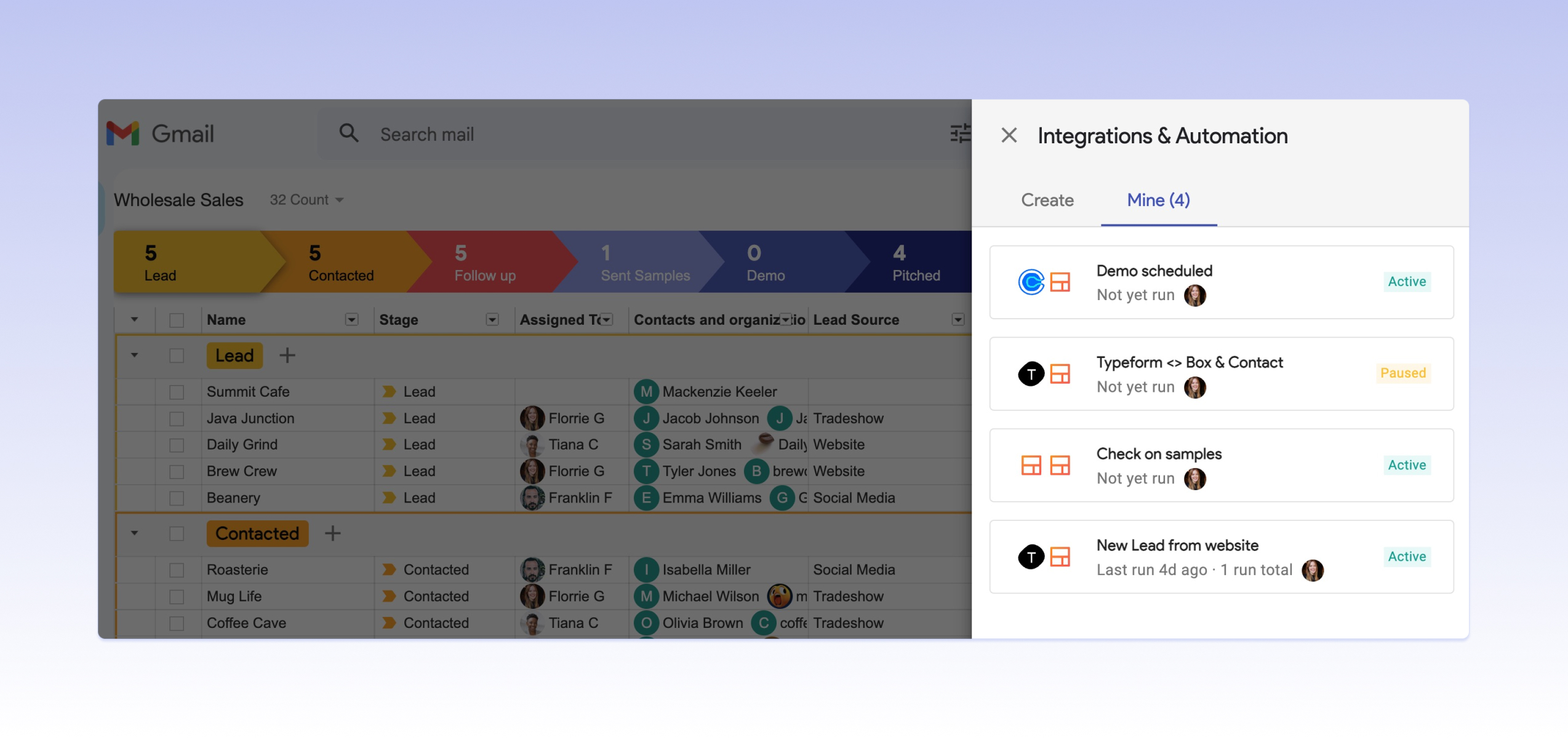
Streak is built inside Gmail. This integration lets you manage your sales pipelines right in your inbox. You can track deals, add notes, and set reminders without leaving Gmail.
- View pipeline stages alongside emails
- Assign tasks and follow up easily
- Keep all client communication in one place
This integration reduces app switching and keeps your sales workflow organized.
Calendar Integration: Streamlining Appointment Scheduling And Follow-ups
Sync your Google Calendar with Streak to schedule appointments and follow-ups smoothly. Meetings with prospects get automatically added to your calendar.
- Set reminders for follow-up calls
- Avoid double bookings with real-time calendar updates
- Plan your day efficiently with all events visible
This integration keeps your schedule clear and sales conversations timely.
Google Sheets Integration: Simplifying Data Management And Reporting
Use Google Sheets with Streak to export and analyze sales data easily. You can create custom reports and track performance.
| Feature | Benefit |
|---|---|
| Export pipeline data | Analyze sales trends and results |
| Update sheets automatically | Keep reports current without manual work |
| Custom formulas and charts | Visualize key sales metrics |
This integration makes data handling faster and clearer for sales teams.
Typeform Integration: Automating Lead Capture And Qualification
Connect Typeform to Streak to capture leads and qualify prospects automatically. Leads from forms enter your pipeline without manual entry.
- Collect contact info and key details via forms
- Auto-create new contacts or update existing ones
- Segment leads based on form responses
This saves time and keeps your lead data accurate and organized.
Calendly Integration: Enhancing Meeting Coordination With Prospects
Calendly links with Streak to simplify meeting scheduling with prospects. Prospects pick times that fit your calendar.
- Share booking links directly from Streak
- Meetings sync automatically to your calendar
- Reduces back-and-forth emails
This integration speeds up scheduling and improves the client experience.
Zapier Integration: Connecting Streak To Hundreds Of Apps For Workflow Automation
Zapier connects Streak with hundreds of apps. This automation links your sales CRM to other tools like Slack, Trello, or Mailchimp.
- Trigger actions based on Streak events (new deal, status change)
- Send notifications or update other platforms automatically
- Create multi-step workflows without coding
This integration automates repetitive tasks and keeps your sales process efficient.
How Streak Crm Integrations Solve Common Sales Challenges
Streak CRM integrations address key problems sales teams face daily. They help streamline work inside Gmail, making sales processes smoother and faster. These integrations reduce errors, boost communication, and improve lead handling. Teams save time and work more efficiently by automating routine tasks. Streak CRM connects tools seamlessly to improve overall sales performance.
Reducing Manual Data Entry To Save Time And Minimize Errors
Manual data entry wastes time and causes mistakes. Streak CRM integrations automatically pull data from emails and other apps directly into the CRM. This reduces typing and copying errors. Sales reps spend less time on admin work and more on selling.
- Auto-import contact details from Gmail
- Sync data with other apps like Google Sheets
- Keep customer info updated in real time
Result: Faster data entry and fewer mistakes, leading to better customer records.
Enhancing Communication And Follow-up Consistency
Sales success depends on timely and consistent follow-ups. Streak CRM integrates with email and calendar tools to set reminders and track conversations. This ensures no lead is forgotten or ignored.
- Schedule follow-up emails automatically
- Receive alerts for important client replies
- Track all communication history in one place
Outcome: Improved client relationships and higher chances of closing deals.
Improving Lead Management And Qualification Processes
Not all leads are ready to buy. Streak CRM helps sort and qualify leads through integrations that gather extra data and score prospects. This prioritizes the best opportunities.
| Feature | Benefit |
|---|---|
| Lead scoring integration | Focus on high-potential clients first |
| Data enrichment tools | Gain deeper insights about leads |
| Pipeline visualization | Track lead stages clearly |
Effect: Better lead handling and smarter sales decisions.
Automating Routine Tasks To Increase Sales Team Efficiency
Repetitive tasks slow down sales teams. Streak CRM automates many daily activities using integrations with Gmail and other apps. This frees reps to focus on selling.
- Auto-send emails based on triggers
- Create tasks from email content
- Sync notes and files automatically
Benefit: More productive sales teams and quicker sales cycles.
Pricing And Affordability Of Streak Crm And Its Integration Features
Streak CRM offers a range of pricing plans to suit different business needs. Its integration features vary depending on the plan chosen. Understanding the costs and benefits helps businesses decide which plan fits their budget and requirements.
Overview Of Streak Crm Pricing Plans: Free, Pro, Pro+, And Enterprise
Streak CRM has four main pricing tiers. Each plan includes core CRM features with increasing limits and integration capabilities.
| Plan | Monthly Price (Per User, USD) | Annual Price (Per User, USD) | Key Features |
|---|---|---|---|
| Free | $0 | $0 | Basic CRM, limited pipelines, no advanced integrations |
| Pro | $59 | $49 | Unlimited pipelines, email tracking, basic integrations |
| Pro+ | $89 | $69 | Advanced integrations, workflow automation, priority support |
| Enterprise | $159 | $129 | Custom integrations, dedicated support, enhanced security |
Cost-benefit Analysis Of Upgrading For Integration Capabilities
Streak’s free plan supports basic CRM use but limits integration options.
Upgrading to Pro opens access to core integrations useful for small teams. The $49 per user annual price remains affordable.
The Pro+ plan adds valuable automation tools and advanced integrations. Its higher price suits teams needing efficient workflows.
The Enterprise plan targets large teams requiring custom integrations and strong security. The investment reflects its premium features.
- Free plan suits users with minimal integration needs.
- Pro and Pro+ plans offer a balance between price and integration power.
- Enterprise fits organizations with complex CRM and integration demands.
Comparing Streak Pricing With Other Crm Solutions Offering Integrations
Many CRMs charge extra for integration features. Streak bundles these in higher-tier plans.
| CRM | Starting Price (Monthly, Per User) | Integration Features | Notes |
|---|---|---|---|
| Streak CRM | $59 (Pro) | Native Gmail integration, automation, API access at higher tiers | Direct Gmail CRM with built-in email tracking |
| Pipedrive | $14.90 | Third-party integrations, API access | Lower entry price but requires add-ons for full integrations |
| Kintone | $24 | Custom CRM workflows, integration add-ons | Pricing increases with add-ons for integrations |
Streak’s pricing is competitive for teams focused on Gmail workflows. Other CRMs may offer lower base prices but add costs for integration features.
Pros And Cons Of Using Streak Crm Integrations Based On Real-world Usage
Streak CRM offers integration features that connect directly with Gmail. These integrations aim to simplify customer relationship management within the email platform. Users experience both benefits and challenges while using Streak CRM integrations in daily tasks. This section explores the advantages, limitations, and real user feedback on these features.
Advantages: Seamless Gmail Integration, Automation, And Customization
Seamless Gmail integration is a key strength of Streak CRM. Since it works inside Gmail, users do not need to switch apps. This saves time and keeps workflows smooth.
- Automation: Streak automates many repetitive tasks, such as email tracking and follow-ups.
- Customization: Pipelines and workflows can be tailored to fit specific business needs.
- Native features: Users can add custom fields, stages, and filters directly within Gmail.
These features help teams increase productivity and keep customer data organized without extra software.
Limitations: Learning Curve And Integration Scope
New users often face a learning curve with Streak’s integrations. Setting up pipelines and automation requires some time and practice.
Integration scope can be limited compared to standalone CRMs. Streak mainly works within Gmail and Google Workspace tools.
| Limitation | Impact |
|---|---|
| Learning Curve | Users need time to master pipeline setup and automation rules |
| Integration Scope | Limited outside Gmail and Google apps, fewer third-party connections |
Teams requiring broad tool integration may find Streak’s options less flexible.
User Feedback And Case Studies Highlighting Integration Impact
Users report that Streak CRM integrations improve email management and sales tracking. Small businesses and startups highlight easier pipeline visibility and faster follow-ups.
- Increased efficiency: Teams save hours per week by automating routine tasks.
- Better organization: Users keep all client information in one place without leaving Gmail.
- Improved communication: Automated reminders reduce missed contacts and deadlines.
Case studies show that fundr teams in Austin, Texas, experienced smoother workflows after adopting Streak’s native integrations. However, some users mention the need for more advanced reporting features.
Overall, real-world usage suggests Streak CRM integrations suit teams focused on Gmail-centric workflows. The balance of ease and functionality depends on team size and integration needs.
Recommendations: Ideal Users And Scenarios For Leveraging Streak Crm Integrations
Streak CRM integrations offer tailored solutions to improve workflow and customer management. The platform fits users who work closely with Gmail and need a simple yet effective CRM tool. Understanding the ideal users and scenarios helps to maximize Streak’s potential.
Best Fit: Small Businesses And Startups Relying On Gmail
Streak CRM is perfect for small businesses and startups that use Gmail as their main email platform. It integrates seamlessly within the Gmail inbox, eliminating the need to switch apps. This reduces time spent on manual data entry and improves communication efficiency.
- Easy setup with no extra software needed
- Affordable plans starting from a free tier
- Simple user interface ideal for non-technical teams
- Customizable pipelines tailored to business needs
Businesses with limited IT resources benefit from Streak’s Gmail-native design. It keeps all customer data and email history in one place.
Use Cases: Sales Teams Needing Streamlined Lead Management
Sales teams can use Streak integrations to track and manage leads effectively. The CRM automates repetitive tasks and keeps pipelines updated in real time. This leads to better follow-ups and faster deal closures.
| Sales Team Needs | How Streak Integrations Help |
|---|---|
| Tracking leads from email conversations | Automatic lead capture and status updates |
| Assigning leads to team members | Shared pipelines with role-based access |
| Scheduling follow-ups | Built-in reminders and email scheduling |
| Analyzing sales performance | Custom reports and pipeline metrics |
These features reduce manual work and help sales teams focus on closing deals.
When To Consider Enterprise Plans For Advanced Integration Needs
Companies with complex workflows require advanced integration features. The Enterprise plan offers:
- Deeper API access for custom tool connections
- Enhanced security and compliance controls
- Priority support and onboarding assistance
- Advanced automation workflows and reporting
Organizations handling large data volumes or regulated industries benefit from this plan. It supports integrating Streak with other enterprise systems like ERP or marketing automation platforms.
Conclusion: Maximizing Sales Efficiency With Streak Crm Integrations
Streak CRM integrations streamline sales tasks inside Gmail. This saves time and keeps all data in one place. Integrations connect Streak with tools like email, calendars, and communication apps. This helps sales teams work faster and smarter.
Using Streak with other apps reduces manual work. Teams can focus on selling, not switching between software. Sales pipelines update automatically with real-time data. This leads to better tracking and faster deal closing.
Summary Of Key Integration Benefits
- Centralized Communication: Manage emails, calls, and notes inside Streak.
- Automation: Automatically update contact info and sales stages.
- Real-Time Sync: Data flows smoothly between Streak and other apps.
- Improved Collaboration: Teams share pipeline updates instantly.
- Custom Workflows: Tailor integrations to fit your sales process.
- Time Savings: Less manual entry means more time for selling.
Next Steps For Implementing Streak Crm In Your Sales Workflow
- Identify Needs: List the tools your team uses daily.
- Explore Integrations: Check Streak’s available integrations on their website.
- Start Small: Connect one or two key apps first, like Gmail and calendar.
- Train Your Team: Show how integrations simplify their tasks.
- Customize Pipelines: Adjust Streak pipelines to match your sales steps.
- Monitor Results: Track time saved and sales progress improvements.
- Expand Gradually: Add more integrations as your team adapts.

Credit: www.youtube.com
Credit: www.streak.com
Frequently Asked Questions
How Much Does Streak Crm Cost?
Streak CRM offers a free plan and paid plans starting at $49 per user per month billed annually. Pro+ costs $69, Enterprise $129.
Is Streak A Crm?
Streak is a CRM platform integrated directly into Gmail. It helps manage sales, support, and workflows without leaving your inbox.
Is Streak Still Free?
Yes, Streak offers a free plan with basic CRM features. Paid plans provide advanced tools and more customization options.
How To Use Streak With Gmail?
Install the Streak extension in Gmail. Open Gmail, click the Streak icon, and sign in. Use Streak features directly inside your inbox to manage pipelines and contacts. Add emails to boxes, track sales, and automate workflows easily within Gmail.
Conclusion
Streak CRM integrates smoothly with Gmail and other tools. It helps teams track customer interactions in one place. These integrations save time and reduce manual work daily. Users can customize workflows to fit their needs easily. Explore how Streak CRM integrations improve your sales process. Check out more details and get started with Streak CRM today.