
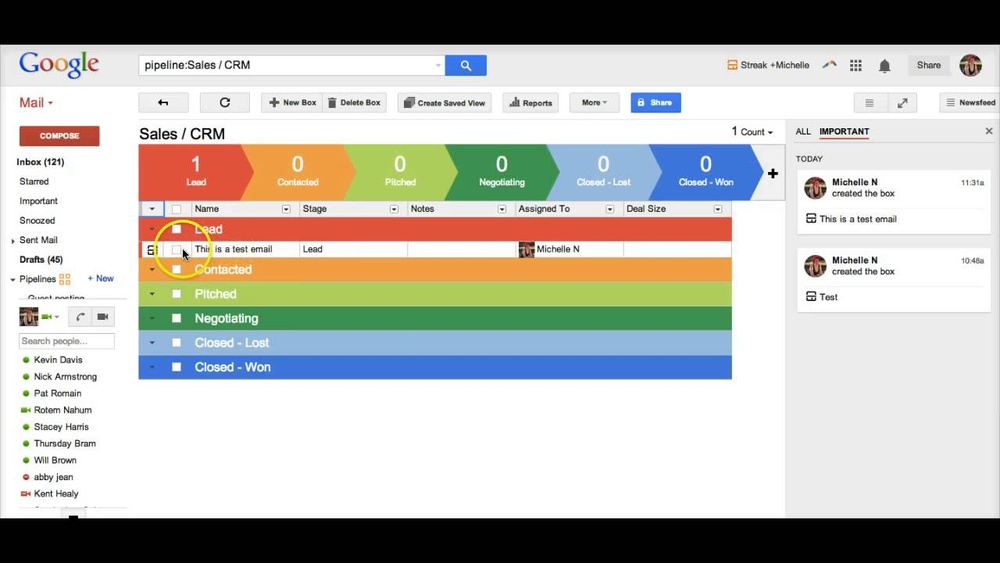
Managing your emails and client relationships can feel overwhelming, especially when everything is scattered across your inbox. What if you could turn Gmail into a powerful tool that not only handles your emails but also tracks your sales, manages contacts, and organizes your workflow effortlessly?
That’s exactly what Streak CRM does. Designed to work right inside your Gmail, Streak helps you stay on top of your tasks without switching between apps. Whether you’re in sales, fundraising, or project management, you’ll find its features tailor-made to boost your productivity and close deals faster. Ready to transform your inbox into a smart CRM? Let’s dive into how you can use Streak CRM to simplify your daily workflow and get more done with less hassle.

Credit: www.youtube.com
Introduction To Streak Crm
Streak CRM is a simple yet powerful tool designed to organize your work directly within Gmail. It helps manage relationships, track emails, and streamline workflows without leaving your inbox. This CRM is perfect for small teams and individuals who want to improve productivity while keeping their email workflow intact.
What Is Streak Crm And Who Is It For?
Streak CRM is a customer relationship management tool built inside Gmail. It allows users to manage contacts, deals, and projects without switching apps.
- Primary Users: Sales teams, support agents, project managers
- Main Purpose: Track emails, manage pipelines, and organize tasks
- Ideal For: Small to medium-sized businesses and individuals using Gmail daily
It works by grouping related emails and information into “boxes”, making it easier to follow up and keep track of client interactions.
How Streak Integrates Seamlessly With Gmail
Streak lives inside your Gmail inbox. This integration makes it easy to use without learning new software.
- Install Streak Extension: Add Streak from the Chrome Web Store or Mac App Store.
- Manage Emails: Use Streak to create pipelines and boxes directly in Gmail.
- Track Activity: See when emails are opened and get reminders for follow-ups.
| Feature | Benefit |
|---|---|
| Email Tracking | Know when recipients open your emails in real time |
| Pipeline Management | Organize sales or projects with visual pipelines inside Gmail |
| Shared Collaboration | Team members can share data and emails easily |
| Easy Setup | Works within Gmail; no switching between apps |
Because Streak is built into Gmail, it keeps your workflow smooth and efficient. You do not need to leave your inbox to track deals or manage contacts.

Credit: startupstash.com
Key Features Of Streak Crm And Their Benefits
Streak CRM integrates powerful tools directly into Gmail. It helps teams manage contacts, track emails, and organize workflows easily. The features work smoothly inside your inbox, saving time and effort.
These key features improve communication and boost productivity. Each tool offers specific benefits that help businesses grow and stay organized.
Email Tracking: Gain Insights On Email Engagement
Email tracking shows when recipients open your messages. This feature helps you know who reads your emails and when.
- See real-time notifications of email opens
- Follow up quickly with interested contacts
- Improve timing and approach based on engagement data
Tracking emails directly inside Gmail keeps your workflow smooth. No need for extra software or tabs.
Pipelines And Boxes: Organize Deals And Contacts Efficiently
Pipelines and Boxes let you organize deals, projects, or contacts clearly. Each box represents an item like a client or task.
| Feature | Benefit |
|---|---|
| Pipelines | Visualize sales stages or project steps |
| Boxes | Store all related information in one place |
| Custom Fields | Track details specific to your process |
This setup keeps your contacts and deals organized and easy to manage.
Mail Merge: Personalize Bulk Emails Without Leaving Gmail
Mail Merge sends personalized emails to many people at once. It uses your contact data to customize each message.
- Create your email template
- Link your contacts from Streak boxes
- Send customized emails directly from Gmail
This saves time and keeps emails personal, improving response rates.
Snippets And Email Sharing: Streamline Communication
Snippets are short, reusable text blocks you insert into emails. Email sharing allows teams to see conversations and collaborate.
- Use snippets for quick replies and common info
- Share email threads with teammates inside Gmail
- Keep communication consistent and fast
These tools help teams stay aligned and reduce repetitive typing.
Send Later Feature: Schedule Emails For Optimal Timing
Send Later lets you schedule emails to go out at the best time. This feature ensures your messages reach inboxes when recipients are most likely to read them.
- Pick the exact date and time for sending
- Plan follow-ups or announcements in advance
- Improve open rates and engagement by timing emails well
Scheduling emails directly in Gmail keeps your workflow simple and efficient.
Getting Started With Streak Crm
Streak CRM integrates directly into Gmail, making it easy to manage your contacts and sales processes without leaving your inbox. This section guides you through the initial steps to start using Streak. You will learn how to install the tool, create pipelines, add contacts, and customize your views.
Installing And Setting Up Streak In Gmail
Begin by installing the Streak CRM extension from the Chrome Web Store or Mac App Store for Safari. The installation is quick and free.
- Go to the Chrome Web Store and search for “Streak CRM”.
- Click Add to Chrome and confirm the installation.
- Once installed, open Gmail and sign in with your Google account.
- Follow the on-screen prompts to grant Streak permissions.
After setup, Streak will appear as a sidebar in Gmail. This sidebar is your main dashboard for managing CRM features.
Creating And Managing Pipelines For Your Workflow
Pipelines organize your workflow visually. Each pipeline represents a process like sales, support, or fundraising.
To create a new pipeline:
- Click the Streak icon in Gmail.
- Select Create Pipeline.
- Choose a pipeline template or start blank.
- Name your pipeline and add stages that match your workflow steps.
You can drag boxes (records) between stages to show progress. Pipelines help track tasks clearly and keep your team aligned.
Adding Contacts And Associating Emails To Boxes
Streak uses boxes to hold information on deals, projects, or contacts.
To add a contact and link emails:
- Open an email from the contact in Gmail.
- Click the orange “+” sign at the top of the email.
- Select an existing box or create a new one for this contact.
All emails linked to a box appear in one place, making communication easy to track and manage.
Using Saved Views To Customize Your Crm Experience
Saved Views let you filter and display boxes based on criteria you choose. This makes it easier to focus on important tasks.
To create a saved view:
- Open your pipeline.
- Click Saved Views and then Create New View.
- Set filters such as stage, assigned user, or date.
- Name the view for quick access later.
Saved Views help you see only the information you need. Switch between views to get different perspectives on your work.
Pricing And Affordability Breakdown
Streak CRM offers a variety of pricing options to suit different needs and budgets. Its plans range from a free version with basic features to paid subscriptions with advanced tools. Understanding these options helps users choose the right plan for their business size and goals. Below is a detailed look at what each plan offers and how they compare.
Overview Of Streak’s Free Plan And Its Capabilities
The free plan of Streak CRM is a great starting point for individuals and small teams. It integrates directly with Gmail, allowing users to manage customer relationships without leaving their inbox.
- Track up to 200 tracked emails per month
- Create and manage pipelines for sales or projects
- Basic email tracking and scheduling
- Access to essential CRM features like contact management and task tracking
- Integration with Gmail and Google Workspace
This plan suits those who need simple CRM functions without added costs. It helps users organize contacts and monitor communications effectively.
Paid Plans: Features And Value For Different User Needs
| Plan | Price (per user/month) | Key Features | Best For |
|---|---|---|---|
| Professional | $15 |
| Small to medium sales teams |
| Enterprise | Custom pricing |
| Large organizations and fundraisers |
Paid plans provide extra features that improve productivity and collaboration. They fit teams needing more automation and detailed insights.
Is Streak Crm Worth The Cost? Cost-benefit Considerations
Streak CRM’s pricing is competitive compared to standalone CRM tools. Its seamless Gmail integration saves time by keeping all communication in one place.
Benefits include:
- Reducing the need to switch apps
- Improving email tracking accuracy
- Automating repetitive tasks
- Enhancing team collaboration on sales or projects
For teams heavily using Gmail, the paid plans justify the cost through increased efficiency. Smaller users may find the free plan sufficient.
Consider your team’s size, email volume, and need for automation before choosing a plan. Streak CRM offers flexible options to balance budget and features.
Pros And Cons Of Using Streak Crm
Streak CRM integrates directly with Gmail, offering a unique way to manage customer relationships inside your inbox. It fits well for sales, support, and project management teams. Understanding the advantages and limitations helps users decide if Streak suits their workflow.
Advantages Based On Real-world Usage Scenarios
- Seamless Gmail Integration: Streak works inside Gmail, so no app switching is needed.
- Email Tracking: Users can see when recipients open emails, improving follow-up timing.
- Easy Pipeline Management: Organize contacts and deals using customizable boxes and stages.
- Collaboration Features: Share pipelines and notes with teammates for better coordination.
- Free Version Available: Basic features come at no cost, helpful for small teams or startups.
- Quick Setup: Installation is simple via Chrome or Safari extensions, ready to use in minutes.
Limitations And Challenges Users May Face
| Challenge | Description |
|---|---|
| Limited to Gmail | Streak only works within Gmail, which restricts users who use other email services. |
| Learning Curve | New users might find the setup and pipeline customization confusing at first. |
| Feature Limits on Free Plan | Advanced features require paid plans, which might be costly for some small teams. |
| Performance Issues | Handling large volumes of data within Gmail can slow down email loading times. |
| Privacy Concerns | Some users worry about sharing sensitive email data through a third-party extension. |

Credit: www.streak.com
Recommendations For Ideal Users And Use Cases
Streak CRM fits well with users who want to manage their emails and workflows inside Gmail. It suits various teams and business types. Understanding who benefits most helps you use Streak efficiently and increase productivity.
Best Fit For Sales, Support, And Project Management Teams
Sales teams use Streak to track leads and close deals faster. It keeps all client communication in one place inside Gmail. Support teams manage customer issues smoothly by organizing requests in shared pipelines.
Project managers monitor progress and deadlines without leaving their inbox. They assign tasks and update statuses easily.
- Sales: Track email opens, follow-ups, and deal stages.
- Support: Manage tickets and customer conversations.
- Project Management: Coordinate tasks and timelines within Gmail.
How Small Businesses And Freelancers Can Benefit
Small businesses gain a simple CRM without extra software. Freelancers keep client emails and projects organized in one tool. Streak helps track proposals, invoices, and deadlines.
Key benefits include:
- Easy setup with no training needed.
- Free basic plan ideal for startups.
- Manage contacts, follow-ups, and tasks in one place.
Maximizing Productivity With Streak In Various Scenarios
Use Streak to save time and stay organized in daily work. Here are common scenarios:
| Scenario | How Streak Helps |
|---|---|
| Tracking Sales Leads | Visual pipelines show deal stages, automate reminders, and track email opens. |
| Managing Customer Support | Organize support tickets, assign team members, and update statuses in Gmail. |
| Handling Projects | Manage tasks, deadlines, and conversations without switching apps. |
| Freelance Client Management | Keep client details, proposals, and follow-ups organized in one place. |
Streak’s integration with Gmail means no need to change your workflow. It works inside the inbox, making it simple and efficient.
Frequently Asked Questions
How Does Streak Crm Work?
Streak CRM integrates directly with Gmail to track emails, manage contacts, and organize sales pipelines within your inbox. It automates workflows and improves client communication efficiently.
How To Use Crm Step By Step?
Install the CRM tool and connect it to your email. Create pipelines and add contacts. Track emails and manage deals. Use boxes to organize tasks. Analyze data to improve customer interactions and sales processes.
How To Use Streak To Track Emails?
Install the free Streak extension in Gmail. Send your email as usual. Check the tracking status in your inbox to see if it’s opened.
Is Streak Crm Free?
Streak CRM offers a free plan with basic features suitable for individuals and small teams. Paid plans provide advanced tools and increased limits.
Conclusion
Streak CRM helps you manage customer contacts right inside Gmail. It keeps your emails organized and tracks important messages easily. You can create pipelines to follow your sales or projects step-by-step. Using Streak saves time and keeps your team on the same page. Start simple, add features as you go, and watch your workflow improve. Try Streak CRM today to see how it fits your needs. Learn more and get started here: Streak CRM.

