

Choosing the right CRM and marketing automation tool can make or break your business growth. You’ve probably heard about HubSpot and Infusionsoft (now known as Keap), but which one really fits your needs?
Both promise to streamline your sales and marketing, yet they approach these goals in very different ways. If you want to save time, boost your sales, and keep your customers happy, it’s crucial to pick the right platform from the start.
You’ll get a clear, straightforward comparison of HubSpot vs Infusionsoft, helping you decide which one aligns best with your business goals and budget. Keep reading to uncover the strengths, weaknesses, and key features that could transform how you manage your customer relationships.
Crm Features
Choosing the right CRM can shape how well your business manages customer relations. HubSpot and Infusionsoft offer strong CRM features designed to help you track and grow your customer base. Each platform has unique tools to organize contacts, manage sales, automate marketing, and support customers.
Contact Management
HubSpot provides a clean and easy way to store contact details. It tracks interactions and keeps notes in one place. Infusionsoft also offers detailed contact profiles and allows tagging for better organization. Both tools help you find and segment contacts quickly.
Sales Pipeline
HubSpot’s sales pipeline is visual and simple to use. You can move deals through stages with drag-and-drop. Infusionsoft’s pipeline focuses on automation, moving leads automatically based on actions. Both platforms show clear sales progress and help forecast revenue.
Marketing Automation
HubSpot offers workflows to send emails and trigger tasks automatically. It integrates with many marketing channels for smooth campaigns. Infusionsoft excels in automation with advanced sequences and personalized messaging. Both help save time and increase engagement.
Customer Support Tools
HubSpot includes ticketing and live chat tools to resolve issues fast. It offers a knowledge base for self-service support. Infusionsoft provides basic support features but focuses more on sales and marketing. HubSpot’s tools suit teams needing full customer support options.
User Experience
User experience plays a key role in choosing between HubSpot and Infusionsoft. It affects how easily users adopt and benefit from the software. A smooth experience can save time and reduce frustration. Both platforms offer different designs and workflows. Understanding these differences helps pick the right tool for your needs.
Interface Design
HubSpot uses a clean and modern interface. It organizes tools into clear sections. This layout helps users find features quickly. The color scheme is soft and pleasant. Infusionsoft’s interface is more complex. It shows many options on one screen. This can overwhelm new users. The design focuses on functionality over simplicity. HubSpot’s design suits those who prefer clarity. Infusionsoft fits users who want detailed controls.
Ease Of Use
HubSpot is known for its user-friendly nature. It requires little technical skill to start. Menus and buttons are easy to understand. Infusionsoft has a steeper learning curve. It offers powerful automation but needs setup time. Users may need training to use it well. HubSpot works well for beginners and small teams. Infusionsoft is better for users who need advanced features.
Onboarding Process
HubSpot provides step-by-step guides during onboarding. It includes tutorials and videos to help users. New users get tips as they explore features. Infusionsoft’s onboarding is longer and more detailed. It often involves personal coaching or support calls. The process ensures users understand complex tools. HubSpot’s onboarding is faster and more intuitive. Infusionsoft’s process suits those willing to invest time upfront.
Pricing Models
The pricing models of HubSpot and Infusionsoft reflect their unique approaches to customer relationship management. Both platforms offer scalable options but differ in how they charge for services and users. Understanding these differences helps businesses choose the right tool for their budget and needs.
Subscription Plans
HubSpot provides tiered subscription plans based on features. It starts with a free CRM plan for basic needs. Paid plans increase in price with added marketing, sales, and service tools. Infusionsoft, now known as Keap, offers three main plans. Each plan bundles CRM, marketing automation, and e-commerce features differently. Monthly fees rise with more advanced options.
User-based Costs
HubSpot charges a flat rate regardless of the number of users. This model suits growing teams wanting predictable costs. Infusionsoft prices depend on the number of users. Each additional user adds to the monthly fee. Small teams may find Infusionsoft costs lower initially. Larger teams might prefer HubSpot’s user-independent pricing.
Additional Fees
HubSpot includes many tools in its subscription but may charge extra for add-ons. Examples include advanced reporting and extra marketing contacts. Infusionsoft often requires additional fees for extra contacts or SMS credits. Both platforms may charge for onboarding and premium support. Businesses should consider these possible extra costs.

Credit: greyloud.com
Integrations
Integrations play a key role in choosing the right CRM platform. They help connect your tools and systems for smoother workflows. Both HubSpot and Infusionsoft offer multiple integration options. These options vary in ease, number, and flexibility. Understanding them can help you pick the best fit.
Third-party Apps
HubSpot supports thousands of third-party apps. These apps cover marketing, sales, customer service, and more. You can find popular tools like Slack, Zoom, and Shopify easily. Infusionsoft offers fewer third-party apps but covers essential categories. Its marketplace focuses on small business needs. HubSpot’s large app ecosystem provides more variety and options.
Native Integrations
Native integrations come built-in with the platform. HubSpot includes native connections to its marketing, sales, and service hubs. This creates a seamless experience within one system. Infusionsoft also offers native integrations with email marketing, payments, and e-commerce. These integrations are simple to set up and use. HubSpot’s native tools work well for teams wanting an all-in-one solution.
Api Capabilities
Both platforms provide APIs for custom integration needs. HubSpot’s API is well-documented and widely used. Developers can build custom apps or connect unusual tools. Infusionsoft’s API allows similar customizations but with fewer resources. It suits businesses with developer support. HubSpot’s strong API support makes it easier to expand functionality over time.
Automation Capabilities
Automation is vital for managing marketing and sales efficiently. Both HubSpot and Infusionsoft offer strong automation tools. These tools help save time and keep your audience engaged without manual work. Understanding their automation features can help you decide which fits your business needs.
Workflow Builders
HubSpot provides a visual workflow builder that is easy to use. You can create automated sequences by dragging and dropping actions. It supports complex triggers and conditions for precise control. Infusionsoft also has a workflow builder but with a steeper learning curve. It focuses on small business needs and offers detailed automation paths. Both allow automation of tasks like sending emails, updating contacts, and assigning leads.
Email Campaigns
HubSpot offers a flexible email campaign tool with ready-made templates. You can personalize emails based on user behavior and data. It tracks email opens, clicks, and responses in real-time. Infusionsoft’s email campaigns focus on automation and segmentation. It allows sending targeted emails to specific groups automatically. Both platforms support A/B testing to improve email performance.
Lead Nurturing
HubSpot excels at lead nurturing with its smart automation. It scores leads and sends them relevant content automatically. You can set up drip campaigns that adjust based on lead actions. Infusionsoft uses tagging and scoring to nurture leads effectively. It helps move prospects through the sales funnel with timely follow-ups. Both tools aim to turn leads into customers with minimal manual effort.

Credit: zixflow.com
Target Audience
Choosing between HubSpot and Infusionsoft depends largely on who will use the software. Each platform suits different types of businesses and needs. Understanding the target audience for each can help you pick the right tool.
Small Businesses
Infusionsoft, now known as Keap, focuses mainly on small businesses. It offers affordable pricing and automation to help small teams manage sales and marketing. HubSpot also serves small businesses but often fits best with those planning to grow quickly. HubSpot provides more advanced features and scalability.
Ecommerce Focus
Infusionsoft is popular among ecommerce sellers. It supports online stores with tools for payment processing and customer follow-up. HubSpot offers ecommerce integrations but centers more on inbound marketing and lead management. Ecommerce businesses wanting deeper marketing automation might prefer Infusionsoft.
Industry Versatility
HubSpot works well across many industries. It adapts to marketing, sales, and service needs in fields like technology, education, and real estate. Infusionsoft targets fewer sectors but excels with service-based businesses and direct sales. HubSpot’s flexibility suits companies that need a broad marketing platform.
Customer Support
Customer support plays a key role in choosing the right CRM software. Both HubSpot and Infusionsoft offer different levels of assistance to help users solve problems and learn the tools. Understanding their support options can guide you to the best fit for your business needs.
Support Channels
HubSpot provides support via phone, email, and live chat. Users can contact experts directly during business hours. Infusionsoft offers email and phone support but has limited live chat options. HubSpot’s 24/7 support is useful for urgent issues. Infusionsoft focuses more on scheduled calls and email responses.
Resource Availability
HubSpot has a large library of articles, videos, and tutorials. The knowledge base covers many topics in detail. Infusionsoft also provides helpful guides and webinars but with fewer resources than HubSpot. HubSpot updates its content regularly to keep users informed about new features and changes.
Community And Training
HubSpot has an active user community forum where members share advice and tips. It also offers free and paid training courses for all skill levels. Infusionsoft has a smaller community but provides coaching and certification programs. HubSpot’s training is more extensive and easy to access online.
Mobile Accessibility
Mobile accessibility is crucial for managing business tools anywhere. Both HubSpot and Infusionsoft offer mobile-friendly options. These help users stay productive outside the office. Understanding their mobile features can guide your choice.
Mobile Apps
HubSpot provides a well-designed mobile app for iOS and Android. It supports tasks like contact management, email tracking, and deal updates. The app syncs seamlessly with the desktop version. Infusionsoft, now Keap, also offers mobile apps. These focus on CRM and sales automation tasks. Users can manage contacts and view sales pipelines on the go.
Responsive Design
HubSpot’s web platform uses responsive design. It adjusts layout and content to fit any screen size. This makes browsing easy on smartphones and tablets. Infusionsoft’s interface is also responsive but may feel less smooth on smaller devices. Both platforms aim to provide access to key features without a desktop.
On-the-go Features
HubSpot enables quick lead capture and email communication from mobile devices. Push notifications keep users informed about new activities or tasks. Infusionsoft offers mobile-friendly campaign management and payment processing. It lets users send invoices and track payments remotely. These features support business operations from any location.
Security And Compliance
Security and compliance are crucial when choosing a CRM platform. Both HubSpot and Infusionsoft prioritize protecting your business data. They offer strong measures to keep information safe and meet legal standards. This section explores how each platform handles security and compliance through data protection, regulatory compliance, and user permissions.
Data Protection
HubSpot uses encryption to safeguard data during transfer and storage. It applies secure protocols to prevent unauthorized access. Infusionsoft also encrypts data and employs firewalls to protect sensitive information. Both platforms regularly update their security systems to address new threats.
Regulatory Compliance
HubSpot complies with major regulations like GDPR and CCPA. It provides tools to help businesses manage customer data rights easily. Infusionsoft follows similar rules and offers features for data privacy management. Both ensure your business can meet regional legal requirements without hassle.
User Permissions
HubSpot allows admins to set detailed user roles and access levels. This controls who can view or edit specific data. Infusionsoft offers customizable permission settings to limit user actions. These controls help prevent accidental or intentional data breaches within your team.
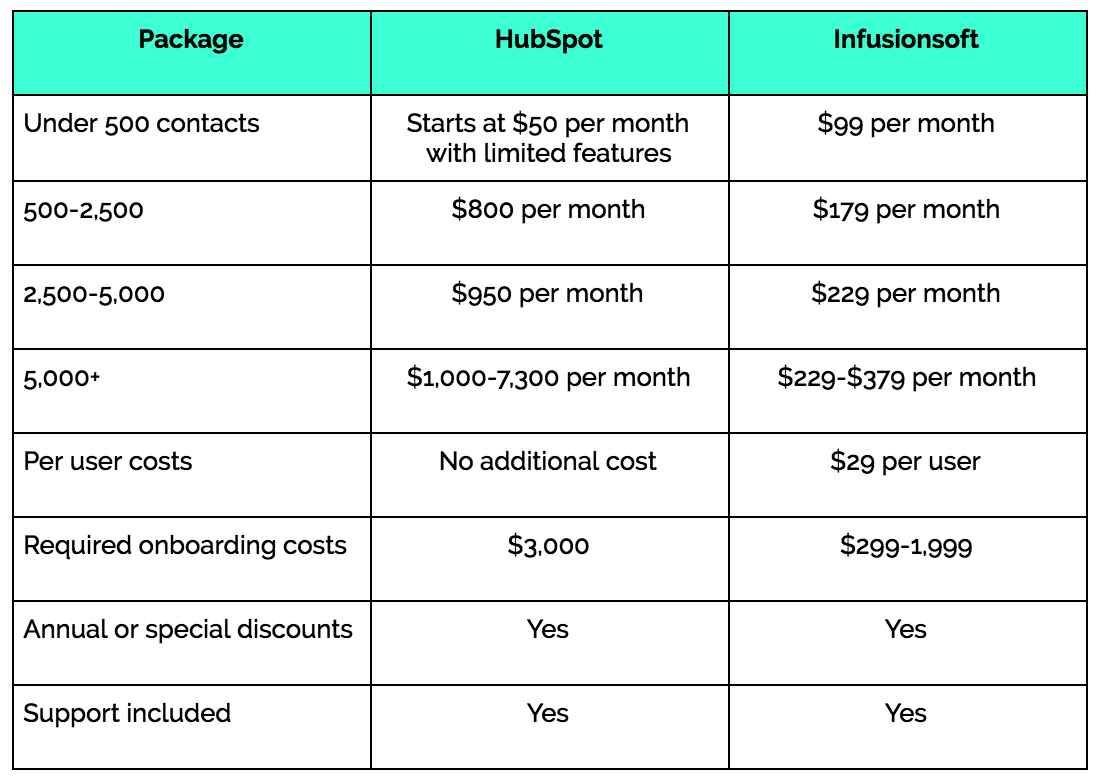
Credit: www.smartbugmedia.com
Market Position
Understanding the market position of HubSpot and Infusionsoft reveals their standing in the CRM and marketing automation world. Both platforms serve businesses aiming to grow through sales and marketing tools. Their approach, target audience, and user experience shape their market reputation and influence buyer decisions.
Brand Reputation
HubSpot is known for its strong brand in inbound marketing and CRM solutions. It serves businesses of all sizes with a focus on ease of use and integration. Infusionsoft, now known as Keap, targets small businesses seeking affordable automation tools. HubSpot’s brand is often linked to innovation and comprehensive features. Keap is recognized for practical, straightforward solutions and good customer support.
Competitor Comparison
HubSpot competes with major CRM players like Salesforce and Zoho. Its broad feature set appeals to marketing and sales teams wanting all-in-one software. Keap competes mainly with small business CRM tools, including ActiveCampaign and Mailchimp. It offers simpler tools but charges per user. HubSpot’s pricing is more flexible with tiered plans, attracting diverse business sizes.
User Reviews
Users praise HubSpot for its user-friendly interface and strong customer service. Many highlight its helpful educational resources and seamless integrations. Keap users often mention its affordability and automation features as key benefits. Some find Keap’s learning curve steeper but appreciate its value for small business needs. Both platforms receive positive feedback for improving sales and marketing workflows.
Frequently Asked Questions
Who Is Hubspot’s Biggest Competitor?
HubSpot’s biggest competitor is Salesforce, known for its robust CRM and marketing automation features. Other strong rivals include Keap (formerly Infusionsoft), Zoho, and ActiveCampaign. These platforms offer similar tools for sales, marketing, and customer service, catering to various business sizes and needs.
What Happened To Infusionsoft?
Infusionsoft rebranded as Keap, focusing on small business CRM and marketing automation. It continues offering powerful sales and marketing tools.
What Crm Is Better Than Hubspot?
Salesforce, Zoho CRM, and Keap often outperform HubSpot in customization and pricing for small businesses. Choose based on specific needs.
What Is The Microsoft Equivalent Of Hubspot?
The Microsoft equivalent of HubSpot is Microsoft Dynamics 365. It offers CRM, marketing, and customer service tools but often needs extra licenses or add-ons.
Conclusion
Choosing between HubSpot and Infusionsoft depends on your business needs. HubSpot offers a user-friendly interface with strong marketing tools. Infusionsoft, now Keap, focuses on small businesses with affordable pricing per user. Both platforms provide valuable CRM and automation features. Consider your budget, ease of use, and specific marketing goals.
Testing each tool can help you find the right fit. The best choice supports your growth and simplifies customer management. Keep your business needs clear to make a smart decision.

