
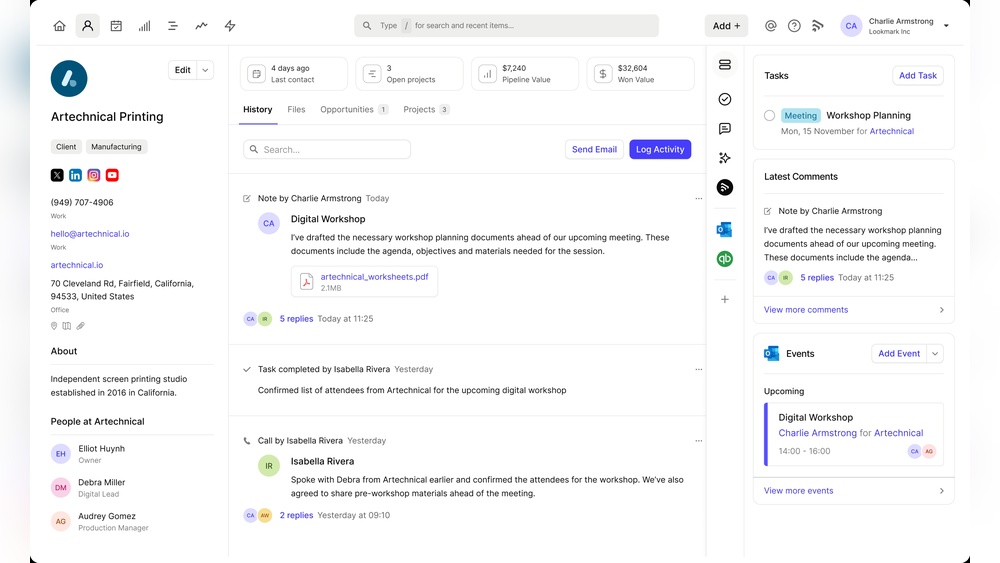
Feeling overwhelmed by scattered sales notes and customer info? You’re not alone.
Managing your business details across post-its, spreadsheets, and random scraps can create chaos and stress. But what if you could bring it all together in one simple, clear place? That’s exactly what Capsule CRM does for you. It helps you organize your sales, projects, and customer service effortlessly, giving you control and calm in your daily workflow. In this guide, you’ll learn how to use Capsule CRM step-by-step, so you can finally stop juggling and start focusing on what matters most—growing your business. Ready to take charge? Let’s dive in.
Introduction To Capsule Crm And Its Purpose
Capsule CRM helps businesses organize sales, projects, and customer details in one place. It replaces scattered notes and spreadsheets with a clear, calm system. Capsule aims to give users control over their customer relationships and sales processes. This tool reduces confusion and brings clarity to daily business activities.
By centralizing information, Capsule supports smoother operations and better customer management. It is designed to fit small to medium businesses that need simple yet effective CRM solutions.
What Is Capsule Crm?
Capsule CRM is a customer relationship management software that stores sales and customer data. It tracks contacts, sales opportunities, and tasks in a single platform. Users can see all customer interactions and sales progress easily.
The software includes modules for:
- Managing contacts and companies
- Tracking sales opportunities
- Scheduling and completing activities
- Generating sales and activity reports
Reports can be exported as spreadsheets or images for further analysis. Capsule’s simple design helps businesses stay organized and focused on growth.
Who Can Benefit From Using Capsule Crm?
Capsule CRM suits businesses of all sizes but is ideal for small and medium enterprises. It fits industries such as:
- Construction
- Wholesale
- Sales and customer service
- Project management
Teams needing a tidy way to manage customers and sales find Capsule helpful. It works well for salespeople, customer service reps, and project managers.
Companies with scattered customer info gain clarity and control using Capsule. It reduces data loss and communication gaps.
How Capsule Crm Boosts Productivity
Capsule CRM saves time by keeping all information in one place. Users can:
- Quickly access customer details and history
- Track sales progress and goals clearly
- Organize tasks and schedule follow-ups
- Generate easy-to-understand reports
These features help teams focus on important work instead of searching for data. Capsule reduces manual work and improves team coordination.
| Feature | Productivity Benefit |
|---|---|
| Centralized Contact Management | Faster access to client info |
| Sales Opportunity Tracking | Clear view of sales pipeline |
| Activity Scheduling | Better task management |
| Reporting Tools | Improved decision making |
With Capsule, businesses run smoothly with less stress and more focus.

Credit: capsulecrm.com
Key Features Of Capsule Crm And Their Benefits
Capsule CRM combines essential tools to manage sales, customers, and projects in one place. Its user-friendly features help businesses stay organized and focused. Understanding these features reveals how Capsule improves daily workflows and decision-making.
Contact And Lead Management: Streamlining Your Customer Relationships
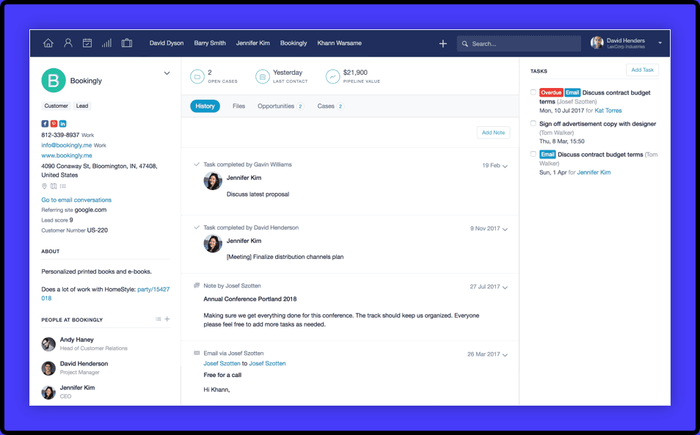
Capsule stores all customer details in one easy-to-access place. It tracks contacts, leads, and companies, keeping information neat and updated. Users can add notes, emails, and files linked to each contact.
- Centralized customer data reduces confusion
- Lead tracking helps follow up on potential sales
- Easy search finds contacts quickly
This helps teams build stronger relationships and respond faster.
Sales Pipeline Visualization: Tracking Opportunities With Ease
Capsule shows sales stages visually in a pipeline layout. It lets users drag opportunities across stages like “Prospect,” “Proposal,” and “Won.” This clear view helps spot bottlenecks and prioritize deals.
- Visual pipeline simplifies sales tracking
- Drag and drop moves deals between stages
- Focus on high-value opportunities to close more sales
Activity And Sales Reporting: Gaining Actionable Insights
Capsule’s reports summarize activities by user and type. Sales reports show won and lost deals, tracking progress toward goals. Reports export easily as spreadsheets or images for sharing.
| Report Type | Purpose | Export Options |
|---|---|---|
| Activity Reports | Overview of completed tasks and calls | CSV, PDF, Image |
| Sales Reports | Track won/lost deals and sales goals | CSV, PDF, Image |
These insights guide smarter sales strategies and time management.
Workflow Automations: Saving Time Through Process Automation
Capsule automates routine tasks like sending follow-up emails or assigning contacts. Automation reduces manual work and errors, keeping the team focused on selling.
- Set triggers based on dates or actions
- Automatically update fields or send reminders
- Ensure consistent customer follow-up
Project Management Integration: Organizing Tasks And Collaborations
Capsule links projects with customer data, allowing task tracking and team collaboration. Users can assign tasks, set deadlines, and follow progress inside the CRM.
- Centralize project details with contacts
- Track task status and due dates
- Improve team communication and accountability
Security Features: Ensuring Data Protection With Two-factor Authentication
Capsule protects data using two-factor authentication (2FA). This adds an extra security step to prevent unauthorized access. User permissions control who sees sensitive information.
- 2FA requires a code from a mobile device
- Role-based access limits data visibility
- Data encryption safeguards stored information
Customization And User Preferences: Personalizing Your Crm Experience
Capsule allows customization of fields, tags, and views. Users can tailor the system to fit their workflow and preferences. This makes the CRM easier to use and more relevant.
- Create custom fields for unique data
- Use tags to group contacts or deals
- Adjust dashboard and report layouts
Personalization increases user adoption and efficiency.
Step-by-step Guide: How To Use Capsule Crm Effectively
Capsule CRM helps keep your sales, projects, and customer details in one place. This guide walks through simple steps to use Capsule CRM clearly and confidently.
Setting Up Your Capsule Crm Account And Choosing The Right Plan
Start by creating your Capsule CRM account on capsulecrm.com. Choose a plan that fits your business size and needs. Plans vary by:
- Number of users
- Storage limits
- Access to features like sales tracking and reporting
Pick a plan that balances cost and features for your daily tasks. After sign-up, customize your profile and company settings.
Importing And Organizing Contacts And Leads
Bring all customer data into Capsule CRM by importing contacts and leads. You can upload files in CSV format or connect existing tools for syncing.
- Clean your contact list to remove duplicates before import
- Use tags and categories to organize contacts by type or priority
- Assign contacts to team members for clear ownership
Organizing contacts early helps find information fast and manage relationships easily.
Managing Your Sales Pipeline And Tracking Opportunities
Use Capsule CRM’s sales pipeline to follow deals from start to finish. Track each opportunity’s status like “Prospecting,” “Negotiation,” or “Closed.”
- Create new opportunities linked to contacts or leads
- Update stages as the deal progresses
- Set expected close dates and values for accurate forecasting
- Log communication notes and activities for each opportunity
This keeps your sales process clear and helps focus on deals that matter most.
Creating And Automating Workflows For Increased Efficiency
Capsule CRM allows you to build workflows that save time. Automate routine tasks to focus on selling and serving customers.
- Set reminders for follow-ups and deadlines
- Automatically assign tasks based on deal stage or contact type
- Use templates for emails and notes to speed communication
Automated workflows reduce errors and keep your team aligned on priorities.
Using Capsule Crm For Event And Project Management
Track events and projects alongside your sales activities in Capsule CRM. This helps keep all work organized in one system.
- Create projects linked to customers or opportunities
- Assign tasks and deadlines to team members
- Monitor progress with activity logs and notes
Combining project and event data with sales info gives a full picture of your business efforts.
Generating And Exporting Reports To Monitor Performance
Capsule CRM offers reports to help you track progress and results. Use reports to analyze sales, activities, and team performance.
| Report Type | Purpose | Export Options |
|---|---|---|
| Activity Reports | Overview of completed tasks by user and type | CSV, PDF |
| Sales Reports | Insights on won and lost deals, sales goals | CSV, PDF |
Export reports as spreadsheets or images for sharing or deeper analysis.

Credit: capsulecrm.com
Pricing And Affordability Breakdown
Understanding Capsule CRM’s pricing helps pick the right plan. Each plan suits different business sizes and needs. This section explains costs, features, and value clearly.
Overview Of Capsule Crm Pricing Plans
Capsule CRM offers simple pricing with two main plans. Both charge per user each month. They include a free trial to explore features before paying.
| Plan | Price Per User/Month | Storage Limit | Contacts Limit |
|---|---|---|---|
| Professional | $18 | 10GB | 50,000 |
| Teams | $36 | 100GB | 100,000 |
What Features Are Included In Each Plan?
Both plans cover core CRM tools. These help manage contacts, sales pipelines, and customer data.
- Contact Management: Store and organize customer details easily.
- Sales Pipeline: Track deals and stages in one view.
- Task Management: Set reminders and to-dos for your team.
- Reports: Generate sales and activity reports quickly.
- Integrations: Connect with email, accounting, and other apps.
The Teams plan adds:
- Advanced permissions for different user roles.
- More storage and contacts capacity.
- Priority support to resolve issues faster.
- Customizable sales pipelines for complex processes.
Assessing Value For Different Business Sizes And Needs
Small businesses benefit from the Professional plan. It offers solid features at a lower price. It suits startups and solo entrepreneurs.
Medium to large teams find the Teams plan better. It supports more users and bigger data needs. Advanced tools help manage complex sales workflows.
Capsule CRM’s pricing scales with business growth. Pay only for the users and storage needed. This keeps costs clear and manageable.
Evaluate needs like contact volume, team size, and sales complexity. Match these with plan features to get the best fit.
Pros And Cons Of Capsule Crm Based On Real-world Usage
Capsule CRM is a popular tool for managing sales and customer data in one place. Users appreciate its simplicity and focus on keeping business processes clear and organized. Real-world feedback reveals both strengths and weaknesses. Understanding these helps decide if Capsule fits your business needs.
Advantages: User-friendly Interface And Powerful Features
Capsule CRM stands out for its easy-to-use interface. The layout is clean and intuitive, allowing quick access to contacts, sales, and tasks.
- Simple navigation: Users can find information without extra clicks.
- Integrated sales tools: Track opportunities, sales goals, and customer interactions in one system.
- Activity and sales reports: Generate clear summaries by user and type, helping teams stay on target.
- Export options: Reports can be saved as spreadsheets or images for sharing.
- Task management: Organize projects and follow-ups to improve customer service.
These features help businesses reduce chaos and gain control over sales and customer data.
Limitations: Areas For Improvement And Potential Challenges
Despite its strengths, Capsule CRM shows some limits based on user experience.
- Customization restrictions: Some users find it hard to tailor fields and workflows fully.
- Reporting depth: Advanced reporting capabilities are limited compared to other CRMs.
- Mobile app: The mobile experience is functional but could be smoother and faster.
- Third-party integrations: Fewer integration options may affect businesses relying on multiple tools.
- Learning curve for new users: Although simple, some features require guidance to use well.
These challenges may affect businesses with complex CRM needs or large teams.
User Feedback And Common Experiences
| Aspect | Positive Feedback | Negative Feedback |
|---|---|---|
| Ease of Use | Clean design, simple navigation, quick setup | Some users want more guidance for advanced features |
| Feature Set | Good balance of sales and task management tools | Limited customization and reporting depth |
| Support | Responsive customer service and helpful resources | Occasional delays during busy periods |
| Value for Money | Affordable pricing for small to medium businesses | May lack features needed for larger enterprises |
Users often highlight Capsule’s ability to reduce stress in managing business data. Some mention the need for better mobile features and more integrations. Overall, Capsule suits businesses seeking clear, straightforward CRM without complexity.
Who Should Use Capsule Crm? Specific Recommendations
Capsule CRM suits businesses needing clear, simple ways to manage sales, contacts, and projects. It helps keep all customer data and tasks organized in one place. This tool fits teams wanting calm and control over their daily work. Capsule is ideal for small to medium businesses that want to improve efficiency without complexity.
Ideal Business Types And Industries
Capsule works best for businesses that rely on strong customer relationships and organized workflows. Common industries include:
- Professional Services – consultants, lawyers, accountants
- Construction and Trades – contractors, builders, suppliers
- Retail and Wholesale – shops, distributors, e-commerce
- Nonprofits – charities, community groups
- Creative Agencies – marketing, design, media
These businesses benefit from Capsule’s easy contact management and sales tracking features.
Best Use Cases: Sales, Event Management, And Project Coordination
| Use Case | How Capsule Helps |
|---|---|
| Sales | Track leads and sales pipelines with clear stages. Automate follow-ups and see customer history in one place. |
| Event Management | Organize contacts, schedule tasks, and manage invitations or attendees easily. |
| Project Coordination | Assign tasks, log communications, and monitor progress on projects with team collaboration. |
Tips For Maximizing Productivity With Capsule Crm
- Use Tags and Custom Fields: Sort contacts and sales by categories that fit your business.
- Set Reminders: Never miss follow-ups or important deadlines.
- Integrate Email: Sync email to keep all communication linked to contacts.
- Leverage Reports: Use sales and activity reports to track performance and improve strategies.
- Mobile Access: Work on the go with Capsule’s mobile-friendly interface.
Applying these tips helps teams stay focused and organized, reducing stress and saving time.
Credit: capsulecrm.com
Frequently Asked Questions
How Does Capsule Crm Work?
Capsule CRM organizes contacts, tracks sales, and manages tasks in one platform. It offers activity reports, sales insights, and goal tracking. Users can customize workflows, automate processes, and export data easily to improve customer relationships and sales efficiency.
How To Use Crm Step By Step?
Start by importing contacts into your CRM. Next, categorize leads and track interactions. Then, set tasks and schedule follow-ups. Use reports to analyze sales and customer data. Finally, automate repetitive tasks to improve efficiency and customer relationships.
How To Use Capsule Pharmacy?
Use Capsule Pharmacy by creating an account online, uploading your prescriptions, and choosing delivery or pickup options. Manage refills easily via their app or website.
Who Uses Capsule Crm?
Small to medium businesses, sales teams, and project managers use Capsule CRM to manage contacts, sales, and projects efficiently.
Conclusion
Capsule CRM helps organize your sales and customer details easily. It keeps all information in one simple place. You can track sales, manage projects, and improve customer service. Using Capsule reduces confusion and saves time every day. Start using Capsule to bring calm and control to your business. Learn more and get started here: Capsule CRM.

