
Are you wondering if Asana can do more than just manage your tasks? Specifically, can you use Asana as a CRM to handle your customer relationships and sales pipeline?
If you’re juggling multiple tools and craving a simpler, more streamlined way to keep track of leads, clients, and follow-ups, this question is crucial for your business. You might already love Asana for organizing projects, but is it powerful enough to replace a dedicated CRM system?
You’ll discover how Asana stacks up as a CRM, what features it offers, and whether it fits your unique needs. Keep reading to find out if Asana can truly become your go-to platform for managing customers and boosting sales.
Credit: capsulecrm.com
Asana As A Crm
Asana is widely known as a project management tool. Many teams use it to organize tasks and collaborate. But Asana can also work as a basic CRM. It helps track customer information and manage sales activities. Using Asana as a CRM suits small businesses or startups with simple needs. It offers flexibility to create custom workflows without heavy software.
Key Crm Features In Asana
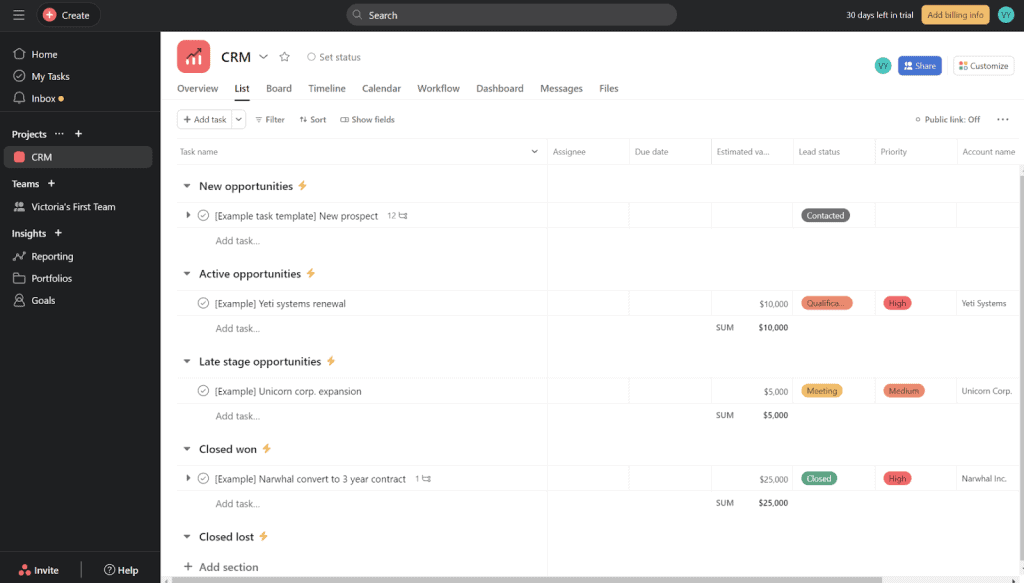
Asana allows users to create projects that act like customer databases. Each task can represent a lead or client. You can add custom fields to store details like contact info, deal stage, or priority. Comments and attachments keep all communication and files in one place. Notifications ensure you never miss important updates.
Filters and search options help find customers quickly. Asana supports integrations with email and calendars. This keeps your CRM data connected with daily communication tools. These features cover many basic CRM needs.
How Asana Supports Sales Pipelines
Sales pipelines organize deals by stages. Asana’s board view is perfect for this. Create columns for each stage like Prospect, Contacted, Proposal, and Closed. Move tasks across columns as deals progress. This visual layout shows the sales flow clearly.
You can set due dates and reminders to follow up on leads. Using rules, automate simple actions like moving tasks or assigning team members. Asana tracks progress and helps forecast sales outcomes. It keeps your pipeline active and visible to the whole team.
Task Management For Customer Tracking
Each customer or lead is a task with details attached. You can assign tasks to sales reps and set deadlines for follow-ups. Subtasks break down complex processes into smaller steps. This keeps work organized and on track.
Comments allow team members to share updates and notes. You can tag people to ask questions or give feedback. Task history shows all changes and actions taken. This helps maintain clear records for each customer.
Types Of Crm Systems
Customer Relationship Management (CRM) systems come in several types. Each type serves a specific purpose in managing and improving customer interactions. Understanding these types helps businesses choose the right CRM or adapt tools like Asana effectively. The four main types are Operational, Analytical, Collaborative, and Strategic CRM systems. Each focuses on unique aspects of customer management and business growth.
Operational Crm Functions
Operational CRM focuses on automating daily tasks in sales, marketing, and support. It helps manage leads, automate marketing campaigns, and handle customer service tickets. This type streamlines the sales pipeline and improves task efficiency. Using Asana as a CRM fits well here, as it manages workflows and customer-related tasks easily.
Analytical Crm Benefits
Analytical CRM deals with analyzing customer data for deeper insights. It helps businesses understand buying patterns, customer behavior, and market trends. This information guides better decision-making and targeted marketing. While Asana is not built for complex data analysis, it can integrate with tools that provide these analytics.
Collaborative Crm Advantages
Collaborative CRM improves communication between teams and customers. It centralizes customer information and shares updates across departments. This leads to better coordination and faster problem-solving. Asana’s task and project sharing features support collaboration, making it useful for this CRM type.
Strategic Crm Focus
Strategic CRM aims at building long-term customer loyalty and relationships. It aligns customer management with overall business goals. This type focuses on customer retention and personalized experiences. Asana can assist by organizing strategic plans and tracking progress toward customer relationship goals.
Building A Crm In Asana
Building a CRM in Asana allows small teams to manage customer data effectively. It transforms Asana from a task manager into a simple, flexible CRM. This method helps track leads, contacts, and sales progress without extra software. Let’s explore how to set up your CRM in Asana step-by-step.
Creating A New Project
Start by creating a new project in Asana. Name it clearly, like “Sales CRM” or “Customer Management.” Choose a blank project to customize it fully. This project will hold all your customer and lead information.
Choosing The Right View
Asana offers different views such as List, Board, and Calendar. The List view shows all leads in rows, perfect for detailed info. The Board view uses columns, ideal for sales stages. Pick the view that fits your sales process best.
Setting Up Task Categories
Use task categories to organize your leads and contacts. Create custom fields like Lead Status, Contact Type, and Priority. These fields help sort and filter your data easily. Each task represents one lead or contact in your CRM.
Assigning Leads And Contacts
Assign each lead or contact to a team member. This keeps responsibility clear and tasks organized. Use due dates for follow-ups and reminders. Assigning helps track progress and ensures timely communication.

Credit: blog.curiosity.ai
Customizing Asana For Crm Needs
Customizing Asana for CRM needs allows businesses to tailor the platform to manage customer relationships effectively. Asana’s flexible structure supports different workflows, making it suitable for tracking leads, managing contacts, and organizing sales processes. By adapting its features, users can create a CRM system that fits their unique requirements without extra software.
This section covers key ways to customize Asana as a CRM. It explains using templates and integrations, setting up automation, tracking interactions, and exploring reporting options. These steps help transform Asana into a practical tool for customer management.
Using Templates And Integrations
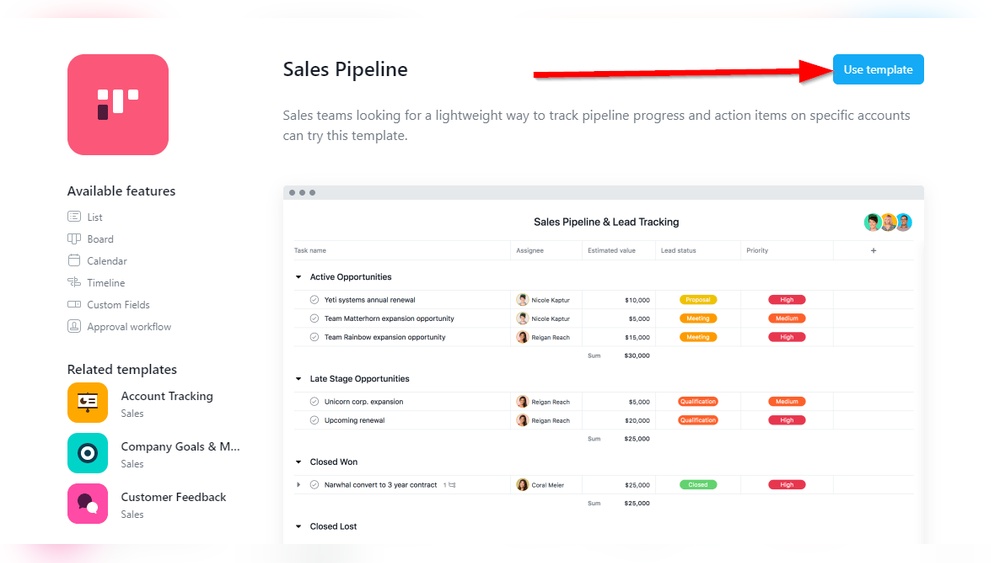
Start by using Asana’s CRM templates designed for sales and customer tracking. These templates provide a basic structure with predefined fields and workflows. They save time and ensure consistency in managing customer data.
Integrations extend Asana’s functionality. Connect email platforms, calendar apps, and communication tools to centralize customer information. These connections help keep all data in one place and improve team collaboration.
Automation And Workflow Setup
Automation reduces manual work and speeds up processes. Set rules to move tasks between stages automatically, such as from lead to follow-up. This keeps the sales pipeline organized and up to date.
Create custom workflows that match your sales cycle. Use Asana’s automation features to assign tasks, set deadlines, and notify team members. This ensures tasks are completed on time without extra effort.
Tracking Customer Interactions
Record every customer interaction within tasks or comments. Add notes from calls, emails, and meetings to keep a clear history. This helps teams stay informed and provide better service.
Use custom fields to track important details like contact status, deal size, or next steps. These fields help prioritize leads and focus on high-value customers.
Reporting And Analytics Options
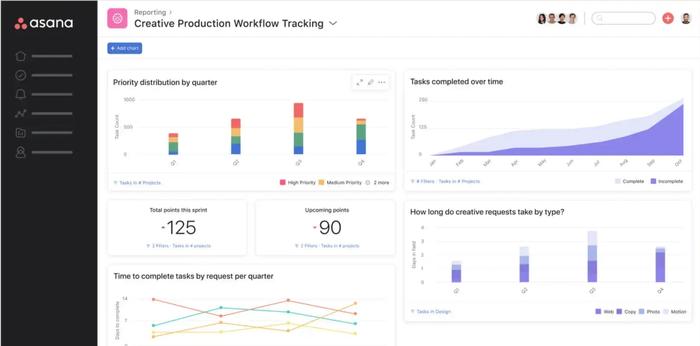
Asana offers reporting tools to monitor CRM performance. Generate reports on task progress, sales stages, or customer response times. These insights help identify bottlenecks and improve strategies.
Use dashboards to visualize key metrics. Charts and graphs provide a clear overview of sales health and team productivity. Regular reviews of this data support smarter decision-making.
Comparing Asana To Dedicated Crms
Comparing Asana to dedicated CRMs reveals clear differences in purpose and features. Asana is primarily a project management tool. Dedicated CRMs focus on managing customer data and sales processes.
Understanding these differences helps decide which tool fits your business needs best. Below, explore Asana’s strengths, its limitations, costs, and when to choose a specialized CRM.
Strengths Of Asana As Crm
Asana offers a flexible workspace to track customer interactions and tasks. It allows easy customization with boards, lists, and timelines. Teams can collaborate in real-time on deals and follow up activities. Integration with email and calendar apps improves communication. Simple automation rules help manage repetitive tasks. Asana supports visual project tracking, which aids workflow clarity.
Limitations To Consider
Asana lacks native CRM features like contact management and sales forecasting. It does not provide deep customer data analytics. It offers limited automation compared to dedicated CRMs. Tracking detailed sales pipelines can be cumbersome. Reporting options are basic and less focused on customer metrics. Complex CRM functions require additional tools or manual workarounds.
Cost Comparison
Asana has a free tier with basic features suitable for small teams. Paid plans start at reasonable prices per user monthly. Dedicated CRMs often charge higher fees based on features and users. Many CRMs offer tiered pricing with advanced sales and marketing tools. Consider total cost including add-ons and integrations. Asana may reduce expenses for teams needing simple CRM functions.
When To Choose Specialized Crm
Choose a specialized CRM if your business needs full sales pipeline management. Use it when customer data tracking and analytics are critical. Opt for CRM when automation and marketing integrations matter. Large sales teams benefit from dedicated CRM workflows. If reporting on revenue and customer trends is essential, use a CRM. For complex customer interactions, specialized tools perform better.
Overcoming Asana’s Crm Challenges
Using Asana as a CRM presents some challenges that teams must address. These challenges include task management, controlling notifications, analyzing data, and ensuring smooth teamwork. Overcoming these issues helps transform Asana into an effective CRM tool. Below are strategies to manage these challenges efficiently.
Managing Task Assignments
Assigning tasks clearly is vital to avoid confusion. Use custom fields to specify roles and priorities. Break large projects into smaller tasks for better tracking. Set deadlines to keep the team on schedule. Regularly review tasks to ensure nothing is missed.
Avoiding Notification Overload
Notifications can quickly become distracting. Adjust notification settings to receive only important alerts. Encourage team members to customize their preferences. Use project status updates instead of individual task comments for broad communication. This reduces noise and keeps the focus on key information.
Handling Advanced Analytics
Asana’s built-in analytics may lack depth for some CRM needs. Integrate third-party tools for detailed reporting. Export data regularly to analyze trends and customer behavior. Use dashboards to visualize key metrics. These steps improve decision-making based on real data.
Streamlining Collaboration
Effective collaboration requires clear communication paths. Use project comments for discussions instead of emails. Create shared calendars to align schedules. Organize files within Asana to keep resources accessible. Encourage regular check-ins to maintain team alignment and momentum.
Maximizing Crm Potential With Asana
Asana can serve as a simple CRM tool to manage customer relationships. It helps track leads, sales progress, and client communication all in one place. Teams can organize tasks and projects around customers easily.
Using Asana as a CRM requires planning and customization. Setting up the right workflows improves team collaboration and customer follow-ups. The platform’s flexibility supports various business sizes and needs.
Tips For Effective Use
Start by creating clear project structures for different customer stages. Use custom fields to track important data like deal value and contact status. Assign tasks to team members to keep accountability clear.
Regularly update task details to avoid outdated information. Use comments to keep communication transparent. Set deadlines for follow-ups to maintain consistent contact with customers.
Integrating With Other Tools
Connect Asana with email platforms to capture customer messages directly. Use integration apps for calendar syncing and notifications. Link Asana with marketing tools to automate lead tracking.
Integration expands Asana’s CRM capabilities. It reduces manual data entry and improves workflow efficiency. Choose tools that fit your team’s daily operations.
Scaling For Growing Teams
As your team grows, create standardized templates for customer projects. Use team permissions to control access to sensitive customer data. Implement regular training to keep everyone updated on processes.
Divide large projects into smaller tasks to improve manageability. Use reporting features to monitor team performance and customer progress. Adjust workflows based on feedback and results.
Maintaining Customer Data Quality
Keep customer information accurate by regularly reviewing entries. Set rules for data entry to avoid duplicates and errors. Use tags and labels to categorize customers clearly.
Encourage team members to update records promptly. Use Asana’s search and filter tools to find and fix inconsistencies. Clean data ensures better decision-making and customer service.
Credit: makingthatsale.com
Frequently Asked Questions
Is Asana Considered A Crm?
Asana is not a traditional CRM but can be customized to manage customer relationships. It offers task and project tracking, not full CRM features. Many teams adapt Asana for lightweight CRM needs, focusing on organization and communication rather than deep customer data analysis or sales automation.
How To Use Asana Crm?
Create a new project in Asana and select list or board view. Add tasks as leads or customers. Use custom fields for tracking details and automate workflows to manage your sales pipeline effectively.
What Are The 4 Types Of Crm?
The four types of CRM are Operational, Analytical, Collaborative, and Strategic. Operational automates tasks, Analytical analyzes data, Collaborative improves communication, and Strategic builds long-term customer loyalty. Many CRM systems combine these types to enhance customer management and business growth.
What Is A Potential Downside Of Asana?
A potential downside of Asana is its complexity for new users, which can slow initial adoption and reduce productivity.
Conclusion
Asana can serve as a simple CRM for small teams. It helps organize contacts, track tasks, and manage sales pipelines. While it lacks some advanced CRM features, it offers flexibility and ease of use. Teams needing complex analytics or automation may require a dedicated CRM tool.
Still, Asana works well for basic customer management and project tracking. Choose based on your business needs and team size. Simple setup and integration make it a convenient option for many users.

