
Choosing the right CRM can make or break your sales success. If you’re stuck deciding between Salesflare and Salesforce, you’re not alone.
You want a tool that fits your team’s needs without overwhelming you with complexity or hidden costs. Salesforce is powerful but often feels too big and complicated for small to medium businesses. On the other hand, Salesflare promises simplicity and ease, designed specifically for B2B teams who want a CRM that just works — without the headache. If you’re looking for a CRM your team will actually love to use, check out Salesflare here. This article dives into how Salesflare and Salesforce stack up, so you can find the perfect match for your business. Ready to discover which CRM will help you close more deals with less hassle? Keep reading.
Introduction To Salesflare And Salesforce
Choosing the right CRM is key for business growth and customer management. Salesflare and Salesforce are two popular CRM platforms serving different audiences. Understanding their core purposes and user base helps businesses pick the best fit. This section breaks down what each tool offers and why comparing them matters in 2026.
Overview Of Salesflare: Purpose And Target Audience
Salesflare is a simple yet powerful CRM designed mainly for small and medium-sized businesses (SMBs) selling B2B. It focuses on ease of use and automation to help teams save time on data entry. Salesflare offers smart features like automatic email tracking, contact enrichment, and pipeline management.
- Automates routine sales tasks
- Integrates well with email and calendars
- Designed for sales teams wanting simplicity
- Works best for SMBs aiming to grow efficiently
The CRM aims to be the one your sales team loves to use, reducing friction and increasing adoption.
Overview Of Salesforce: Purpose And Target Audience
Salesforce is a comprehensive CRM platform that serves medium to large enterprises. It covers sales, service, marketing, and operations in one ecosystem. Salesforce offers extensive customization and advanced analytics.
- Supports complex business processes
- Strong AI features like Copilot
- Highly scalable and customizable
- Targets large teams and enterprises
Many enterprises choose Salesforce for deep integration with other tools and robust data management.
Why Compare Salesflare And Salesforce In 2026?
Business needs change rapidly. Both Salesflare and Salesforce evolve yearly with new features. Comparing them in 2026 helps find the best CRM for current demands.
- Pricing and simplicity: Salesflare offers a user-friendly, affordable option for SMBs.
- Enterprise capabilities: Salesforce suits organizations needing advanced features and scalability.
- Technology updates: Both platforms add AI and automation to improve sales workflows.
- Integration needs: Businesses must evaluate which CRM fits their existing tools better.
This comparison guides businesses on which CRM matches their size, budget, and sales process in 2026.

Credit: salesflare.com
Key Features That Set Salesflare Apart
Salesflare stands out with features designed for ease and efficiency. It helps small and medium-sized B2B businesses manage sales smoothly. The platform focuses on reducing manual work while increasing user adoption. Its smart tools support sales teams in staying organized and productive.
Intuitive User Interface For Enhanced Adoption
Salesflare offers a clean and simple interface. Users find it easy to navigate without technical skills. The design reduces the learning curve, helping teams start quickly.
The interface organizes information clearly. Salespeople can access contacts, deals, and communication history in one place. This setup minimizes confusion and keeps users focused on selling.
Automated Data Entry And Smart Contact Management
Manual data entry can slow sales teams. Salesflare automatically captures emails, meetings, and calls. It links this data to the right contacts and companies.
- Syncs with email and calendar apps
- Detects new contacts and updates details
- Removes duplicate entries
This automation saves time and increases data accuracy. Salesflare’s smart contact management keeps all information up to date without extra effort.
Built-in Email Tracking And Engagement Insights
Salesflare tracks emails to show when recipients open or click links. This feature helps sales reps know the best moments to follow up.
Engagement insights include:
- Email open and click notifications
- Time spent reading emails
- Interaction history per contact
These insights make communication more effective and personalized. Sales teams can prioritize leads who show interest.
Seamless Integration With Popular Business Tools
Salesflare connects easily with many common apps. Integration keeps workflows smooth and data synced.
| Category | Popular Tools |
|---|---|
| Gmail, Outlook | |
| Calendar | Google Calendar, Office 365 |
| Marketing | Mailchimp, ActiveCampaign |
| Collaboration | Slack, Microsoft Teams |
| Accounting | QuickBooks, Xero |
This integration helps teams work with familiar tools. It eliminates switching between apps, boosting productivity.
Distinctive Features Of Salesforce And Their Benefits
Salesforce stands out with features tailored for enterprises needing deep customization and automation. Its tools support complex sales, marketing, and service processes. The platform grows with your business through flexible scaling. These features help teams work smarter and faster across departments.
Comprehensive Enterprise-level Customization And Scalability
Salesforce offers extensive customization for complex business needs. Users can tailor:
- Custom objects and fields
- Workflows and approval processes
- Page layouts and user interfaces
This lets companies build a CRM that fits their exact processes. It supports scaling from small teams to global enterprises. Salesforce handles large data volumes and many users without losing performance.
Advanced Ai Capabilities With Salesforce Einstein And Copilot
Salesforce integrates powerful AI tools like Einstein and Copilot. These features provide:
- Smart lead scoring to prioritize sales efforts
- Automated data entry and insights
- Personalized customer recommendations
- AI-driven forecasting and analytics
These AI tools reduce manual work and improve decision-making. Teams get clear, actionable insights faster.
Robust Marketing, Sales, And Service Automation
Salesforce automates key business functions:
- Marketing: Email campaigns, customer journeys, and lead nurturing
- Sales: Opportunity tracking, quote generation, and pipeline management
- Service: Case routing, knowledge base, and customer support workflows
Automation saves time and ensures consistent customer experiences. It also helps track performance across teams.
Extensive Ecosystem And Appexchange Marketplace
Salesforce boasts a large ecosystem of third-party apps via AppExchange. Benefits include:
| Feature | Benefit |
|---|---|
| Thousands of apps | Add new features without custom coding |
| Industry-specific solutions | Meet unique business needs quickly |
| Certified integrations | Connect with popular tools and platforms easily |
| Community support | Access expert advice and best practices |
This ecosystem extends Salesforce’s power beyond its core features.

Credit: fearlessflyer.com
Pricing And Affordability Breakdown
Understanding the cost differences between Salesflare and Salesforce helps businesses choose the right CRM. Pricing impacts both small businesses and large enterprises differently. This section breaks down each platform’s pricing models, highlighting affordability and total cost of ownership.
Salesflare Pricing Structure: Cost-effectiveness For Smbs
Salesflare offers a simple pricing model tailored for small and medium-sized businesses (SMBs). It provides straightforward plans without complex add-ons or hidden fees.
- Core Plan: Includes essential CRM features ideal for growing teams.
- All-in-One Pricing: Combines automation, email tracking, and pipeline management.
- No Setup Fees: Quick onboarding with no extra costs.
This structure makes Salesflare highly cost-effective for SMBs that need a powerful yet easy-to-use CRM. Prices are transparent, helping businesses plan budgets confidently.
Salesforce Pricing Tiers: Enterprise Investment And Hidden Costs
Salesforce uses a tiered pricing system that targets enterprises and larger organizations. It offers multiple editions, each with increasing features and complexity.
| Edition | Monthly Cost (per user) | Key Features |
|---|---|---|
| Essentials | $25 | Basic CRM, email integration |
| Professional | $75 | Customizable CRM, automation |
| Enterprise | $150 | Advanced customization, analytics |
| Unlimited | $300 | Full support, unlimited customization |
Extra costs arise from add-ons, integrations, and training. This can significantly increase the total price. Salesforce demands a larger investment and may require a dedicated admin.
Comparing Total Cost Of Ownership For Different Business Sizes
SMBs benefit from Salesflare’s fixed and simple pricing. It lowers upfront and ongoing expenses.
Enterprises often choose Salesforce for its vast features but face higher costs. These include:
- License fees per user
- Customization and integration charges
- Training and support expenses
The overall cost depends on the company size and CRM needs. Small businesses find Salesflare affordable and easy to manage. Large companies invest more in Salesforce to handle complex processes.
Pros And Cons Based On Real-world Usage
Choosing between Salesflare and Salesforce depends on real-world experiences. Both have clear strengths and notable limitations. Users often weigh ease of use, features, and cost. Understanding these can guide businesses to the right CRM choice. The following sections break down practical pros and cons.
Salesflare: Strengths And Limitations In Practice
Salesflare is designed for small and medium B2B businesses. It offers a simple, intuitive interface that sales teams enjoy using daily.
- Strengths:
- Easy setup with minimal training needed
- Automatic data capture reduces manual entry
- Focus on sales pipeline and relationship tracking
- Affordable pricing for growing businesses
- Limitations:
- Lacks advanced customization options
- Limited integrations compared to larger CRMs
- Not ideal for very large or complex sales teams
- Fewer marketing automation features
Salesforce: Advantages And Challenges From User Perspectives
Salesforce is a powerful, feature-rich CRM used by many large companies. It supports sales, marketing, and service functions.
- Advantages:
- Highly customizable to fit complex workflows
- Wide range of integrations and add-ons
- Strong AI tools and analytics (e.g., Copilot)
- Scales well for large enterprises
- Challenges:
- Steep learning curve for new users
- High cost, especially for smaller teams
- Complex setup and maintenance requirements
- User adoption can be slow without training
Impact Of Complexity And User Adoption On Roi
Complexity affects both CRMs differently. Salesflare’s simplicity boosts quick adoption and immediate benefits. Teams spend less time learning and more time selling.
Salesforce offers deep features but requires significant training. Slow user adoption can reduce return on investment (ROI).
| Factor | Salesflare | Salesforce |
|---|---|---|
| User Adoption Speed | Fast due to easy interface | Slow, needs training |
| Setup Complexity | Low, quick deployment | High, needs expert help |
| ROI Timeline | Short-term gains visible | Long-term investment |
| Maintenance | Minimal ongoing effort | Continuous updates and management |
Businesses must balance features against ease of use. Fast adoption often leads to better sales outcomes. Complex systems may pay off over time but need patience and resources.
Why Businesses Consider Alternatives To Salesforce
Many companies seek alternatives to Salesforce due to its high costs and complexity. Smaller businesses especially find Salesforce overwhelming and expensive. Others want simpler tools that fit their specific needs better. Salesforce offers many features, but not all match every business process. These challenges push companies to explore other CRM options like Salesflare.
High Pricing And Total Cost Of Ownership Concerns
Salesforce pricing can be costly for small and medium businesses. The base subscription often increases with add-ons and user licenses. Total cost of ownership includes setup, customization, and ongoing support.
- High monthly fees per user
- Extra charges for advanced features
- Costs for integration and training
These expenses make budgeting difficult for growing companies. Alternatives like Salesflare offer simpler pricing tailored for SMBs, reducing financial strain.
Complexity And Steep Learning Curve Challenges
Salesforce’s powerful platform comes with a steep learning curve. Many users struggle with its complex setup and navigation. Training takes significant time and effort.
- Complex workflows and configurations
- Multiple modules to manage
- Need for dedicated admins or consultants
Businesses prefer CRMs with intuitive designs that teams can adopt quickly. Salesflare simplifies CRM use, focusing on ease and speed.
Desire For More Intuitive Interfaces And Specific Features
Users want CRM software with clear, user-friendly interfaces. Salesforce’s interface can feel cluttered and overwhelming. Some businesses require specific features like built-in AI or marketing automation that are easier to access.
- Simple dashboards and navigation
- Automatic data capture
- Smart email and contact management
Salesflare offers a clean design and smart automation that fits B2B sales teams well.
Salesforce’s Feature Bloat And Process Mismatch Issues
Salesforce includes many features that many businesses do not use. This feature bloat can slow down workflows and confuse users.
| Issue | Effect |
|---|---|
| Too many options | Users get overwhelmed and make errors |
| Generic processes | Does not fit every company’s sales style |
| Customization needs | Requires costly and time-consuming setup |
Alternatives like Salesflare provide focused features that match small and medium B2B sales teams’ needs. This reduces confusion and speeds up adoption.
Ideal Use Cases And Recommendations
Choosing the right CRM impacts sales and customer relationships. Both Salesflare and Salesforce serve different business needs. Understanding their ideal scenarios helps select the best tool. This section breaks down when each CRM fits best and suggests alternatives for unique cases.
When To Choose Salesflare: Best Fit Scenarios
Salesflare suits small and medium-sized businesses that sell B2B. It offers a simple, intuitive interface that teams quickly adopt. The CRM automates data entry, reducing manual work and saving time.
- Businesses wanting a user-friendly CRM without complex setup
- Companies needing automated tracking of email, calls, and meetings
- Sales teams preferring a tool with built-in automation for follow-ups
- Organizations focusing on efficient pipeline management without heavy customization
Salesflare is ideal for teams that value simplicity and speed over deep customization.
When Salesforce Is The Optimal Choice: Enterprise Needs
Salesforce fits large enterprises requiring extensive CRM features. It supports complex sales processes and deep customization. Salesforce integrates with many business systems and scales well as companies grow.
- Enterprises needing robust analytics and reporting
- Organizations requiring custom workflows and automation
- Businesses wanting integration with other enterprise tools like ERP and marketing platforms
- Teams looking for advanced AI features such as Salesforce Copilot
Salesforce suits companies with complex sales cycles and large data volumes.
Alternative Crm Options For Specific Business Requirements
Some businesses seek CRMs tailored to unique needs beyond Salesflare and Salesforce. Here are alternatives:
| CRM | Best For | Key Strengths |
|---|---|---|
| HubSpot | Inbound marketing focused firms | User-friendly interface, marketing automation |
| Zoho | Budget-conscious SMBs | Customizable, broad functionality at low cost |
| Zendesk | Customer support and experience | AI-powered support, easy to use |
| SAP Customer Experience | Large enterprises | Deep integration with SAP business functions |
| Oracle CX Suite | Medium to large enterprises | Advanced analytics, industry-specific solutions |
Choosing depends on business size, budget, and feature needs. Each CRM serves a distinct purpose.
Customer Success Stories And Market Sentiment
Customer success stories and market sentiment reveal real-world experiences with Salesflare and Salesforce. These insights help businesses decide which CRM fits their needs. Feedback highlights how companies manage the switch, community opinions, and the role of user experience in CRM choice.
Businesses Successfully Transitioning From Salesforce To Salesflare
Many small and medium businesses choose Salesflare after using Salesforce. They report easier setup and less complexity. Salesflare’s simple design suits teams that want a CRM without steep learning curves.
- Faster onboarding with minimal training
- Improved user adoption due to intuitive interface
- Lower costs with comparable CRM features
- Better automation for B2B sales workflows
These businesses appreciate Salesflare’s focus on sales teams, helping them stay organized without overwhelming tools. The transition often leads to higher productivity and satisfaction.
Community Feedback: Insights From Reddit And Linkedin
Reddit and LinkedIn discussions offer candid views from CRM users. Threads show mixed opinions about Salesforce’s complexity and Salesflare’s simplicity.
| Platform | Salesforce Feedback | Salesflare Feedback |
|---|---|---|
|
| |
|
|
Users often recommend Salesforce for complex needs. Salesflare gains favor for simplicity and speed.
How User Experience Influences Crm Choice
User experience (UX) plays a key role in CRM selection. A CRM that is hard to use can slow down teams and reduce adoption.
Salesflare’s design focuses on simplicity. It automates data entry and keeps the interface clean. This reduces the time sales reps spend on admin tasks.
Salesforce offers deep customization and features but has a steep learning curve. Teams with technical support can benefit from its power.
Businesses prioritize:
- Ease of use
- Quick setup
- Effective automation
- Cost efficiency
Salesflare excels in these areas for SMBs, while Salesforce suits larger enterprises needing extensive capabilities.
Conclusion: Making The Right Crm Choice In 2026
Choosing the best CRM in 2026 requires clear understanding of your business needs. Both Salesflare and Salesforce offer strong CRM solutions. Each suits different types of businesses and goals. This section breaks down key factors to guide your decision.
Balancing Features, Costs, And Usability
Salesforce provides extensive features for large enterprises. It integrates sales, service, marketing, and operations. Its AI-powered tools, like Copilot, enhance productivity and data insights. Yet, Salesforce’s complexity and high pricing can challenge smaller teams.
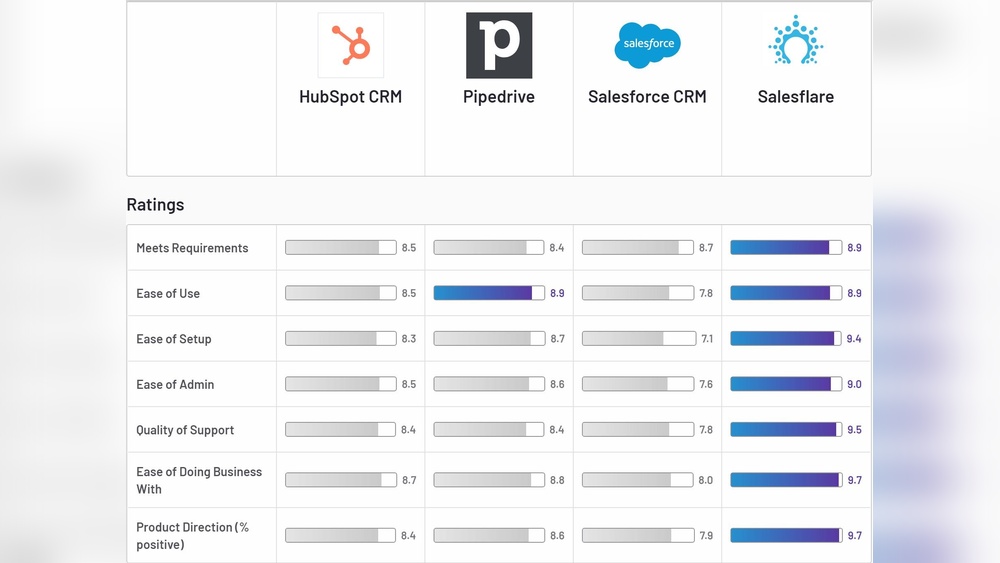
Salesflare targets small and medium businesses. It offers a simpler, user-friendly CRM focused on B2B sales. Salesflare automates data entry and keeps workflows smooth. Its affordability and ease of use make it ideal for teams wanting quick adoption.
| Aspect | Salesforce | Salesflare |
|---|---|---|
| Target User | Large enterprises | Small & Medium businesses |
| Features | Comprehensive, includes AI & marketing | Simple, sales automation focused |
| Cost | High, with complex pricing tiers | Affordable, clear pricing |
| Usability | Complex, steep learning curve | Intuitive, easy adoption |
Future Trends In Crm Technology And Ai Integration
AI integration is shaping CRM’s future. Salesforce leads with advanced AI tools like Copilot. These tools assist in predictive analytics and automate routine tasks. Salesflare also incorporates AI, focusing on smart data capture and automation for smaller teams.
Expect more CRM solutions to offer AI-driven insights and seamless workflows. Cloud-based platforms and mobile accessibility will continue growing. Businesses should pick CRMs ready for AI advancements to stay competitive.
Final Recommendations Based On Business Size And Goals
- Small to Medium Businesses: Choose Salesflare for ease of use and cost efficiency. It suits B2B sales teams wanting fast setup and automation.
- Large Enterprises: Opt for Salesforce if needing deep customization, broad integrations, and advanced AI features. Ideal for complex sales and marketing operations.
- Businesses Focused on Marketing Automation: Salesforce offers stronger marketing tools integrated within the CRM.
- Teams Prioritizing User Experience: Salesflare’s intuitive design reduces training time and increases adoption.
Match CRM choice with your budget, team size, and growth plans. This ensures your CRM supports sales goals without unnecessary complexity or cost.

Credit: technologyadvice.com
Frequently Asked Questions
Who Is Salesforce’s Biggest Competitor?
Microsoft stands as Salesforce’s biggest competitor, offering strong enterprise CRM with deep integration and advanced AI tools. HubSpot, Zoho, Oracle, SAP, and Zendesk also compete, targeting various business sizes and needs with user-friendly interfaces and specialized features.
Why Are Companies Leaving Salesforce?
Companies leave Salesforce due to high costs, complex features, steep learning curves, low user adoption, and poor fit for smaller businesses. Many seek more intuitive, affordable, and flexible CRM solutions that better match their specific needs and workflows.
What Is The 1 Crm In The World?
Salesforce is the 1 CRM worldwide, known for its comprehensive features, strong integrations, and AI tools. It leads enterprises in sales, marketing, and customer service management globally.
Which Company Is Better Than Salesforce?
Microsoft, HubSpot, Zoho, Oracle, and Zendesk often outperform Salesforce in cost, usability, and specific business needs.
Conclusion
Choosing between Salesflare and Salesforce depends on your business needs. Salesflare offers a simple, user-friendly CRM ideal for small to medium B2B teams. Salesforce provides a powerful but complex platform suited for larger enterprises. Consider your budget, team size, and required features before deciding. For an easy-to-use CRM that your team will actually enjoy, explore Salesflare. Each tool has strengths, but the right fit helps your sales process run smoothly and efficiently.

