
Choosing the right tool to manage your business can be tough, especially when you’re deciding between something flexible like Notion and a dedicated CRM like HubSpot. If you want a workspace that adapts to your unique way of working, Notion offers a customizable platform for notes, projects, and even simple CRMs.
But if your focus is on growing sales, automating marketing, and nurturing customer relationships, HubSpot steps in as a powerful, all-in-one CRM designed just for startups and small businesses like yours. Wondering which one fits your needs best? Keep reading to discover how Notion and HubSpot stack up, and find out why HubSpot’s free CRM might be exactly what your business data deserves. Ready to explore HubSpot? Check it out here: HubSpot CRM for Startups & Small Businesses.
Introduction To Notion And Hubspot
Both Notion and HubSpot serve distinct roles in business productivity and customer management. Each platform offers unique features tailored to specific needs. Understanding their core functions helps businesses choose the right tool.
Overview Of Notion As A Productivity And Customization Tool
Notion is a flexible workspace designed for note-taking, project management, and custom workflows. It allows teams and individuals to create systems that fit their style.
- Combines notes, databases, and tasks in one place
- Highly customizable with templates and integrations
- Supports collaboration across teams and departments
- Can be adapted as a simple CRM for client tracking
Users appreciate Notion for its adaptability and ease of use. It works well for documenting, planning, and organizing work in a single platform.
Overview Of Hubspot As A Crm And Marketing Platform
HubSpot focuses on customer relationship management (CRM) and marketing automation. It centralizes customer data to improve sales and marketing efforts.
- Offers a 100% free CRM with no expiration
- Unifies all customer information on one platform
- Includes AI tools to simplify data analysis
- Supports startups and small businesses scaling customer relations
- Strong marketing and sales automation features
HubSpot aims to streamline customer management and marketing workflows. It is designed to grow with businesses and improve customer engagement.
Purpose And Target Audience Of Each Platform
| Platform | Purpose | Target Audience |
|---|---|---|
| Notion | Productivity, documentation, customizable workflows | Teams and individuals seeking flexible task and knowledge management |
| HubSpot | CRM, marketing automation, customer data management | Startups and small businesses focused on sales and marketing growth |
Notion suits users who want control over how they organize work. HubSpot fits businesses aiming to enhance customer relationships and marketing results.
Key Features Of Notion
Notion offers a versatile workspace that adapts to individual and team needs. It combines note-taking, project management, and database functions in one platform. Users can customize it to organize knowledge, manage tasks, and track projects effectively. Its flexibility stands out, making it suitable for various workflows and industries.
Customizable Internal Wikis And Knowledge Management
Notion enables teams to create internal wikis that store important information in a clear, accessible way. Pages and documents can be linked and organized hierarchically. This helps keep knowledge centralized and easy to find.
- Create rich-text pages with embedded media.
- Organize content using nested pages and tables.
- Control access with user permissions.
This feature supports smooth collaboration and reduces information silos.
Project Management And Task Tracking Flexibility
Notion provides flexible tools for managing projects and tracking tasks. Users can set up boards, lists, calendars, and timelines that fit their workflow.
- Drag-and-drop task management with Kanban boards.
- Assign tasks, set due dates, and add comments.
- View projects in multiple formats for clarity.
These options help teams stay organized and meet deadlines efficiently.
Building Custom Databases And Simple Crm Systems
Notion’s database feature allows users to build custom systems that suit their specific needs.
| Use Case | Features | Benefits |
|---|---|---|
| Custom Databases | Tables, filters, relations, and formulas | Organize and analyze data with ease |
| Simple CRM Systems | Track clients, deals, and communication | Manage customer relationships without complexity |
This flexibility lets users tailor their workspace for sales, project tracking, or content management.
Community Templates And Affordable Pricing
Notion offers a large library of community-created templates for different workflows.
- Templates for project management, personal planning, CRM, and more.
- Easy to duplicate and customize for quick setup.
- Free and paid plans available, with many features in the free tier.
The pricing is competitive, making Notion accessible for startups and small teams.
Key Features Of Hubspot
HubSpot is a powerful CRM designed for startups and small businesses. It centralizes customer data and simplifies business processes with smart automation and easy-to-use tools. HubSpot helps teams manage sales, marketing, and customer service all in one place.
Comprehensive Sales Automation And Pipeline Management
HubSpot offers automated sales workflows that reduce manual tasks. It tracks deals through customizable pipelines, giving full visibility of sales stages.
- Automated task reminders and follow-ups
- Deal tracking with visual pipelines
- Contact and company management
- Sales analytics and reporting
Teams can prioritize leads and close deals faster with these tools.
Marketing Campaigns And Lead Nurturing Tools
HubSpot includes tools to create and manage email marketing campaigns and nurture leads effectively.
- Email templates and scheduling
- Lead segmentation for targeted outreach
- Automated workflows to engage contacts
- Tracking and analytics for campaign performance
This helps businesses build stronger connections and grow their audience.
Customer Support And Service Automation
HubSpot streamlines customer support with automation and ticket management.
- Ticket tracking and prioritization
- Automated responses and routing
- Knowledge base to reduce support requests
- Customer feedback collection
Support teams respond quickly and deliver better service.
Integrated Platform For Business Growth And Scalability
HubSpot combines sales, marketing, and service in one platform. This integration supports business growth and adapts as needs change.
| Feature | Benefit |
|---|---|
| Unified Customer Database | Easy access to all customer information |
| Customizable Dashboards | Track key metrics in one place |
| Scalable Tools | Grow without switching platforms |
| Third-Party Integrations | Connect with other business apps |
This makes HubSpot a flexible solution for expanding businesses.

Credit: www.youtube.com
Pricing And Affordability Comparison
Choosing between Notion and HubSpot often boils down to cost and value. Both platforms offer unique pricing models that cater to different team sizes and business needs. Understanding their pricing structures helps businesses select the best fit without overspending.
Notion’s Cost-effective Plans For Small To Medium Teams
Notion provides flexible pricing ideal for small and medium teams. Its plans focus on affordability while offering essential collaboration tools.
| Plan | Price (per user/month) | Key Features |
|---|---|---|
| Free | $0 | Unlimited pages, blocks, 5 guests, basic integrations |
| Personal Pro | $5 | Unlimited file uploads, version history, unlimited guests |
| Team | $10 | Collaborative workspace, admin tools, advanced permissions |
| Enterprise | Custom Pricing | Advanced security, analytics, dedicated support |
Notion’s pricing suits teams needing a simple, customizable workspace. The free plan supports individual users well. Paid plans add collaboration and security features.
Hubspot’s Pricing Structure And Potential Expenses
HubSpot offers a free CRM with no time limit, great for startups. Paid plans focus on sales, marketing, and service hubs with tiered pricing.
| HubSpot Plan | Starting Price (per month) | Core Features |
|---|---|---|
| Free CRM | $0 | Contact management, deal tracking, basic reporting |
| Starter | $50 | Email marketing, live chat, simple automation |
| Professional | $890 | Advanced automation, custom reporting, integrations |
| Enterprise | $3,200+ | Custom objects, predictive lead scoring, advanced analytics |
HubSpot’s pricing can grow costly as teams add features or scale. Many core tools stay free, but advanced marketing and sales functions require paid tiers.
Value For Money Based On Features And Business Needs
Deciding which tool offers better value depends on business priorities.
- Notion fits teams needing a flexible workspace for notes, docs, and lightweight project management.
- Its lower price points benefit startups and small teams with straightforward collaboration needs.
- HubSpot excels for businesses focused on sales pipelines, marketing campaigns, and customer relationships.
- Its CRM features are robust, but costs rise quickly when unlocking advanced tools.
Businesses with simple workflows may find Notion more affordable and sufficient. Companies requiring deep CRM and marketing automation often lean toward HubSpot despite higher expenses.
Pros And Cons Based On Real-world Usage
Choosing between Notion and HubSpot depends on specific business needs. Both tools serve different purposes and excel in unique areas. Understanding their strengths and weaknesses helps in making an informed decision.
Advantages Of Using Notion For Internal Collaboration And Documentation
Notion shines as a platform for teams needing flexible collaboration and custom documentation. Its drag-and-drop interface allows easy creation of pages, notes, and databases.
- Customizable workflows: Adapt pages to team needs without coding.
- Centralized knowledge base: Store all documents and project details in one place.
- Real-time collaboration: Multiple users can edit and comment simultaneously.
- Integration capabilities: Connect with tools like Slack and Google Drive for smooth workflows.
Teams use Notion to track projects, share meeting notes, and manage internal tasks effectively.
Limitations Of Notion As A Dedicated Crm
Notion is not built as a CRM, so it lacks many specialized features found in dedicated CRM software.
- No built-in sales automation: Manual tracking of deals and follow-ups is needed.
- Limited reporting tools: Complex analytics and sales forecasting are unavailable.
- Scalability concerns: Managing large customer databases can become cumbersome.
- Absence of marketing tools: No email campaigns or lead nurturing features.
Users create custom CRMs in Notion, but it requires significant setup and maintenance.
Strengths Of Hubspot In Sales And Marketing Automation
HubSpot excels in managing customer relationships and automating sales and marketing tasks. It offers a wide range of features tailored for small businesses and startups.
| Feature | Benefit |
|---|---|
| Contact Management | Centralizes customer data with easy access and updates. |
| Sales Automation | Automates follow-ups, deal tracking, and pipeline management. |
| Marketing Tools | Email campaigns, lead capture forms, and performance analytics. |
| Free CRM Plan | No expiration, ideal for startups with budget constraints. |
| AI Features | Helps analyze customer data for better decision-making. |
HubSpot reduces manual work and improves marketing reach efficiently.
Challenges With Hubspot’s Flexibility And Cost
HubSpot can be less flexible and more expensive as businesses grow or require custom setups.
- Limited customization: Workflows and fields may not fit all business models.
- Rising costs: Advanced features come with higher subscription fees.
- Complex interface: Some users find it overwhelming initially.
- Dependence on internet: No offline access for CRM data.
Careful planning is needed to balance HubSpot’s capabilities with budget and usability.
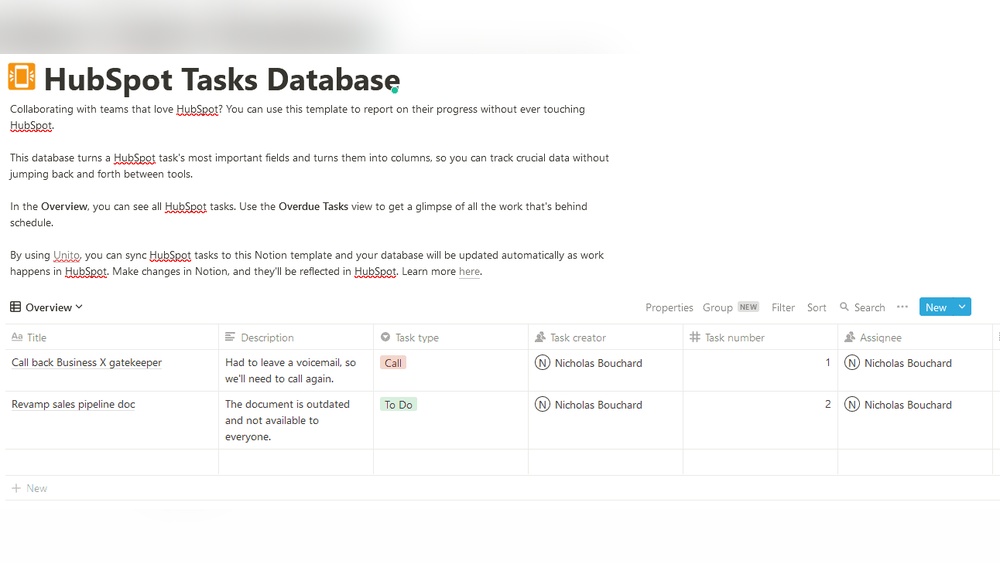
Integrating Notion And Hubspot For Optimal Productivity
Combining Notion and HubSpot creates a powerful workflow. Each tool handles distinct tasks that improve business operations. HubSpot manages customer data and sales pipelines, while Notion supports internal collaboration and project tracking. Syncing data between these platforms streamlines processes and boosts productivity.
How Businesses Use Hubspot For Customer-facing Data
HubSpot centralizes all customer information in one place. It tracks interactions, sales leads, and marketing campaigns efficiently. Businesses use HubSpot to:
- Manage contacts and sales pipelines
- Automate marketing emails and follow-ups
- Analyze customer behavior with built-in AI
- Keep sales teams aligned with real-time updates
This CRM software helps startups and small businesses maintain strong customer relationships. HubSpot’s free version offers essential tools without time limits, ideal for growing teams.
Using Notion For Internal Processes And Team Collaboration
Notion serves as a flexible workspace for teams. It organizes documents, tasks, and project plans in customizable formats. Key uses include:
- Building custom workflows and databases
- Collaborating on project updates and meeting notes
- Tracking progress with kanban boards or calendars
- Sharing knowledge and SOPs across teams
Notion adapts to unique business needs, improving team communication and reducing email overload.
Benefits Of Syncing Data Between Both Platforms
Connecting HubSpot and Notion offers several benefits:
| Benefit | Description |
|---|---|
| Centralized Information | Customer data and internal notes stay linked and accessible. |
| Reduced Data Entry | Automatic syncing prevents manual updates and errors. |
| Improved Team Alignment | Sales and operations share the same insights and goals. |
| Faster Decision Making | Real-time data flow accelerates responses to customer needs. |
Examples Of Combined Workflows Enhancing Efficiency
Here are workflows that integrate both tools:
- Sales Pipeline Management: HubSpot tracks leads while Notion records team strategies and follow-up tasks.
- Customer Support: HubSpot logs support tickets; Notion stores troubleshooting guides and internal notes.
- Marketing Campaigns: HubSpot runs email campaigns; Notion plans content calendars and creative assets.
- Project Tracking: HubSpot data informs project priorities; Notion monitors deadlines and team responsibilities.
These workflows reduce silos and ensure every team member accesses up-to-date information.
Specific Recommendations For Ideal Users
Choosing between Notion and HubSpot depends on your business needs and goals. Both tools serve different purposes and suit different user types. This section helps identify which tool fits your requirements best.
When To Choose Notion For Flexibility And Customization
Notion is perfect for users needing a flexible, customizable workspace. It suits teams and individuals who want to create tailored systems for productivity and documentation.
- Build custom workflows without rigid structures
- Combine notes, tasks, databases, and project tracking
- Adapt pages to fit unique business processes
- Use as a simple CRM by customizing client info and project details
Notion works well for startups and small businesses that prefer to design their own tools. It is ideal when you want a single space for varied tasks, not only CRM.
When Hubspot Is The Best Option For Crm And Marketing
HubSpot excels as a CRM platform focused on sales, marketing, and customer relationships. It is strong for businesses aiming to scale these areas efficiently.
| HubSpot Strengths | Benefits |
|---|---|
| Unified customer data | Easy access to all contacts and interactions in one place |
| Free CRM with no expiration | Cost-effective solution for startups and small businesses |
| AI-powered insights | Improved understanding of customer behavior and sales trends |
| Marketing automation tools | Streamlines email campaigns, lead tracking, and customer follow-ups |
Choose HubSpot when your main focus is managing customer relationships and driving marketing efforts.
Scenarios Benefiting From Using Both Tools Together
Combining Notion and HubSpot offers a powerful workflow. Use Notion for internal collaboration and custom task management. Use HubSpot for CRM and marketing automation.
- Track project progress and meeting notes in Notion
- Manage contacts and sales pipelines in HubSpot
- Share marketing insights from HubSpot in Notion for team planning
- Integrate data manually or with third-party tools to sync information
This blend suits startups that want flexibility in operations and strong CRM capabilities.
Tips For Selecting The Right Platform Based On Business Goals
- Identify core needs: Prioritize whether CRM, marketing, or flexible workspace is more critical.
- Consider team size: HubSpot scales better for growing sales teams; Notion suits smaller, versatile groups.
- Evaluate budget: HubSpot offers a free CRM with robust features; Notion’s pricing depends on usage levels.
- Think about integrations: HubSpot integrates well with marketing tools; Notion works best as a standalone or with manual sync.
- Test both: Use free versions to explore features before deciding.
Align the platform choice with your business priorities for best results.

Credit: www.daylite.app
Conclusion: Making The Right Choice For Productivity And Crm
Choosing between Notion and HubSpot depends on your specific needs. Both tools offer unique strengths for enhancing productivity and managing customer relationships. Understanding their core features helps you pick the best fit for your team and business goals.
Summary Of Strengths And Use Cases For Notion And Hubspot
| Tool | Strengths | Ideal Use Cases |
|---|---|---|
| Notion |
|
|
| HubSpot |
|
|
Considerations For Long-term Business Growth And Scalability
HubSpot excels in supporting business growth with scalable CRM features. It handles increasing customer data and sales pipelines without losing performance.
Notion offers flexibility but requires manual scaling efforts. Its custom setup suits evolving workflows but may need more maintenance as your team grows.
- HubSpot offers automation to save time on repetitive tasks.
- Notion allows full control over workspace design and data structure.
- HubSpot integrates well with other marketing and sales tools.
- Notion works best where custom workflows matter more than automation.
Final Thoughts On Integration And Unified Workflow Solutions
Both platforms provide options to integrate with other tools, but their focus differs. HubSpot aims to centralize customer-related activities in one place. This unified approach simplifies CRM management.
Notion serves as a flexible hub for diverse team workflows, combining notes, tasks, and CRM elements. It suits teams that prefer building personalized systems.
Choosing depends on your need for a ready-to-use CRM versus a customizable productivity platform. Consider how your team works and what tools will blend best into daily routines.

Credit: www.breakcold.com
Frequently Asked Questions
Is Notion Similar To Hubspot?
Notion is a flexible workspace for notes and projects. HubSpot focuses on CRM, sales, and marketing automation. They serve different purposes but can integrate for better business management.
Is Notion Still Relevant In 2025?
Notion remains relevant in 2025 due to its flexibility, customization, and strong team collaboration features. Many users prefer it for project management and internal documentation. Its adaptability supports diverse workflows, making it a valuable all-in-one workspace despite competition from specialized tools like HubSpot.
Who Is Notions’ Biggest Competitor?
Notion’s biggest competitors include monday. com, Asana, Trello, Airtable, and ClickUp. These platforms offer strong project management and collaboration features.
Do People Use Notion As A Crm?
Yes, many people use Notion as a CRM by creating custom databases to track clients, projects, and sales. It offers flexibility but lacks built-in sales automation. Notion suits small teams wanting personalized CRM systems rather than large-scale, automated solutions like HubSpot.
Conclusion
Choosing between Notion and HubSpot depends on your business needs. Notion offers flexibility for notes, projects, and team collaboration. HubSpot excels in managing sales, marketing, and customer relationships. Many businesses use both tools to cover all bases. HubSpot’s free CRM unifies customer data simply and effectively. It suits startups and small businesses aiming for growth. Explore HubSpot’s features and see how it fits your workflow by visiting HubSpot CRM. Make a choice that supports your team’s daily tasks and goals.

