
Are you searching for a CRM that your team will actually enjoy using? Monday CRM might be the solution you’ve been looking for.
Known as the only AI-first CRM, it offers an intuitive, visual interface combined with powerful automation to help you grow faster. But is it the right fit for your business? Before you dive in, it’s important to weigh the pros and cons to see if Monday CRM matches your team’s needs and budget. You’ll discover what makes Monday CRM stand out, where it might fall short, and who will benefit the most from its features. If you want a CRM that’s flexible, customizable, and packed with AI-driven tools, keep reading to find out if Monday CRM is worth your investment. Ready to explore Monday CRM? Check it out here: Monday CRM
Introduction To Monday Crm And Its Purpose
Monday CRM is designed as an intuitive, AI-powered platform to help teams manage customer relationships easily. It focuses on visual workflows and customization, making it ideal for businesses seeking clear organization and efficiency.
The platform aims to centralize customer data and automate routine tasks. This allows teams to save time and focus on growing their business. Small to mid-sized businesses especially benefit from its flexible structure and user-friendly design.
Overview Of Monday Crm As A Visual And Customizable Platform
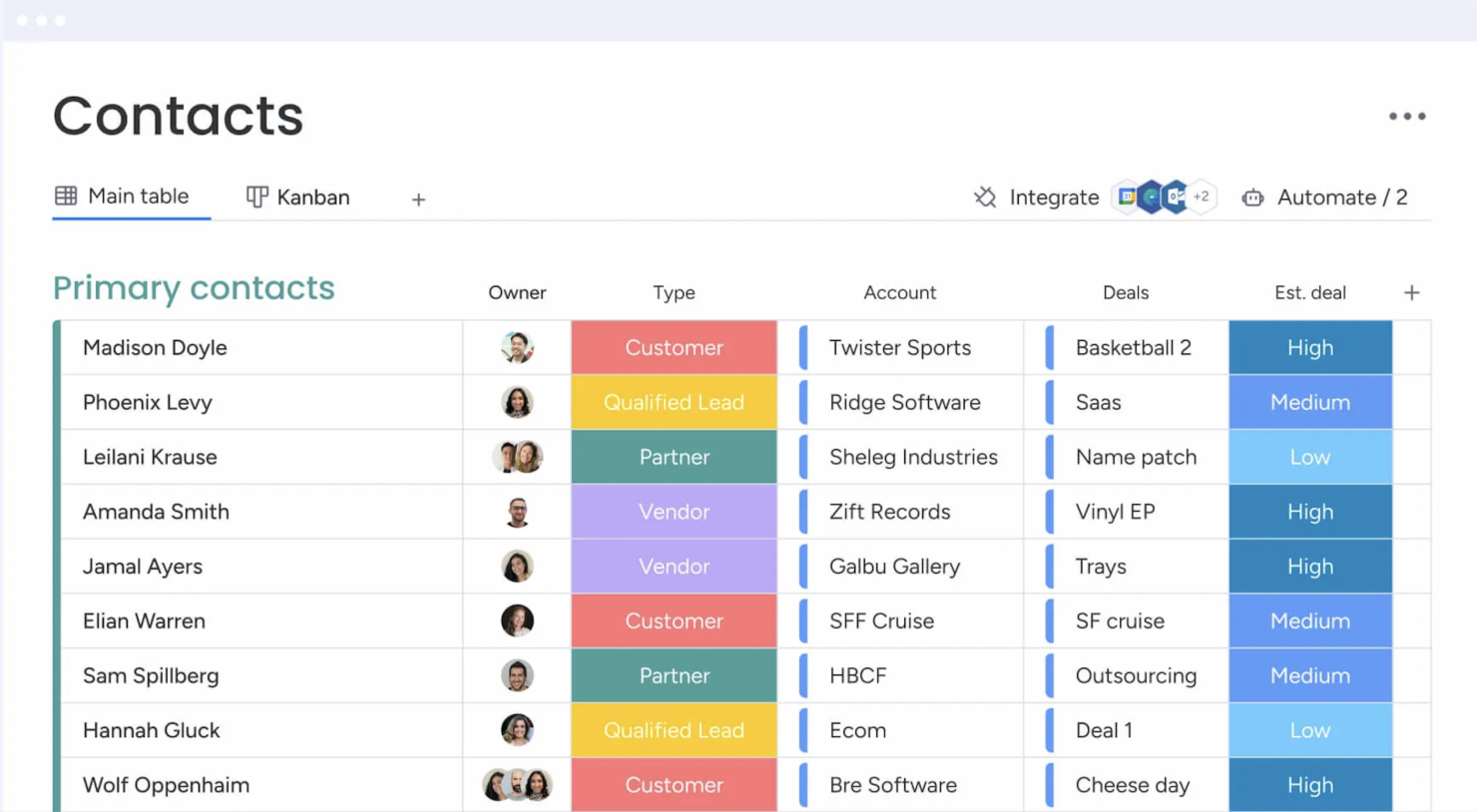
Monday CRM offers a highly visual interface that uses boards, columns, and color codes. This helps teams see progress and manage deals at a glance.
- Drag-and-drop features simplify task management.
- Customizable templates fit different sales processes.
- AI-powered insights improve decision-making.
The platform supports code-free automations to reduce manual work. Users can tailor workflows without technical skills, adapting Monday CRM to their needs.
How Monday Crm Supports Small To Mid-sized Businesses
Monday CRM fits small and mid-sized companies by offering:
| Feature | Benefit for SMBs |
|---|---|
| Simple Setup | Quick adoption with minimal training |
| Flexible Plans | Scales with team size and budget |
| Visual Workflow Tracking | Easy monitoring of sales stages |
| Automation Tools | Reduces repetitive tasks |
This combination helps smaller teams stay organized without extra costs or complexity.
The Role Of Monday Crm In Centralizing Customer Data And Automating Workflows
Monday CRM acts as a central hub for all customer information. It collects data from contacts, deals, and communications in one place.
This centralization allows teams to:
- Access updated customer details quickly
- Track interactions and deal progress clearly
- Generate reports to analyze sales performance
Automation features help by:
- Sending reminders and follow-ups automatically
- Updating deal statuses without manual input
- Integrating with emails and calendars
Such automation cuts down errors and saves time, boosting team productivity.
Key Features That Make Monday Crm Unique
Monday CRM stands out with features designed for clarity, ease, and efficiency. It offers tools that help teams manage customers and sales smoothly. The platform’s design focuses on visual management, automation, and integration, making daily work simpler.
These features suit small to mid-sized teams that want flexible and clear workflows. The system balances power and ease but may require some time to set up advanced functions. Below are the main features that make Monday CRM unique.
Visual & Customizable Dashboards: Simplifying Workflow Management
Monday CRM provides visual dashboards that show all tasks and sales stages clearly. Users can customize views to fit their team’s process.
- Drag-and-drop interface for easy changes
- Color-coded statuses for quick tracking
- Multiple views: Kanban, timeline, calendar
These dashboards help teams see progress at a glance. They reduce confusion and improve task management.
Centralized Data Management: Enhancing Customer Communication Tracking
All customer information stays in one place. This centralized system records contacts, emails, notes, and deals.
- Easy access to communication history
- Track deal stages and customer interactions
- Search and filter data efficiently
Teams avoid losing track of conversations. Everyone stays updated on customer status and next steps.
Automation & Ai Capabilities: Streamlining Repetitive Tasks
Monday CRM uses automation and AI to handle routine work. This frees users to focus on important tasks.
- Automate follow-ups and notifications
- AI suggests next actions based on data
- Code-free setup for custom workflows
These tools reduce errors and save time. They help keep deals moving without manual effort.
Integrations With Popular Tools: Expanding Functionality And Collaboration
The platform connects with many well-known apps. This integration supports teamwork across different tools.
| Integration | Purpose |
|---|---|
| Email (Gmail, Outlook) | Sync emails and track communication |
| Slack | Real-time team communication |
| Google Calendar | Schedule and manage events |
| Zapier | Connect with 1000+ apps easily |
Integrations help teams work faster and share data without switching apps.
Scalability For Growing Teams: Adapting To Business Needs
Monday CRM scales with your business. It suits small teams and grows as you add users and features.
- Flexible pricing plans for different team sizes
- Advanced features unlock with higher plans
- Custom workflows adapt to changing needs
Growth means adding complexity, but Monday CRM stays manageable. Teams can expand without switching platforms.
Pricing And Affordability Breakdown
Monday CRM offers different pricing plans designed to fit various team sizes and needs. Understanding these plans helps teams choose the right option without overspending. Pricing depends on features, user count, and plan tiers. This section breaks down the costs and value for small, medium, and large teams.
Understanding Monday Crm’s Plan Structure: Basic Vs Standard
The Basic plan covers essential CRM features. It suits small teams needing simple contact and deal management.
The Standard plan adds important tools like timeline views, integrations, and automation. Most users find this plan better for growing teams.
| Plan | Key Features | Ideal For |
|---|---|---|
| Basic | Contact management, simple boards, limited automation | Small teams, entry-level CRM users |
| Standard | Advanced views, integrations, increased automation | Growing teams needing workflow customization |
Cost Implications Of Advanced Features And Higher-tier Plans
Advanced features come with higher costs. Features like AI-powered automation, deeper reporting, and enhanced security require the Pro or Enterprise plans.
These plans suit teams needing complex workflows or high data volume. Costs rise quickly as user numbers increase.
- Pro plan: Better automation, analytics, and integrations
- Enterprise plan: Custom security, premium support, and scalability
Teams must balance feature needs against budget constraints.
Evaluating Value For Small To Medium Teams
Small and medium teams benefit most from the Basic or Standard plans. These plans provide strong visual tools and easy customization.
Automation and integrations improve efficiency without major cost increases. The user-friendly interface reduces training time.
Many teams find the Standard plan offers the best balance of features and price.
Potential Pricing Challenges For Larger Enterprises
Larger enterprises face rising costs with the need for advanced features and many users.
Complex customizations and automations may require higher-tier plans. This increases monthly fees significantly.
Some users report that setting up workflows and managing integrations takes time and technical skill.
Enterprises must plan budgets carefully for growth and advanced needs.
Credit: thedigitalprojectmanager.com
Pros And Cons Of Monday Crm Based On Real-world Usage
Monday CRM offers a mix of benefits and drawbacks observed by real users. Its intuitive design and automation attract many small to mid-sized teams. Yet, some face challenges with mobile syncing and advanced configurations. Understanding these pros and cons helps in deciding if Monday CRM fits your team’s needs.
Pros: Intuitive Interface, Customization, And Strong Automation
Monday CRM stands out for its easy-to-navigate interface. Users quickly adapt to the visual layout, which simplifies contact and deal management. Customization options allow teams to tailor workflows without coding.
- Visual workflow tracking makes managing tasks clear and efficient.
- Code-free automations save time by handling repetitive tasks.
- Flexible customization fits different business processes.
This combination suits small and medium teams aiming for clear data centralization and faster growth.
Cons: Mobile Syncing Issues And Email Integration Limitations
Users report syncing problems on mobile devices. Data may not update quickly, causing delays. Email integration also shows limits:
- Some email features feel clunky or incomplete.
- Advanced email functions often require higher-tier plans.
- These factors can reduce efficiency for teams relying on mobile or email communication.
Challenges With Feature Gating And Complexity For Advanced Setups
Several powerful features are locked behind expensive plans. This feature gating frustrates growing teams needing:
- Duplicate management tools
- Advanced reporting
- Complex custom workflows
Setting up such features takes time and technical skill. Teams with complex needs may find Monday CRM less flexible without additional investment.
User Experience: Learning Curve And Potential Overwhelm
Monday CRM is simple for basic use but can overwhelm users in deeper setups. The learning curve appears when:
- Configuring advanced automations
- Customizing detailed reports
- Managing large data sets
New users may need training to use all functions effectively. Some feel the platform gets complicated beyond standard plans.
Specific Recommendations For Ideal Users And Scenarios
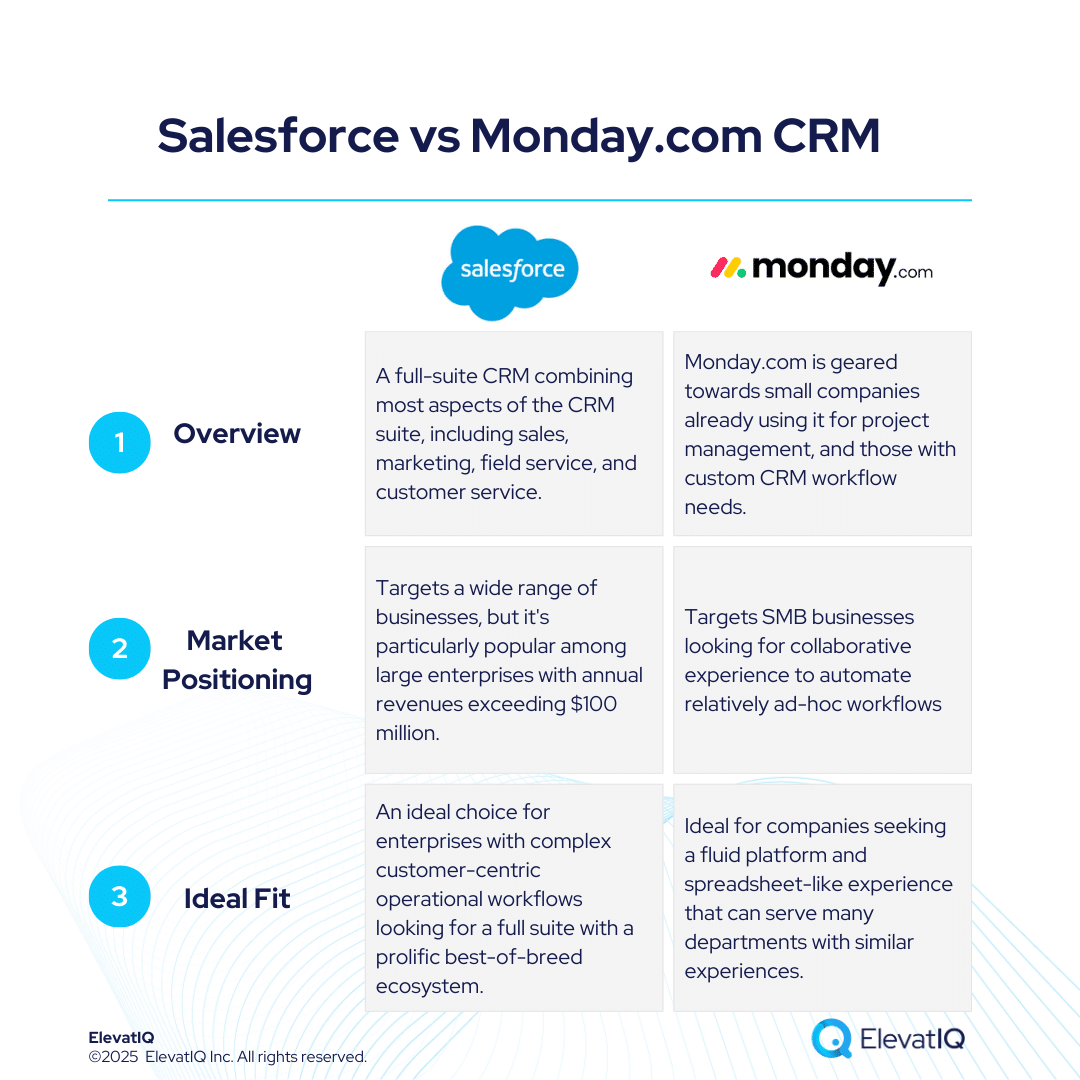
Monday CRM suits different teams and businesses based on their needs. Its strengths lie in visual dashboards, flexible workflows, and automation. Some users find it simpler for small to mid-sized businesses but less ideal for large enterprises. Below are tailored recommendations to help decide if Monday CRM fits your setup.
Best Fit: Teams Prioritizing Visual Dashboards And Flexible Workflows
Teams that value clear visual displays of data benefit most from Monday CRM. The platform offers customizable dashboards that show contacts, deals, and tasks in an intuitive way. Flexible workflows allow teams to adapt pipelines and processes without code.
- Easy-to-understand visual tracking
- Drag-and-drop pipeline management
- Code-free automation for routine tasks
- Good fit for teams needing frequent workflow changes
These features make Monday CRM ideal for marketing, sales, or project teams who want to stay organized visually.
Recommended For Small To Mid-sized Businesses With Moderate Crm Needs
Monday CRM works well for small and mid-sized businesses with moderate CRM demands. It centralizes data and automates key tasks without complex setups.
| Benefit | Reason |
|---|---|
| Cost-effective for moderate team size | Pricing scales with team size; smaller teams pay less |
| Simple contact and deal management | Strong foundation for tracking sales and contacts |
| Customizable automations | Code-free automation supports routine workflows |
| Learning curve manageable | Setup may take time but is doable for non-experts |
Such businesses gain value from Monday CRM’s balance of features and usability.
Suitability For Companies Already Using Monday.com For Project Management
Companies using Monday.com for project management find CRM integration smoother. The same interface and workflow logic reduce training time.
- Unified platform for projects and CRM
- Shared data and automation across teams
- Consistent user experience
This integration benefits teams wanting to avoid multiple tools and keep all data centralized.
Considerations For Enterprises And Large Teams
Large enterprises and teams face some challenges with Monday CRM.
- Cost: Pricing rises steeply with advanced features and more users.
- Complex setups: Custom workflows and automations require time and expertise.
- Advanced features: Some functions like email integration and duplicate management may feel limited or require higher plans.
- Mobile syncing: Can be less smooth for large data volumes.
For large teams needing deep, enterprise-grade CRM functions, consider these limits carefully before choosing Monday CRM.
Credit: www.elevatiq.com

Credit: www.breakcold.com
Frequently Asked Questions
What Are The Disadvantages Of Monday Crm?
Monday CRM can become costly as teams grow and need advanced features. Setup of custom workflows and automations takes time. Mobile syncing and email integration often feel clunky. Some essential features require higher-priced plans. The interface may overwhelm users with too many options.
Is Monday Crm Any Good?
Monday CRM offers a visual, customizable interface ideal for small to mid-sized teams. It centralizes data and automates tasks but can get costly and complex with advanced features. Mobile syncing and email integration may lag, making it best for businesses valuing flexibility and visual workflow tracking.
Who Is Monday Crm Best Suited For?
Monday CRM suits small to mid-sized teams seeking customizable, visual workflows and project management integration. It fits businesses valuing flexibility and automation, especially those already using Monday. com. Ideal for teams needing centralized data and scalable solutions without complex enterprise demands.
What Are The Benefits Of Monday Crm?
Monday CRM offers a visual, customizable interface for clear workflow tracking. It centralizes data, automates tasks, and integrates with popular tools. Ideal for small to mid-sized teams, it scales as businesses grow, enhancing customer management and boosting team efficiency.
Conclusion
Monday CRM offers a clear visual layout and strong customization options. It helps teams manage contacts and deals smoothly. Automation and AI features reduce repetitive work effectively. Small to mid-sized teams find it flexible and scalable. Some users note issues with mobile syncing and email integration. Advanced features often require higher payment plans. Setting up complex workflows can take extra time. Pricing may feel confusing for some users. Overall, Monday CRM suits teams needing easy-to-use, visual tools. Learn more about Monday CRM and decide if it fits your needs here.

