
Are you tired of juggling sales leads, customer details, and project tasks scattered across countless notes and spreadsheets? Imagine having all that vital information neatly organized in one place—easy to access, simple to manage, and designed to keep your business running smoothly.
That’s exactly what Capsule offers. With Capsule CRM, you get a clear, calm, and controlled way to handle your sales pipeline, customer relationships, and daily tasks without the usual chaos. Want to discover how Capsule’s features can transform your workflow and boost your business efficiency? Dive into this article to explore the powerful tools Capsule provides to keep your business brain sharp and panic-free. Ready to take control? Check it out here: Capsule CRM Features.
Introduction To Capsule Crm And Its Purpose
Capsule CRM helps businesses keep their sales, projects, and customer details organized. It gathers all information in one place. This creates clarity and control in business management. Capsule aims to reduce the chaos of scattered data like post-its, spreadsheets, or notes on the back of a hand. The goal is to make running a business feel calm and manageable.
What Is Capsule Crm? An Overview
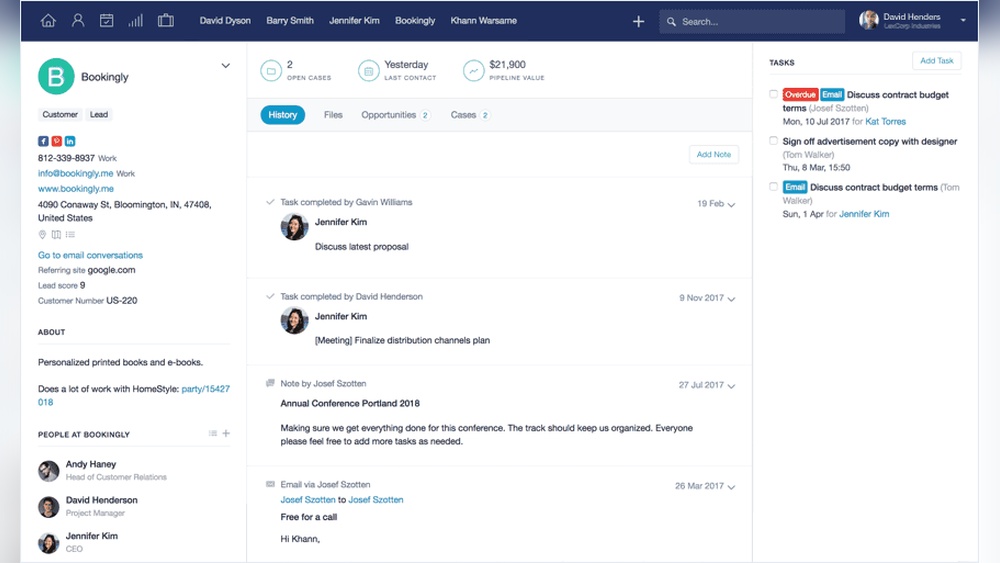
Capsule CRM is a simple, smart customer relationship management tool. It stores all sales and customer info in a tidy, easy-to-access system. Capsule lets users track contacts, sales opportunities, and customer history in one spot.
- Organizes sales pipelines clearly
- Keeps customer conversations and details together
- Manages projects alongside customer data
- Accessible on multiple devices
This helps teams avoid losing important information or missing follow-ups.
Who Can Benefit From Capsule Crm?
Capsule CRM fits small to medium businesses that need order and control. It works well for:
- Sales teams wanting to track deals and contacts
- Customer support groups managing service requests
- Project managers keeping tasks linked to clients
- Business owners seeking a simple, all-in-one solution
Anyone feeling overwhelmed by scattered notes or data will find Capsule useful.
How Capsule Crm Supports Business Growth
Capsule helps businesses grow by improving organization and communication. Key benefits include:
| Feature | Benefit |
|---|---|
| Centralized Data | Easy access to all customer and sales info |
| Sales Pipeline Tracking | Clear view of deal stages to boost closing rates |
| Task and Project Management | Keeps work linked to customers and deadlines |
| Contact Management | Organizes customer info for quick follow-ups |
These features reduce errors and improve team focus. Capsule ensures no customer falls through the cracks. The result: better relationships and steady business growth.

Credit: www.discovercrm.com
Key Features That Make Capsule Crm Unique
Capsule CRM brings together all essential business tools in one simple platform. It helps keep customer data organized, tracks sales, and improves team work. Each feature is designed to save time and reduce stress. Let’s explore the key features that make Capsule stand out.
Contact Management: Centralized And Searchable Customer Data
Capsule stores all customer details in one place. You can add notes, emails, and phone numbers linked to each contact. The search function is fast and accurate, letting you find any customer instantly.
- Store full contact history
- Group contacts by tags or types
- Quick search with filters
Sales Pipeline Management: Visualize And Streamline Sales Processes
Capsule shows your sales journey with clear visual pipelines. Move deals through stages easily and spot bottlenecks fast. This helps keep sales on track and close more deals.
- Drag-and-drop pipeline interface
- Customize sales stages to fit your process
- Track deal value and expected close dates
Task And Activity Tracking: Stay Organized And Meet Deadlines
Never miss a follow-up or important task. Capsule lets you create, assign, and track tasks linked to contacts or deals. Set reminders to stay on schedule.
- Task creation with due dates
- Assign tasks to team members
- View tasks by day, week, or contact
Automation And Workflow Tools: Save Time And Reduce Errors
Automate routine tasks in Capsule to cut down manual work. Set workflows that trigger actions like sending emails or updating records automatically.
- Automated follow-up reminders
- Custom workflow rules
- Reduce data entry mistakes
Collaboration Features: Enhance Team Communication And Efficiency
Teams work better with Capsule’s collaboration tools. Share notes, assign tasks, and keep everyone updated on customer status in real time.
- Shared contact and deal records
- Internal notes visible to the team
- Task assignment and progress tracking
Mobile Crm Access: Manage Your Business On The Go
Capsule’s mobile app lets you access all CRM features anywhere. Check contacts, update deals, and add tasks from your phone or tablet.
- Full access to contacts and pipelines
- Add notes and tasks on the move
- Syncs instantly with desktop version
Reporting And Analytics: Make Data-driven Decisions
Understand your sales performance with Capsule’s reports. Track revenue, pipeline health, and team activity. Use data to improve your sales strategies.
- Customizable sales reports
- Visual charts and graphs
- Export data for deeper analysis
Integration Capabilities: Connect Capsule With Your Favorite Tools
Capsule connects easily to other software you use. Sync with email, accounting, marketing, and productivity apps to create a smooth workflow.
- Email services like Gmail and Outlook
- Accounting tools such as Xero
- Marketing platforms and calendars
Pricing And Affordability Breakdown
Capsule CRM offers a clear, straightforward pricing structure. It suits small and medium businesses aiming for an organized, efficient sales and customer management system. Understanding the costs and benefits helps businesses pick the best plan.
Overview Of Capsule Crm Pricing Plans
Capsule provides two main pricing plans designed to fit different needs:
| Plan | Price (per user/month) | Key Features | Storage |
|---|---|---|---|
| Professional | $18 | Advanced sales and marketing tools, integrations, customer support | 50,000 contacts |
| Teams | $36 | Includes Professional features plus more users, workflows, and automation | Unlimited contacts |
Both plans offer full access to Capsule’s core CRM features. The Teams plan targets larger groups needing automation and collaboration.
Comparing Cost Versus Value For Small And Medium Businesses
Capsule CRM’s pricing matches the value it delivers. The Professional plan is affordable for startups and small businesses. It covers essential CRM features that help track contacts, sales, and tasks efficiently.
The Teams plan offers more tools for growing businesses. It supports multiple users and adds automation to save time. This plan suits companies ready to scale their sales process.
- Simple pricing avoids surprise costs.
- Plans include key tools for customer management.
- Affordable monthly fees fit most small and medium budgets.
Overall, Capsule provides strong value with clear pricing and useful features.
Free Trial And Onboarding Resources: Risk-free Testing
Capsule CRM offers a free trial to test the platform without a credit card. This allows businesses to explore features before buying.
Onboarding support includes:
- Guided tutorials to set up your account quickly.
- Step-by-step instructions for importing contacts and data.
- Helpful customer service to answer questions.
This risk-free approach helps businesses decide if Capsule fits their needs. It also reduces setup stress and speeds up adoption.

Credit: capsulecrm.com
Pros And Cons Of Capsule Crm Based On Real-world Usage
Capsule CRM offers a simple way to manage sales, projects, and customers in one place. Users find it helpful for keeping business details organized without stress. This section explores the advantages and limitations of Capsule CRM based on actual user experiences.
Advantages: User-friendly Interface And Effective Features
Capsule CRM stands out for its clean and easy-to-navigate interface. Users quickly learn how to track contacts, sales, and tasks without confusion.
- Centralized customer data: All contacts and interactions stored in one tidy place.
- Simple task management: Set reminders and follow-ups with ease.
- Sales pipeline tracking: Visualize deals and progress clearly.
- Integration options: Works well with common tools like Gmail and Outlook.
The platform helps reduce time spent on organizing notes and spreadsheets. This clarity allows teams to focus more on selling and customer service.
Limitations: Areas For Improvement And Feature Gaps
Capsule CRM has some areas where users see room for improvement.
| Limitation | Description |
|---|---|
| Limited advanced reporting | Some users want more detailed sales and performance reports. |
| Fewer customization options | Customization is basic compared to some larger CRM systems. |
| No built-in marketing automation | Lacks tools for email campaigns or lead nurturing. |
| Mobile app limitations | The mobile experience is functional but less robust than desktop. |
These gaps may affect businesses with complex CRM needs or large sales teams. Still, Capsule remains suitable for small to medium-sized companies seeking simplicity.
Customer Feedback And Testimonials
Real users praise Capsule CRM for making customer management less stressful. They highlight how it brings calm and control to daily work.
“Capsule helped me organize my contacts and sales steps easily. No more scattered notes.”
“The interface is clean and straightforward. I can track deals without getting lost.”
Some customers mention the need for better reporting and marketing tools. Still, they value Capsule’s core features and user-friendly design.
The blend of simplicity and efficiency in Capsule CRM appeals to businesses wanting a calm, clear way to handle sales and customer data.
Ideal Users And Scenarios For Capsule Crm
Capsule CRM fits well with businesses that want simple, clear, and effective ways to manage customers and sales. It organizes contacts, sales pipelines, and projects in one easy place. This CRM suits teams needing better control without complex features. Below are the key users and situations where Capsule CRM shows its strength.
Small To Medium-sized Businesses Seeking Simplicity
Capsule CRM works best for small and medium-sized businesses that want to avoid complicated software. It offers a clean interface and easy navigation. Teams can manage contacts, sales, and tasks without extra training.
- Centralizes customer information for quick access
- Tracks sales opportunities simply
- Integrates with common tools to reduce manual work
This CRM reduces the stress of managing scattered data, helping businesses run smoothly.
Sales Teams Needing Clear Pipeline Visibility
Sales teams benefit from Capsule’s transparent sales pipelines. The visual pipeline lets users see each deal’s stage at a glance.
- Drag-and-drop pipeline management
- Easy tracking of deal progress
- Notifications for follow-ups and deadlines
Clear visibility helps sales reps focus on the right deals and close more sales.
Businesses Requiring Customizable And Scalable Crm Solutions
Capsule CRM adapts well as businesses grow. It allows customization to fit unique needs without complexity.
| Feature | Benefit |
|---|---|
| Custom Fields and Tags | Track specific customer details relevant to your business |
| Flexible Sales Pipelines | Design pipelines that match your sales process |
| Integrations | Connect with email, accounting, and marketing apps |
Its scalability supports growing teams without the need to switch systems.
Use Cases Demonstrating Capsule Crm’s Impact On Growth
Capsule CRM helps businesses organize their sales and customer data clearly. Here are real examples:
- Consulting firms use Capsule to track client contacts and project stages easily.
- Retail businesses manage customer follow-ups and sales pipelines smoothly.
- Service providers customize fields to log detailed customer preferences and history.
Each case shows how Capsule reduces confusion and helps teams focus on growth activities.

Credit: capsulecrm.com
Frequently Asked Questions
What Is A Capsule Crm?
Capsule CRM is a cloud-based software that helps small to medium businesses manage contacts, sales pipelines, and tasks efficiently. It streamlines customer relationship management with easy contact organization, sales tracking, and task automation to boost productivity and improve client interactions.
What Are The Key Features Of A Crm?
Key CRM features include contact management, sales tracking, automation, analytics, mobile access, collaboration tools, and cloud-based storage. AI enhances data insights and workflow efficiency, helping businesses improve customer relationships and sales processes effectively.
What Is The Difference Between Capsule Crm And Monday Crm?
Capsule CRM targets small to medium businesses with simple contact and pipeline management. Monday CRM offers advanced sales tools and customization for larger teams.
Is Capsule Crm Good?
Capsule CRM offers simple, effective tools for small to medium businesses. It manages contacts, sales pipelines, and tasks efficiently. Its user-friendly interface and automation features enhance productivity. Capsule CRM suits businesses seeking straightforward, affordable customer management solutions.
Conclusion
Capsule helps keep your business organized and stress-free. It stores sales, projects, and customer details in one place. This makes managing your work simple and clear. You can focus on growing your business without confusion. Try Capsule today to see how it fits your needs. Learn more at https://saaslabpro.com/capsule.

