

Are you struggling to keep up with your sales and marketing tasks while trying to grow your business? Imagine having a tool that handles follow-ups, organizes customer information, and helps you sell more—automatically.
That’s exactly what Keap does for you. Keap is a powerful all-in-one platform designed to put your business growth on autopilot. Whether you’re just starting out or looking to scale, Keap simplifies your daily workflow so you can focus on what matters most: your customers and your business. Curious about how Keap can transform your sales and marketing efforts? Dive into this article to discover how Keap’s automation features can save you time, boost your sales, and help you grow efficiently. Ready to see it in action? Check out Keap here and start turning your business into a well-oiled machine.
Introduction To Keap: Empowering Small Businesses With Crm And Automation
Keap is a powerful platform designed to help small businesses manage their customer relationships and automate sales and marketing tasks. It combines CRM tools with automation features that save time and increase efficiency. Small business owners can use Keap to organize contacts, track leads, send follow-ups, and grow their sales without extra effort.
This introduction explains how Keap evolved, who it serves, and what makes it unique in the crowded CRM market.
Overview Of Keap And Its Evolution From Infusionsoft
Keap began as Infusionsoft, a popular CRM solution focused on small businesses. Over time, it transformed to become more user-friendly and accessible. The rebranding to Keap reflects its goal to simplify business growth through automation.
The platform now offers:
- Contact management
- Marketing automation
- Sales pipeline tracking
- Invoicing and payment tools
Keap keeps improving its features to meet the changing needs of small business owners. The shift from Infusionsoft to Keap brought a clearer focus on ease of use and practical automation.
Purpose And Target Audience Of Keap
Keap serves small businesses and solo entrepreneurs who want to save time and increase sales. It targets users who need a simple way to manage customers and automate repetitive tasks.
Its main purposes include:
- Helping businesses stay organized
- Automating follow-ups and marketing
- Boosting sales with less manual work
- Providing easy tools without technical skills
Keap is ideal for those who want to spend less time on admin and more time growing their business.
How Keap Stands Out In The Crm Market
Keap stands out by combining CRM and automation in one simple platform. Here is why it is different:
| Feature | Keap Advantage |
|---|---|
| Ease of Use | Simple setup and clear interface |
| Automation | Built-in marketing and sales automation tools |
| All-in-One Platform | CRM, marketing, sales, and payments in one place |
| Support for Small Businesses | Designed specifically for small business needs |
Keap helps small businesses grow by making sales and marketing easier and faster. It removes the need for multiple tools and manual work.

Credit: www.youtube.com
Key Features Of Keap And Their Benefits
Keap offers a powerful set of tools that help small businesses automate sales and marketing tasks. These features save time, reduce errors, and improve customer interactions. The platform combines easy-to-use automation with smart data management to grow your business effectively.
Contact Management: Streamlining Customer Data For Better Engagement
Keap centralizes all customer information in one place. This makes it simple to track contacts, leads, and customer history. You can quickly find details like phone numbers, emails, and past interactions.
- Organized contact records help personalize communication.
- Tagging and segmentation allow targeted marketing.
- Automated follow-ups keep customers engaged.
Sales Pipeline Automation: Simplifying Lead Tracking And Conversion
Keap automates your sales process from lead capture to closing deals. The visual sales pipeline shows each stage clearly. It helps prioritize leads and track progress easily.
- Set automated reminders for follow-ups.
- Move leads through stages without manual work.
- Identify bottlenecks and improve sales strategies.
Marketing Automation: Personalized Email Campaigns With Ai Assistance
Keap uses AI to help create and send email campaigns. You can design personalized messages based on customer behavior and preferences.
- Automated email sequences nurture leads over time.
- AI content assistant speeds up email creation.
- Track open rates and clicks to refine campaigns.
Appointment Scheduling: Reducing No-shows With Automated Reminders
Keap’s appointment scheduler lets customers book meetings directly. Automated reminders reduce missed appointments and improve client satisfaction.
- Syncs with your calendar to avoid conflicts.
- Sends SMS and email reminders automatically.
- Easy rescheduling options for clients.
E-commerce Integration: Boosting Sales Through Seamless Online Transactions
Keap integrates with popular e-commerce platforms. This allows smooth payment processing and order tracking in one system.
| Feature | Benefit |
|---|---|
| Shopping cart integration | Faster checkout and less abandoned carts |
| Payment automation | Secure and quick transactions |
| Order tracking | Improved customer satisfaction |
Mobile Accessibility: Managing Business On-the-go
Keap’s mobile app lets you manage contacts, sales, and marketing from anywhere. This flexibility keeps your business running smoothly outside the office.
- Access customer data instantly.
- Send emails and texts on the move.
- Update sales pipeline in real time.
Analytics And Reporting: Gaining Insights To Drive Growth
Keap provides detailed reports on sales, marketing, and customer activity. These insights help make better decisions and spot opportunities.
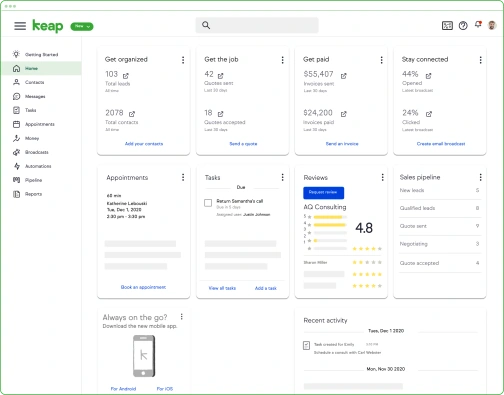
- Visual dashboards show key metrics at a glance.
- Track campaign performance and ROI.
- Identify trends to improve strategies.
Pricing And Affordability Of Keap
Keap offers pricing plans designed to fit various small business needs. Its pricing focuses on delivering strong value through automation and CRM tools. Understanding these plans helps businesses choose the right option without overspending.
Overview Of Keap’s Pricing Plans And Features Included
Keap provides multiple pricing tiers, each with different features:
| Plan | Price (per month) | Key Features |
|---|---|---|
| Keap Lite | $79 |
|
| Keap Pro | $149 |
|
| Keap Max | $199 |
|
Comparing Value For Small Business Budgets
Keap plans suit small businesses with different budgets and needs. The Lite plan is affordable for startups and solo entrepreneurs. It covers essential marketing and sales tools.
The Pro plan adds powerful automation and helps grow customer relationships. It is a good fit for growing businesses that need more contacts and features.
For businesses with larger contact lists, the Max plan offers advanced CRM functions and support. This tier provides the best value for companies aiming to scale.
Free Trial And Onboarding Support Options
Keap offers a 14-day free trial to test its features. This trial allows users to explore the platform risk-free. No credit card is required upfront.
Onboarding support helps new users start quickly. Keap provides:
- Step-by-step setup guides
- Live chat and email support
- Video tutorials and webinars
These resources reduce the learning curve and help businesses get results faster.
Pros And Cons Of Using Keap Based On Real-world Experience
Keap is a popular CRM and marketing automation tool designed to help small businesses sell more and grow efficiently. Users often praise its powerful features but also note some challenges. This section highlights the key advantages and limitations of Keap from real users’ perspectives.
Advantages: User-friendly Interface And Robust Automation
Keap’s interface is clean and easy to navigate. Users can quickly access contacts, campaigns, and sales pipelines without confusion.
- Drag-and-drop automation builder simplifies creating email sequences and follow-ups.
- Pre-built templates speed up campaign setup.
- All-in-one platform combines CRM, marketing, sales, and e-commerce tools.
- Automation handles repetitive tasks, freeing time for business growth.
- Integration with popular apps enhances workflow without extra complexity.
These features help businesses save time and stay organized while growing sales efficiently.
Limitations: Learning Curve And Cost Considerations
Keap has a learning curve that some new users find steep. Understanding automation and CRM setup takes time and effort.
- Complex features require patience to master.
- Initial setup can be overwhelming for beginners.
Pricing is another concern. Keap’s plans may be expensive for startups or small businesses with tight budgets. Costs increase with more contacts and advanced features.
| Plan | Starting Price | Best For |
|---|---|---|
| Lite | $79/month | Basic CRM and simple automation |
| Pro | $149/month | Advanced automation and sales pipeline |
| Max | $199/month | Full features and larger teams |
Users must weigh automation benefits against subscription costs carefully.
Customer Support And Community Resources
Keap offers multiple support channels to assist users:
- Live chat and phone support for quick help.
- Extensive knowledge base with tutorials and FAQs.
- Active user community forum for peer advice.
- Regular webinars and training sessions to boost skills.
Many users value the support but mention response times can vary during busy periods.
Community forums provide practical tips from experienced users, easing the learning curve.
Who Should Use Keap? Ideal Users And Business Scenarios
Keap suits businesses aiming to streamline sales and marketing. It fits various industries that want to save time and improve client communication. The platform helps manage contacts, automate follow-ups, and track customer journeys. Below are key users and scenarios where Keap shines.
Small Businesses And Entrepreneurs Looking To Automate Sales And Marketing
Small businesses benefit from Keap’s simple automation tools. Entrepreneurs can:
- Set up email sequences to nurture leads.
- Track sales pipelines clearly.
- Send invoices and payments quickly.
- Manage contacts all in one place.
This saves time on repetitive tasks and boosts sales efficiency.
Service-based Businesses Needing Appointment And Client Management
Service providers use Keap to handle bookings and client info. Features include:
- Online appointment scheduling.
- Automated reminders to reduce no-shows.
- Client history tracking for personalized service.
- Easy follow-up workflows after appointments.
These tools improve client experience and reduce manual work.
E-commerce Ventures Seeking Integrated Crm Solutions
Keap supports online stores with CRM and marketing in one place. Benefits include:
| Feature | Benefit |
|---|---|
| Order and customer tracking | See purchase history and preferences |
| Automated cart recovery emails | Increase sales by reminding buyers |
| Email marketing campaigns | Promote products and offers easily |
This creates a smooth sales process and better customer relations.
Businesses Planning To Scale With Automated Workflows
Growing businesses rely on Keap to automate complex tasks. Key automation features:
- Lead capture with instant responses.
- Task automation for sales follow-up.
- Segmented marketing based on customer behavior.
- Reporting tools to track growth.
Automated workflows free up time and support scaling efficiently.
Credit: keap.com
Conclusion: Unlocking Growth With Keap’s Crm And Automation Tools
Keap combines powerful CRM and automation tools to help businesses grow smoothly. It simplifies managing customer relationships and sales tasks. The platform lets businesses save time, follow up faster, and increase sales. Using Keap, companies can focus on growth without getting stuck in daily repetitive tasks.
Summary Of Keap’s Value Proposition
- All-in-One Platform: Keap merges CRM, marketing, sales, and e-commerce tools in one place.
- Automation: Automates follow-ups, appointment scheduling, and email sequences to keep customers engaged.
- Efficiency: Reduces manual work, enabling faster responses and better customer management.
- Growth Focus: Designed to help small businesses sell more and grow without extra effort.
- User-Friendly: Easy setup with AI-powered content assistants for quick campaign creation.
| Feature | Benefit |
|---|---|
| CRM | Organizes customer data for personalized communication |
| Marketing Automation | Delivers timely emails and messages automatically |
| Sales Pipeline | Tracks prospects and moves deals faster |
| Appointment Scheduling | Simplifies booking and reduces no-shows |
Final Thoughts On Making The Most Of Keap For Business Success
Maximize Keap’s tools by setting clear goals and automating repetitive tasks. Use the CRM to keep customer data organized and follow up quickly. Build email sequences that nurture leads without extra effort.
Regularly review your sales pipeline and adjust automation rules to improve results. Take advantage of Keap’s AI content assistant to create effective campaigns fast. Keep your system simple and focused on essential tasks.
Keap helps small businesses stay efficient and grow steadily. Its blend of CRM and automation tools makes managing sales and marketing easier. Using these tools well creates more time to focus on customers and business growth.

Credit: nuacom.com
Frequently Asked Questions
How Much Does Keap Cost?
Keap pricing starts at $79/month for the Lite plan. Higher tiers like Pro and Max cost more, based on features.
How Does Keap Work?
Keap automates sales and marketing by managing contacts, sending emails, tracking leads, and organizing customer data in one platform.
Is Keap A Crm System?
Keap is a CRM system designed for small businesses. It combines customer management, marketing automation, sales, and e-commerce tools.
What Is The 1 Crm In The World?
Salesforce is the 1 CRM globally, leading in market share with powerful sales, marketing, and AI-driven tools. It suits all business sizes.
Conclusion
Keap helps businesses automate sales and marketing tasks easily. It saves time and keeps customers engaged automatically. Small businesses can use Keap to grow without extra effort. The platform combines CRM, email marketing, and automation in one tool. To learn more or try Keap, visit this link. This tool fits well for those wanting simple, smart business growth.

