
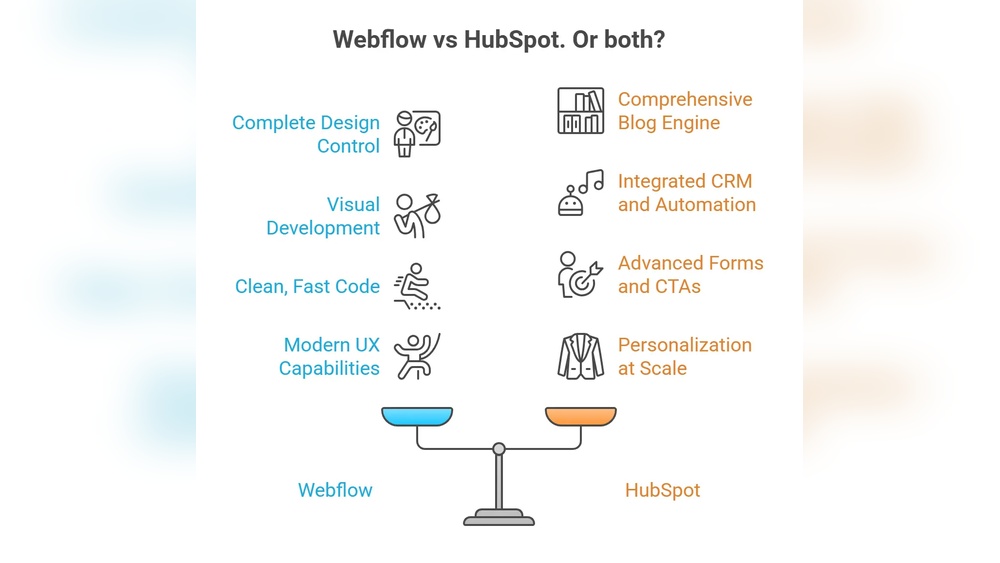
Choosing the right platform can make or break your business growth. If you’re torn between Webflow and Hubspot, you’re not alone.
Both offer powerful tools but serve very different purposes. What if you could get the best of both worlds? You’ll discover how Webflow’s design flexibility stacks up against Hubspot’s all-in-one CRM and marketing automation powerhouse. Whether you want to build a stunning website or supercharge your customer relationships, knowing which platform fits your needs will save you time and money. Ready to find out which one will boost your business the most? Let’s dive in. If you want to explore Hubspot’s CRM features right now, check it out here: Hubspot CRM.
Introduction To Webflow And Hubspot
Choosing the right platform for your business website is crucial. Webflow and HubSpot are two popular options that serve different needs. Understanding their purpose and audience helps decide which fits best. This section introduces both platforms and explains why comparing them matters.
Overview Of Webflow: Purpose And Target Audience
Webflow is a web design tool, CMS, and hosting platform combined. It focuses on giving users control over website design without coding. The platform targets:
- Business owners wanting custom websites
- Freelance web designers
- Web development agencies
- Content creators needing flexibility
Webflow offers a visual editor with advanced design features. It suits users who want to build visually rich, responsive sites quickly. The platform balances ease of use with powerful customization.
Overview Of Hubspot: Purpose And Target Audience
HubSpot is a Customer Relationship Management (CRM) platform with marketing, sales, and service tools. It aims to help businesses manage customer interactions and grow sales efficiently. The main users include:
- Sales teams tracking leads and deals
- Marketing teams managing campaigns
- Customer service departments
- Businesses wanting integrated CRM and website tools
HubSpot combines CRM with website management features. Users can add forms, chatbots, and track visitors on their sites. Integration with Webflow is possible, linking design with customer data.
Why Compare Webflow And Hubspot For Your Business Website?
Both platforms offer website solutions but serve different goals. Comparing helps identify the best fit based on needs such as:
- Design flexibility: Webflow excels in creative control and visual design.
- Customer management: HubSpot focuses on CRM and marketing automation.
- Integration: HubSpot can integrate with Webflow to combine strengths.
- User skill level: Webflow suits designers; HubSpot targets sales and marketing users.
- Business size and goals: Small businesses and agencies might prefer Webflow; sales-driven companies lean toward HubSpot.
Understanding these points clarifies which platform fits your website and business strategy best.
Key Features That Set Webflow Apart
Webflow stands out with its unique blend of design freedom, technical power, and user-friendly tools. It empowers users to build websites without coding skills. The platform offers features that balance creativity with functionality. These features help users create beautiful, fast, and optimized websites. Below are key aspects that differentiate Webflow from other platforms.
No-code Design Flexibility: Empowering Customization And Creativity
Webflow provides a no-code design environment that gives full control over website layout and style. Users can drag and drop elements, customize animations, and adjust interactions visually. This level of freedom supports unique designs tailored to brand identity.
The platform suits business owners, web designers, and freelancers alike. It allows:
- Pixel-perfect control without coding
- Responsive design tools for all screen sizes
- Custom animations and interactions easily added
- Visual CSS and HTML editing
Seo Optimization Capabilities: Enhancing Search Engine Visibility
Webflow includes built-in SEO tools to improve search engine rankings. Users can manage:
- Meta titles and descriptions
- Alt text for images
- Clean, semantic HTML markup
- Automatic sitemap generation
- Fast loading speeds that boost SEO
These features help websites rank better on Google and other search engines.
Speed And Performance: Building Fast, Responsive Websites
Webflow hosts sites on a global Content Delivery Network (CDN). This ensures fast loading times worldwide. The platform optimizes images and code automatically. Users benefit from:
- Quick page load speeds
- Responsive design adapting to any device
- Reliable uptime and secure hosting
Fast, responsive sites improve user experience and reduce bounce rates.
Integration Options: Seamlessly Connecting With Other Tools
Webflow supports many third-party integrations. It connects easily with marketing, CRM, and analytics tools. For example, Webflow integrates with HubSpot via a certified app. This allows:
- Embedding and styling HubSpot forms
- Mapping Webflow forms to HubSpot CRM
- Adding HubSpot chatbots and assets
- Setting up site tracking with HubSpot
These integrations enable smooth workflows and enhanced marketing capabilities.
Key Features That Make Hubspot Unique
HubSpot stands out for its all-in-one platform that combines powerful tools for sales, marketing, and customer service. Its design focuses on ease of use and integration, making it a preferred choice for businesses of all sizes. The platform offers features that help teams manage customer relationships, automate marketing efforts, and analyze data effectively.
Comprehensive Crm Integration: Streamlining Customer Relationship Management
HubSpot’s CRM is built into the platform, offering a unified view of every customer interaction. It helps teams keep track of contacts, deals, and communication history in one place.
- Contact management: Easily organize and segment contacts.
- Deal tracking: Monitor sales pipelines and progress.
- Task automation: Set reminders and follow-up tasks.
- Integration: Connects seamlessly with email, phone, and other tools.
This integration reduces manual work and improves team collaboration.
Marketing Automation: Driving Effective Inbound Marketing Campaigns
HubSpot’s marketing automation tools help create personalized campaigns without extra effort. Users can design workflows that trigger actions based on customer behavior or data.
- Email marketing: Automated email sequences and personalization.
- Lead nurturing: Target prospects with relevant content.
- Social media management: Schedule and monitor posts.
- Ad management: Track and optimize paid ads.
These features allow marketers to engage customers at the right time with the right message.
Content Management System (cms): Managing Content With Marketing Focus
HubSpot’s CMS is designed to support marketing goals by simplifying website and content management. It offers tools for creating, editing, and optimizing content without coding skills.
- Drag-and-drop editor: Build pages easily.
- SEO recommendations: Improve search engine visibility.
- Personalization: Show customized content to visitors.
- Multi-device support: Ensure mobile-friendly pages.
This CMS helps deliver a smooth user experience and better conversion rates.
Analytics And Reporting: Gaining Actionable Business Insights
HubSpot provides detailed reports and dashboards that show how marketing, sales, and service efforts perform. Data is presented clearly to support quick decisions.
| Feature | Benefit |
|---|---|
| Traffic analytics | Understand website visitor behavior |
| Campaign reporting | Measure marketing ROI |
| Sales analytics | Track deal progress and revenue |
| Customer feedback | Improve service quality |
These insights help teams adjust strategies and improve business outcomes.

Credit: brixtemplates.com
Pricing And Affordability Breakdown
Understanding the pricing structure helps choose the right platform. Webflow and HubSpot serve different needs, reflected in their costs. This section breaks down pricing tiers, compares value for small to medium businesses, and reveals hidden fees.
Webflow Pricing Tiers: What You Get At Each Level
Webflow offers clear pricing plans focused on website design and hosting. Plans split between Site Plans and Account Plans. Each plan suits different user needs.
| Plan | Price (per month) | Main Features |
|---|---|---|
| Basic | $15 | Simple site, 100 pages, 500 form submissions/month |
| CMS | $20 | Content management, 2,000 CMS items, 1,000 form submissions/month |
| Business | $45 | High traffic, 10,000 CMS items, 2,500 form submissions/month |
| Enterprise | Custom Pricing | Advanced features, custom limits, dedicated support |
Account Plans include:
- Individual: $16/month for one user, limited projects
- Team: $35/user/month, collaboration features
Hubspot Pricing Structure: Understanding The Cost For Different Needs
HubSpot offers modular pricing by product suites: CRM, Marketing, Sales, Service, and CMS. Pricing varies by feature level and contact limits.
| HubSpot Hub | Starter | Professional | Enterprise |
|---|---|---|---|
| Marketing Hub | From $50/month (1,000 contacts) | From $890/month | From $3,200/month |
| Sales Hub | From $20/user/month | From $500/month | From $1,200/month |
| Service Hub | From $20/user/month | From $400/month | From $1,200/month |
| CMS Hub | From $25/month | From $400/month | From $1,200/month |
HubSpot CRM is free with basic features. Pricing scales up with added users, contacts, and advanced tools.
Comparing Value For Small To Medium Businesses
Webflow suits businesses needing flexible, visually rich websites with built-in hosting. Pricing stays predictable with fixed monthly plans.
HubSpot fits companies requiring integrated CRM, marketing, and sales tools. Costs rise with more contacts and users.
- Webflow: Best for web design focus, simple pricing.
- HubSpot: Best for sales/marketing automation, scalable but pricier.
Small businesses with limited budgets may prefer Webflow’s straightforward plans. Medium businesses needing CRM features lean toward HubSpot despite higher costs.
Hidden Costs And Add-ons To Consider
Both platforms have extra costs beyond base pricing. These may impact total spend.
- Webflow: Charges for additional form submissions, ecommerce transactions, and team seats.
- HubSpot: Extra fees for more contacts, additional users, premium support, and advanced integrations.
- Third-party apps and integrations can add to expenses on both platforms.
- Custom enterprise solutions usually require negotiation and higher fees.
Careful review of limits and add-ons prevents unexpected bills.
Pros And Cons Based On Real-world Usage
Choosing between Webflow and HubSpot depends on specific needs and daily tasks. Each platform offers unique benefits and drawbacks. Real-world users share insights about design, marketing, and cost.
Webflow Pros: Design Freedom, Speed, And Seo Strengths
- Design Freedom: Webflow provides a visual, drag-and-drop editor. Users create custom websites without coding. This suits freelancers, agencies, and business owners.
- Speed: Websites built with Webflow load quickly. Fast loading improves user experience and search engine ranking.
- SEO Strengths: Webflow offers clean HTML, meta tags, and easy URL control. These features help boost organic traffic.
Webflow Cons: Limited In-house Marketing Tools And Learning Curve
- Limited Marketing Tools: Webflow lacks built-in CRM and marketing automation. Users often need third-party tools for email campaigns or lead management.
- Learning Curve: Beginners may find Webflow’s interface complex. Mastery requires time, especially for advanced design and interactions.
Hubspot Pros: Robust Crm, Automation, And Marketing Capabilities
- Robust CRM: HubSpot offers a powerful, easy-to-use CRM system. It centralizes customer data and sales pipelines.
- Automation: Automated email sequences, workflows, and lead nurturing save time and increase efficiency.
- Marketing Capabilities: HubSpot includes content management, social media tools, and analytics. These help manage campaigns and track performance.
Hubspot Cons: Higher Cost And Steeper Learning Curve For Non-marketers
- Higher Cost: HubSpot’s pricing can be expensive for small businesses. Advanced features require premium plans.
- Steeper Learning Curve: Non-marketers may struggle with complex marketing tools. Training and practice are often needed.
Ideal Users And Use Cases For Webflow
Webflow suits a wide range of users who want strong control over website design without coding. It fits creative professionals and businesses that need fast, optimized websites. Its flexible, no-code platform helps organizations build custom sites tailored to their goals.
Creative Agencies And Freelancers Seeking Full Design Control
Webflow gives creative agencies and freelancers complete freedom to craft unique websites. They can design pixel-perfect layouts using a visual interface. No need to write complex code.
- Drag-and-drop tools for custom designs
- Ability to create responsive websites easily
- Direct control over animations and interactions
- Export clean, production-ready code if needed
This makes Webflow ideal for designers who want to build distinctive web experiences.
Businesses Prioritizing Website Speed And Seo
Fast loading times and strong SEO features help businesses attract visitors. Webflow’s hosting is optimized for speed and uptime.
| Feature | Benefit |
|---|---|
| Global CDN | Delivers content quickly worldwide |
| Clean semantic HTML | Helps search engines understand site structure |
| Built-in SEO tools | Easy meta tags and sitemap management |
Businesses focused on visibility and performance often choose Webflow.
Organizations Needing Flexible, No-code Website Development
Webflow suits organizations that want flexible, no-code website creation. The platform simplifies building and editing sites without developers.
- Drag-and-drop editing with real-time previews
- CMS for managing dynamic content without code
- Integration options with marketing and CRM tools
- Scalable design system for brand consistency
Teams can update websites quickly and maintain brand control.
Ideal Users And Use Cases For Hubspot
HubSpot suits businesses that want a unified platform for marketing, sales, and customer management. It works well for teams focused on inbound marketing and lead management. Its integrated tools help companies automate tasks and track customer journeys. Enterprises benefit from detailed analytics to guide decisions. HubSpot fits varied business sizes but shines most in organized marketing-driven environments.
Businesses Focused On Inbound Marketing And Lead Generation
HubSpot offers powerful features for attracting visitors and converting leads. It supports:
- Content creation and management
- SEO tools
- Email marketing campaigns
- Landing pages and forms
- Lead nurturing workflows
These tools help teams build strong inbound funnels. Users can capture leads easily and track interactions. The platform’s automation reduces manual follow-ups and improves engagement rates.
Companies Requiring Integrated Crm And Marketing Automation
HubSpot combines a robust CRM with marketing automation. This creates a seamless experience for managing contacts and campaigns. Key benefits include:
- Centralized customer data
- Automated email sequences
- Task and pipeline management
- Personalized marketing based on behavior
- Sales and marketing alignment
This integration helps sales teams close deals faster. Marketing teams deliver relevant content at the right time. The shared data improves coordination across departments.
Enterprises Looking For Comprehensive Analytics And Reporting
HubSpot provides detailed analytics dashboards and reporting tools. Large businesses gain insights on:
| Analytics Feature | Benefit |
|---|---|
| Website traffic analysis | Understand visitor behavior and sources |
| Campaign performance reports | Measure ROI on marketing efforts |
| Sales pipeline tracking | Monitor deal stages and forecast revenue |
| Customer engagement metrics | Identify high-value contacts and trends |
Data visualization tools simplify complex information. Teams can make informed decisions quickly. HubSpot supports custom reports tailored to specific business needs.
Integrating Webflow With Hubspot: Leveraging The Best Of Both
Combining Webflow and HubSpot creates a powerful website and marketing duo. Webflow offers great design flexibility. HubSpot brings robust CRM and marketing tools. Together, they help businesses build attractive websites and manage customer interactions efficiently.
This integration allows seamless data flow between design and marketing. Users gain better control over site functionality and customer engagement. It supports smarter marketing strategies with accurate data from Webflow sites.
How Integration Enhances Website Functionality And Marketing
Integrating HubSpot with Webflow improves both website features and marketing capabilities. The Certified HubSpot App in the Webflow Marketplace makes this easy.
- Embed and style HubSpot forms directly on Webflow pages
- Connect Webflow forms to HubSpot CRM for automatic data capture
- Add HubSpot chatbots for real-time visitor engagement
- Use HubSpot assets to enrich Webflow content
This connection lets marketers track visitor behavior while maintaining full design control. It reduces manual data entry and streamlines lead generation.
Using Hubspot Forms And Chatbots On Webflow Sites
HubSpot forms and chatbots integrate smoothly on Webflow sites. You can:
- Embed HubSpot forms using the certified app or custom code
- Style forms to match your Webflow design for a consistent look
- Deploy HubSpot chatbots to answer visitor questions instantly
- Capture leads and send them directly to HubSpot CRM
This setup creates better user experiences and increases conversion rates. Visitors interact naturally with your site, while HubSpot handles data management.
Tracking And Analytics Synergy Through Integration
Connecting Webflow with HubSpot creates a strong tracking and analytics system. Key benefits include:
| Feature | Benefit |
|---|---|
| HubSpot Site Tracking | Monitors visitor actions on your Webflow site in real time |
| Behavioral Analytics | Identifies popular pages and visitor paths |
| Lead Scoring | Ranks leads based on interaction data for better sales focus |
| Marketing Automation | Triggers targeted campaigns based on website activity |
This synergy provides clear insights to improve marketing efforts. You understand visitor needs and act faster with data-driven decisions.
Final Verdict: Choosing The Right Platform For Your Business Website
Choosing the best platform for your business website can shape your online success. Both Webflow and HubSpot offer unique features. Understanding their strengths helps you pick the right one. Consider your goals and technical needs carefully to ensure the platform matches your business.
Decision Criteria Based On Business Goals And Technical Needs
Business goals drive platform choice. HubSpot suits businesses wanting strong CRM and marketing automation. It centralizes customer data and marketing in one place.
Webflow fits those needing highly customizable, design-focused websites. It appeals to users wanting control over site layout without coding.
| Criteria | HubSpot | Webflow |
|---|---|---|
| Primary Use | CRM, Marketing Automation, Sales | Website Design, Development, Customization |
| Technical Skill Required | Low to Medium | Medium to High (design skills helpful) |
| Integration | Built-in CRM and Marketing tools | Supports HubSpot integration via app |
| Best For | Customer management and inbound marketing | Unique, visually rich websites |
Summary Of Strengths And Limitations
- HubSpot Strengths: Strong CRM, marketing tools, easy to manage customer data.
- HubSpot Limitations: Less flexible website design, may feel rigid for creative layouts.
- Webflow Strengths: Full control over design, no coding needed, great for creative sites.
- Webflow Limitations: Requires design knowledge, limited CRM features by itself.
Recommendations For Making The Most Informed Choice
- Define your core business needs: marketing, sales, or website design.
- Assess your team’s technical skills and capacity to manage platforms.
- Consider future growth: will you need advanced marketing or more customization?
- Test both platforms with trial versions if possible to explore features.
- Use the HubSpot app on Webflow if you want both strong CRM and design.
Choosing the right platform means balancing functionality and ease of use. Both HubSpot and Webflow serve different purposes but can work together effectively.

Credit: www.ripemedia.com
Credit: www.n4.studio
Frequently Asked Questions
Is Webflow Still Relevant In 2025?
Webflow remains relevant in 2025 due to its strong no-code design, SEO benefits, and flexible customization options. It suits designers and businesses seeking control.
Who Is Hubspot’s Biggest Competitor?
HubSpot’s biggest competitors include Salesforce, Zoho CRM, Freshdesk, Zendesk, and Keap. They offer CRM, marketing, and support tools.
Does Hubspot Work With Webflow?
Yes, HubSpot works with Webflow via a certified app in the Webflow Marketplace. It enables form embedding, asset integration, chatbots, and site tracking.
Do Professionals Use Webflow?
Yes, many professionals use Webflow for its design flexibility, speed, and no-code development capabilities. It suits agencies, freelancers, and business owners.
Conclusion
Choosing between Webflow and HubSpot depends on your business needs. Webflow excels in design flexibility and SEO features. HubSpot offers strong CRM and marketing automation tools. Both platforms support integration for smooth workflows. For those needing powerful customer management, HubSpot stands out. Explore HubSpot’s CRM features here: HubSpot CRM. Consider your priorities carefully to pick the best fit for your goals.

