
When it comes to managing your team’s workflow and customer relationships, choosing the right tool can feel overwhelming. You might be wondering: should you go for Monday CRM or stick with Monday Work Management?
Both promise to boost productivity, but they serve very different needs. If you want a system that not only tracks your projects but also helps you close deals faster with AI-powered insights and automations, then understanding the key differences is crucial for your success. Ready to discover which Monday.com solution fits your business like a glove? Let’s dive into a clear comparison that will help you make the smartest choice for your team’s growth and efficiency. Explore Monday CRM here: Monday CRM – the only AI-first CRM your team will love.
Introduction To Monday Crm And Work Management
Monday.com offers versatile tools to improve teamwork and efficiency. Its two main solutions, Monday CRM and Monday Work Management, serve distinct roles in business operations. Understanding these tools helps teams choose the right system for their needs. This section explores the platform, differences, and the importance of comparing both for better productivity.
Overview Of Monday.com Platform And Its Evolution
Monday.com started as a simple project management tool. It grew into a platform that supports diverse business functions. Today, it integrates AI-powered features and code-free automations to simplify work.
- Supports collaboration across departments
- Customizable workflows for any business type
- Visual dashboards to track progress easily
- AI tools to automate repetitive tasks
The platform evolved to include specialized products like Monday CRM to focus on sales and customer relations.
Distinct Purposes: Crm Vs Work Management Explained
| Feature | Monday CRM | Monday Work Management |
|---|---|---|
| Main Use | Manage sales cycle and customer relationships | Organize and track all types of work and projects |
| Focus | Lead generation, sales tracking, customer retention | Task management, collaboration, workflow customization |
| Key Features | AI-driven sales insights, pipeline management, automations | Flexible project boards, automations, dashboards |
| Best For | Sales teams, customer success teams | Project managers, operations, marketing, HR |
Why Comparing Monday Crm And Work Management Matters For Productivity
Choosing between Monday CRM and Monday Work Management impacts team efficiency. Each tool targets different workflows. Using the right one reduces confusion and saves time.
- Aligns tools with team goals: Sales teams benefit from CRM features.
- Enhances workflow clarity: Work Management suits varied project needs.
- Simplifies task tracking: Avoids mixing sales and general tasks.
- Improves automation use: Tailored automations fit specific processes.
Clear understanding helps teams focus on their core activities. This leads to better results and less frustration.

Credit: www.kickconsulting.com.au
Key Features Of Monday Work Management
Monday Work Management is designed to help teams handle a variety of tasks and projects easily. It offers tools that fit many workflows and business needs. The platform supports different teams, from marketing to HR, making work smoother and more organized. Its features focus on improving how teams collaborate and complete work faster.
Extreme Flexibility For Managing Diverse Workflows
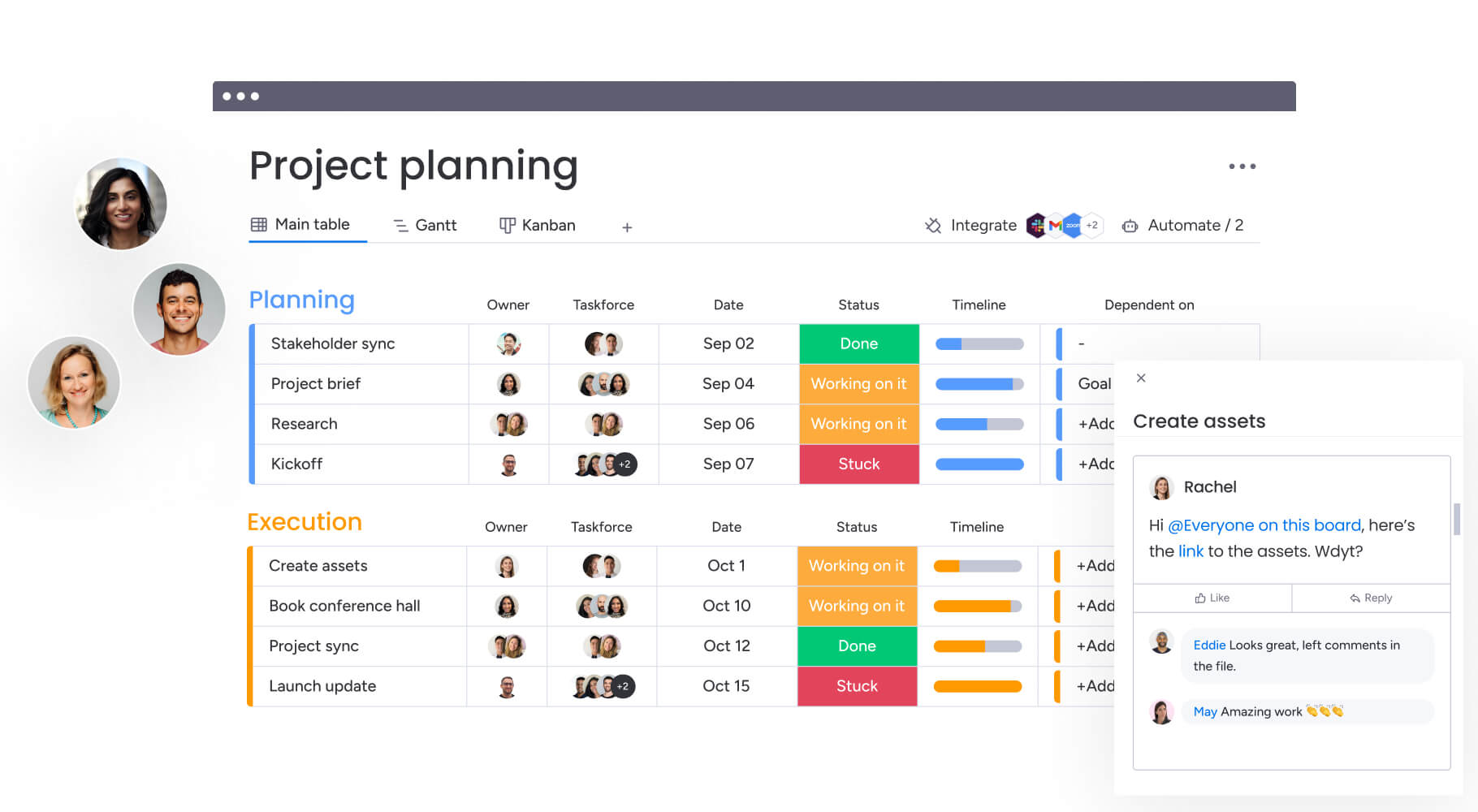
Monday Work Management adapts to many types of workflows. Teams can create boards for projects, tasks, or processes with ease. It supports:
- Task tracking with clear deadlines
- Project milestones for better planning
- Multiple views like Kanban, calendar, and timeline
- Easy switching between different work styles
This flexibility allows teams to work the way they want without limits. It fits small tasks and complex projects equally well.
Automations And Dashboards For Streamlined Operations
Automations reduce manual work by handling repetitive tasks. For example:
- Automatic status updates
- Notifications when tasks change
- Task assignments based on triggers
Dashboards give a clear overview of team progress. They show data in real-time with charts and reports. This helps managers and team members stay informed and act fast.
Customization Capabilities Across Departments And Teams
Teams can tailor Monday Work Management to fit their needs. Customization options include:
| Customization Type | Description |
|---|---|
| Custom Fields | Add specific data points to tasks and projects |
| Templates | Use or create templates for repeated workflows |
| Views | Select from multiple ways to see work data |
| Integrations | Connect with tools like email, calendars, and apps |
This level of customization helps different teams work in ways that suit them best.
How These Features Enhance Team Collaboration And Efficiency
The combination of flexibility, automation, and customization boosts teamwork. Teams share updates easily and avoid confusion.
- Clear task assignments keep everyone responsible.
- Automations save time on routine work.
- Dashboards offer a shared view of progress.
- Customization lets teams work in their style.
These features help teams finish projects quicker and with less stress. Communication flows better, and work gets done without delays.
Key Features Of Monday Crm
Monday CRM offers a focused set of features designed to streamline the sales process. It guides teams through every stage, from initial lead capture to long-term customer retention. Built with AI and automation, it helps sales teams stay organized and efficient. Its integration within a broader work management framework allows seamless access to customer data alongside project workflows.
Sales Cycle Management From Lead Generation To Retention
Monday CRM covers the entire sales cycle. It starts with capturing leads through customizable forms and imports. Then, it tracks each lead’s progress through qualification, nurturing, and deal closing stages.
- Lead capture and assignment
- Automated follow-ups and reminders
- Deal tracking with status updates
- Customer retention tools like engagement tracking
This continuous management ensures no lead is lost and customers stay engaged after purchase.
Integration Of Customer Data Within Work Management Framework
Customer information lives inside the same platform used for project and task management. This integration offers:
- Centralized data storage for easy access
- Real-time updates visible to sales and operations teams
- Cross-department collaboration on customer needs
- Automated workflows linking sales actions to project tasks
Such integration reduces data silos and improves team communication.
Tools For Sales Pipeline Visualization And Tracking
Monday CRM provides clear visuals of sales pipelines. These tools help teams understand deal progress and prioritize efforts.
| Feature | Description |
|---|---|
| Kanban Boards | Drag and drop deals through sales stages |
| Custom Dashboards | Track key metrics like deal value and closing rates |
| Timeline Views | Visualize sales activities over time |
| Automated Alerts | Notify teams about deal deadlines or status changes |
These tools provide clarity and help teams focus on winning deals.
Benefits Of Using Monday Crm For Small To Medium Businesses
Monday CRM fits well with the needs of small and medium businesses (SMBs). Its simple interface and automation reduce manual work.
- Quick setup with no coding needed
- AI-powered insights to improve sales decisions
- Flexible enough to customize for different industries
- Affordable pricing with scalable plans
The platform helps SMBs grow sales without complexity or high costs.
Credit: monday.com
Pricing And Affordability Breakdown
Pricing and affordability are key factors in choosing between Monday CRM and Monday Work Management. Understanding their pricing tiers and what you get at each level helps businesses pick the best fit. This section explains how costs compare, the value offered for features, and which business sizes benefit most from each option.
Comparison Of Pricing Tiers For Monday Crm And Work Management
| Plan | Monday CRM | Monday Work Management |
|---|---|---|
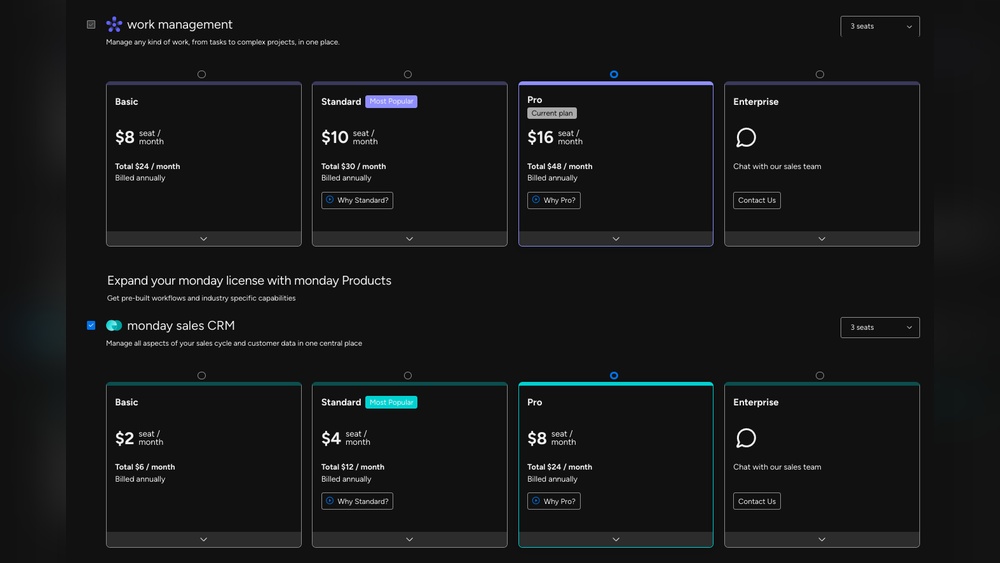
| Basic | $10/user/month – Core CRM tools, lead tracking, AI-powered automations | $8/user/month – Project tracking, basic workflows, dashboards |
| Standard | $16/user/month – Advanced CRM features, sales pipeline automation, integrations | $10/user/month – Enhanced project management, custom automations, timeline views |
| Pro | $24/user/month – Full CRM suite, AI insights, premium support | $16/user/month – Comprehensive work management, advanced reporting, time tracking |
| Enterprise | Custom pricing – Tailored CRM solutions, dedicated account manager | Custom pricing – Scalable project and workflow management |
The pricing shows Monday Work Management starts lower but Monday CRM includes AI tools at every level.
Cost-effectiveness Relative To Feature Sets
Monday CRM focuses on sales and customer relations. It offers strong automation powered by AI. This helps sales teams save time and close deals faster.
Monday Work Management provides flexible tools for any team type. It supports project tracking, timelines, and workflow customization. This fits teams needing broad task and project control.
- Monday CRM offers targeted sales features justifying higher costs at advanced plans.
- Monday Work Management delivers versatile work tools at a more affordable price.
Both platforms offer automation but Monday CRM’s AI-driven features add extra value for sales teams. Work Management’s strength is in adapting to many business processes.
Value For Different Business Sizes And Needs
Small businesses benefit from Monday Work Management’s lower entry cost and broad work tools.
Sales-focused small teams may choose Monday CRM for its AI support and sales pipeline management.
Medium and large businesses gain value from Monday CRM’s advanced AI and automation in sales departments.
Businesses with diverse projects and departments prefer Monday Work Management for its flexibility and lower per-user price.
- Startups and small teams: Work Management for cost savings and flexibility.
- Sales teams: CRM for tailored sales automation and insights.
- Enterprises: Choose based on specific needs; CRM for sales focus, Work Management for broad workflows.
Choosing depends on business size, team goals, and need for sales automation versus general work management.
Pros And Cons Based On Real-world Usage
Choosing between Monday CRM and Monday Work Management depends on specific team needs and workflows. Both tools offer unique features tailored to distinct purposes. Users often weigh strengths and drawbacks based on actual daily use. This section breaks down their benefits and challenges from real-world perspectives.
Strengths Of Monday Work Management In Project And Task Handling
Monday Work Management excels at organizing and tracking diverse projects and tasks across teams. Its flexibility suits various departments, from marketing to operations.
- Customizable workflows: Adapt boards and views to fit any process.
- Visual project tracking: Use timelines, kanban boards, and calendars for clear progress insights.
- Automations: Reduce manual work with code-free triggers and actions.
- Collaboration: Centralize communication with comments, file sharing, and notifications.
This platform helps teams stay aligned and meet deadlines efficiently.
Advantages Of Monday Crm In Sales Process Optimization
Monday CRM focuses on streamlining sales workflows from lead capture to closing deals.
- AI-powered insights: Prioritize leads and forecast sales trends.
- Pipeline management: Visualize stages and monitor deals in real time.
- Automation: Automate follow-ups, task assignments, and data entry.
- Contact management: Store detailed client information in one place.
Its intuitive design helps sales teams increase efficiency and close deals faster.
Limitations And Challenges Users Face With Each Tool
| Tool | Limitations |
|---|---|
| Monday Work Management |
|
| Monday CRM |
|
User Feedback And Common Pain Points
Users appreciate Monday Work Management for its adaptability but mention initial setup as challenging. Teams sometimes find advanced features overwhelming without training.
Feedback on Monday CRM highlights its ease of use and automation benefits. Some users desire more detailed analytics and smoother integration with other sales tools.
- Both tools benefit from ongoing user support and updates.
- Customization options can be both a strength and a hurdle.
- Clear documentation helps reduce confusion and setup time.
Specific Recommendations For Ideal Users And Scenarios
Choosing between Monday CRM and Monday Work Management depends on your team’s goals and tasks. Each tool fits different needs and workflows. Understanding when to use one or both helps teams work smarter and faster.
When To Choose Monday Work Management Over Crm
Monday Work Management suits teams needing broad project and task oversight. It works well for:
- Managing multiple projects across departments
- Tracking daily tasks and deadlines
- Custom workflows beyond sales or customer data
- Teams requiring flexible boards and dashboards
It’s ideal for teams that want to organize, automate, and visualize any type of work.
Best Use Cases For Monday Crm In Sales-driven Teams
Monday CRM targets sales-focused teams aiming to streamline customer relations. Best use cases include:
- Tracking leads and sales pipelines
- Automating follow-ups and reminders
- Managing customer information and interactions
- Improving sales team collaboration and reporting
Its AI-powered features help sales teams grow faster with less manual effort.
Scenarios Where Combining Both Tools Adds Maximum Value
Using Monday CRM and Monday Work Management together benefits teams with diverse needs:
- Sales teams managing customer data alongside project tasks
- Marketing teams tracking campaigns and customer engagement
- Customer support teams coordinating tasks and client follow-ups
This combination delivers a full view of work and customer relations, boosting efficiency.
Industry And Team Size Considerations
| Industry | Best Fit Tool | Team Size | Reason |
|---|---|---|---|
| Sales & Retail | Monday CRM | Small to Medium | Focus on lead tracking and sales automation |
| Marketing & Creative | Both | Medium to Large | Manage campaigns and customer data simultaneously |
| IT & Development | Monday Work Management | Small to Large | Flexible project management and task tracking |
| Customer Support | Both | Medium | Combine task workflows with CRM for client follow-ups |
Team size affects tool choice. Small teams benefit from CRM’s simplicity. Larger teams need Work Management’s flexibility or both tools combined.
Conclusion: Making The Right Choice For Your Productivity Needs
Choosing between Monday CRM and Monday Work Management depends on your team’s specific goals. Both tools boost productivity but focus on different areas. Understanding their strengths helps select the best fit for your workflow.
Summary Of Key Differences And Benefits
| Feature | Monday CRM | Monday Work Management |
|---|---|---|
| Primary Purpose | Streamlines the entire sales cycle from lead to retention | Manages diverse projects and workflows across departments |
| Automation | AI-powered, code-free automations tailored for sales tasks | Flexible automations for various project management needs |
| Customization | Focused on sales pipelines and customer management | Highly adaptable to any kind of work or process |
| Best For | Sales teams aiming to grow and manage customer relations | Teams handling multiple projects or operational workflows |
Final Thoughts On Enhancing Workflow With Monday.com Solutions
Monday CRM simplifies sales with AI-driven insights and easy automations. It helps sales teams stay organized and close deals faster.
Monday Work Management offers a broad platform for managing projects across many teams. It keeps workflows visible and adaptable.
Both solutions improve communication and reduce manual work. Choose based on whether your focus is sales or general project management.
Next Steps For Evaluating And Implementing Your Choice
- Identify your team’s core needs: sales-focused or project management.
- Test both platforms using free trials to explore features.
- Assess ease of use and how each fits your existing workflow.
- Plan a phased rollout with clear goals and team training.
- Monitor progress and adjust settings for maximum efficiency.
Careful evaluation ensures you select the right tool. It sets your team up for smoother processes and better results.

Credit: community.monday.com
Frequently Asked Questions
What Is The Difference Between Monday Work Management And Monday Crm?
Monday Work Management offers flexible project and task management across teams. Monday CRM focuses on sales processes, managing leads, deals, and customer relationships efficiently.
Is Monday.com A Work Management Platform?
Yes, monday. com is a work management platform. It helps teams plan, track, and manage projects efficiently with customizable workflows and automation.
Who Is Monday.com’s Biggest Competitor?
Monday. com’s biggest competitors are Asana, ClickUp, Smartsheet, and Wrike. Each offers strong project management and collaboration features. Trello, Airtable, Notion, and Jira also compete by catering to specific team needs and workflows.
Is Monday Really A Crm?
Yes, Monday. com offers a CRM solution designed to manage sales pipelines and customer relationships effectively. It also provides flexible work management tools for various business needs.
Conclusion
Choosing between Monday CRM and Work Management depends on your team’s needs. Monday CRM focuses on sales and customer relationships. Work Management helps organize projects and daily tasks across teams. Both use automation to save time and boost efficiency. Visit Monday CRM to learn how AI-powered tools can support your sales process. Pick the tool that fits your workflow best and helps your team stay productive. Simple and clear options make work easier for everyone.

