
Choosing the right marketing and sales automation tool can make or break your business growth. If you’re torn between Highlevel and Keap, you’re not alone.
Both promise to put your business growth on autopilot, but which one truly fits your unique needs? You want a platform that’s easy to use, helps you sell more, and speeds up your follow-ups without overwhelming you with complexity. You’ll discover the key differences between Highlevel and Keap, so you can make the best choice for your business. Ready to find out which tool will boost your efficiency and sales? Let’s dive in. If you want to explore Keap right away, check it out here: Keap – Marketing and Sales Automation Software.

Credit: www.gohighlevel.com
Introduction To Highlevel And Keap
HighLevel and Keap are popular marketing tools for businesses. Both help manage sales, marketing, and customer relationships. Choosing the right platform affects how well a business grows and serves customers.
Overview Of Highlevel: Purpose And Target Audience
HighLevel is an all-in-one marketing platform designed mainly for agencies. It offers a white label CRM that agencies can brand as their own. This tool helps agencies manage multiple clients, automate marketing, and generate leads.
- Purpose: Marketing automation, CRM, lead generation, and client management.
- Target Audience: Marketing agencies, freelancers, and consultants who manage client campaigns.
- Features: Automated workflows, SMS and email marketing, appointment booking, and sales pipelines.
Overview Of Keap: Purpose And Target Audience
Keap focuses on helping small businesses grow by automating sales and marketing tasks. It offers tools for follow-up, customer management, and payment processing. Keap aims to put business growth on autopilot, making tasks easier.
- Purpose: Sales automation, marketing automation, and customer relationship management.
- Target Audience: Small businesses, solo entrepreneurs, and startups.
- Features: Email marketing, lead capture, follow-up automation, and invoicing.
Why Comparing Highlevel Vs Keap Matters For Marketing Success
Choosing between HighLevel and Keap impacts marketing results. Each tool suits different business needs and sizes.
Comparison helps business owners:
- Understand which platform fits their customer base.
- Pick the right features for their marketing style.
- Manage budgets wisely by selecting suitable pricing plans.
- Improve sales and customer follow-up efficiency.
| Aspect | HighLevel | Keap |
|---|---|---|
| Primary Users | Marketing agencies and consultants | Small businesses and solo entrepreneurs |
| Main Focus | Client management and multi-client campaigns | Automated sales and marketing for business growth |
| Key Features | White label CRM, SMS marketing, lead pipelines | Follow-up automation, email marketing, invoicing |
| Pricing Style | Agency plans, monthly and annual | Small business plans with scalable options |
Key Features Of Highlevel
HighLevel offers a robust set of features designed to help marketing agencies manage clients and campaigns efficiently. The platform combines multiple tools into one system, reducing the need for separate software. Each feature works together to improve lead handling, customer engagement, and data analysis. Below are the main features that make HighLevel stand out.
All-in-one Marketing Platform: Streamlining Agency Operations
HighLevel integrates essential marketing tools into a single platform. Agencies can manage emails, SMS, calls, and social media from one dashboard. This reduces time spent switching between apps. Teams can automate workflows, saving hours on repetitive tasks.
- Unified communication system
- Built-in marketing automation
- Client management tools
- Easy campaign setup and tracking
Advanced Lead Management And Automation Capabilities
HighLevel offers powerful lead tracking and automation features. Leads move smoothly through sales pipelines with minimal manual work. Automated follow-ups improve contact rates and conversions.
- Smart lead capture forms
- Multi-channel follow-up sequences
- Lead scoring and segmentation
- Automated reminders and notifications
White Label Crm: Customization And Branding Benefits For Agencies
Agencies can brand HighLevel’s CRM as their own. This creates a professional image for clients and builds trust. Custom logos, colors, and domain names enhance brand consistency.
- Full white-label options
- Custom dashboards and reports
- Client-specific portals
- Improved client retention through branding
Website And Funnel Builder: Enhancing Customer Engagement
HighLevel includes tools to build websites and sales funnels easily. Drag-and-drop editors require no coding skills. Funnels guide visitors from interest to purchase, boosting sales.
- Pre-built funnel templates
- Responsive website designs
- Integrated payment gateways
- Lead capture and nurture forms
Appointment Scheduling And Pipeline Management
The platform offers a built-in calendar and pipeline system. Clients can book appointments online, reducing scheduling conflicts. Pipelines give clear views of sales stages and progress.
- Automated appointment reminders
- Multiple calendar sync options
- Visual sales pipeline overview
- Easy drag-and-drop pipeline updates
Reporting And Analytics: Driving Data-driven Decisions
HighLevel provides detailed reports and analytics to track performance. Agencies can analyze campaign results and client engagement. Data helps optimize strategies and improve ROI.
- Real-time dashboards
- Customizable reports
- Conversion tracking
- Client progress monitoring
Key Features Of Keap
Keap offers a robust set of features designed to help small businesses manage sales and marketing efficiently. Its tools focus on automating tasks, organizing customer data, and improving follow-ups. The platform is built to support growth by simplifying complex processes.
Comprehensive Crm With Focus On Small Businesses
Keap provides a powerful CRM system tailored for small businesses. It stores customer details, tracks interactions, and organizes contacts for easy access. The CRM helps maintain strong client relationships by keeping all data in one place.
Features include:
- Contact management with custom tags and notes
- Activity tracking and history logs
- Segmented lists for targeted communication
Marketing Automation And Email Campaigns
Keap’s marketing tools automate repetitive tasks and enhance engagement. Users can create email campaigns with personalized messages and schedule them easily. Automation rules trigger emails based on customer actions.
- Drag-and-drop email builder
- Automated follow-up sequences
- Personalization with customer data
Lead Capture And Management Tools
Keap offers built-in options to capture leads from websites and forms. It collects prospect information automatically and adds it to the CRM. This makes lead management simple and organized.
- Customizable web forms and landing pages
- Automatic lead assignment
- Real-time lead notifications
Sales Pipeline Management And Follow-up Sequences
The sales pipeline in Keap helps track deals from start to finish. Users can visualize stages and prioritize tasks. Automated follow-up sequences ensure no lead is forgotten.
| Pipeline Feature | Benefit |
|---|---|
| Drag-and-drop pipeline view | Simplifies deal tracking |
| Task reminders and alerts | Ensures timely follow-ups |
| Automated follow-up emails | Maintains customer engagement |
Integration Capabilities With Third-party Tools
Keap connects with many popular apps and services. This expands its functionality and fits into existing workflows. Integrations cover payment gateways, calendars, and more.
- Payment processors like PayPal and Stripe
- Calendar syncing with Google Calendar
- Connection with accounting and e-commerce platforms
User-friendly Interface And Ease Of Use
Keap’s interface is clean and intuitive. It allows users to start quickly without a steep learning curve. The design focuses on simplicity, helping small businesses save time.
- Clear navigation menus
- Guided setup and tutorials
- Responsive design for mobile use
Pricing And Affordability Breakdown
Understanding the pricing structure helps businesses choose the right platform. Both HighLevel and Keap offer tiered plans. Each plan suits different business needs and budgets. This section breaks down their pricing and value for agencies and small businesses.
Highlevel Pricing Plans: Agency Starter To Pro Options
HighLevel’s pricing targets agencies with scalable features. It offers three main plans:
| Plan | Monthly Cost | Key Features |
|---|---|---|
| Agency Starter | $97 | Essential marketing tools, limited accounts |
| Agency Unlimited | $297 | Unlimited accounts, advanced automations, integrations |
| Agency Pro | $497 | White label, SaaS mode, full agency branding |
The plans scale from basic to full agency management. The Agency Starter plan suits small teams. The Agency Pro plan fits agencies needing full customization.
Keap Pricing Tiers And What They Include
Keap’s plans focus on sales and marketing automation for small businesses. Pricing tiers include:
| Plan | Starting Monthly Cost | Main Features |
|---|---|---|
| Lite | $79 | Basic CRM, email marketing, payments |
| Pro | $149 | Advanced automation, sales pipeline, reminders |
| Max | $199 | Full automation, team features, custom reporting |
Keap’s tiers allow gradual access to more tools. The Lite plan covers basic needs. The Max plan suits growing businesses with teams.
Cost Efficiency: Which Platform Offers Better Value?
HighLevel’s pricing fits agencies needing multi-client management. It provides unlimited accounts on mid and high tiers. This benefits agencies managing many clients under one roof.
Keap focuses on small businesses and solopreneurs. Its pricing is lower for single users but lacks unlimited client management.
- HighLevel offers more agency-focused features.
- Keap is budget-friendly for individual users.
- HighLevel’s higher plans include white-label capabilities.
- Keap’s automation tools improve sales follow-up efficiency.
Value depends on business size and needs. Agencies gain more from HighLevel’s multi-account support. Small businesses benefit from Keap’s simple pricing and automation.
Considerations For Budget-conscious Agencies And Businesses
Budget matters most when choosing between these platforms.
- Define your client management needs.
- Count how many users or clients you must support.
- Check which automation tools are essential.
- Consider white-label features if branding is key.
- Review monthly vs annual payment savings.
Start with plans that match your current size. Upgrade as your business grows. Both platforms offer scalable pricing to fit evolving needs.
Pros And Cons Based On Real-world Usage
Choosing between HighLevel and Keap depends on actual user experiences. Both platforms offer unique benefits and face certain challenges in everyday business operations. Understanding their strengths and limitations helps in making an informed choice.
Highlevel Strengths: Feature-rich, Customizable, Agency-focused
- Feature-rich: HighLevel provides extensive marketing, sales, and CRM tools in one platform.
- Customizable: Users can tailor workflows, funnels, and automation to fit specific needs.
- Agency-focused: Designed especially for marketing agencies, it supports white labeling and client management.
Highlevel Limitations: Learning Curve, Pricing, Template Constraints
- Learning Curve: New users may need time to master the platform’s advanced features.
- Pricing: Plans can be costly for small businesses or beginners.
- Template Constraints: Some users find the templates less flexible for unique branding.
Keap Advantages: Ease Of Use, Reliable Automation, Integration
- Ease of Use: Keap offers an intuitive interface suited for small businesses.
- Reliable Automation: Automates follow-ups, sales pipelines, and marketing tasks smoothly.
- Integration: Works well with many third-party tools, enhancing workflow efficiency.
Keap Drawbacks: Pricing, Limited Advanced Features, Scalability Issues
- Pricing: Costs can add up as more features or contacts are needed.
- Limited Advanced Features: May lack some complex automation and customization options.
- Scalability Issues: Growing businesses might outgrow Keap’s capabilities over time.
Credit: www.gohighlevel.com
Ideal Users And Use Case Recommendations
Choosing the right marketing and sales automation tool depends on business size, goals, and user needs. Both HighLevel and Keap offer unique strengths. Understanding who each platform suits best helps in making an informed choice.
Who Should Choose Highlevel: Agencies And Marketing Professionals
HighLevel is built primarily for agencies and marketing professionals. It offers advanced tools designed to manage multiple clients from a single dashboard. Features include white-label options, customizable funnels, and deep automation capabilities.
- Ideal for marketing agencies managing many client accounts.
- Supports white-label branding to resell services under your name.
- Strong automation workflows for lead nurturing and client communication.
- Robust integrations for comprehensive marketing campaigns.
Agencies benefit from HighLevel’s scalable plans and client management features that streamline workflow and increase efficiency.
Who Should Choose Keap: Small To Medium-sized Businesses
Keap targets small to medium-sized businesses (SMBs) seeking to automate sales and marketing without steep learning curves.
- Best for business owners managing sales and marketing themselves.
- User-friendly CRM with easy-to-use automation tools.
- Includes invoicing, payment processing, and appointment scheduling.
- Pricing structured to fit growing businesses with clear tiers.
Keap helps SMBs follow up faster, organize contacts, and close deals efficiently.
Scenarios Where Highlevel Excels Over Keap
| Scenario | Why HighLevel Excels |
|---|---|
| Managing Multiple Clients | White-label CRM and client management tools designed for agencies |
| Complex Marketing Funnels | Advanced funnel builder and automation workflows |
| Custom Branding | Full white-labeling to deliver a branded experience |
| Unlimited Campaigns | Plans support unlimited contacts and campaigns for scaling |
Scenarios Best Suited For Keap’s Features And Pricing
- Simple Sales Automation: Easy setup for follow-ups and lead capture without complex workflows.
- Payment and Invoicing: Integrated tools to handle billing inside the platform.
- Appointment Scheduling: Built-in calendar features for easy client bookings.
- Budget-Friendly Growth: Pricing plans fit smaller budgets with essential automation features.
- Single Business Focus: Ideal for entrepreneurs managing their own sales and marketing.
Conclusion: Making The Right Choice For Marketing Success
Choosing the right marketing platform shapes business growth and efficiency. Both HighLevel and Keap offer strong tools but differ in focus and features. Understanding these differences helps pick the best fit for your needs.
Summary Of Key Differences And Benefits
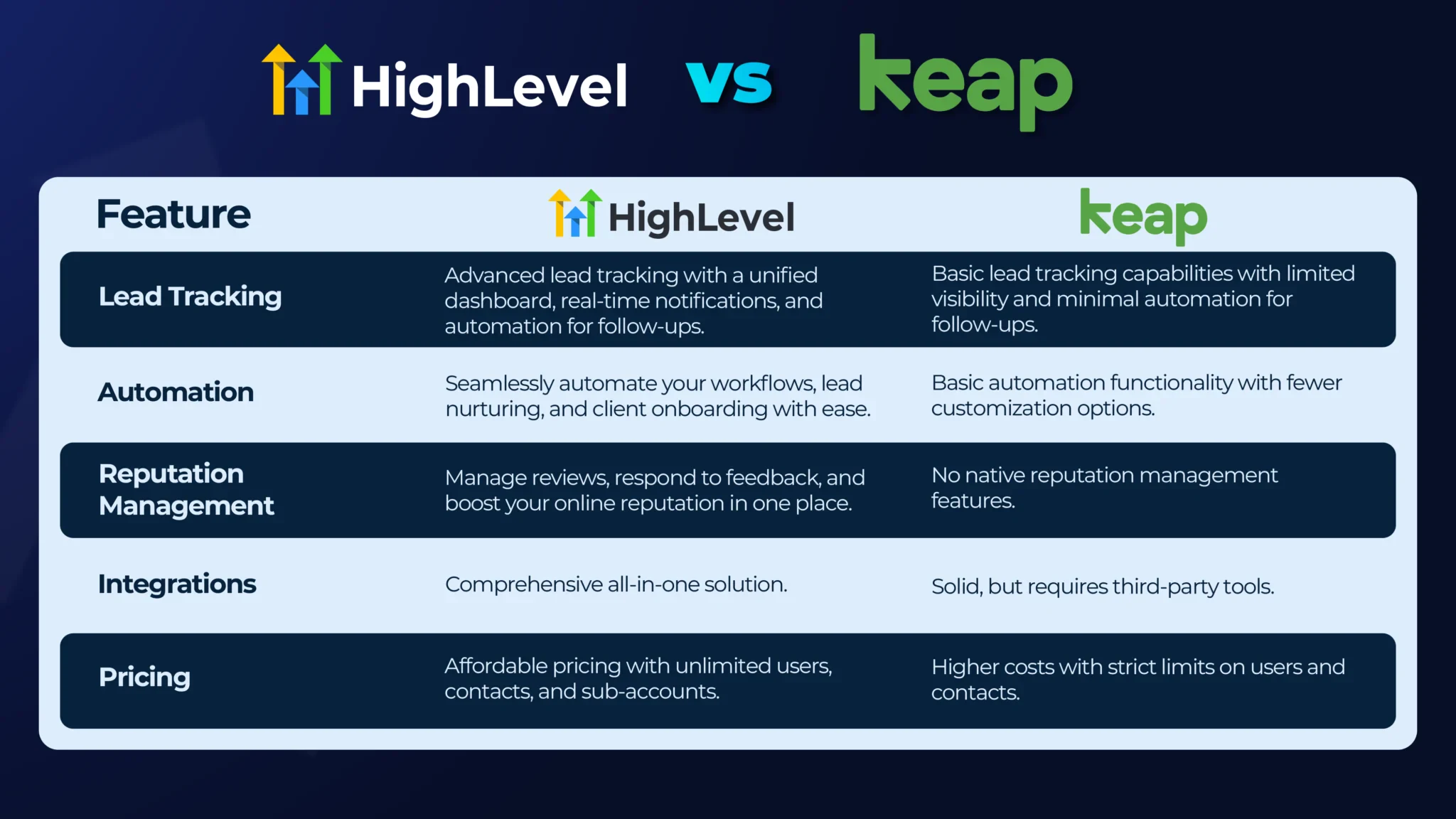
| Feature | HighLevel | Keap |
|---|---|---|
| Target Users | Marketing agencies and service providers | Small to medium businesses |
| Pricing Structure | Agency-focused plans with white-label options | Tiered plans for business growth |
| Key Strength | Comprehensive CRM with automation and white-labeling | Easy-to-use sales and marketing automation |
| Automation | Advanced workflows, multi-channel campaigns | Follow-ups, sales pipeline management |
| Usability | Feature-rich but steeper learning curve | Simple interface, beginner-friendly |
Factors To Consider When Choosing Between Highlevel And Keap
- Business Size: Keap suits small businesses; HighLevel fits agencies.
- Feature Needs: HighLevel offers deeper customization and white-label options.
- Ease of Use: Keap provides a simpler, faster learning experience.
- Budget: Compare plans to find the best cost-value balance.
- Automation Complexity: HighLevel supports complex campaigns; Keap covers essential automations.
Final Recommendations For Business Growth And Efficiency
Choose Keap if your priority is easy setup and efficient sales automation. It helps businesses sell more and follow up faster without complexity.
Choose HighLevel if your focus is on agency-level control, white-labeling, and advanced marketing workflows. It fits businesses needing full customization and multi-channel reach.
Assess your business goals, team skills, and budget carefully. Both platforms aim to automate marketing and sales but serve different audiences.
Making the right choice ensures smoother operations and drives consistent business growth.
Credit: blog.gohighlevel.com
Frequently Asked Questions
What Are The Disadvantages Of Gohighlevel?
GoHighLevel lacks a free plan and has expensive pricing. Its complex features cause a steep learning curve. Template customization and third-party integrations remain limited. Training materials often feel outdated. Inventory management features are basic.
Who Are Keap Crm Competitors?
Keap CRM competitors include ActiveCampaign, HubSpot CRM, Encharge, Pipedrive, Salesforce Marketing Cloud, Brevo, Zoho CRM, Freshsales, and Omnisend. These alternatives offer diverse CRM and automation features to suit various business needs and sizes.
How Much Does Highlevel Cost?
HighLevel costs start at $97/month for the Agency Starter Plan. Unlimited plans go up to $297/month, with a Pro Plan at $497/month.
What Is Highlevel Used For?
HighLevel is an all-in-one platform for marketing agencies. It manages leads, automates marketing, builds websites, and tracks sales funnels efficiently.
Conclusion
Choosing between Highlevel and Keap depends on your business needs. Highlevel suits agencies needing a white-label CRM. Keap offers easy marketing and sales automation for small businesses. Both tools help manage leads and automate follow-ups. Keap focuses on simplicity and efficiency. Explore how Keap can grow your business with this link: Keap. Consider your budget, features, and support before deciding. The right tool can improve sales and save time. Take a step toward better business management today.

