

Choosing the right CRM can make or break your sales success. If you’re torn between Copper CRM and Pipedrive, you’re not alone.
Both offer powerful tools to manage your leads and close deals, but which one fits your business like a glove? Imagine having a CRM that not only tracks your sales pipeline but also uses AI to optimize every lead and automate your sales process — freeing you up to focus on what matters most: selling. Ready to discover which CRM will boost your productivity and grow your business faster? Keep reading to see how Copper CRM stacks up against Pipedrive, the easy and effective CRM designed to help you close deals smarter.
Introduction To Copper Crm And Pipedrive
Choosing the right CRM system shapes how businesses handle sales and customer relations. Copper CRM and Pipedrive are two popular options. Both offer tools to manage leads, track deals, and boost sales. Understanding their differences helps businesses pick the best fit for 2025 and beyond.
Overview Of Copper Crm: Purpose And Target Audience
Copper CRM focuses on seamless integration with Google Workspace. It suits teams that rely on Gmail, Google Calendar, and other Google apps daily. Copper’s design aims to reduce manual data entry and keep workflows simple.
- Designed for small to medium businesses.
- Ideal for teams using Google products extensively.
- Helps manage contacts, sales pipelines, and customer data effortlessly.
- Focuses on ease of use and automation within Google ecosystem.
Overview Of Pipedrive: Purpose And Target Audience
Pipedrive is a user-friendly CRM built to help sales teams close deals faster. It offers visual sales pipelines and AI tools that simplify lead tracking and deal management. Automation features support a smooth sales process from start to finish.
- Targets small to mid-sized sales teams.
- Offers strong tools for pipeline visibility and deal tracking.
- Includes AI-powered insights to prioritize leads.
- Focuses on sales process optimization and automation.
Why Comparing Copper Crm And Pipedrive Matters For 2025 Success
Sales and customer management tools evolve quickly. Choosing between Copper CRM and Pipedrive affects productivity and growth. Both systems offer unique strengths, but your business needs must guide the choice.
Key points to consider:
- Integration: Copper excels with Google Workspace users.
- Sales Focus: Pipedrive targets deal-driven sales teams.
- Automation: Both offer automation, but with different approaches.
- User Experience: Easy navigation matters for adoption and daily use.
Understanding these factors helps businesses pick a CRM that supports goals in 2025 and beyond.

Credit: efficient.app
Key Features That Set Copper Crm Apart
Copper CRM offers several unique features designed to enhance team productivity and improve customer relationship management. Its deep integration with Google Workspace and automation tools help reduce manual tasks. Copper also focuses on fast onboarding with built-in support, making it easier for users to adopt the platform quickly. These features give Copper an edge, especially for teams heavily using Google apps and seeking to strengthen client connections.
Seamless Google Workspace Integration: Enhancing Productivity For Google-centric Teams
Copper CRM is built to work perfectly with Google Workspace. It syncs smoothly with Gmail, Google Calendar, Google Drive, and Google Contacts. This tight integration means teams do not need to switch between apps to update CRM data.
- Automatic syncing of emails and calendar events
- Access and attach Google Drive files directly in Copper
- Manage contacts and leads right from Gmail
- Real-time collaboration using Google Docs and Sheets
This integration saves time and keeps all data consistent. It helps Google-centric teams stay productive by streamlining daily tasks and communication.
Automated Data Entry: Reducing Manual Work And Improving Accuracy
Copper CRM automatically captures information from emails and calendar events. This feature reduces the need for manual data entry, minimizing errors and saving time.
Key automation benefits include:
- Auto-logging of emails to the right contacts and deals
- Automatic creation of new leads based on email interactions
- Smart data population in contact and company fields
- Less time spent on repetitive updates
These automations free up sales reps to focus on closing deals instead of updating records.
Built-in Chat Support And Faster Onboarding: Streamlining User Adoption
Copper offers built-in chat support to assist users in real-time. This feature helps new users learn the platform faster and get answers quickly.
- Instant help via chat within the app
- Access to tutorials and guided onboarding
- Reduced downtime during transition to Copper
- Support team available for quick issue resolution
Faster onboarding means teams start benefiting from Copper sooner. It lowers the learning curve and speeds up adoption across the company.
Relationship Management Focus: Strengthening Client Connections
Copper CRM places strong emphasis on managing and nurturing relationships. It organizes contacts, companies, and interactions clearly, helping teams build trust with clients.
| Feature | Benefit |
|---|---|
| Contact & Company Profiles | Comprehensive view of client information and history |
| Activity Tracking | Monitor calls, meetings, and emails linked to clients |
| Pipeline Visualization | Clear stages to manage and prioritize deals |
| Task Reminders | Keep follow-ups timely and consistent |
These features help sales teams maintain strong connections and improve client satisfaction.
Distinctive Features Of Pipedrive And Their Benefits
Pipedrive stands out as a CRM designed for sales teams who want to close deals faster. It offers tools that help track every step in the sales process. The platform focuses on simplifying sales tasks and boosting efficiency. Its features work together to make managing leads, deals, and customer relationships easier.
Each feature of Pipedrive supports better sales outcomes by saving time and providing clear insights. The system is built to fit the way sales teams work, not the other way around. These distinctive features deliver clear benefits that help teams stay organized and focused on selling.
Advanced Sales Pipeline Management: Driving Sales Efficiency
Pipedrive’s sales pipeline management lets users see every stage of their deals clearly. It uses a visual interface that shows leads moving through the sales process. This helps teams prioritize the right deals and avoid missing opportunities.
- Drag-and-drop interface: Easily move deals between stages.
- Deal tracking: Monitor progress and deadlines for each sale.
- AI-powered suggestions: Get tips on which deals need focus next.
This feature reduces manual work and improves follow-ups. Sales reps spend less time organizing and more time closing.
Customizable Reporting And Analytics: Gaining Actionable Insights
Reports and analytics in Pipedrive can be tailored to meet specific business needs. Users create custom dashboards that highlight key sales metrics. This helps teams understand what drives their success or where they struggle.
| Report Type | Benefit |
|---|---|
| Sales performance reports | Track individual and team results |
| Activity reports | See how much effort goes into each deal |
| Forecasting reports | Predict future sales and revenue |
These insights help managers make informed decisions quickly. Teams can adjust strategies and improve results.
Robust Integrations Ecosystem: Expanding Functionality Across Tools
Pipedrive connects with many popular business tools. This ecosystem allows users to automate workflows and keep data synchronized across platforms.
- Email integrations: Sync communications with contacts.
- Marketing tools: Automate campaigns linked to sales activities.
- Customer support apps: Provide seamless service alongside sales.
- Accounting software: Link sales data directly to invoicing.
These integrations reduce manual data entry and help create a smooth workflow. Teams can focus on selling instead of switching apps.
User-friendly Interface Designed For Sales Teams: Simplifying Workflow
Pipedrive’s interface is simple and clean. It is built to match the needs of sales reps and managers. The design reduces learning time and helps users work faster.
- Clear navigation menus with easy access to pipelines and contacts
- Mobile-friendly design for sales on the go
- Visual cues and notifications to keep tasks on track
- Minimal clutter, focusing on key sales actions
This approach makes onboarding quick and daily use less stressful. Sales teams can stay organized without unnecessary complexity.
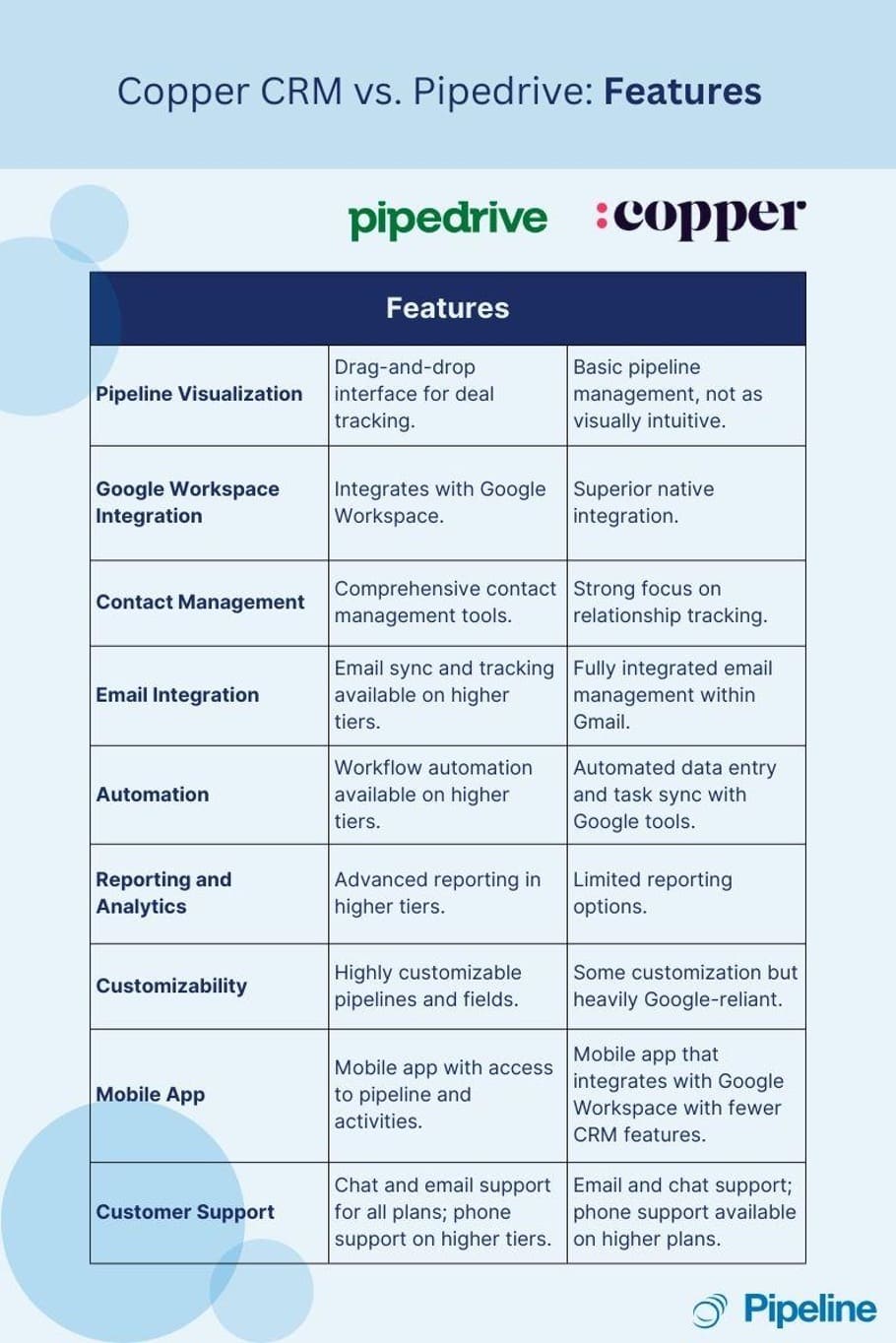
Credit: pipelinecrm.com
Pricing And Affordability Comparison
Choosing the right CRM depends heavily on pricing and the value offered. Copper CRM and Pipedrive each have unique pricing models designed to fit different business needs. Understanding these structures helps businesses make budget-friendly decisions that align with their goals.
Copper Crm Pricing Structure: Evaluating Cost Vs. Value For Google-centric Users
Copper CRM offers plans tailored for users deeply integrated with Google Workspace. Its pricing is straightforward, focusing on seamless Google app integration.
| Plan | Price per User/Month (Billed Annually) | Key Features |
|---|---|---|
| Basic | $25 | Google Workspace Integration, Contact Management, Lead Tracking |
| Professional | $59 | Workflow Automation, Reporting, Sales Forecasting |
| Business | $119 | Advanced Analytics, Custom Integrations, Priority Support |
Value points:
- Deep Google Workspace connectivity saves time.
- Simple interface suits small to mid-sized teams.
- Higher plans offer automation and analytics.
Pipedrive Pricing Plans: Assessing Affordability For Sales-focused Organizations
Pipedrive targets sales teams with a pricing structure that supports pipeline management and deal closing efficiency.
| Plan | Price per User/Month (Billed Annually) | Key Features |
|---|---|---|
| Essentials | $15 | Pipeline Management, Email Integration, Mobile Apps |
| Advanced | $29 | Workflow Automation, Email Tracking, Custom Reporting |
| Professional | $59 | Full CRM Suite, Revenue Forecasting, Team Management |
| Enterprise | $99 | Custom Solutions, Dedicated Support, Enhanced Security |
Affordability highlights:
- Lower entry price fits small sales teams.
- Advanced plans include automation and deeper analytics.
- Enterprise plan suits large organizations needing customization.
Free Trials And Onboarding Offers: How They Impact Initial Investment
Both Copper CRM and Pipedrive provide free trials that reduce upfront costs and risks.
- Copper CRM: Offers a 14-day free trial with access to most features. No credit card required.
- Pipedrive: Provides a 14-day free trial with full feature access. Easy setup and guided onboarding.
Onboarding support varies:
- Copper CRM: Self-service resources plus optional paid onboarding.
- Pipedrive: Includes free onboarding webinars and tutorials; paid personalized onboarding available.
These trials and onboarding options help reduce initial investment by allowing teams to test features before buying.
Pros And Cons Based On Real-world Usage
Choosing the right CRM depends on understanding the strengths and weaknesses users experience daily. Both Copper CRM and Pipedrive offer unique features that appeal to different business needs. Below is a clear look at what users like and dislike about each platform based on real-world usage.
Strengths Of Copper Crm: What Users Appreciate Most
- Seamless Google Workspace Integration: Users love how Copper works smoothly with Gmail, Google Calendar, and Drive.
- Easy to Use Interface: The clean design helps teams adopt the system quickly without much training.
- Automatic Data Capture: Copper tracks emails and contact details automatically, reducing manual entry.
- Strong Contact Management: Users praise the ability to organize contacts and companies efficiently.
- Good for Small to Medium Teams: Many find Copper perfect for businesses needing simple CRM tools without complexity.
Limitations Of Copper Crm: Challenges And Areas For Improvement
- Limited Customization: Some users want more options to tailor pipelines and reports.
- Pricing for Larger Teams: Costs rise quickly as team size grows, which can be a concern.
- Reporting Features: Advanced analytics and reporting are basic and may not fit complex needs.
- Mobile App Limitations: The mobile experience is less powerful compared to the desktop version.
- Integration Gaps: Fewer third-party integrations compared to competitors.
Strengths Of Pipedrive: User-reported Advantages
- Visual Sales Pipeline: Users find the drag-and-drop pipeline easy to manage and understand.
- Automation and AI Tools: Pipedrive’s AI helps prioritize leads and automate routine tasks effectively.
- Customization Flexibility: Users can customize stages, fields, and workflows to match their sales process.
- Strong Reporting and Insights: Offers detailed reports that help teams track performance clearly.
- Integrations: Connects with many popular apps, boosting team productivity.
Limitations Of Pipedrive: Common Pain Points
- Steeper Learning Curve: New users may take longer to get familiar with all features.
- Cost for Full Features: Some essential tools require higher pricing tiers.
- Mobile App Issues: Occasionally reported bugs and slower performance in mobile app.
- Limited Email Marketing: Users note the absence of built-in email campaign tools.
- Customer Support: Some users report slower responses during peak times.
Ideal Users And Scenarios For Each Crm
Choosing the right CRM depends on your business size, sales process, and integration needs. Both Copper CRM and Pipedrive serve different types of users and business scenarios. Understanding who benefits most from each platform helps make a smart choice.
Who Should Choose Copper Crm: Best Fit Use Cases
Copper CRM suits businesses that rely heavily on Google Workspace. It integrates seamlessly with Gmail, Google Calendar, and Drive. This makes it ideal for teams using Google apps daily.
- Small to medium businesses wanting automatic data entry from emails
- Companies needing a simple CRM that works inside Google tools
- Sales teams looking for easy collaboration with Google Docs and Sheets
- Organizations focused on contact and relationship management rather than complex sales pipelines
Copper is also great for users who prefer a clean, minimal learning curve CRM that fits into existing Google workflows.
Who Should Opt For Pipedrive: Optimal Scenarios And Business Types
Pipedrive works best for businesses focused on sales pipeline management. It offers tools to track deals, forecast sales, and automate sales tasks.
- Sales teams needing a clear visual pipeline of deals
- Businesses wanting AI-powered lead scoring and sales automation
- Companies requiring detailed reporting on sales performance
- Organizations aiming to improve sales efficiency and close deals faster
Pipedrive fits well with small to large companies that want to optimize and control every step of their sales process.
Comparative Recommendations: Matching Features To Business Needs
| Criteria | Copper CRM | Pipedrive |
|---|---|---|
| Best for | Google Workspace users, relationship management | Sales pipeline management, deal tracking |
| Integration | Deep Google Apps integration | Wide integrations + AI sales tools |
| Ease of Use | Simple, minimal setup | User-friendly with more sales features |
| Automation | Basic automation within Google ecosystem | Advanced sales automation and AI |
| Ideal Business Size | Small to mid-sized businesses | Small to large sales teams |
Choose Copper CRM if you want a CRM that feels like part of Google Workspace. Pick Pipedrive for powerful sales pipeline tools and automation.
Conclusion: Making The Right Crm Choice For 2025
Choosing the right CRM is critical for sales growth and customer management in 2025. Both Copper CRM and Pipedrive offer strong tools but serve different business needs. Understanding their strengths helps select the best fit for your team and goals.
Summary Of Key Differences And Benefits
| Feature | Copper CRM | Pipedrive |
|---|---|---|
| Integration | Seamless with Google Workspace | Wide range, AI-powered sales tools |
| Ease of Use | Simple, especially for Google users | Intuitive pipeline management |
| Sales Automation | Good automation for workflows | Advanced AI and deal automation |
| Reporting | Basic to moderate analytics | Robust, detailed sales reports |
| Pricing | Competitive for Google users | Flexible plans based on team size |
- Copper CRM suits teams heavily using Google Workspace.
- Pipedrive excels in pipeline tracking and AI-driven sales.
- Pipedrive automates sales processes more deeply.
- Copper offers better native Google app integration.
Final Thoughts On Long-term Success With Copper Crm Vs Pipedrive
Long-term success depends on team needs and workflow fit. Copper CRM fits businesses tied to Google apps. It reduces switching between tools.
Pipedrive supports complex sales pipelines with AI to close deals faster. It scales well for growing sales teams.
Both CRMs improve customer relationships and sales tracking. Choose based on ease of use, automation needs, and integration preferences.
Next Steps: How To Evaluate And Trial Both Crms Effectively
- Define your sales process and key CRM needs.
- Sign up for free trials on both platforms: Pipedrive and Copper CRM.
- Test core features: pipeline management, automation, reporting, and integrations.
- Involve your sales team in hands-on testing for user experience feedback.
- Compare costs against your budget and expected return.
- Review customer support and training resources.
Trial periods reveal real-world fit. Focus on ease, efficiency, and team adoption during testing.

Credit: www.folk.app
Frequently Asked Questions
What Are The Main Differences Between Copper And Pipedrive?
Copper integrates deeply with Google Workspace, offering seamless email and contact syncing. Pipedrive focuses on visual sales pipelines and customizable workflows, ideal for sales teams wanting clear deal tracking and automation.
Which Crm Is Better For Small Businesses, Copper Or Pipedrive?
Pipedrive suits small businesses with its intuitive pipeline management and affordable pricing. Copper is great for Google Workspace users seeking native integration but may be pricier for smaller teams.
How Do Copper And Pipedrive Pricing Compare?
Copper tends to be more expensive, especially after the free trial. Pipedrive offers multiple pricing tiers, making it more flexible and budget-friendly for various business sizes.
Can Copper And Pipedrive Integrate With Other Tools?
Yes, both CRMs support multiple integrations. Copper excels with Google apps, while Pipedrive offers extensive third-party integrations via Zapier and native apps for marketing, support, and analytics.
Conclusion
Choosing between Copper CRM and Pipedrive depends on your business needs. Copper integrates well with Google Workspace, easing daily tasks. Pipedrive focuses on simplifying sales with AI tools and pipeline tracking. It helps you manage deals and automate sales processes efficiently. For businesses wanting a straightforward sales tool, Pipedrive is a solid choice. Explore Pipedrive’s features and plans to see if it fits your workflow. Learn more about Pipedrive here: Pipedrive CRM.

