
Are you struggling to keep your sales process smooth and efficient? If you’re using Close CRM to manage your leads, integrating it with Calendly could be a game-changer for your workflow.
Imagine having all your meeting bookings automatically synced with your CRM, so you never miss a follow-up or lose track of a potential deal. This integration helps you save time, reduce manual data entry, and focus on what really matters—closing deals faster. You’ll discover how the Close CRM Calendly integration works and why it’s a smart move for your sales strategy. Ready to stop missing leads and start closing more? Let’s dive in and see how you can bring clarity and speed to your sales process with this powerful combo. Start streamlining your sales today with Close CRM and watch your productivity soar!
Credit: www.close.com
Introduction To Close Crm Calendly Integration
Integrating Close CRM with Calendly simplifies scheduling and sales management. This connection helps sales teams save time and organize meetings efficiently.
The integration ensures every scheduled appointment is tracked inside the CRM. It creates a smooth workflow from booking to closing deals.
Overview Of Close Crm And Calendly
Close CRM is a sales-focused customer relationship management tool. It helps teams manage leads, calls, emails, and deals in one platform. Close CRM focuses on speeding up the sales process and improving communication.
Calendly is an online scheduling tool. It lets users set meeting times without the back-and-forth emails. Calendly connects with calendars like Google Calendar to avoid double bookings.
| Feature | Close CRM | Calendly |
|---|---|---|
| Main Use | Manage sales and customer data | Schedule meetings and appointments |
| Key Function | Track leads and close deals | Automate meeting bookings |
| Integration Focus | Sales communication and pipeline | Calendar syncing and scheduling |
Purpose And Benefits Of Integrating Scheduling With Crm
Connecting Calendly with Close CRM combines scheduling and sales data seamlessly. This integration offers several advantages:
- Automatic lead creation: New meetings generate leads inside Close CRM.
- Better time management: Sales reps avoid double bookings and missed calls.
- Improved follow-ups: Meeting details stay linked to customer records.
- Faster sales cycles: Scheduling delays reduce, speeding up deal closing.
- Centralized data: All contact and meeting info is in one place.
The integration reduces manual data entry. It keeps the sales team focused on closing deals, not managing schedules.
Key Features Of Close Crm Calendly Integration
The Close CRM Calendly integration streamlines how teams manage meetings and leads. It connects your scheduling and sales platforms. This connection helps sales teams work faster and keep data organized. The integration focuses on syncing calendars, capturing leads, and customizing data flow.
Real-time Syncing Of Calendly Event Types With Close Crm
The integration keeps your Calendly event types updated instantly in Close CRM. Every new or changed event type in Calendly appears without delay in Close. This feature ensures your sales team always works with the latest scheduling options.
- Automatic update of event types
- Reduces manual data entry
- Keeps sales reps informed about available meetings
Automatic Lead Capture From Scheduled Meetings
Every meeting scheduled through Calendly creates a new lead in Close CRM. This automatic lead capture stops leads from slipping through the cracks. It saves time by removing the need to enter lead details manually.
- Lead info from Calendly populates CRM fields
- Quickly follow up with prospects
- Improves lead tracking and sales pipeline accuracy
Customizable Meeting Data Flow Into Crm
Data from Calendly meetings can be customized to fit your sales process. You choose which details transfer to Close CRM and where they appear. This flexibility helps keep your CRM clean and organized.
| Calendly Data | Close CRM Field | Benefit |
|---|---|---|
| Invitee Name | Contact Name | Clear identification of prospects |
| Meeting Type | Opportunity Type | Better sales pipeline segmentation |
| Scheduled Time | Activity Date | Accurate follow-up scheduling |
Seamless Calendar Connection And Invitee Matching
The integration creates a smooth link between your calendar and CRM. Invitees who book meetings through Calendly match automatically with existing contacts in Close. This keeps your database tidy and avoids duplicates.
- Syncs calendar events with CRM activities
- Matches invitees to existing contacts
- Ensures accurate client and meeting records
How Close Crm Calendly Integration Boosts Sales Productivity
The integration between Close CRM and Calendly simplifies key sales tasks. It helps sales teams work faster and smarter. Sales reps spend less time on routine work and more time closing deals. The connection creates a smooth flow of information between scheduling and customer management. This reduces errors and missed opportunities. The result is better focus, quicker follow-ups, and higher sales output.
Eliminating Manual Data Entry For Sales Teams
Manual data entry wastes time and causes mistakes. The Close CRM Calendly integration automatically sends meeting details to the CRM. This removes the need to copy information by hand.
- Meeting times and client details sync instantly.
- Sales reps avoid typing errors and duplicated data.
- Data stays accurate and up to date without extra effort.
Automation saves hours each week, letting teams focus on selling. It also keeps the CRM clean and reliable, which improves reporting and decision-making.
Reducing Lead Loss With Automated Contact Creation
New leads can slip through the cracks without quick action. Calendly bookings automatically create new contacts in Close CRM. This ensures every potential client enters the sales pipeline.
- Calendly captures lead information during booking.
- Close CRM instantly creates a contact record.
- Leads are tracked from the moment they schedule a meeting.
This automation cuts lead loss and missed follow-ups. Sales reps see all new leads in one place, ready for outreach.
Improving Follow-up Efficiency Through Timely Meeting Logs
Follow-ups matter most right after meetings. The integration logs all scheduled meetings in Close CRM automatically. Sales reps get quick access to meeting notes and times.
- Instant meeting logs update contact records.
- Reps can review meeting details before follow-up calls.
- Timely reminders help keep outreach on schedule.
This improves the speed and quality of follow-ups. Quick action increases chances of closing deals faster.
Enhancing Customer Experience With Streamlined Scheduling
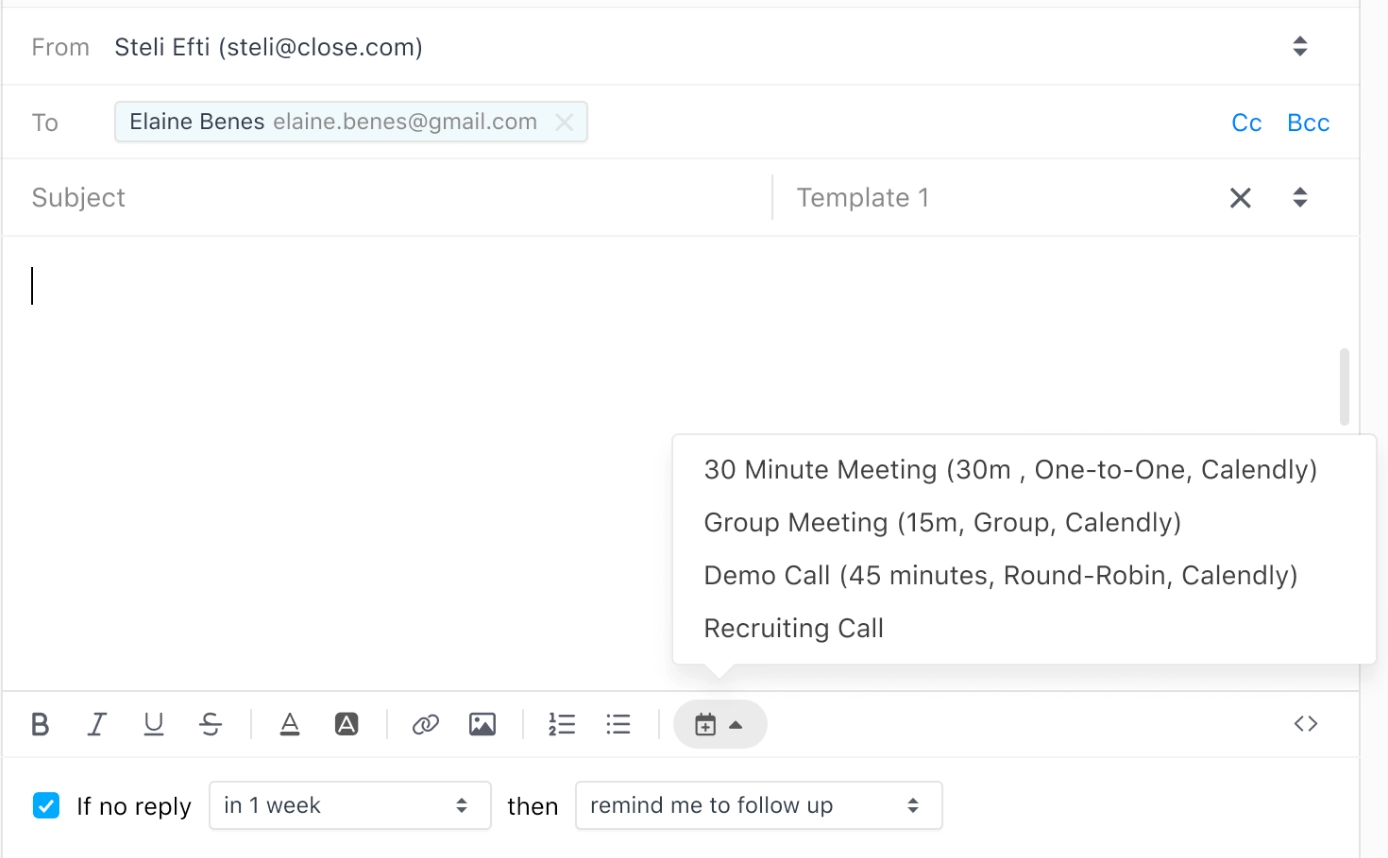
Customers prefer easy scheduling without back-and-forth emails. Calendly offers a simple way to book meetings that syncs directly with Close CRM.
- Clients select available times from a shared calendar.
- Meetings automatically appear in both Calendly and Close CRM.
- Sales reps avoid double bookings and scheduling conflicts.
This smooth process creates a positive impression. Customers feel valued and enjoy a hassle-free experience. A better experience builds trust and increases loyalty.
Pricing And Affordability Breakdown
Understanding the costs and value of Close CRM and Calendly integration helps businesses plan better. Pricing affects small teams and large sales groups differently. This section breaks down pricing for both platforms and the impact of their integration on budgets.
Close Crm Pricing Overview And Subscription Plans
Close CRM offers a few clear subscription plans tailored to sales teams. Each plan includes core CRM features but varies in limits and advanced tools.
| Plan | Monthly Cost (per user) | Main Features |
|---|---|---|
| Basic | $29 | Email Sync, Calling, Reporting |
| Professional | $69 | All Basic Features + Advanced Reporting, API Access |
| Business | $99 | Everything in Professional + Customization, Premium Support |
Close CRM pricing scales with features and user needs. The Professional plan fits most growing sales teams.
Calendly Pricing Tiers And Limitations
Calendly offers multiple tiers with varying limits on scheduling and integrations.
| Plan | Monthly Cost (per user) | Key Limits |
|---|---|---|
| Free | $0 | 1 Event Type, Basic Integrations |
| Essentials | $10 | Unlimited Event Types, Reminders, Google/Outlook Sync |
| Professional | $15 | Advanced Integrations, Custom Branding, Team Features |
Lower tiers have limited customization and fewer integrations. CRM sync is usually in higher plans.
Cost Implications Of Using The Integration
- Using Close CRM with Calendly requires at least Professional plans on both platforms for smooth syncing.
- Monthly combined costs can range from $79 to $114 per user, depending on chosen plans.
- Integration reduces manual data entry, saving time and lowering operational costs.
- Some hidden costs may appear if advanced API use or extra add-ons are needed.
Budgeting for the integration means considering subscription fees plus potential setup and training expenses.
Evaluating Roi For Sales Teams And Businesses
- Time Savings: Automated meeting scheduling and lead syncing cut down admin work.
- Lead Conversion: Faster follow-ups increase chances to close deals.
- Team Productivity: Better workflow means reps spend more time selling.
- Cost Efficiency: Reduced errors and duplicated efforts lower overhead.
- Scalability: Plans grow with the team, avoiding wasted spend.
Sales teams often recover integration costs through improved deal closure rates and saved hours.
Pros And Cons Based On Real-world Usage
Using the Close CRM Calendly integration offers clear benefits and some challenges. Real users report how this setup affects their daily sales workflow. Below is a breakdown of key advantages and common issues encountered.
Advantages: Increased Efficiency, Better Lead Management, And Real-time Updates
The integration streamlines meeting scheduling and lead tracking. Teams save time by automatically syncing Calendly bookings with Close CRM.
- Increased Efficiency: Automates data entry, reducing manual work.
- Better Lead Management: New leads from Calendly appear instantly in Close, enabling faster follow-up.
- Real-Time Updates: Changes in Calendly appointments reflect immediately in Close CRM, keeping sales pipelines accurate.
Users notice less friction between scheduling and sales tasks, helping move deals forward smoothly.
Challenges: Potential Sync Issues, Pricing Barriers For Advanced Features
Some users face syncing problems, such as delayed or missed updates between Calendly and Close CRM. These hiccups can disrupt workflow.
| Challenge | Description |
|---|---|
| Sync Issues | Occasional delays or failures in syncing appointment data. |
| Pricing Barriers | Advanced integration features require higher-cost plans on both platforms. |
Cost can limit access to key functions like team scheduling or custom branding.
User Feedback On Usability And Customization Limits
Users find the integration mostly easy to set up and use. The interface is straightforward for basic tasks.
- Customization options are somewhat limited in lower pricing tiers.
- Some wish for more control over how data flows between Calendly and Close.
- The setup process is simple but can feel restrictive for advanced users.
Technical Considerations And Reliability Concerns
Technical reliability varies depending on internet connectivity and app updates.
- Occasional bugs appear after platform updates.
- Integration depends heavily on stable API connections.
- Users recommend monitoring sync status regularly to catch errors early.
Despite these concerns, most users find the integration stable enough for daily sales operations.
Ideal Users And Recommended Scenarios For Integration
The Close CRM Calendly integration suits teams needing smooth scheduling and efficient sales tracking. It connects appointment booking directly with customer records. This saves time and reduces missed leads.
This integration works best for users who want to automate workflows and keep all data in one place. It enhances communication between sales and support teams by syncing calendars and CRM details.
Small To Mid-sized Sales Teams Seeking Automation
Teams with limited resources benefit from this integration. It automates meeting scheduling and updates contact info without manual input.
- Save hours spent on calendar management
- Focus more on closing deals
- Reduce errors from manual entry
Sales reps see all appointments and customer notes in Close CRM. It helps them prepare before calls and track progress easily.
Businesses Needing Seamless Scheduling And Crm Data Sync
Companies that rely on timely meetings and accurate customer data find this integration useful. Calendly books client meetings, while Close CRM stores all communication.
Data flows automatically between both tools:
| Calendly | Close CRM |
|---|---|
| Appointment booked | Contact record updated |
| Rescheduling or cancellations | Calendar events adjusted |
| Meeting details and notes | Logged in customer timeline |
This keeps teams aligned and reduces follow-up delays.
Use Cases: Inside Sales, Customer Support Scheduling, And Lead Nurturing
Several scenarios fit this integration well:
- Inside Sales: Automate demo or discovery call bookings. Track all interactions in one place.
- Customer Support Scheduling: Clients book support calls easily. Support agents see customer history instantly.
- Lead Nurturing: Schedule follow-ups without leaving the CRM. Keep leads warm with timely contact.
The integration creates a smooth experience from first contact to closing or resolving issues.
When To Consider Alternatives Or Additional Tools
This setup suits many teams but has limits. Consider other options if:
- You need advanced customization beyond basic scheduling
- Your team uses multiple calendars or CRM systems
- High volume of complex meeting types with special requirements
- Desire deeper analytics or marketing automation features
Adding tools like Zapier or native CRM extensions can fill gaps. Evaluate your workflow needs before finalizing.
Step-by-step Guide To Setting Up Close Crm And Calendly Integration
Integrating Close CRM with Calendly helps automate your scheduling and sales tracking. This guide walks through the setup process clearly and simply. Follow each step to connect your accounts, configure event details, match contacts correctly, and solve common issues.
Connecting Calendly To Close Crm
Start by linking your Calendly account to Close CRM. This connection syncs your scheduled meetings directly into your sales pipeline.
- Log into your Close CRM dashboard.
- Navigate to the Integrations section.
- Choose Calendly from the list of available apps.
- Click Connect and enter your Calendly login details.
- Authorize permissions to allow Close CRM access to your Calendly events.
After successful connection, new Calendly meetings will appear in Close CRM automatically.
Configuring Event Types And Data Flow
Customize which Calendly event types sync and how data flows into Close CRM.
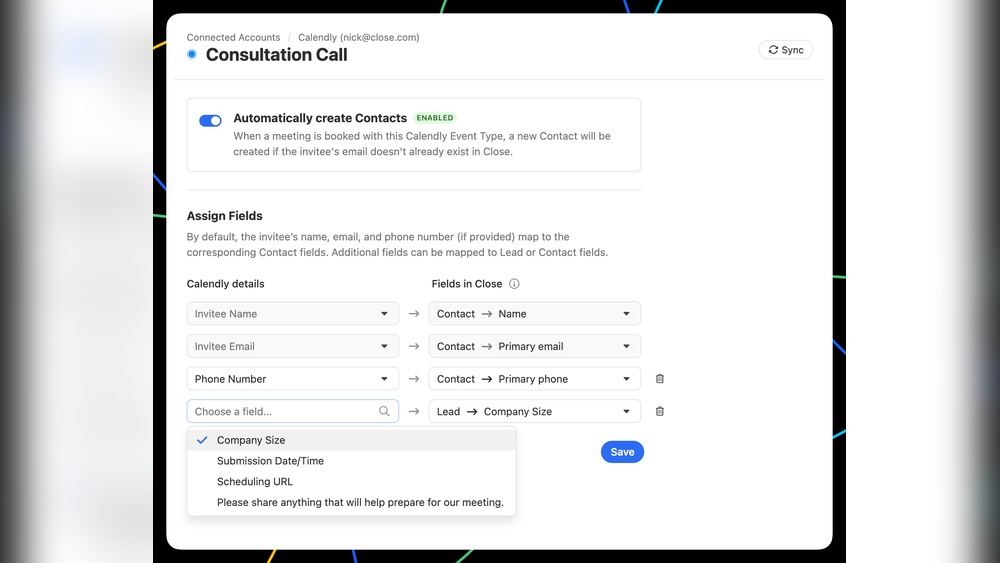
- Select specific event types to track, such as demo calls or consultations.
- Map event fields like name, email, and meeting time to Close CRM contact fields.
- Set rules for creating new leads or updating existing contacts based on event data.
- Choose how meeting notes or links appear in Close CRM activities.
| Calendly Event Field | Close CRM Field | Purpose |
|---|---|---|
| Invitee Name | Contact Name | Identify the lead or contact |
| Invitee Email | Email Address | Match or create contacts |
| Event Date & Time | Activity Date | Schedule follow-up tasks |
Tips For Ensuring Accurate Contact Matching
Correct contact matching avoids duplicates and keeps your CRM clean.
- Use email addresses as the primary unique identifier.
- Regularly check for duplicate contacts in Close CRM.
- Set rules to update existing contacts rather than creating new ones.
- Ensure Calendly invitees fill all required fields.
- Test the integration by scheduling a few events and verifying contact creation.
Troubleshooting Common Integration Issues
Address typical problems to keep your integration smooth.
- Sync delays: Check internet connection and API limits.
- Missing events: Confirm event types are selected for syncing.
- Duplicate contacts: Adjust matching rules and clean CRM.
- Authorization errors: Reconnect Calendly and Close CRM accounts.
- Data mismatches: Verify field mappings in integration settings.
Credit: www.close.com
Conclusion: Maximizing Sales With Close Crm Calendly Integration
The integration of Close CRM with Calendly streamlines scheduling and sales tracking. This connection saves time, reduces errors, and keeps your sales process smooth. Sales teams gain clear visibility of appointments and follow-ups without switching tools. The combined power helps close deals faster and keeps leads warm.
Summary Of Benefits And Key Features
- Automated Scheduling: Calendly syncs appointments directly into Close CRM.
- Improved Lead Management: All meeting data is logged under each lead’s profile.
- Time Savings: No manual entry of meeting details or follow-up tasks.
- Better Team Coordination: Visibility of team calendars helps avoid double-booking.
- Increased Conversion Rates: Faster response to leads after meetings.
| Feature | Benefit |
|---|---|
| Two-way Sync | Ensures calendar and CRM data are always up to date |
| Automated Follow-ups | Triggers reminders and emails after meetings |
| Lead Profile Updates | Keeps contact info and meeting notes organized |
Final Recommendations For Sales Teams
Set up the integration properly to avoid missed appointments. Use the automation features to reduce manual work. Train your team on syncing calendars and updating lead statuses. Regularly review meeting data to spot trends and improve outreach. Keep communication clear and timely for every lead.
- Connect Calendly and Close CRM using official or trusted tools.
- Test appointment syncing before full rollout.
- Create templates for meeting follow-ups in Close CRM.
- Monitor calendar conflicts and resolve quickly.
- Gather feedback from sales reps to optimize workflows.
Future Outlook And Continuous Improvements
Both Close CRM and Calendly continue to add features and fix bugs. Expect deeper integration with more automation options. Improvements in user interface will make scheduling and lead tracking easier. Sales teams will gain more insights from combined data analytics. Staying updated with new releases ensures the best use of this integration.
- Enhanced AI tools to predict best times for meetings.
- More customization options for notifications and workflows.
- Better mobile app experiences for on-the-go scheduling.
- Expanded third-party integrations to connect with other sales tools.
Credit: www.close.com
Frequently Asked Questions
How Much Does Close Crm Cost?
Close CRM pricing starts at $29 per user/month for the Basic plan. Advanced plans range up to $99 per user/month.
How Do I Close Calendly?
To close Calendly, log into your account, go to Billing or Subscription settings, and select “Cancel Subscription. ” Confirm to finalize closure.
What Are The Downsides Of Calendly?
Calendly’s downsides include costly advanced features, limited free plan customization, occasional sync issues, and a complex setup for some users. It may feel impersonal and lacks some professional branding options in lower tiers. Technical glitches and non-single-use booking links can also hinder workflow.
What Is A Close Crm?
Close CRM is a cloud-based sales engagement platform designed to streamline communication and manage customer relationships efficiently.
Conclusion
Integrating Close CRM with Calendly streamlines your sales scheduling. It saves time by syncing meetings and customer data automatically. This connection helps avoid missed leads and follow-ups. Use the integration to keep your sales process smooth and organized. Try the integration today by visiting Close CRM and see how it fits your workflow. Simple tools lead to better customer relationships and faster deal closing.

