

Are you using HubSpot and wondering whether to choose an active list or a static list for your contacts? Knowing the difference between these two can make a huge impact on how you manage your customer data and run your marketing campaigns.
An active list updates automatically as contacts meet your set criteria, while a static list stays fixed, capturing a snapshot of contacts at one moment in time. Which one fits your business goals better? You’ll discover exactly how each list works, when to use them, and how they can save you time and effort. Ready to take control of your CRM like a pro? Let’s dive in. If you want to get started with a powerful CRM that keeps all your data organized and easy to manage, check out HubSpot. It’s designed for startups and small businesses just like yours, and best of all, it’s 100% free with no expiration date. Your data deserves better than spreadsheets—HubSpot makes it simple to understand and use.
Introduction To Hubspot Lists And Their Purpose
HubSpot lists organize contacts to improve marketing efforts and sales outreach. These lists help segment audiences based on shared traits or behaviors. Proper segmentation leads to targeted communication and better engagement. HubSpot offers two main types of lists: Active and Static. Each serves a distinct role in managing contact data.
Understanding Hubspot Lists: Active Vs Static
Active lists update automatically. Contacts enter or leave based on set rules or criteria. For example, an active list might include all contacts who opened an email in the last 30 days. The list changes as contacts meet or no longer meet those conditions.
Static lists are fixed snapshots of contacts. They include only the contacts added when the list was created. Contacts do not update automatically. Manual changes are needed to add or remove contacts.
| Feature | Active List | Static List |
|---|---|---|
| Update Frequency | Automatic | Manual |
| Use Case | Dynamic segmentation, ongoing campaigns | Fixed groups, one-time campaigns |
| Contact Changes | Contacts added/removed based on criteria | Contacts remain as initially added |
| Best For | Smart marketing automation | Simple, static targeting |
Why Smart Segmentation Matters In Marketing Automation
Smart segmentation divides contacts into meaningful groups. It ensures messages match the audience’s needs. Segmentation improves email open rates, click rates, and conversions.
Active lists provide real-time segmentation. They adapt as contacts change behavior or profile data. This keeps marketing relevant and timely.
Static lists help manage fixed groups, such as event attendees or one-time promotions. They simplify campaign setup when audiences do not change.
- Better personalization: Send tailored messages to each segment.
- Improved engagement: Reach contacts with relevant content.
- Efficient workflows: Automate processes based on contact activity.
- Accurate reporting: Track performance by segmented groups.
HubSpot lists make segmentation easy. Using active and static lists correctly boosts marketing automation success. The right list type fits your campaign goals and contact management style.
Key Features Of Active Lists In Hubspot
Active Lists in HubSpot are essential tools for managing and organizing your contacts efficiently. They adapt automatically to changes in your data, helping you maintain up-to-date and targeted contact groups. These lists keep your marketing and sales efforts sharp by ensuring your segments are always accurate and relevant.
Dynamic Membership: How Active Lists Automatically Update
Active Lists use dynamic membership to add or remove contacts automatically. Whenever a contact meets or no longer meets the set criteria, the list updates itself without manual work.
- Contacts enter the list when they match conditions.
- Contacts leave the list if they no longer fit the criteria.
- Updates happen in the background, saving time.
This feature ensures your lists always reflect the most current status of your contacts.
Real-time Segmentation: Keeping Your Data Continuously Relevant
Active Lists provide real-time segmentation, which means your contact groups change instantly as data updates. This keeps your marketing messages relevant and timely.
- Segment contacts based on recent behaviors or properties.
- Use up-to-date lists for email campaigns and workflows.
- React quickly to changes like new sign-ups or purchases.
Real-time updates help you send the right message to the right audience without delays.
Use Cases: Ideal Scenarios For Leveraging Active Lists
Active Lists work well in many situations where contact data changes often. Here are some common examples:
- Lead Nurturing: Automatically group leads based on their engagement level.
- Event Follow-Up: Segment attendees and non-attendees dynamically.
- Customer Retention: Track customers with recent purchases or inactivity.
- Sales Pipeline: Update prospect lists according to deal stages.
These use cases show how Active Lists keep your CRM organized and actionable.
Key Features Of Static Lists In Hubspot
Static lists in HubSpot capture a fixed group of contacts at a specific moment. Unlike active lists, these lists do not update automatically. This makes static lists reliable for targeting a specific audience without changes over time.
Static lists require manual updates to add or remove contacts. This gives users full control over who is included. Many businesses use static lists for campaigns needing consistent membership.
Fixed Membership: The Snapshot Advantage
Static lists act as a snapshot of contacts meeting criteria at creation time. Membership stays unchanged unless edited manually. This prevents unexpected additions or removals.
Because the list content remains constant, static lists provide a stable target audience. This is ideal for campaigns needing exact contact groups without ongoing changes.
Manual Updates: Controlled List Management
Users update static lists manually. This controlled process helps avoid errors from automatic changes. Adding or removing contacts happens intentionally, ensuring accuracy.
Manual updates allow marketers to:
- Review contacts before changes
- Maintain list quality
- Keep track of list edits
This approach suits campaigns requiring careful audience management.
Use Cases: When To Choose Static Lists For Campaigns
Static lists work best for campaigns with fixed audiences. Examples include:
- Event invitations sent to a defined group
- Surveys targeting specific customers
- One-time email blasts requiring exact recipients
Use static lists when consistent membership is critical. They ensure campaigns reach the same contacts every time.
In summary, static lists offer stability and control. They suit campaigns needing fixed contact groups without automatic updates.

Credit: community.hubspot.com
Pricing And Affordability Breakdown For Using Lists In Hubspot
HubSpot offers two main types of lists for managing contacts: Active and Static lists. Both serve different purposes but affect your HubSpot subscription costs differently. Understanding their pricing and affordability helps startups and small businesses plan their budgets effectively.
Cost Considerations For Active And Static Lists
Static lists are simple snapshots of contacts at a specific time. They do not update automatically, so they require manual changes. Static lists are included in most HubSpot plans without extra cost.
Active lists update automatically based on set criteria. This dynamic feature requires more system resources and is usually tied to higher-tier HubSpot plans.
| List Type | Update Method | Impact on Cost |
|---|---|---|
| Static List | Manual updates | Included in free and paid plans |
| Active List | Automatic updates | Requires Professional or Enterprise plans |
How List Usage Impacts Your Hubspot Subscription
HubSpot pricing depends on the number of contacts and features like active lists. Using many active lists may push you to upgrade plans.
- Free CRM users get static lists but no active lists.
- Starter plans offer limited list features, mainly static lists.
- Professional and Enterprise plans unlock active list capabilities.
- More active lists mean higher subscription tiers and costs.
Manage your contact database size carefully. Large lists can increase subscription fees.
Tips For Maximizing Value With List Segmentation
Segment contacts wisely to save costs and improve marketing efficiency.
- Use static lists for one-time campaigns or simple groups.
- Reserve active lists for ongoing, dynamic targeting needs.
- Regularly clean your lists to remove inactive contacts.
- Combine criteria to create precise active lists and reduce list size.
- Monitor list growth to avoid unexpected subscription jumps.
Smart list segmentation helps keep your HubSpot subscription affordable.
Pros And Cons Based On Real-world Usage
Choosing between Active and Static Lists in HubSpot depends on your needs and workflows. Each type has clear strengths and drawbacks. Understanding these helps you manage contacts effectively and save time.
Advantages Of Active Lists: Automation And Accuracy
Active Lists update automatically based on set criteria. This automation ensures your lists stay accurate without manual work.
- Real-time updates: Contacts are added or removed instantly when they meet or no longer meet conditions.
- Efficient segmentation: Use for dynamic marketing campaigns that require up-to-date contact groups.
- Reduced errors: Eliminates mistakes from manual list updates.
- Time-saving: Automates repetitive list management tasks.
Active Lists work best for evolving audiences. They help keep your CRM data fresh and relevant.
Limitations Of Active Lists: Potential Complexity And Resource Use
Active Lists can become complex as criteria increase. Complex rules may slow down list updates.
- Performance impact: Large or complicated lists can consume more system resources.
- Learning curve: Setting up criteria needs careful planning and understanding.
- Less control: Lists change automatically, which may surprise some users.
Active Lists suit users comfortable with HubSpot’s logic and automation features.
Advantages Of Static Lists: Simplicity And Control
Static Lists are snapshots of contacts at one moment. They offer straightforward management and full control.
- Easy to create: Simply select contacts and save the list.
- Stable membership: Contacts do not change unless you edit the list.
- Good for fixed groups: Ideal for one-time email blasts or targeted segments.
- Less technical: No complex rules or automation needed.
Static Lists provide predictability and simplicity for small campaigns or manual workflows.
Limitations Of Static Lists: Manual Maintenance And Staleness
Static Lists require manual updates to stay current. This can lead to outdated contact groups.
- Time-consuming: Need regular review and editing to remain useful.
- Risk of errors: Contacts may be missed or wrongly included without automation.
- Less responsive: Not ideal for fast-changing audiences or ongoing campaigns.
Static Lists work well for small, fixed groups but lack the flexibility of Active Lists.
Specific Recommendations For Ideal Users And Scenarios
Choosing between Active and Static Lists in HubSpot depends on your marketing goals and how you want to manage contacts. Each list type suits different needs and offers unique advantages. Understanding which list to use can streamline your CRM efforts and improve campaign results.
When Marketers Should Opt For Active Lists
Active Lists automatically update based on defined criteria. They are perfect for dynamic groups that change often. Use active lists when you want your segments to stay current without manual work.
- When targeting leads with specific behaviors like recent website visits
- For ongoing nurture campaigns that require fresh contacts
- Tracking contacts who meet evolving criteria like new form submissions
- Automating personalized email workflows that adjust as contacts change
Active lists keep your marketing relevant by adapting to real-time data.
Best Situations To Use Static Lists
Static Lists capture a fixed group of contacts at a specific moment. These lists do not change unless updated manually. Use static lists when your audience needs to stay consistent.
- Sending one-time emails or announcements to a fixed audience
- Creating lists for event invitations or webinars
- Segmenting contacts for manual review or offline campaigns
- Backing up specific contact groups for record-keeping
Static lists offer control and stability for targeted, one-off campaigns.
Combining Both List Types For Optimal Segmentation Strategy
Using both list types together provides flexibility and precision in segmentation. Marketers can benefit from the strengths of each list type by combining them strategically.
| List Type | Use Case | Benefit |
|---|---|---|
| Active Lists | Maintain updated segments for automated campaigns | Ensures contacts always meet the latest criteria |
| Static Lists | Freeze a group of contacts for specific outreach | Provides a fixed audience for precise targeting |
Example strategy:
- Create an active list for leads interested in a product.
- From that active list, export or save a static list before a promotion.
- Use the static list to send tailored messages during the campaign.
This approach balances automation with manual control for better results.
How To Create And Manage Active And Static Lists In Hubspot
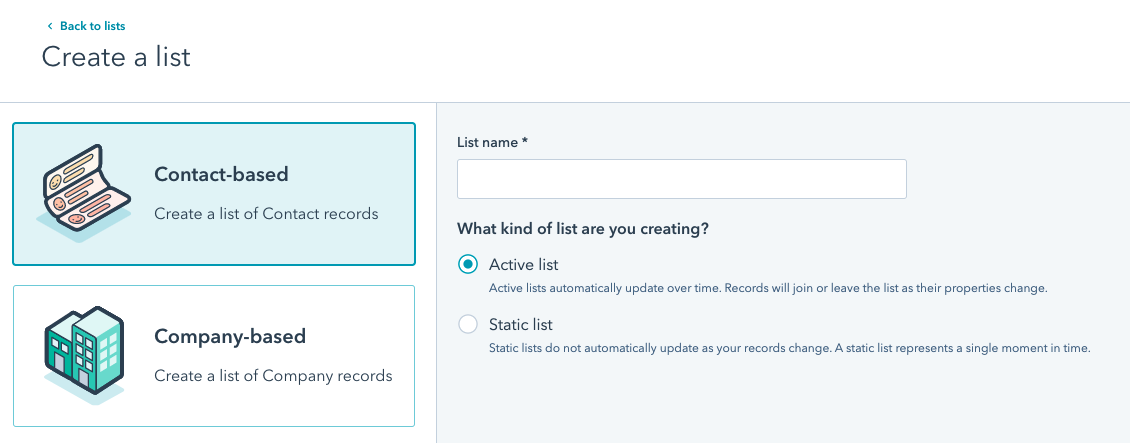
Creating and managing lists in HubSpot helps organize your contacts efficiently. Active lists update automatically based on criteria you set. Static lists capture a fixed group of contacts at one time. Both list types serve different needs in managing your customer data.
This section explains how to create and maintain these lists step-by-step. Follow these simple instructions to keep your HubSpot CRM organized and useful.
Step-by-step Guide To Creating Active Lists
- Log into your HubSpot account and navigate to the Contacts menu.
- Select Lists from the dropdown options.
- Click the Create list button at the top right.
- Choose Active list as the list type.
- Set your criteria using filters such as contact properties, behaviors, or deal stages.
- Apply multiple filters with AND/OR logic to refine the list.
- Name your list clearly for easy identification.
- Click Save. Your active list will update automatically as contacts meet the criteria.
Step-by-step Guide To Creating Static Lists
- Go to the Contacts section in HubSpot.
- Click on Lists and then Create list.
- Select Static list as the list type.
- Add contacts manually or import a contact group to this list.
- You can also select contacts based on filters and add them all at once.
- Give the static list a clear, descriptive name.
- Save the list. It will not update automatically; update it manually if needed.
Best Practices For Maintaining List Accuracy And Efficiency
- Regularly review your active list criteria to ensure relevance.
- Clean static lists by removing outdated or invalid contacts.
- Use clear naming conventions to avoid confusion between lists.
- Limit list size to improve CRM performance and email deliverability.
- Segment contacts logically for targeted marketing and sales efforts.
- Schedule routine audits to check for duplicates and inaccuracies.
- Leverage list automation in active lists to save time.
- Manually update static lists after major campaigns or events.
Credit: www.bbdboom.com
Conclusion: Choosing The Right List Type For Your Marketing Goals
Choosing between Active and Static lists in HubSpot depends on your marketing needs. Each list type offers unique advantages that help manage contacts effectively. Understanding these differences ensures better targeting and campaign success.
Summary Of Key Differences And Benefits
| Feature | Active List | Static List |
|---|---|---|
| Updates | Automatically updates contacts based on set criteria | Fixed snapshot of contacts; manual updates required |
| Use Case | Best for ongoing segmentation and dynamic campaigns | Ideal for one-time campaigns or fixed contact groups |
| Management | Less maintenance; real-time list accuracy | Needs manual editing to stay current |
| Flexibility | High flexibility with changing contact data | Low flexibility; static snapshot only |
Active lists help keep your marketing agile by automatically reflecting changes in contacts. Static lists offer control when you want a fixed audience for specific campaigns.
Final Tips For Smart Segmentation Using Hubspot Lists
- Define clear goals before choosing a list type.
- Use active lists for continuous engagement and lead nurturing.
- Use static lists for event invites or one-time email blasts.
- Regularly review and clean your static lists to avoid outdated contacts.
- Combine both list types to balance automation and control.
- Leverage HubSpot’s CRM tools to track list performance.
Smart segmentation improves message relevance and customer experience. HubSpot’s lists simplify this process by organizing contacts based on your chosen criteria.
Credit: backslashcreative.com
Frequently Asked Questions
What Is The Difference Between Static And Active Lists?
Static lists capture contacts at one time and need manual updates. Active lists auto-update as contacts meet set criteria.
What Is The Difference Between Static And Dynamic Lists In Hubspot?
Static lists in HubSpot are fixed snapshots of contacts and require manual updates. Dynamic (active) lists auto-update based on set criteria, always reflecting current data. Static lists suit one-time campaigns, while dynamic lists work for ongoing segmentation and automation.
How To Change Hubspot List From Static To Active?
You cannot directly change a static list to active in HubSpot. Create a new active list with the same criteria instead.
What Is A Static List?
A static list is a fixed group of contacts that doesn’t update automatically. You must add or remove members manually. It captures a specific moment in time, ideal for one-time campaigns or event attendees. Static lists provide stable, controlled segments without automatic changes.
Conclusion
Choosing between active and static lists depends on your needs. Active lists update automatically based on set rules. Static lists capture a fixed group at one time and stay unchanged. Active lists save time by keeping data fresh without manual edits. Static lists work well for one-time campaigns or specific snapshots. Understanding these differences helps you use HubSpot effectively. Explore how HubSpot’s CRM can simplify your contact management by visiting HubSpot. Manage your contacts smarter and grow your business with ease.

