

Choosing the right tool to grow your business can feel overwhelming, especially when deciding between popular options like Keap and Mailchimp. You want more than just email marketing—you need a system that helps you sell more, follow up faster, and manage your customers effortlessly.
That’s where Keap shines. It combines CRM, sales automation, email marketing, payments, and scheduling all in one place, designed to put your business growth on autopilot. But how does it really compare to Mailchimp? If you’re serious about scaling your business efficiently, keep reading to discover which platform suits your needs best and why Keap might be the game-changer you’re looking for. Ready to explore? Check out Keap here: https://saaslabpro.com/keap.
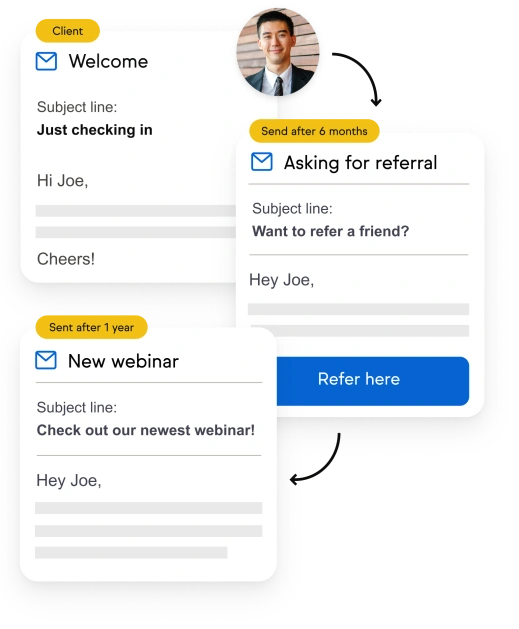
Credit: keap.com
Introduction To Keap And Mailchimp
Keap and Mailchimp stand out as popular tools for marketing automation. Both help businesses reach customers and boost sales. Understanding their differences guides smart marketers to choose the best fit.
Overview Of Keap: Purpose And Target Audience
Keap focuses on sales and marketing automation for small businesses. It combines CRM, email marketing, payments, and scheduling in one platform. This tool suits businesses aiming to automate sales pipelines and follow-ups.
- Designed for sales-driven small businesses
- Strong pipeline management features
- Includes payment processing and scheduling
- Best for users needing advanced automation and integration
Keap is powerful but may have a steeper learning curve and higher cost. It fits businesses ready to invest in a complete system.
Overview Of Mailchimp: Purpose And Target Audience
Mailchimp began as an email marketing tool and grew into an all-in-one marketing platform. It suits businesses focused on easy-to-use email campaigns and simple marketing automation.
- Ideal for beginners and small to medium businesses
- Offers email marketing, landing pages, and basic automation
- Known for a user-friendly interface
- Affordable plans for growing lists
Mailchimp works well for companies needing quick setup and straightforward marketing tools.
Why Comparing Keap And Mailchimp Matters For Smart Marketers
Choosing the right tool impacts marketing success. Both platforms offer automation but serve different needs. Comparing helps marketers:
- Match features to business goals
- Optimize budgets by selecting suitable plans
- Save time by picking user-friendly interfaces
- Enhance customer engagement with right automation
Smart marketers focus on tools that fit their workflow and growth plans. Keap and Mailchimp comparison highlights these differences clearly.
Credit: selzy.com
Key Features Of Keap
Keap offers a robust set of tools designed to help small businesses automate sales and marketing. Its features focus on improving customer management, streamlining operations, and enhancing workflow efficiency. These key features support business growth by combining automation with easy-to-use tools.
Comprehensive Sales And Marketing Automation: Driving Growth With Pipeline Management
Keap provides powerful sales and marketing automation to help businesses follow up with leads quickly and close deals faster. The platform uses a visual pipeline to track every stage of the sales process.
- Automated follow-up sequences based on customer actions
- Task reminders and lead scoring to prioritize prospects
- Clear pipeline views to monitor deal progress
- Integration with marketing campaigns for seamless lead nurturing
This automation reduces manual work and ensures no lead is missed, helping businesses grow efficiently.
Integrated Crm And Email Marketing: Streamlining Customer Management
The built-in CRM (Customer Relationship Management) in Keap stores customer data in one place. It connects directly with email marketing tools for easy communication.
- Contact segmentation for targeted messaging
- Personalized email campaigns based on customer behavior
- Tracking of email opens, clicks, and responses
- Automatic syncing of customer information and interactions
This integration simplifies managing contacts and helps deliver relevant messages at the right time.
Payments And Scheduling Integration: Simplifying Business Operations
Keap includes payment processing and appointment scheduling to streamline daily tasks.
| Feature | Benefit |
|---|---|
| Online payments | Collect payments directly through invoices or checkout links |
| Appointment scheduling | Allow customers to book meetings or services online |
| Automated reminders | Reduce no-shows with email and SMS alerts |
| Integration with sales pipeline | Link payments and appointments to customer records and deals |
These tools save time and improve the customer experience.
Customization And Deep Integration Capabilities: Enhancing Workflow Efficiency
Keap supports custom workflows and integrations to fit unique business needs.
- Customizable automation rules and templates
- Integration with popular apps like QuickBooks, Zapier, and more
- API access for advanced connections
- Flexible tagging and segmentation for precise targeting
This flexibility allows businesses to create smooth, efficient workflows tailored to their processes.
Key Features Of Mailchimp
Mailchimp offers a range of features designed for easy email marketing. Its tools help businesses create, send, and track campaigns quickly. The platform suits both beginners and growing companies. Below, explore Mailchimp’s main features that support effective marketing and audience engagement.
User-friendly Email Marketing Tools: Fast And Effective Campaign Creation
Mailchimp provides simple drag-and-drop editors to build emails without coding. Templates are ready to use and customizable. Campaigns can be launched in minutes, saving valuable time.
- Pre-built email templates
- Automation workflows for follow-ups
- Multi-channel campaign support (email, social ads)
- Mobile-friendly design preview
This ease of use helps marketers focus on content, not technical tasks.
Audience Segmentation And Personalization: Targeting The Right Customers
Mailchimp’s segmentation tools let you divide your audience based on behavior, location, and more. Personalization options increase open rates and engagement.
- Segment contacts by tags, purchase history, or activity
- Send personalized content using merge tags
- Set up dynamic content blocks
- Use predictive insights to target high-value customers
Such targeting ensures messages reach the most relevant customers.
Affordable And Scalable Pricing Tiers: Growing With Your Business
Mailchimp’s pricing suits small startups and large businesses. Plans scale with your list size and feature needs. A free tier allows basic email marketing at no cost.
| Plan | Monthly Cost | Key Features |
|---|---|---|
| Free | $0 | Up to 500 contacts, basic templates, single-step automation |
| Essentials | Starts at $13 | More templates, A/B testing, 24/7 support |
| Standard | Starts at $20 | Advanced audience insights, retargeting ads, dynamic content |
| Premium | Starts at $350 | Advanced segmentation, multivariate testing, phone support |
This structure fits various budgets and marketing goals.
Modern Design Templates And Analytics: Improving Engagement And Insights
Mailchimp features modern, mobile-responsive templates. Drag-and-drop tools make customization easy. Analytics dashboards show campaign performance in real-time.
- Track opens, clicks, and unsubscribes
- Compare campaign results side-by-side
- Monitor subscriber growth and engagement trends
- Integrate with Google Analytics for deeper insights
These tools help marketers improve content and timing for better results.
Pricing And Affordability Breakdown
Choosing the right marketing platform depends greatly on cost and value. This section compares Keap and Mailchimp pricing plans. Each platform targets different business needs and budgets. Understanding their pricing helps small businesses invest wisely.
Keap Pricing Structure: Investment Vs. Value For Small Businesses
Keap offers a premium pricing model tailored for businesses wanting strong automation and CRM features. Its plans start higher but combine sales, marketing, and payment tools in one.
- Keap’s entry-level plan begins around $79/month.
- Includes sales pipeline management, automated follow-ups, and payment processing.
- Best for businesses focused on sales automation and deeper customer management.
- Higher price reflects extensive features and integrations.
This investment suits small businesses ready to grow with robust tools. It might feel costly for startups on a tight budget.
Mailchimp Pricing Options: Flexibility For Various Budgets
Mailchimp provides several pricing tiers to fit various business sizes and budgets. It focuses mainly on email marketing but includes basic automation and audience management.
| Plan | Monthly Cost | Key Features |
|---|---|---|
| Free | $0 | Up to 500 contacts, basic email templates, limited automation |
| Essentials | Starts at $13 | More emails/month, A/B testing, 24/7 support |
| Standard | Starts at $20 | Advanced audience insights, retargeting ads, automation workflows |
| Premium | Starts at $350 | Advanced segmentation, multivariate testing, phone support |
Mailchimp’s tiered pricing works well for businesses needing scalable, flexible email marketing tools.
Cost Comparison: Which Platform Offers Better Roi?
Comparing costs alone misses the full picture. Keap offers more all-in-one features, which may reduce the need for extra tools. This can increase return on investment over time.
Mailchimp is less expensive upfront, especially for small mailing lists. It fits companies focused mainly on email campaigns.
| Criteria | Keap | Mailchimp |
|---|---|---|
| Starting Price | $79/month | Free to $13/month |
| Included Features | CRM, sales automation, payments, scheduling | Email marketing, basic automation, audience insights |
| Best For | Sales-driven small businesses | Businesses needing flexible email marketing |
| ROI Potential | Higher with multi-tool integration | Good for email-focused campaigns |
Businesses prioritizing sales automation may find Keap offers better long-term value. Those focused on simple email marketing often prefer Mailchimp for budget control and ease.
Pros And Cons Based On Real-world Usage
Choosing between Keap and Mailchimp depends on your business needs and budget. Both tools offer distinct advantages and face some limitations. Understanding their strengths and weaknesses from actual user experience helps in making the right choice.
Advantages Of Using Keap: Powerful Automation And All-in-one Solution
Keap stands out for its robust automation capabilities. It combines CRM, sales pipeline management, email marketing, payments, and scheduling into one platform. This all-in-one approach helps businesses handle multiple tasks without switching tools.
- Strong pipeline and contact management
- Automated follow-ups and personalized emails
- Integrated payment processing
- Appointment scheduling built-in
- Deep integration with many apps and services
Users appreciate its ability to streamline sales and marketing workflows in a single place. This reduces manual work and improves efficiency.
Drawbacks Of Keap: Complexity And Higher Cost
Keap’s power comes with a steep learning curve. The interface can be complex for beginners or small teams needing basic features. Setting up automation and pipelines may take time.
The pricing is higher than many competitors, which might not suit businesses on a tight budget. Some users find the upfront cost difficult to justify if they only need simple email marketing.
- Complex setup and navigation
- Higher monthly fees
- Less suitable for very small or budget-conscious businesses
Advantages Of Using Mailchimp: Ease Of Use And Cost-effectiveness
Mailchimp is known for its user-friendly interface. Beginners find it easy to create campaigns quickly without much training.
It offers a free plan and competitive pricing for small mailing lists. This makes it a popular choice for startups and small businesses with limited budgets.
- Intuitive drag-and-drop email builder
- Free tier for basic email marketing
- Simple setup and campaign management
- Good templates and reporting tools
Drawbacks Of Mailchimp: Limited Advanced Crm Features
Mailchimp lacks some advanced CRM and sales automation features found in Keap. Users needing strong pipeline management or integrated payments may find it insufficient.
Its automation options are basic compared to Keap’s deep workflows. This limits growth potential for businesses wanting to automate complex sales processes.
- No built-in sales pipeline management
- Limited payment and scheduling integrations
- Automation less powerful for multi-step campaigns
Ideal User Recommendations
Choosing between Keap and Mailchimp depends on your business goals and needs. Each platform suits different types of users. Understanding who benefits most from each can guide smart decisions.
When Keap Is The Best Choice: Sales-driven And Growing Businesses
Keap fits businesses focused on sales growth and automation. It offers a powerful all-in-one CRM with pipeline management, payments, and scheduling features.
- Best for businesses needing deep integration of sales and marketing
- Ideal if you want to automate follow-ups and manage customer relationships
- Supports complex workflows and personalized customer journeys
- Suitable for businesses with a budget for advanced tools
Keap helps businesses sell more and follow up faster with automation. It suits those ready to invest in growth beyond basic email marketing.
When Mailchimp Is The Best Choice: Small Businesses Needing Simple Email Marketing
Mailchimp is great for small businesses that want easy, fast email marketing. It provides user-friendly tools without complex setups.
- Perfect for beginners or those with limited technical skills
- Offers simple email campaign creation and automation
- Affordable pricing for small lists and basic needs
- Good for businesses focusing mainly on email newsletters
Mailchimp suits businesses that want quick setup and straightforward email marketing without heavy sales automation.
Scenarios Where Each Platform Excels: Matching Features To Business Needs
| Business Need | Keap Strength | Mailchimp Strength |
|---|---|---|
| Sales Automation | Advanced pipeline and follow-up automation | Basic automation for email campaigns |
| Ease of Use | More complex, requires learning | Simple, beginner-friendly interface |
| Pricing | Higher cost, suitable for growth investment | Affordable for small lists and simple needs |
| Marketing Tools | Comprehensive marketing and sales features | Focus on email marketing and basic automation |
| Business Size | Growing businesses with sales teams | Small businesses and startups |
Match your choice to your business size, budget, and marketing goals. Keap excels with sales-driven growth. Mailchimp shines in simple, cost-effective email marketing.
Final Verdict: Choosing Between Keap And Mailchimp
Choosing between Keap and Mailchimp depends on your business goals and needs. Both tools offer marketing automation but serve different purposes and budgets. Understanding their strengths and weaknesses helps pick the right platform.
Summary Of Strengths And Weaknesses
| Feature | Keap | Mailchimp |
|---|---|---|
| Best For | Sales-driven businesses needing automation and CRM | Simple, fast email marketing and basic automation |
| Strengths |
|
|
| Weaknesses |
|
|
How To Assess Your Business Priorities And Budget
Start by listing your top business goals. Do you want to focus on sales automation or simple email marketing? Consider these points:
- Sales Process Complexity: Need CRM and pipeline tools? Choose Keap.
- Budget Constraints: Tight budget or just email campaigns? Mailchimp fits better.
- Ease of Use: Want quick setup? Mailchimp is simpler.
- Growth Plans: Planning to scale sales with automation? Keap offers more features.
Compare pricing plans carefully. Keap has a higher starting cost but more features. Mailchimp offers free and lower-cost plans for smaller lists.
Tips For Getting Started With Your Chosen Platform
Follow these tips to begin smoothly:
- Sign Up for a Trial: Both platforms offer free trials or free tiers.
- Explore Templates: Use pre-built email and automation templates.
- Set Clear Goals: Define what you want to achieve with your campaigns.
- Import Contacts Carefully: Clean your list before importing to avoid issues.
- Test Automations: Run test campaigns and workflows to check functionality.
- Use Support Resources: Utilize tutorials, help centers, and customer support.
Starting simple and building up features step-by-step ensures smooth adoption.

Credit: www.youtube.com
Frequently Asked Questions
Who Is Mailchimp’s Biggest Competitor?
Mailchimp’s biggest competitor is HubSpot, known for its all-in-one marketing, sales, and service platform. Other strong competitors include Klaviyo, SendGrid, and Flodesk. These platforms offer specialized email marketing, automation, and CRM solutions tailored to various business needs.
Is Keap Worth It?
Keap is worth it for small businesses needing powerful sales and marketing automation. It offers robust CRM, pipeline management, payments, and scheduling. Its complexity and cost may deter budget-conscious users seeking simple email tools. Invest time to unlock strong growth benefits with Keap’s all-in-one platform.
Which Crm Is Best For Email Marketing?
HubSpot, Mailchimp, and Keap are top CRMs for email marketing. HubSpot offers a robust free plan. Mailchimp excels in user-friendly email design. Keap suits businesses needing powerful automation and sales tools. Choose based on your budget, features, and ease of use preferences.
What Crm Works Best With Mailchimp?
HubSpot CRM works best with Mailchimp, offering seamless integration and powerful marketing automation. Keap also integrates well, ideal for sales-driven businesses.
Conclusion
Choosing between Keap and Mailchimp depends on your business needs. Keap suits sales-driven, growing businesses needing all-in-one automation. It combines CRM, email, payments, and scheduling in one platform. This can save time and reduce tool juggling. Mailchimp may work better for simpler email marketing needs or tighter budgets. Both tools offer strong email capabilities, but Keap’s advanced features require more setup. Consider your priorities carefully before deciding. To explore how Keap can support your business growth, visit Keap’s official page.

