
Choosing the right CRM can feel overwhelming when you’re juggling the growth of your startup or small business. You want a tool that not only organizes your customer data but also helps you connect, engage, and grow without endless headaches.
That’s where the showdown between Odoo and HubSpot comes in. Both promise powerful features, but which one truly fits your needs? Are you looking for deep customization and full business management, or do you prefer an easy-to-use platform focused on marketing and sales? Keep reading to uncover the strengths and weaknesses of each, so you can make a smart choice that drives your business forward. Ready to see if HubSpot’s free CRM might be your perfect match? Check it out here: HubSpot CRM.

Credit: www.youtube.com
Introduction To Odoo And Hubspot
Choosing the right software can shape how a business grows. Odoo and HubSpot stand out as top choices for companies seeking better management tools. Each offers unique features and serves different business needs. Understanding their core strengths helps in making an informed decision.
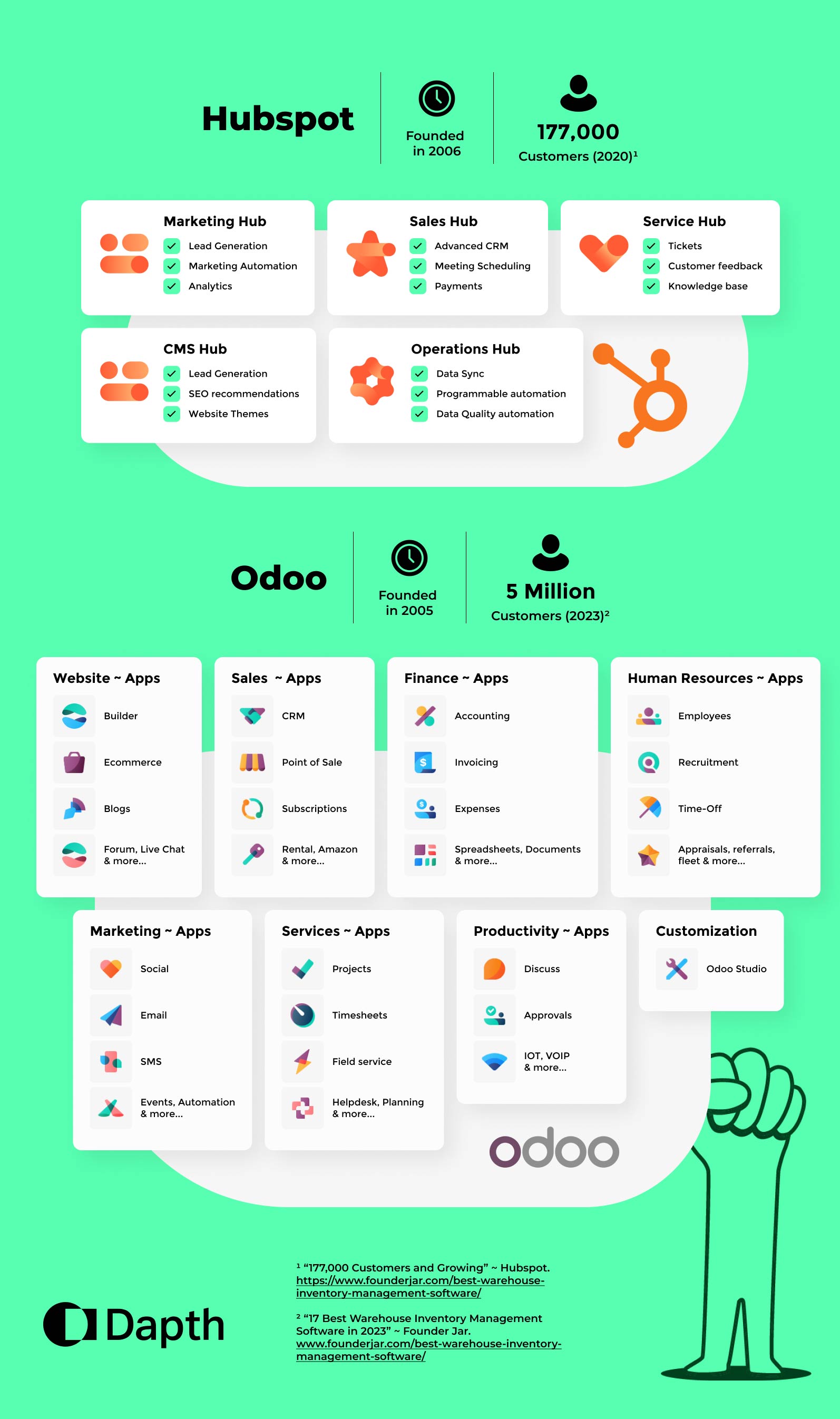
Overview Of Odoo: An Open-source Erp And Crm Solution
Odoo is an open-source platform combining ERP (Enterprise Resource Planning) and CRM (Customer Relationship Management). Its open-source nature means anyone can access and customize the source code.
This flexibility allows businesses to tailor the software to their exact needs, but complex changes may require skilled developers. Odoo offers a wide range of integrated apps, such as:
- Sales and CRM management
- Inventory and warehouse control
- Accounting and finance tools
- Project and manufacturing management
Developed in Belgium, Odoo supports businesses looking for a comprehensive, customizable system. Its strength lies in integration and adaptability across different business processes.
Overview Of Hubspot: A User-friendly Crm And Marketing Platform
HubSpot is a proprietary CRM platform designed for startups and small businesses. It offers a user-friendly interface that requires little to no technical skill to operate.
The platform unifies customer data on a single dashboard. Key features include:
- Contact and lead management
- Email marketing automation
- Sales pipeline tracking
- Customer service tools
HubSpot provides a free CRM version with no expiration, making it accessible for companies with limited budgets. Its focus is on ease of use and quick deployment.
Purpose And Target Audience Of Each Platform
| Platform | Purpose | Target Audience |
|---|---|---|
| Odoo | Complete business management with customizable ERP and CRM tools | Medium to large businesses and those needing tailored solutions |
| HubSpot | Simple, integrated CRM with marketing and sales automation | Startups, small businesses, and users seeking easy setup |
Odoo suits businesses requiring deep customization and multiple operations in one system. HubSpot fits organizations wanting a straightforward CRM that works out of the box.
Credit: dapth.com
Key Features Of Odoo And Their Business Benefits
Odoo stands out as a versatile business management solution. It offers a range of features designed to meet diverse business needs. These features help companies streamline operations, improve efficiency, and adapt easily to growth. Understanding Odoo’s core capabilities reveals why many businesses choose it over other platforms.
Open-source Customizability: Tailoring Erp And Crm To Complex Needs
Odoo is an open-source platform. This means its source code is accessible to developers. Businesses can modify the software to fit their exact requirements. Complex workflows and unique processes can be built directly into the system.
Benefits include:
- Complete control over business processes
- Ability to add unique features without limits
- Cost-effective customization compared to proprietary software
However, deep customizations may require expert developers. This can increase implementation time and costs.
Modular Architecture: Adding Apps For Scalable Business Management
Odoo uses a modular design. Businesses start with basic apps and add more as needs grow. Modules cover areas such as sales, inventory, accounting, and marketing.
| Module | Purpose | Business Benefit |
|---|---|---|
| Sales | Manage orders and customer interactions | Boosts sales process efficiency |
| Inventory | Track stock levels and movements | Reduces stockouts and overstock risks |
| Accounting | Automate billing and financial reports | Ensures accurate and timely financial data |
This modular approach supports scalability. Companies pay only for what they need. They can expand features without switching systems.
Comprehensive Business Management: Integrating Sales, Inventory, And Accounting
Odoo integrates key business functions into one platform. Sales, inventory, and accounting work seamlessly together. Data flows smoothly across departments without manual entry.
Key advantages include:
- Improved accuracy: Reduces errors caused by data duplication.
- Better visibility: Real-time insights into stock, sales, and finances.
- Time savings: Automates routine tasks like invoicing and stock updates.
This integration simplifies business management. It helps companies make faster, data-driven decisions.
Key Features Of Hubspot And Their Business Benefits
HubSpot offers a range of features designed to help startups and small businesses manage customer relationships easily. Its tools focus on simplifying tasks, improving marketing efforts, and streamlining sales and support. These features bring clear benefits by saving time, increasing leads, and enhancing customer satisfaction.
Intuitive User Interface: Simplifying Crm For Non-technical Users
HubSpot’s interface is clean and easy to navigate. Users can quickly find the tools they need without technical skills. The dashboard shows important data clearly, helping teams stay organized.
- Drag-and-drop tools for easy setup
- Clear menus and labels
- Minimal training required
This simplicity reduces errors and speeds up daily work. Teams focus on customers, not software issues.
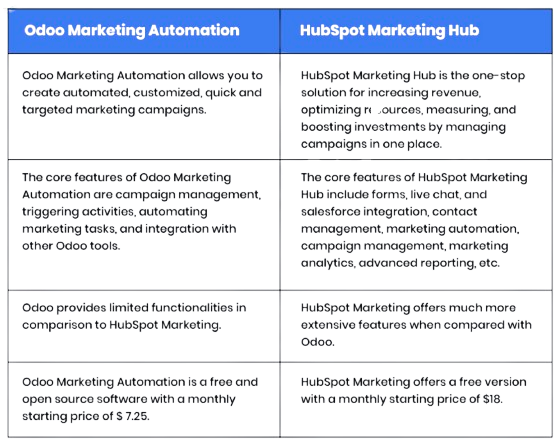
Advanced Marketing Automation: Enhancing Lead Generation And Nurturing
HubSpot automates marketing tasks to generate more leads and nurture them efficiently. Businesses can create email sequences and workflows that send messages at the right time.
| Feature | Benefit |
|---|---|
| Automated Email Campaigns | Reach prospects without manual effort |
| Lead Scoring | Identify hottest leads fast |
| Behavior Tracking | Send personalized content based on actions |
Automation improves efficiency and keeps leads engaged, increasing chances to convert them into customers.
Focused Crm Hubs: Streamlined Sales, Marketing, And Customer Service Tools
HubSpot organizes its CRM tools into hubs for sales, marketing, and customer service. Each hub targets specific business needs.
- Sales Hub: Manage pipelines and close deals faster
- Marketing Hub: Create campaigns and track performance
- Service Hub: Support customers with ticketing and feedback tools
This structure keeps teams focused and improves collaboration. Each hub connects seamlessly, providing a full view of customer interactions.
Pricing And Affordability Comparison
Pricing plays a key role in choosing the right CRM software. It affects budgets and the return on investment. Comparing Odoo and HubSpot helps businesses find the best fit for their needs and wallet.
Odoo Pricing Structure: Evaluating Costs For Customization And Modules
Odoo offers a modular pricing system. Each module adds specific features, letting businesses pay for only what they need.
- Base price covers core apps.
- Additional modules like sales, inventory, and accounting cost extra.
- Customization requires developer skills, which may increase overall costs.
- Open-source nature allows full access to source code for tailored solutions.
Complex customizations can raise implementation expenses. Small businesses might find basic modules affordable, but advanced setups need expert help.
Hubspot Pricing Tiers: Free Crm And Paid Marketing Packages
HubSpot provides a free CRM with no time limits, ideal for startups and small businesses.
- Free CRM: Includes contact management, deal tracking, and basic reporting.
- Paid packages: Marketing, Sales, and Service Hubs with tiered pricing.
- Pricing grows with added features and contacts.
- Paid plans start with essential tools and scale up for larger teams.
HubSpot’s free tier supports businesses with limited budgets and gradual growth.
Cost-benefit Analysis For Different Business Sizes And Needs
| Business Size | Odoo | HubSpot |
|---|---|---|
| Small Businesses | Affordable with basic modules; customization costs may vary. | Free CRM available; paid plans add marketing and sales tools. |
| Medium Businesses | Flexible module selection; requires investment in development. | Scalable paid tiers; pricing increases with contacts and features. |
| Large Businesses | High customization potential; costs rise with complexity. | Advanced packages support large teams; pricing can be high. |
Odoo suits businesses needing tailored solutions and control. HubSpot works well for those wanting easy startup and growth options.
Pros And Cons Based On Real-world Usage
Choosing between Odoo and HubSpot depends on business needs and user experience. Both platforms offer unique benefits and face distinct challenges. Understanding their strengths and weaknesses helps make a practical decision.
Odoo Strengths And Weaknesses: Flexibility Versus Complexity
Odoo is an open-source platform known for its high flexibility. Users can customize almost every feature to fit specific business processes.
- Open-source code allows deep customization by developers.
- Wide range of modules covers CRM, ERP, inventory, and more.
- Scalable to support growing businesses.
On the downside, customization often requires technical skills.
- Complex setup can increase implementation time and costs.
- Steep learning curve for non-technical users.
- Support may be limited compared to proprietary software.
Hubspot Advantages And Limitations: Ease Of Use Versus Customization
HubSpot offers a user-friendly CRM especially suitable for startups and small businesses. Its clean interface requires little training.
- 100% free CRM with no expiration.
- Unified platform consolidates all customer data.
- Built-in AI helps users understand data easily.
- Proprietary software with limited backend customization.
Customization options are more restricted compared to Odoo.
- Source code is not accessible for deep changes.
- Advanced features can increase costs as needs grow.
- Best suited for businesses wanting simplicity and fast setup.
User Feedback And Common Challenges
| Aspect | Odoo | HubSpot |
|---|---|---|
| Ease of Use | Complex interface; requires training | Intuitive and beginner-friendly |
| Customization | Highly customizable with developer help | Limited customization; mostly preset features |
| Implementation Cost | Potentially high due to complexity | Low to moderate; free starter version |
| Support | Community-driven; some paid options | Comprehensive official support |
| Scalability | Strong for diverse business needs | Good for small to mid-sized companies |
Users often face challenges with Odoo’s technical setup. HubSpot users mention limits in deep feature changes but appreciate the easy start and data insights.
Ideal Users And Business Scenarios For Odoo
Odoo fits businesses needing a flexible, all-in-one management system. Its open-source nature allows deep customization. Companies wanting to integrate multiple business functions under one platform benefit from Odoo. It suits users who require more than just CRM, including manufacturing, inventory, sales, and accounting.
Odoo works well for businesses with complex workflows and unique needs. Its modular design lets companies select apps they need without paying for extras. This makes Odoo ideal for growing companies that want control over their software.
Best Fit For Product-based Businesses And Manufacturers
Odoo suits product-based businesses and manufacturers due to its strong inventory and production management tools. It supports:
- Inventory tracking and control
- Manufacturing resource planning (MRP)
- Supply chain management
- Quality control processes
These features help manufacturers streamline operations and reduce errors. Product-based businesses gain from Odoo’s ability to handle multiple warehouses and variants.
Suitability For Companies Needing Deep Integration And Custom Erp
Companies requiring a custom ERP system find Odoo highly suitable. Its open-source code allows developers to tailor the platform extensively. This leads to:
- Custom workflows matching exact business processes
- Integration with other systems and software
- Scalable solutions as the company grows
Such deep integration is difficult with proprietary platforms. Odoo allows businesses to unify CRM, sales, accounting, and more under one system.
When To Choose Odoo For Complex Business Operations
Odoo is a good choice for complex business operations needing multiple functions in one place. Examples include:
- Businesses with diverse departments like sales, manufacturing, and finance
- Companies managing multiple locations or warehouses
- Operations requiring detailed reporting and automation
Its modular setup helps handle intricate workflows smoothly. Users can add or remove apps as business needs change.
Ideal Users And Business Scenarios For Hubspot
HubSpot suits businesses focused on customer relationships and marketing. It works well for small to medium-sized companies that want easy-to-use tools. HubSpot centralizes customer data and supports sales and marketing teams with automation and insights. Its free CRM option is valuable for startups and growing businesses. HubSpot fits best where inbound marketing and customer engagement are priorities.
Best Fit For Service-oriented Smbs And Agencies
HubSpot is ideal for small and medium-sized businesses (SMBs) and agencies that provide services rather than products. These businesses benefit from:
- Centralized client management
- Tracking interactions across multiple channels
- Easy-to-use tools for sales and support teams
- Automation for routine tasks like follow-ups
Service providers gain a clear view of customer journeys and can improve communication. Agencies can manage multiple clients efficiently using HubSpot’s intuitive interface.
Advantages For Businesses Prioritizing Inbound Marketing And Sales
HubSpot excels at supporting inbound marketing strategies. Features include:
| Feature | Benefit |
|---|---|
| Content creation tools | Helps publish blogs, landing pages, and emails |
| Lead capture forms | Converts visitors into leads automatically |
| Marketing automation | Personalizes follow-up emails and workflows |
| Sales pipeline tracking | Monitors deal progress in real time |
This makes HubSpot a strong choice for businesses focused on attracting and nurturing leads through inbound methods.
When Hubspot Is The Optimal Choice For Customer Engagement
HubSpot works best for companies wanting to deepen customer engagement. It offers:
- Unified customer data view for better insights
- Automated email sequences based on user behavior
- Tools for managing customer support and feedback
- Integration with social media and communication platforms
These features help maintain strong relationships with customers. Businesses can respond quickly to customer needs and improve satisfaction.
Credit: elefanterevops.com
Final Verdict: Choosing Between Odoo And Hubspot For Business Growth
Choosing the right CRM and ERP system affects business growth deeply. Odoo and HubSpot offer distinct advantages. Understanding their strengths helps in making an informed decision. This section compares their flexibility, ease of use, and strategic fit for various growth goals.
Comparing Flexibility And Scalability For Long-term Success
Odoo is an open-source platform. This means its source code is accessible and highly customizable. Businesses with specific needs can tailor Odoo extensively. Complex customizations may require developer expertise and increase costs. Yet, this flexibility supports evolving requirements and complex workflows.
HubSpot offers a proprietary system with limited customization. It focuses on ease of integration and user-friendly features. HubSpot’s CRM scales well for startups and small businesses without heavy IT support. Its AI-driven insights unify customer data effectively, making it easier to manage growth.
| Feature | Odoo | HubSpot |
|---|---|---|
| Source Code Access | Open source, fully accessible | Proprietary, limited access |
| Customization | Highly customizable, needs dev skills | Some customization, easier setup |
| Scalability | Strong for complex growth | Great for startups and SMBs |
Balancing Ease Of Use With Customization Needs
HubSpot prioritizes simplicity and fast adoption. Its intuitive interface suits teams new to CRM software. The platform offers built-in automation and AI tools that reduce manual work. Users can start for free, with no time limits, making it accessible.
Odoo offers deep customization but has a steeper learning curve. It suits businesses ready to invest in tailored solutions. Complex modules require more setup time but deliver precise fits for unique processes. Customization flexibility may slow initial adoption but benefits long-term efficiency.
- HubSpot – Easier learning, quicker deployment
- Odoo – More powerful customization, longer setup
Strategic Recommendations For Different Growth Objectives
For businesses focused on rapid growth with simple CRM needs, HubSpot is ideal. It supports startups and small businesses with straightforward setup and strong customer data management.
Businesses needing a comprehensive ERP with tailored workflows should choose Odoo. Its open-source nature suits companies with complex operations and development resources.
- Startups & Small Businesses: HubSpot’s free CRM and ease of use fit best.
- Mid-sized to Large Enterprises: Odoo’s customization and scalability offer long-term value.
- Companies with IT teams: Odoo enables deep system integration and control.
- Businesses needing quick setup: HubSpot provides fast deployment and user-friendly tools.
Frequently Asked Questions
What Is The Difference Between Hubspot And Odoo?
Odoo is an open-source ERP and CRM platform offering deep customization and full business management. HubSpot focuses on user-friendly CRM, marketing, and sales automation with limited ERP features. Odoo suits complex operations; HubSpot fits SMBs needing intuitive marketing and customer engagement tools.
What Is The Disadvantage Of Using Odoo?
Odoo’s main disadvantage is its complexity, requiring technical skills for customization and increasing implementation costs. It has a steep learning curve.
Is Odoo A Chinese Company?
Odoo is not a Chinese company. It is a business management software developed in Belgium.
Is There Anything Better Than Hubspot?
Some alternatives to HubSpot excel in specific areas. ActiveCampaign offers advanced automation. Odoo provides deep customization and ERP integration. Freshsales and Pipedrive focus on ease of use with strong sales features. The best choice depends on your business needs and technical skills.
Conclusion
Choosing between Odoo and HubSpot depends on your business needs. Odoo offers deep customization for complex operations. HubSpot provides an easy-to-use CRM focused on sales and marketing. HubSpot’s free CRM unifies customer data simply and clearly. It requires no expiration or trial limits. Explore how HubSpot can support your startup or small business by visiting HubSpot CRM. Both tools have strengths, so pick what fits your goals best.

