
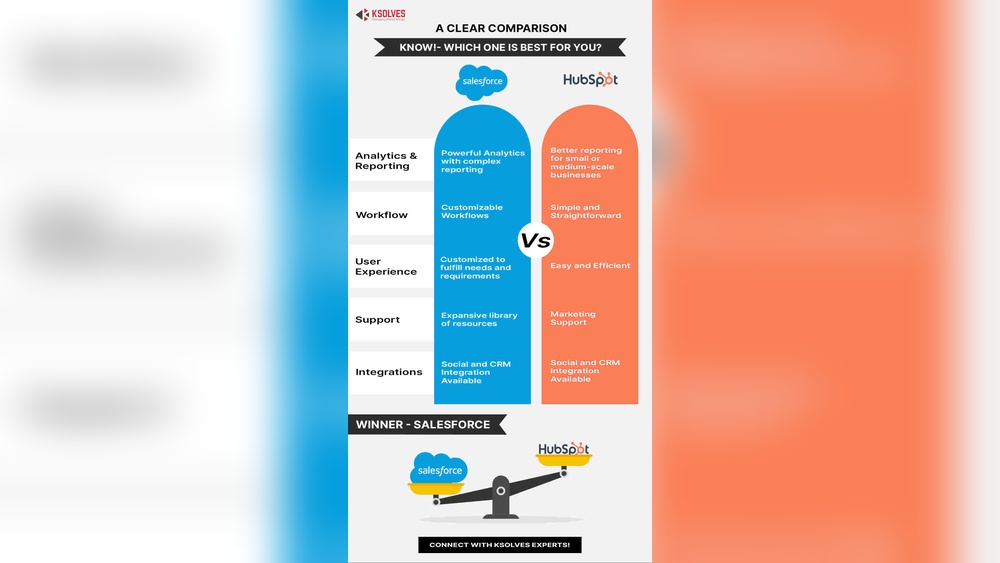
Choosing the right CRM can make or break your small business growth. You want a tool that’s easy to use, affordable, and powerful enough to handle all your customer data without overwhelming you.
That’s why many small businesses face the tough choice between Salesforce and HubSpot CRM. Which one fits your needs better? Which will give you more value without the headache? You’ll get a clear, straightforward comparison of Salesforce vs HubSpot CRM tailored specifically for small businesses like yours. Plus, you’ll discover why HubSpot stands out with its 100% free, no-expiration CRM that brings all your customer info into one simple platform with smart AI features. Keep reading to find out which CRM can truly help your business thrive.
Introduction To Salesforce And Hubspot Crm For Small Businesses
Choosing the right CRM helps small businesses manage customers and grow. Both Salesforce and HubSpot offer strong CRM solutions. Each serves different needs and business types. This section introduces these platforms and their target users.
Overview Of Salesforce Crm: Purpose And Target Audience
Salesforce CRM is designed mainly for sales teams focused on outbound sales. It targets businesses that need detailed sales tracking and advanced customization.
Salesforce suits small businesses aiming to scale quickly and handle complex sales processes. It offers powerful tools for managing leads, contacts, and sales pipelines.
- Strong automation features
- Customizable dashboards and reports
- Extensive integration options
Its flexibility fits businesses with dedicated sales staff needing detailed workflows.
Overview Of Hubspot Crm: Purpose And Target Audience
HubSpot CRM focuses on inbound marketing and customer relationship management. It targets startups and small businesses wanting an easy-to-use, free CRM platform.
HubSpot unifies customer data on one platform and uses AI to simplify data understanding. It requires little setup and works well for teams without technical resources.
- 100% free with no expiration
- Simple interface for quick adoption
- Built-in marketing tools
- Ideal for managing contacts and marketing campaigns
HubSpot is best for companies emphasizing marketing growth and customer engagement.
Why Choosing The Right Crm Matters For Small Businesses
Small businesses must pick a CRM that fits their needs and budget. The right CRM improves customer management and sales tracking. It helps avoid wasted time and resources.
Key reasons to choose wisely:
- Efficiency: Automate tasks and organize data easily.
- Growth: Support sales and marketing efforts effectively.
- Cost: Avoid overspending on unnecessary features.
- User Experience: Ensure team members adopt the system quickly.
A CRM tailored to business goals boosts productivity and customer satisfaction.
Key Features Comparison: Salesforce Vs Hubspot
Choosing the right CRM for small businesses depends on the features each platform offers. Salesforce and HubSpot serve different needs yet share common CRM benefits. Understanding their key features helps decide which suits your business better.
Salesforce’s Advanced Sales Management And Customization Benefits
Salesforce excels in sales management with robust tools designed for complex sales processes. Its platform offers:
- Customizable sales pipelines: Tailor stages and workflows to match your sales cycle.
- Lead scoring and assignment: Automate lead distribution based on criteria.
- Advanced automation: Use AI-powered tools for predictive sales insights.
- Highly flexible customization: Modify objects, fields, and layouts without limits.
These features support small businesses that need detailed control over sales processes and want to scale efficiently.
Hubspot’s User-friendly Marketing Automation And Inbound Tools
HubSpot is built for ease of use and marketing automation. It focuses on inbound marketing to attract and nurture leads. Key features include:
- Drag-and-drop email builder: Create campaigns without technical skills.
- Lead capture forms and pop-ups: Easily add to websites to gather contacts.
- Marketing automation workflows: Set triggers for email sequences and follow-ups.
- Content management tools: Manage blogs, landing pages, and SEO.
HubSpot suits businesses that prioritize marketing and want a simple, all-in-one platform.
Integration Capabilities And Ecosystem Support For Both Platforms
| Feature | Salesforce | HubSpot |
|---|---|---|
| Third-party integrations | Extensive AppExchange marketplace with thousands of apps | Wide range of native integrations and marketplace apps |
| API access | Comprehensive API support for custom development | API available, but less complex for small businesses |
| Native ecosystem tools | Includes Service Cloud, Marketing Cloud, and more | Includes Marketing Hub, Sales Hub, and CMS Hub |
| Ease of integration | Requires technical skills or developer support | User-friendly setup with guided integration processes |
Both platforms support growing businesses with strong ecosystems. Salesforce offers deeper customization for developers. HubSpot focuses on quick and easy setup.
Reporting And Forecasting: How Each Crm Drives Business Insights
Salesforce provides detailed reporting tools with:
- Custom report builder for tailored views
- Advanced forecasting models using AI
- Dashboards showing real-time sales metrics
- Ability to track team and individual performance
HubSpot offers straightforward reporting features that include:
- Pre-built reports for marketing and sales performance
- Visual dashboards that update automatically
- Forecasting tools based on deal stages
- Easy export and sharing options
Salesforce suits businesses needing deep, customizable insights. HubSpot works well for those who want simple, clear reports without complexity.
Pricing And Affordability Breakdown
Choosing the right CRM depends heavily on cost and value. Small businesses need clear pricing and good returns. This section compares Salesforce and HubSpot pricing plans. It highlights what each tier offers and how they fit small business budgets.
Salesforce Pricing Tiers And What They Include
Salesforce offers multiple pricing tiers to suit different business sizes and needs. Each tier unlocks more advanced features and support options.
| Plan | Monthly Cost (Per User) | Key Features |
|---|---|---|
| Essentials | $25 | Basic CRM, Account & Contact Management, Email Integration |
| Professional | $75 | Complete CRM, Lead Scoring, Campaign Management |
| Enterprise | $150 | Advanced Customization, Workflow Automation, Analytics |
| Unlimited | $300 | All Features, 24/7 Support, Unlimited Custom Apps |
Salesforce Essentials fits startups with basic CRM needs. Higher tiers add marketing and automation tools.
Hubspot’s Pricing Structure And Free Tier Advantages
HubSpot provides a unique pricing model with a strong free tier that never expires.
- Free CRM: Unlimited users, contact management, deal tracking, and basic email marketing
- Starter Plan: Starting at $20/month, adds more marketing and sales tools
- Professional and Enterprise Plans: Offer advanced automation, analytics, and custom reporting
The free tier is ideal for small businesses that want to test CRM without upfront costs. It centralizes customer data and uses AI for insights.
Cost-effectiveness For Small Businesses: Evaluating Roi
Small businesses must measure CRM costs against benefits. Both platforms offer valuable tools, but affordability varies.
- Salesforce: Higher cost but rich in customization and scalability.
- HubSpot: Low entry cost and strong free tier lower initial investment.
HubSpot’s free CRM reduces risk and allows gradual upgrades. Salesforce suits businesses needing deep sales process control.
Return on investment depends on business size, goals, and CRM use intensity. HubSpot often wins for startups with tight budgets.
Credit: www.salesforce.com
Pros And Cons Based On Real-world Usage
Small businesses often struggle to find the right CRM that fits their unique needs. Salesforce and HubSpot both offer strong options, but each has its own set of advantages and drawbacks. Understanding these pros and cons from real users helps businesses choose wisely. This section breaks down the strengths and limitations of each platform, focusing on practical use in small business settings.
Strengths And Limitations Of Salesforce In Small Business Settings
Salesforce is powerful but can be complex for small teams. It excels in customization and integration but may require more setup and training.
- Strengths:
- Highly customizable workflows and dashboards
- Extensive app marketplace for integrations
- Robust reporting and analytics tools
- Strong support for outbound sales processes
- Limitations:
- Steep learning curve for new users
- Higher cost compared to many small business CRMs
- Setup and maintenance can be time-consuming
- May overwhelm smaller teams with unnecessary features
Strengths And Limitations Of Hubspot For Growing Teams
HubSpot focuses on simplicity and inbound marketing. Its free CRM makes it ideal for startups and small businesses with limited budgets.
- Strengths:
- 100% free CRM with no expiration
- User-friendly interface with easy setup
- Strong marketing automation and inbound tools
- Unified platform for sales, marketing, and service
- AI features that simplify customer data analysis
- Limitations:
- Limited customization compared to Salesforce
- Advanced features require paid plans
- Less suitable for complex outbound sales processes
- Reporting options are basic in free version
User Experience And Learning Curve Comparison
| Aspect | Salesforce | HubSpot |
|---|---|---|
| Ease of Use | Complex interface, requires training | Simple interface, intuitive for beginners |
| Learning Curve | Steep, especially for non-technical users | Gentle, designed for quick adoption |
| Setup Time | Longer setup due to customization | Fast setup, ready to use out-of-the-box |
| Support and Resources | Extensive documentation, but can be overwhelming | Helpful tutorials and active community |
Choosing between Salesforce and HubSpot depends on your team’s size, budget, and technical skill. HubSpot suits teams wanting ease and speed. Salesforce fits those needing advanced features and deep customization.
Ideal Users And Use Case Recommendations
Choosing the right CRM depends on the type of small business and its unique needs. Both Salesforce and HubSpot CRM serve different users with different goals. Understanding which businesses benefit most and the best use cases helps make a smart choice.
Which Small Businesses Benefit Most From Salesforce Crm?
Salesforce CRM suits small businesses that:
- Require advanced customization and complex workflows
- Have larger sales teams with structured processes
- Need deep analytics and reporting tools
- Operate in industries like finance, tech, or manufacturing
- Plan to scale quickly and require integrations with many apps
Its robust platform fits businesses ready to invest time in setup and training.
Best Scenarios For Choosing Hubspot Crm
HubSpot CRM works well for small businesses that:
- Focus on inbound marketing and customer engagement
- Want a simple, user-friendly CRM with quick setup
- Prefer a free CRM with no expiration and essential features included
- Have small teams needing unified customer data on one platform
- Value built-in AI tools for easy data understanding
HubSpot fits startups and small businesses prioritizing ease and marketing automation.
How Business Goals And Processes Influence Crm Choice
Business goals and internal processes shape CRM decisions:
- Sales Process Complexity: Complex sales cycles benefit from Salesforce’s customization.
- Marketing Focus: HubSpot excels with inbound marketing and lead nurturing.
- Team Size: Larger teams may need Salesforce’s advanced user management.
- Budget Constraints: HubSpot offers a free tier, ideal for tight budgets.
- Integration Needs: Salesforce supports extensive third-party apps and custom integrations.
Match CRM features to your specific goals for better results.

Credit: www.salesforce.com
Final Thoughts: Making The Right Crm Choice For Your Small Business
Choosing the right CRM is crucial for small businesses aiming to grow efficiently. Both Salesforce and HubSpot offer strong tools but suit different needs. Understanding your business goals and workflow helps in picking the best fit. The right CRM will improve customer management, sales processes, and marketing efforts without overwhelming your team.
Key Takeaways From The Salesforce Vs Hubspot Comparison
- HubSpot offers a free CRM with no expiration, ideal for startups and small businesses.
- HubSpot excels in inbound marketing and easy-to-use interface.
- Salesforce is powerful for outbound sales teams and complex sales processes.
- Salesforce provides extensive customization and integrations but may require more training.
- HubSpot unifies customer data with AI-driven insights, simplifying data management.
- Pricing structure differs: HubSpot starts free with paid upgrades; Salesforce typically involves higher costs.
Steps To Evaluate Your Business Needs Before Deciding
- Identify your main goals: Are you focused on marketing, sales, or customer service?
- Assess team size and skill level: Choose a CRM your team can easily adopt.
- List essential features: CRM automation, reporting, integrations, ease of use.
- Consider budget limits: Include setup, subscription, and training costs.
- Test the CRM: Use free trials or demos to explore interfaces and tools.
Additional Resources And Next Steps For Implementation
- Visit the HubSpot CRM official page for detailed features and pricing.
- Explore Salesforce tutorials and community forums for practical insights.
- Schedule team training sessions to ensure smooth adoption.
- Set clear milestones to track CRM integration success.
- Regularly review CRM performance to adjust processes and maximize ROI.
Credit: logiframe.com
Frequently Asked Questions
What Are The Main Differences Between Salesforce And Hubspot Crm?
Salesforce offers extensive customization and advanced features. HubSpot is user-friendly, with strong marketing tools. Salesforce suits larger teams; HubSpot fits small businesses needing simplicity and affordability.
Which Crm Is More Affordable For Small Businesses?
HubSpot CRM is generally more affordable with free and lower-tier plans. Salesforce pricing is higher, targeting larger enterprises with more complex needs. Small businesses often prefer HubSpot for budget-friendly options.
How Do Salesforce And Hubspot Handle Marketing Automation?
HubSpot excels in inbound marketing automation with built-in tools. Salesforce provides robust outbound sales automation but requires additional integrations for marketing. HubSpot is ideal for small businesses focusing on marketing growth.
Which Crm Offers Better Ease Of Use For Beginners?
HubSpot CRM is known for its intuitive, easy-to-navigate interface. Salesforce has a steeper learning curve due to complex features. Small businesses new to CRM often find HubSpot simpler to adopt.
Conclusion
Choosing the right CRM matters for small businesses. HubSpot offers an easy, free solution with solid marketing tools. Salesforce provides advanced features but can be complex and costly. Consider your business needs, budget, and team skills. HubSpot suits startups wanting simple, all-in-one software. Explore its benefits here: HubSpot CRM for Small Businesses. Make a clear choice that fits your growth plans and daily operations.

