
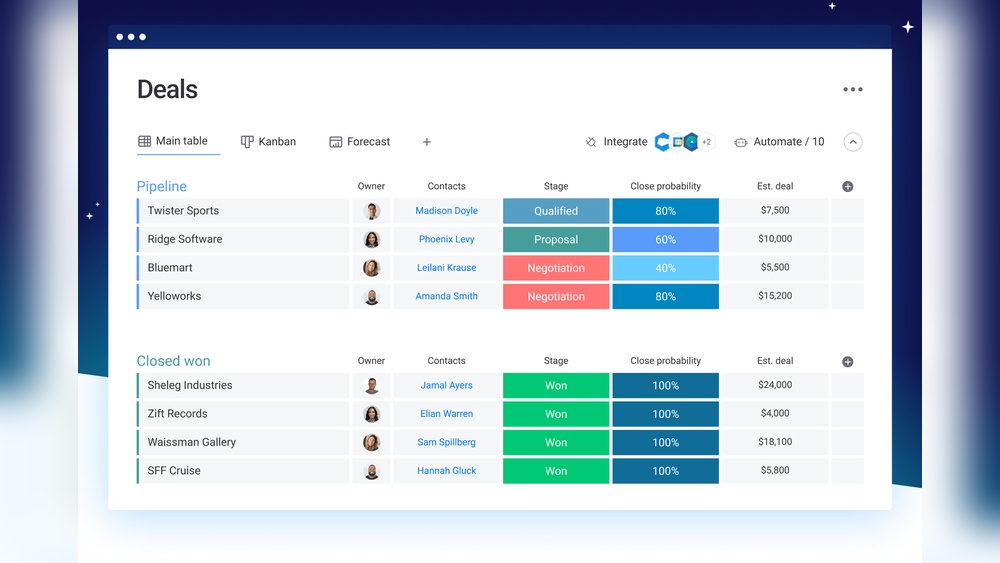
Are you looking for a simple yet powerful way to organize your sales and customer relationships? Using Monday as a CRM could be the game-changer you need.
Imagine having all your contacts, deals, and tasks in one place, with clear visual boards that make managing your sales pipeline easy and even enjoyable. No more juggling spreadsheets or scattered notes—Monday CRM lets you automate routine tasks and focus on closing deals faster. If you want to see how this AI-first CRM can transform your sales workflow, check out Monday CRM now. You’ll learn exactly how to set up Monday as your CRM, customize it to fit your team’s unique needs, and leverage its automation features to save time and boost your productivity. Ready to turn Monday into your ultimate sales assistant? Let’s dive in!
Credit: monday.com
Introduction To Using Monday As A Crm
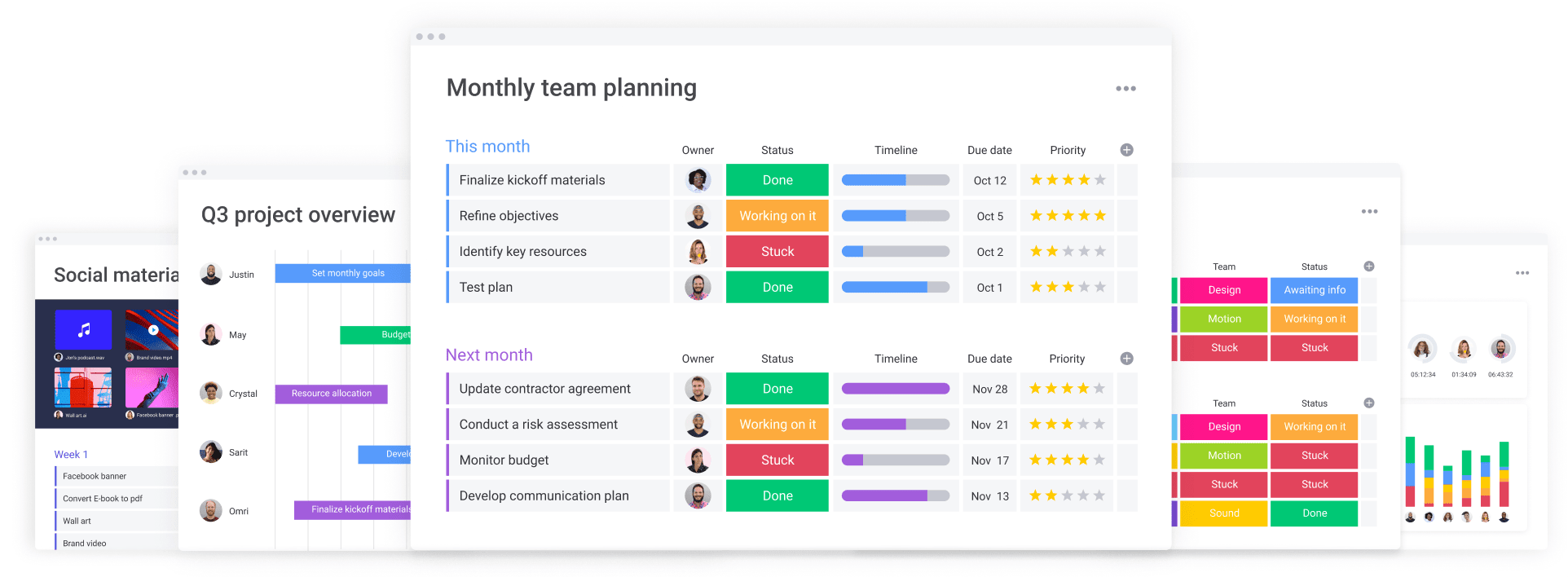
Monday.com CRM offers several key features that simplify sales and customer management. Its design helps teams track deals, manage contacts, and automate tasks in one place. These features create a clear, efficient workflow that suits growing teams and evolving business needs.
Visual And Customizable Boards For Clear Workflow Management
The platform uses color-coded, drag-and-drop boards to visualize sales pipelines and tasks. Each board is highly customizable to fit unique team processes. Users can create stages for deals, add custom fields, and rearrange items easily.
- Intuitive interface with clear visual cues
- Flexible setup for different sales workflows
- Easy to update and track progress in real-time
This visual approach helps teams see where deals stand and what needs attention next.
Centralized Data Management For Seamless Information Access
All customer and deal data is stored in one centralized platform. This eliminates scattered spreadsheets and lost information. Team members access contact details, communications, and deal history from a single dashboard.
- Unified view of customer profiles
- Quick access to deal stages and notes
- Improved collaboration through shared data
Centralized data boosts transparency and ensures no lead or task slips through the cracks.
Automation And Ai To Reduce Busywork And Increase Efficiency
Monday CRM includes automation and AI-powered tools that handle repetitive tasks. Automations send reminders, update statuses, and assign tasks automatically, saving time and reducing errors.
- Automatic notifications for deal follow-ups
- AI suggestions for task prioritization
- Code-free automation setup for easy customization
These features help teams focus on meaningful work instead of routine chores.
Robust Integration Options To Connect Your Essential Tools
The platform connects with many popular tools, making workflows smoother. Integrations include video calls, email, and advanced CRM systems like Salesforce.
| Tool Type | Examples | Benefit |
|---|---|---|
| Communication | Zoom, Email | Streamlines client meetings and follow-ups |
| CRM | Salesforce (advanced plans) | Extends CRM capabilities and data syncing |
| Other Tools | Various apps via Zapier | Automates cross-platform tasks |
Integrations reduce manual data entry and keep information synced across platforms.
Security And Scalability Tailored For Growing Teams
Monday CRM scales with your team size and business demands. It supports small teams and expands to handle moderate growth without losing performance.
- Data security protocols protect sensitive customer info
- Flexible plans accommodate increasing user numbers
- Reliable platform uptime for continuous access
Security and scalability ensure your CRM adapts as your business evolves.
Credit: www.enable.services
Key Features That Make Monday.com A Powerful Crm
Monday.com CRM offers various pricing options to fit different team sizes and needs. Understanding these plans helps choose the best fit for your budget and requirements. The pricing structure balances essential features with advanced tools, making it accessible for small to mid-sized teams.
Understanding Monday.com’s Pricing Tiers
Monday.com CRM pricing is divided into several tiers. Each tier unlocks more features and greater customization. The main tiers include:
- Basic Plan: Entry-level features for small teams starting with CRM.
- Standard Plan: Most popular, includes essential CRM tools and automation.
- Pro Plan: Advanced features, AI tools, and deeper integrations.
- Enterprise Plan: Custom pricing, full scalability, and premium support.
Each tier charges per user, billed monthly or yearly. Yearly billing offers some savings.
What Features Are Included In Each Plan?
| Feature | Basic | Standard | Pro | Enterprise |
|---|---|---|---|---|
| Visual & Customizable Boards | ✔️ | ✔️ | ✔️ | ✔️ |
| Automation & AI Tools | Limited | ✔️ | Advanced | Advanced + Custom |
| Integrations (e.g. Zoom, Salesforce) | Basic | ✔️ | ✔️ + Deeper | All |
| Lead Management Forms | Basic | ✔️ | ✔️ | Custom |
| Centralized Data Management | ✔️ | ✔️ | ✔️ | ✔️ |
| Support | Standard | Priority | Priority + Dedicated | Premium Dedicated |
Balancing Cost With Functionality For Small To Mid-sized Teams
Small and mid-sized teams need tools that improve sales without overspending.
The Standard Plan offers a good mix of features and price. It includes automation, lead management, and core CRM tools.
The Basic Plan fits very small teams or those just starting with CRM.
Teams needing AI-driven automation and deeper integrations will find the Pro Plan valuable.
Enterprise is ideal for large teams with complex needs and custom requirements.
- Start with Standard for balanced cost and features.
- Upgrade as your team and sales grow.
- Use automation to save time and reduce manual work.
Choosing the right plan keeps costs manageable and improves sales workflows.
Pricing And Affordability Breakdown
Choosing Monday.com CRM means balancing its strengths against its limitations. This platform offers a unique blend of sales and project management tools. It fits small to mid-sized teams well. Understanding its pros and cons helps teams decide if it suits their needs.
Advantages Based On Real-world Usage
- Visual and Customizable Interface: Color-coded boards and drag-and-drop features make workflows clear and easy to manage.
- Centralized Data Management: All contacts and deal information stay in one place, reducing confusion.
- Automation and AI Tools: Automates repetitive tasks, saving time and lowering human error.
- Combines CRM with Project Management: Reduces the need for multiple software, simplifying team operations.
- Scalability: Works well for growing teams needing flexible CRM solutions.
- Team Collaboration: Enables easy sharing of data and progress among team members.
Challenges And Limitations To Consider
- Pricing Tiers: Advanced features often require higher-tier plans, which may be costly.
- Learning Curve: Despite its intuitive design, new users may need time to master all features.
- Integration Limits: Basic plans offer limited integration options; deeper integrations require upgrades.
- Overlapping Features: Some users find the mix of CRM and project management features overwhelming.
- Best for Moderate Needs: Large enterprises may find it less suitable due to scalability constraints.
How To Navigate Potential Drawbacks
- Start with a Trial: Use the free or basic plan to test core features before committing.
- Train Your Team: Provide simple tutorials to speed up the learning process.
- Choose Plans Wisely: Select a pricing tier that fits your current needs and budget.
- Use Available Integrations: Connect essential tools first, then expand as needed.
- Customize Workflows: Tailor boards and automations to reduce complexity.
| Feature | Benefit | Consideration |
|---|---|---|
| Automation & AI | Saves time by handling routine tasks | Advanced automations may need higher plans |
| Visual Boards | Clear workflow visualization | May feel complex for new users |
| Integrations | Connects with Zoom, Salesforce, etc. | Limited on basic plans |
| Combined CRM & Project Management | Less software needed | Can be overwhelming initially |
Pros And Cons Of Using Monday.com As Your Crm
Monday CRM fits perfectly for teams that want a flexible, visual, and easy-to-use CRM. It works best where sales and project management need to come together in one place. This section highlights who benefits most and how to use Monday CRM in different situations.
Best Fit: Small To Mid-sized Teams Needing Customizable Crm
Monday CRM suits small to mid-sized teams that want control over their sales process. Its visual boards help teams see deals and tasks clearly. Teams that change their workflow often will find its drag-and-drop and color-coded interface helpful.
- Startups and growing businesses needing scalable CRM
- Sales teams wanting to track leads, deals, and customer data in one place
- Teams combining sales with project or content workflows
- Businesses needing automation to reduce manual work
- Users who prefer a code-free, AI-driven platform
The platform is ideal if your team values customization, clarity, and collaboration.
When To Choose Monday.com Over Traditional Crm Tools
Choose Monday CRM instead of classic CRMs when your team wants a flexible, easy-to-adapt system. Traditional CRMs often have fixed structures that limit how you work.
| Scenario | Why Monday CRM Works Better |
|---|---|
| Need for visual sales pipeline | Boards show deal stages clearly with colors and drag-drop |
| Combining sales and project tasks | One platform handles both workflows without switching tools |
| Desire for automation without coding | Built-in AI and automation simplify repetitive tasks easily |
| Team collaboration is key | Centralized data and updates keep everyone on the same page |
| Need for tailored CRM processes | Customizable boards and forms adapt to unique sales steps |
Tips For Maximizing Productivity And Adoption
- Start Simple: Build basic boards and add complexity gradually.
- Use Automations: Set up automated reminders and task assignments.
- Train Teams: Provide short training sessions to familiarize users.
- Customize Views: Use filters and groupings to focus on priorities.
- Leverage Integrations: Connect tools like Zoom to save time.
- Regularly Review: Update workflows based on team feedback.
These steps help teams quickly adapt and gain value from Monday CRM.
Specific Recommendations For Ideal Users And Scenarios
Setting up monday.com CRM is simple and helps organize your sales process clearly. Follow practical steps to turn monday.com into a powerful CRM tailored to your team’s needs. Start by building your sales pipeline and boards, then automate tasks to speed up sales cycles. Connect your email and tools for smooth communication. Finally, train your team for easy adoption.
Setting Up Your Sales Pipeline And Boards
Begin by creating boards that represent each stage of your sales process. Use color-coded columns and drag-and-drop features to visualize deals easily. Typical stages include:
- Lead Capture
- Contact Made
- Negotiation
- Deal Won or Lost
Each item on the board represents a sales opportunity. Customize columns to track key details such as contact info, deal size, and expected close date. Use filters and groups to sort deals by priority or team member.
Automating Workflows For Faster Sales Cycles
Save time by setting up automations that reduce repetitive tasks. Common automations include:
- Automatic status updates when a deal moves stages
- Notifications to team members when a new lead is assigned
- Reminder emails for follow-ups
Use code-free automation recipes available inside monday.com to build workflows without coding skills. This speeds up your sales cycle and keeps your team aligned.
Integrating Email And External Tools Effectively
Connect your email and tools like Zoom or Slack to monday.com for centralized communication. Integrations help you:
- Sync emails directly to contacts and deals
- Schedule meetings without leaving the CRM
- Receive notifications from other apps inside your boards
Use the integration center in monday.com to link your favorite tools. This creates a seamless workflow that keeps all information in one place.
Training Your Team For Smooth Crm Adoption
Ensure your team learns to use monday.com CRM well by:
- Holding short training sessions focused on core features
- Sharing simple guides with screenshots
- Encouraging team members to ask questions early
- Using monday.com’s support and tutorials
Clear training helps your team adopt the CRM quickly and use it confidently every day.
Credit: support.monday.com
Getting Started: Practical Steps To Set Up Monday.com As A Crm
Monday.com CRM offers a simple, visual platform that helps teams manage sales and workflows efficiently. It streamlines tasks, reduces errors, and keeps data organized in one place. Teams can focus more on selling and less on managing tools.
The intuitive interface and built-in AI tools save time by automating routine work. This makes sales processes faster and clearer. Teams of all sizes can customize Monday.com CRM to fit their unique needs and grow with it.
Summary Of Key Benefits And Features
- Visual & Customizable Interface: Color-coded boards with drag-and-drop ease.
- Centralized Data Management: All contacts and deals stored in one place.
- Automation & AI: Automates repetitive tasks, reducing manual work.
- Lead Management: Custom forms and automatic tracking of leads.
- Scalability: Grows with your team, ideal for small to mid-sized businesses.
- Integrations: Connects with tools like Zoom and Salesforce for seamless workflows.
| Feature | Benefit |
|---|---|
| Visual Boards | Easy workflow tracking and transparency |
| AI & Automation | Save time and reduce errors |
| Centralized CRM | Quick access to all sales data |
| Customizable Forms | Efficient lead capture and follow-up |
Final Thoughts On Using Monday.com To Drive Sales Success
Monday.com CRM helps sales teams stay organized and productive. It blends CRM and project management in one tool. This reduces the need for multiple apps and saves time.
Automation cuts down on repetitive tasks, so teams focus on closing deals. Visual dashboards give clear insight into sales progress. Teams communicate better with centralized data and updates.
Choosing Monday.com CRM means having a flexible platform that adapts to your workflow. It supports steady growth and improves team collaboration. This leads to faster sales cycles and better results.
Frequently Asked Questions
Can You Use Monday As A Crm?
Yes, you can use Monday as a CRM. It offers customizable boards, automation, and visual sales pipeline management, ideal for small to mid-sized teams.
How Does Monday Crm Work?
Monday CRM manages sales pipelines with customizable boards and forms. It centralizes data, automates tasks, and tracks leads efficiently. Users easily visualize workflows and follow up using built-in automation. This flexible tool suits small to mid-sized teams aiming to streamline sales and improve productivity.
Is Monday A Good Crm Tool?
Monday. com is a good CRM tool for small to mid-sized teams. It offers strong customization, visual workflows, and automation. It centralizes data and simplifies sales tracking. Some advanced features may require higher plans, and it has a learning curve for complex setups.
Ideal for flexible, growing businesses.
Is Monday A Cms Or Crm?
Monday is primarily a work operating system but offers CRM features. It helps manage sales pipelines and customer relationships flexibly.
Conclusion
Using monday.com CRM helps teams stay organized and focused on sales. It brings all customer data into one clear place. Visual boards make tracking deals simple and quick. Automation cuts down repetitive work and saves time. The platform grows with your team’s needs and connects with useful tools. Explore how this tool fits your workflow by visiting monday.com CRM. Start managing your sales better and keep your team on the same page every day.

