
Are you wondering, “Is Streak CRM safe to use for managing your emails and contacts?” If you rely on Gmail to run your business or fundraising efforts, keeping your data secure is probably your top priority. Streak CRM promises seamless integration right inside your inbox, but how well does it protect your privacy and sensitive information?
You’ll discover the key security features of Streak CRM, how it safeguards your data, and whether it’s the right choice for your team. Ready to learn more? Check out Streak CRM for yourself here: Streak CRM. Don’t let uncertainty hold you back—get the facts and decide with confidence!

Credit: www.folk.app
Introduction To Streak Crm And Its Purpose
Streak CRM is a tool designed to help teams manage customer relationships directly within Gmail. It simplifies sales, support, and project management by organizing emails and contacts in one place. This CRM fits naturally into daily workflows, making it easier to track tasks and communications without switching apps.
Its main goal is to increase productivity and keep all customer data accessible and organized inside the email platform people already use. Streak CRM aims to bring CRM features to Gmail users, especially teams that rely heavily on email communication.
What Is Streak Crm?
Streak CRM is a customer relationship management tool built inside Gmail. It lets users:
- Track emails and customer interactions
- Manage sales pipelines
- Organize contacts and deals
- Automate repetitive tasks
- Collaborate with team members in real-time
Unlike traditional CRMs, Streak lives within your inbox, making CRM functions accessible without leaving Gmail.
How Streak Integrates With Gmail
Streak CRM works as a Gmail extension. It adds CRM features directly to the Gmail interface, such as:
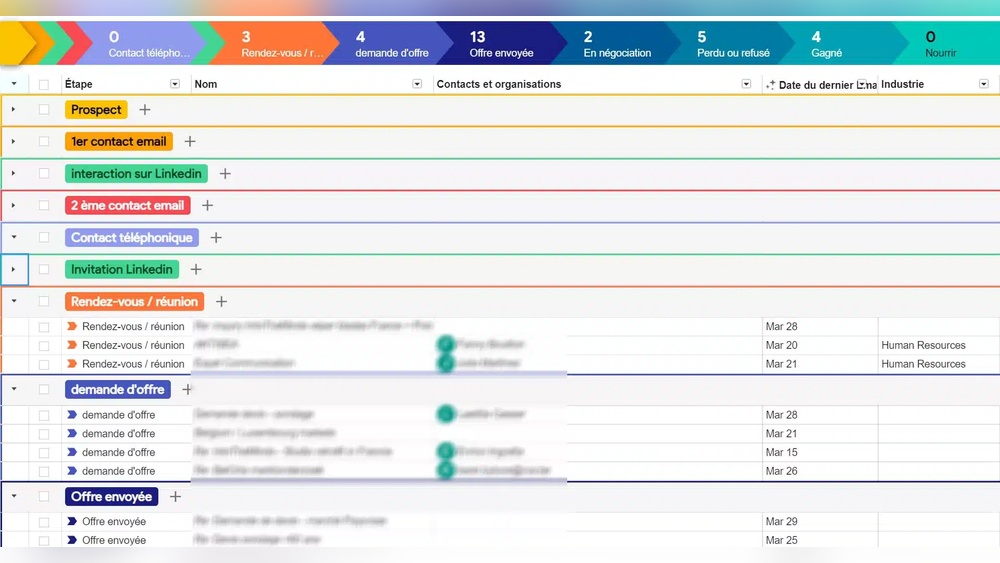
- Customizable pipelines visible inside email threads
- Buttons to add contacts or deals from emails
- Email tracking and scheduling
- Shared notes and task assignments within email conversations
This integration means users can manage customer data alongside their daily emails, streamlining communication and CRM processes.
Primary Uses And Target Audience
Streak CRM suits teams that depend on email for customer interaction. Typical users include:
- Sales teams managing leads and deals
- Customer support teams handling requests and follow-ups
- Recruiters tracking candidates
- Small businesses needing simple CRM inside Gmail
It works best for those who want a lightweight, easy-to-use CRM without learning new software. Streak helps teams stay organized and focused on their inbox-based workflows.
Key Security Features Of Streak Crm
Streak CRM integrates multiple security layers to protect your data. Its design focuses on safeguarding sensitive information within Gmail. Understanding these features helps users trust the platform for managing contacts and sales pipelines.
Data Encryption And Protection Measures
Streak CRM uses encryption to secure data both during transfer and storage. All data moves through encrypted connections (TLS/SSL), preventing interception. Stored information is encrypted at rest, making unauthorized access difficult.
Data backups occur regularly to ensure no loss occurs. Streak employs advanced technologies to protect against data breaches and leaks.
Physical, Electronic, And Procedural Safeguards
- Physical safeguards: Data centers hosting Streak’s servers have strict security controls, including surveillance and restricted access.
- Electronic safeguards: Firewalls, intrusion detection systems, and malware protection guard against cyber threats.
- Procedural safeguards: Staff follows strict protocols for data handling, access, and incident response to minimize risks.
Access Controls And User Authentication
Streak CRM enforces strong access controls to limit who can view or change data. Users must authenticate via their Google accounts, leveraging Google’s secure login system.
Two-factor authentication (2FA) support adds an extra security layer. Permissions can be set to control data visibility within teams, ensuring only authorized users access specific information.
Compliance With Gdpr And Other Regulations
Streak CRM complies with the General Data Protection Regulation (GDPR), ensuring user data privacy rights are respected.
| Regulation | Compliance Details |
|---|---|
| GDPR | Data processing transparency, user consent, and data access rights |
| Other Regulations | Adheres to industry standards for data security and privacy |
Users can request data export or deletion to maintain control over their information.
Privacy Policies And Data Handling
Privacy and data security are key concerns for any CRM tool. Streak CRM prioritizes user trust by clearly outlining how it manages personal and business information. Understanding Streak’s privacy policies helps users feel confident about data safety and control.
How Streak Handles User Data
Streak collects data only to provide its CRM services within Gmail. It processes:
- Email content related to CRM pipelines
- User profile information
- Interaction data for improving service quality
Streak does not sell or rent user data to third parties. It uses encryption to protect data during transmission and storage. Access to user data is limited to authorized personnel only.
Data Storage Locations And Their Significance
Streak stores data on Google Cloud servers located primarily in the United States. This choice benefits users by:
- Leveraging Google’s strong security infrastructure
- Ensuring high availability and reliability
- Complying with U.S. data protection laws
For users outside the U.S., understanding data location helps assess compliance with local regulations like GDPR. Streak adheres to such regulations by implementing strict privacy controls and offering data processing agreements.
User Control Over Data And Permissions
Users maintain full control over their data within Streak CRM. Features include:
- Easy permission management through Google account settings
- Options to export or delete data anytime
- Granular control over which emails and contacts are added to Streak pipelines
Streak requests explicit user consent before accessing Gmail data. Users can revoke access at any moment, ensuring transparency and control.
Pricing And Affordability Breakdown
The pricing structure of Streak CRM suits various users, from individuals to teams. Understanding the costs helps decide which plan fits best. This section breaks down the free and paid plans, analyses value for different needs, and compares Streak’s prices with competitors.
Overview Of Free And Paid Plans
Streak offers a free plan with essential CRM features inside Gmail. It supports basic tracking and pipelines, ideal for personal use or small projects.
Paid plans include:
- Solo: For individuals needing more features than free.
- Pro: Designed for small teams with enhanced CRM tools.
- Enterprise: For large teams requiring advanced customization and support.
| Plan | Monthly Cost (per user) | Key Features |
|---|---|---|
| Free | $0 | Basic tracking, pipelines, limited storage |
| Solo | $15 | More pipelines, email tracking, priority support |
| Pro | $49 | Team collaboration, advanced reports, integrations |
| Enterprise | Custom pricing | Custom features, dedicated support, security controls |
Cost-value Analysis For Different User Needs
Individuals and freelancers often find the free or Solo plan enough. It covers email tracking and basic CRM features without extra cost.
Small teams benefit from the Pro plan. It offers collaboration tools and deeper insights, helping sales and fundraising efforts.
Large teams needing security and custom features should consider the Enterprise plan. This plan justifies higher cost with tailored support and controls.
- Free plan suits basic needs, no financial risk.
- Solo plan balances cost with added functionality.
- Pro plan delivers more collaboration and reporting.
- Enterprise plan fits complex business needs.
Comparing Streak’s Pricing With Competitors
Competitors like HubSpot CRM and Pipedrive offer free tiers and paid plans. HubSpot’s free plan has more features but limits advanced tools to paid tiers.
Pipedrive starts paid plans around $15 per user, similar to Streak’s Solo plan. Both offer scalable options for teams.
| CRM | Free Plan | Starting Paid Plan | Notes |
|---|---|---|---|
| Streak | Yes (basic features) | $15/user (Solo) | Integrates inside Gmail, simple setup |
| HubSpot CRM | Yes (more features) | $50/user (Starter) | Broader marketing tools, higher starting price |
| Pipedrive | No | $15/user | Focus on sales pipeline, no free tier |
Streak’s pricing is competitive for Gmail users. Its free plan is a strong option for entry-level CRM needs.
Pros And Cons Of Using Streak Crm Based On Real-world Usage
Streak CRM integrates directly into Gmail, making it popular for teams needing simple contact management. Users appreciate its convenience but also report some challenges. Real-world experience reveals clear advantages and notable limitations. Understanding both sides helps decide if Streak CRM suits your needs.
Advantages Of Streak Crm For Users
- Seamless Gmail integration: No need to switch apps; CRM works inside your inbox.
- User-friendly interface: Easy to set up and navigate, even for beginners.
- Customizable pipelines: Track deals, projects, or fundraising with flexible stages.
- Collaboration tools: Share contacts and emails with team members smoothly.
- Free plan availability: Good features accessible without immediate cost.
- Email tracking: Know when recipients open your messages, improving follow-up timing.
Common Limitations And Concerns
- Limited advanced features: Missing some options found in larger CRMs.
- Dependent on Gmail: Not ideal if your team uses other email services.
- Performance lag: Can slow down Gmail, especially with large data.
- Data export challenges: Exporting data is not straightforward for backup.
- Mobile app limitations: Mobile experience is less robust than desktop.
User Feedback On Security And Usability
Users generally feel secure using Streak CRM. The platform employs strong encryption to protect data. It complies with major privacy laws like GDPR, ensuring your information stays private.
Many users find the CRM easy to use for daily tasks. The direct Gmail integration helps keep workflows simple. Some mention occasional bugs but no major security issues.
Security measures include:
| Security Feature | Description |
|---|---|
| Data Encryption | Encrypts data in transit and at rest to prevent unauthorized access. |
| GDPR Compliance | Meets European data protection standards for privacy and user control. |
| User Authentication | Supports Google account login with two-factor authentication options. |
In summary, Streak CRM suits users wanting a simple, Gmail-based system. It balances ease of use with solid security, though it lacks some advanced CRM features.

Credit: capsulecrm.com
Is Streak Crm Safe? Unveiling The Truth
Streak CRM integrates directly with Gmail, making it a popular choice for many users. Data safety is a top concern for users storing sensitive customer and business information. Understanding how safe Streak CRM is can help users trust the platform for daily use.
This section reveals key facts about Streak’s security, common concerns, and ways to stay safe while using it.
Common Security Concerns Addressed
- Data Privacy: Users worry if their emails and contact info remain private.
- Access Control: Concerns about unauthorized access to CRM data.
- Data Loss: Fear of losing important customer records or emails.
- Integration Risks: Risks from linking CRM to Gmail and other apps.
Streak CRM stores data within Google’s secure cloud, benefiting from Google’s strong security measures. User data is not sold or shared without consent.
Effectiveness Of Streak’s Security Protocols
| Security Feature | Description | Benefit |
|---|---|---|
| Encryption | Data is encrypted during transfer and storage using TLS and AES standards. | Protects data from interception and unauthorized access. |
| Access via Google Account | Uses Google OAuth for login and permissions management. | Allows strong authentication and simplifies permission control. |
| GDPR Compliance | Follows GDPR rules for user data privacy and protection. | Ensures legal standards for European users and data handling. |
| Regular Security Audits | Conducts periodic reviews to find and fix vulnerabilities. | Maintains up-to-date defenses against new threats. |
These protocols show Streak CRM’s commitment to protecting user data.
Potential Risks And How To Mitigate Them
- Phishing Attacks: Users may receive fake emails asking for login details.
- Weak Passwords: Easy passwords increase risk of account hacking.
- Third-Party Apps: Some connected apps may request excessive permissions.
Follow these steps to reduce risks:
- Use strong, unique passwords for your Google and Streak accounts.
- Enable two-factor authentication (2FA) on your Google account.
- Review and limit permissions granted to third-party apps.
- Be cautious with emails requesting sensitive information.
- Regularly back up important CRM data outside Streak.
Applying these measures keeps your CRM data secure and under your control.
Who Should Use Streak Crm?
Streak CRM is designed for users who want a simple, integrated CRM inside Gmail. It fits best for teams that rely heavily on email for communication and sales. The tool is built to manage customer relationships without leaving the inbox.
This CRM suits those who prefer a lightweight, easy-to-use solution that works within Google Workspace. Streak helps organize emails, track deals, and manage pipelines right from Gmail.
Ideal Users And Business Scenarios
- Small Sales Teams: Manage leads and sales pipelines without switching apps.
- Fundraising Teams: Track donor conversations and donation stages smoothly.
- Customer Support: Keep customer emails organized and follow up efficiently.
- Freelancers and Consultants: Handle client communications and project statuses in one place.
Streak works well for businesses focused on email-driven workflows and those who want to avoid complex CRM setups.
| Business Scenario | Why Streak CRM? |
|---|---|
| Email-Centric Sales | Manage contacts, track emails, and automate follow-ups inside Gmail. |
| Donor Management | Organize fundraising pipelines and monitor donor engagement easily. |
| Customer Service | Track support requests and maintain conversation history in one place. |
When To Consider Alternative Crm Solutions
Streak CRM may not fit every business type. Consider other options if:
- Your team needs advanced reporting and analytics features.
- You require extensive integrations beyond Google Workspace.
- Your sales process is highly complex with multiple stages and teams.
- You want a CRM with built-in marketing automation tools.
In these cases, platforms like HubSpot, Pipedrive, or Copper might offer better support.
Recommendations For Enhancing Security When Using Streak
Streak integrates tightly with Gmail, so security depends on both Streak and Google.
- Use Strong Passwords: Protect your Google account with a strong, unique password.
- Enable Two-Factor Authentication (2FA): Add an extra layer of protection for your Google login.
- Review App Permissions: Regularly check which apps have access to your Google data.
- Limit User Access: Only grant CRM access to necessary team members.
- Monitor Activity: Use Google Workspace admin tools to monitor suspicious activity.
These steps help safeguard your data while using Streak CRM inside Gmail.

Credit: www.intotheminds.com
Conclusion: Making An Informed Decision About Streak Crm
Choosing the right CRM is vital for managing contacts and sales effectively. Streak CRM integrates directly with Gmail, making it a popular choice for many teams. Understanding its safety and security features helps users decide if it fits their needs. Below is a clear summary to help you make an informed decision.
Summary Of Safety And Security Insights
Streak CRM uses strong security measures to protect user data. It stores information safely and complies with privacy laws like GDPR. Here are key points about its safety:
- Data encryption both in transit and at rest
- Two-factor authentication (2FA) support for user accounts
- Regular security audits and updates
- Compliance with major privacy standards, including GDPR
- Minimal data access to third parties
These measures reduce risks of data breaches and unauthorized access.
Balancing Features, Cost, And Security
Streak CRM offers useful features like email tracking, pipeline management, and integration with Gmail. Its pricing includes a free plan suitable for small teams.
| Plan | Cost | Key Features | Security |
|---|---|---|---|
| Free | $0 | Basic CRM tools, email tracking | Standard encryption and 2FA |
| Pro | $49/user/month | Advanced pipeline, team collaboration | Enhanced security features |
Evaluate your budget and security needs together. Strong security often comes with paid plans, but the free option still offers solid protection.
Final Thoughts On Choosing Streak Crm
Streak CRM fits teams that use Gmail heavily and want simple, integrated tools. Its security is reliable, backed by encryption and privacy compliance.
Focus on these when deciding:
- How important is seamless Gmail integration?
- What is your team size and budget?
- Do you need advanced security features?
- Are you comfortable with a cloud-based CRM?
Streak CRM offers a balanced mix of features, cost, and security. This balance makes it a strong option for many users.
Frequently Asked Questions
Is Streak Email Tracking Safe?
Streak email tracking is safe, using strong physical, electronic, and procedural safeguards to protect user data. It limits access and complies with security standards.
Who Owns Streak Crm?
Streak CRM is owned by Aleem Mawani. He founded and leads the company based in Austin, Texas.
How Much Does Streak Crm Cost?
Streak CRM offers a free plan and paid plans: Pro at $49, Pro+ at $69, and Enterprise at $129 per user monthly (billed annually).
Does Streak Track Your Own Views?
Streak blocks tracking of your own email views to avoid counting them as external views. It focuses on accurate view tracking only.
Conclusion
Streak CRM offers strong security to keep your data safe. It uses physical and electronic safeguards to protect your information. The platform follows privacy rules and respects user data. You can manage your contacts and sales within Gmail confidently. For teams wanting a simple, secure CRM, Streak fits well. Explore more details and try it yourself here: Streak CRM. Choosing a CRM with reliable protection helps your business thrive.

