
Struggling to keep your sales, projects, and customer details organized? You’re not alone.
Capsule CRM is designed to bring clarity and control to your business by putting everything in one easy-to-manage place. But before you dive in, you probably want to know—how much does Capsule CRM cost? Understanding Capsule CRM pricing can help you decide if it’s the right fit for your business without any surprises. You’ll get a clear breakdown of their pricing plans, what features come with each, and how to choose the best option for your needs. Ready to take control with a CRM that feels like your business brain—without the panic? Let’s explore Capsule CRM pricing together. Check out Capsule CRM pricing here
Introduction To Capsule Crm And Its Purpose
Capsule CRM helps businesses organize sales, projects, and customer service in one place. It reduces stress by replacing scattered notes and spreadsheets with clear, simple tools.
The goal is to give businesses clarity, calm, and control. Capsule CRM keeps your customer and sales data tidy, so managing your business feels easy and smooth.
What Is Capsule Crm? Overview And Core Functions
Capsule CRM is a customer relationship management tool designed for small to medium businesses. It focuses on keeping customer details, sales, and projects organized.
- Manage contacts and track sales opportunities
- Organize customer communications and history
- Track tasks and deadlines related to customers
- Integrate with email and popular apps
- Generate simple reports for sales and activities
The interface is user-friendly and built for easy adoption, minimizing training time for teams.
Who Should Use Capsule Crm? Ideal User Profiles
Capsule CRM fits small business owners and teams wanting simple, effective CRM tools. It suits:
- Small sales teams needing clear contact management
- Service businesses tracking customer projects and support
- Startups requiring a straightforward sales pipeline
- Businesses looking for affordable CRM with core features
Users value a clean system without extra complexity or heavy customization.
Why Capsule Crm Stands Out Among Small Business Crms
Capsule CRM stands out due to its simplicity and focus on essentials. Key advantages include:
| Feature | Benefit |
|---|---|
| Easy-to-use interface | Quick learning curve for teams |
| All-in-one sales and customer management | Less need for multiple tools |
| Affordable pricing plans | Good value for small businesses |
| Integrations with common apps | Smooth workflow connections |
| Good onboarding resources | Easy setup and support |
This CRM focuses on what small businesses need most, avoiding clutter and steep learning curves.

Credit: www.discovercrm.com
Key Features Of Capsule Crm And Their Benefits
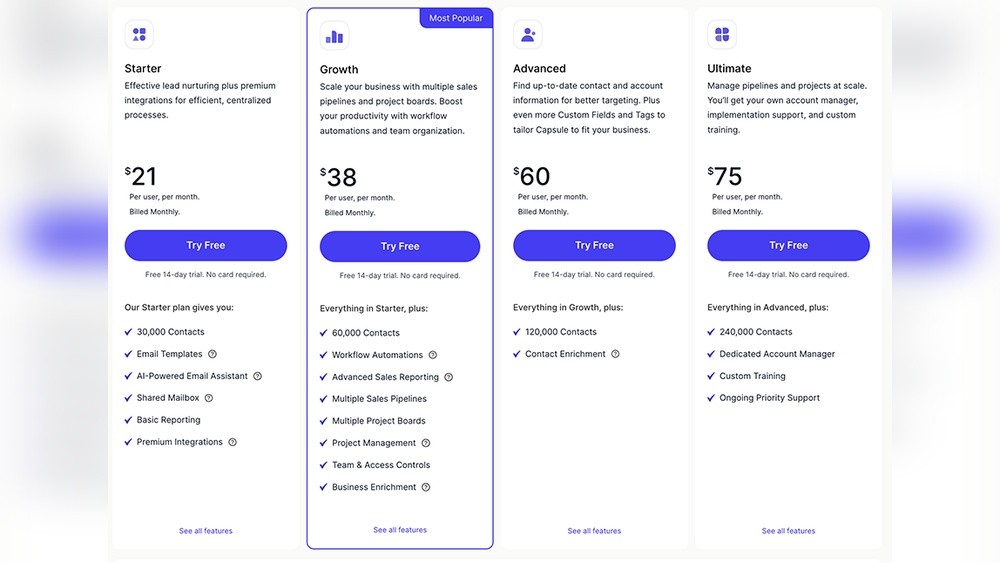
Capsule CRM offers clear pricing plans tailored to different business sizes. The plans range from a Free option to more advanced packages designed for growing teams. This breakdown explains each plan’s features, how user count affects cost, billing options, and extra charges. Understanding these details helps choose the right plan for your business needs.
Overview Of Available Plans: Free, Professional, And Teams
| Plan | Price (per user/month) | Best For | Main Features |
|---|---|---|---|
| Free | $0 | Individuals or small startups | Basic contact management, limited records, 2 users max |
| Professional | $18 | Small to medium businesses | Unlimited contacts, sales pipeline, integrations, 50,000 records |
| Teams | $36 | Larger teams needing collaboration | Advanced reporting, workflows, roles & permissions, priority support |
Detailed Features Included In Each Pricing Tier
- Free Plan: Manage contacts, track sales, up to 2 users, 10MB storage.
- Professional Plan: Unlimited contacts, custom fields, email templates, 100MB storage.
- Teams Plan: Role-based access, team collaboration tools, advanced workflows, 200MB storage.
All plans include mobile apps and basic customer support. Higher tiers add more automation and reporting tools.
How User Count Impacts Monthly Costs
Capsule charges per user every month. More users increase total cost linearly.
- Free plan allows only up to 2 users at no cost.
- Professional and Teams plans require payment for each additional user.
- Adding users scales monthly fees but grants access to full features.
Choosing the right number of users is key to controlling expenses.
Annual Vs. Monthly Billing: Savings Opportunities
Capsule offers both monthly and annual billing. Paying annually provides a discount.
- Monthly billing: Flexibility to adjust users or plans.
- Annual billing: Typically saves around 20% compared to monthly fees.
Annual payment suits businesses with stable user counts seeking lower costs.
Additional Costs: Implementation, Training, And Add-ons
Base plans cover core CRM features. Extra expenses may include:
- Implementation: Fees for setup or data migration services.
- Training: Optional sessions to help teams learn the system.
- Add-ons: Third-party integrations or advanced tools not in plans.
Review these potential costs before committing to a plan.
Capsule Crm Pricing Plans Breakdown
Capsule CRM offers a clear and simple solution to manage sales, projects, and customer data in one place. Its pricing aligns well with the features provided, especially for small to medium businesses. Understanding Capsule’s costs and benefits helps decide if it fits your business needs and budget.
Summary Of Pricing And Feature Value
Capsule CRM pricing is straightforward with plans designed for small and growing businesses:
| Plan | Monthly Cost (per user) | Key Features |
|---|---|---|
| Free | $0 | Basic contact management, 250 contacts, 10MB storage |
| Professional | $18 | Unlimited contacts, sales pipeline, integrations, 10GB storage |
| Teams | $36 | Advanced reporting, workflows, multiple pipelines, 20GB storage |
Each plan offers useful tools to organize sales and customer data. The Professional plan balances cost and features for most small businesses. Teams with complex needs benefit from the higher-tier options.
Final Verdict Based On Business Needs And Budget
Capsule CRM suits businesses that want ease of use and a tidy, centralized platform. Its simple interface reduces learning time and user frustration.
Small businesses gain solid contact and sales management without overwhelming features. Growing businesses can upgrade for automation and deeper insights.
- Best for teams needing clear sales pipelines.
- Good fit if you prefer straightforward pricing.
- Not ideal if you want heavy AI or enterprise-level customization.
How To Start A Free Trial And Evaluate Capsule Crm Yourself
Testing Capsule is simple and risk-free with its free plan.
- Visit capsulecrm.com.
- Click “Get Started for Free” to create an account.
- Explore core features like contact management and sales pipelines.
- Assess if the interface feels intuitive for your team.
- Upgrade anytime to access advanced tools if needed.
Starting with the free plan lets you see Capsule’s value before spending money. Try organizing your customer data and tracking sales to measure its impact on your workflow.

Credit: www.cmap.io

Credit: capsulecrm.com
Frequently Asked Questions
Is Capsule Crm Good?
Capsule CRM offers a simple, user-friendly platform ideal for small businesses. It manages contacts, sales pipelines, and tasks efficiently. Its intuitive interface and lean features make onboarding easy. Capsule suits businesses seeking straightforward CRM without complex automation or heavy customization.
How Much Does A Crm Cost Per Month?
CRM costs vary by features and users, typically ranging from $12 to $100+ per user monthly. Basic plans start around $12-$18. Advanced plans with automation and analytics cost more. Some CRMs offer free basic versions. Annual billing often reduces monthly fees.
Additional costs may include setup and training.
What Is The Difference Between Hubspot And Capsule Crm?
HubSpot offers all-in-one marketing, sales, and service tools with advanced automation. Capsule CRM focuses on simple contact and pipeline management for small businesses. HubSpot includes deeper analytics and integrations, while Capsule provides a user-friendly, lean CRM solution with basic automation.
What Is A Capsule Crm?
Capsule CRM is a cloud-based software for small businesses to manage contacts, sales pipelines, and tasks efficiently.
Conclusion
Capsule CRM offers clear pricing options for small businesses. Plans start with essential tools for contact and sales tracking. As your business grows, advanced features become available. Pricing depends on users, features, and billing choices. Capsule keeps things simple and easy to use. It helps organize sales, projects, and customer info in one place. For those wanting an affordable CRM with straightforward pricing, Capsule fits well. Explore detailed pricing and find your best plan here: Capsule CRM Pricing.

