
Are you tired of juggling customer chats across multiple platforms while trying to keep your sales organized? Imagine if all your WhatsApp conversations could instantly sync with your Capsule CRM, giving you a clear view of every interaction in one place.
That’s exactly what Capsule CRM WhatsApp integration offers—a seamless way to connect your messaging and customer management effortlessly. You get to save time, reduce errors, and focus on what truly matters: growing your business with calm and control. Ready to streamline your workflow and never lose track of a lead again? Discover how integrating WhatsApp with Capsule can transform your daily operations and give you that much-needed business brain boost. Explore the power of Capsule CRM WhatsApp Integration and take your customer communication to the next level!
Introduction To Capsule Crm Whatsapp Integration
Capsule CRM WhatsApp Integration connects your customer relationship management with the world’s most popular messaging app. This link allows businesses to communicate smoothly and keep all customer chats and details in one place. Managing sales and customer support becomes clearer and faster. The integration simplifies workflows and helps build stronger connections with clients.
Overview Of Capsule Crm And Its Core Functionalities
Capsule CRM is a tool designed to organize your sales, projects, and customer data in a simple way. It collects information from different sources like emails, notes, and calls into a single platform. Key features include:
- Contact and lead management
- Sales pipeline tracking
- Task and calendar organization
- Customer service support
- Collaboration tools for teams
This structure helps businesses work calmly and control their customer relationships without chaos.
Purpose And Benefits Of Integrating Whatsapp With Capsule Crm
The integration links WhatsApp messages directly with your Capsule contacts. This means:
- All WhatsApp chats appear inside Capsule for easy access.
- Customer conversations are logged automatically.
- Teams see full message history and respond faster.
- Sales and support data stay centralized and updated.
Benefits include saving time, reducing missed messages, and improving customer experience. The integration supports tools like Wati and CallBell to handle WhatsApp Business chats smoothly.
How Seamless Messaging Enhances Sales And Customer Engagement
Seamless messaging means quick, clear communication without switching apps. This helps sales teams:
- Respond instantly to customer questions on WhatsApp.
- Track leads and follow-ups in one place.
- Keep conversation history for personalized service.
- Work together with teammates easily.
Customers feel valued when businesses reply fast and remember their needs. This leads to stronger relationships and better sales results.
Credit: capsulecrm.com
Key Features Of Capsule Crm Whatsapp Integration
Capsule CRM WhatsApp integration brings your customer chats and sales data together. It helps your team save time and work smarter. This integration offers several features that keep your communication smooth and your contacts organized.
Automatic Syncing Of Whatsapp Conversations With Capsule Contacts
Every WhatsApp message you send or receive is automatically linked to the right contact in Capsule. This means you never lose track of conversations. Your team can see full chat histories without switching apps.
This syncing happens in real time, matching messages to contacts by phone number. It keeps your database up to date without manual entry.
Centralized Communication: Managing Messages Within Crm
All WhatsApp chats appear inside Capsule’s interface. Your team can read, reply, and manage messages directly from the CRM. This central hub reduces the need to jump between platforms.
- View all conversations in one place
- Assign chats to team members
- Keep notes and tags on each contact
Centralizing communication helps maintain clear and organized customer records.
Real-time Notifications And Updates Via Whatsapp
Receive instant alerts on new messages through WhatsApp. Your team stays informed about customer replies and important updates without delay.
Notifications improve response times and ensure no message is missed.
Task Automation Triggered By Whatsapp Interactions
Actions in WhatsApp can trigger automated tasks inside Capsule. For example, a new message can create a follow-up task or update a sales pipeline stage.
Automation reduces manual work and keeps your sales process moving smoothly.
Multi-platform Support And Ease Of Setup
The integration supports multiple devices and works seamlessly on desktop and mobile. Setup is straightforward, with clear instructions to connect WhatsApp Business to Capsule.
This ease of use means your team can start benefiting quickly without technical hassle.
How Each Feature Benefits Your Sales Process
Integrating WhatsApp with Capsule CRM brings key advantages to your sales workflow. Each feature works to streamline communication, improve lead tracking, and boost team efficiency. These improvements help your sales team stay organized and responsive.
Enhancing Customer Relationship Management Through Synced Conversations
WhatsApp messages sync directly with Capsule contacts. This means all conversations are stored in one place. Sales teams get a full view of customer interactions without switching apps.
- Centralized contact history: View all WhatsApp chats alongside emails and calls.
- Context-rich communication: Quickly understand past conversations before reaching out.
- Better relationship tracking: Keep notes and updates linked to each contact.
Reducing Missed Leads With Centralized Messaging
All WhatsApp messages appear inside Capsule CRM automatically. Leads never slip through unnoticed or lost in separate apps.
- Unified inbox: Access WhatsApp chats alongside other channels.
- Lead identification: New contacts created from WhatsApp messages.
- Consistent follow-up: Assign and track messages as sales tasks.
Improving Response Times Using Real-time Notifications
Receive instant alerts when customers message via WhatsApp. Faster replies keep prospects engaged and reduce wait times.
- Immediate awareness: Notifications pop up on your device or desktop.
- Quicker sales cycle: Prompt answers increase chances of closing deals.
- Customer satisfaction: Timely responses build trust and loyalty.
Boosting Productivity With Automated Task Creation
Messages can trigger automatic tasks in Capsule CRM. Sales reps spend less time on manual follow-ups and more on selling.
| Feature | Benefit |
|---|---|
| Auto-create follow-up tasks | Ensures no lead is forgotten or delayed |
| Task reminders | Keep sales reps on schedule with deadlines |
| Link tasks to contacts | All info stays connected for easy reference |
Simplifying Communication Workflows Across Teams
Teams share WhatsApp conversations inside Capsule CRM. This improves collaboration and avoids duplicated efforts.
- Shared visibility: Everyone sees customer messages and notes.
- Clear task assignments: Delegate follow-ups without confusion.
- Streamlined handoffs: Smooth transitions between sales and support.

Credit: timelines.ai
Pricing And Affordability Breakdown
Understanding the costs of Capsule CRM and WhatsApp integration helps businesses plan budgets. Clear pricing details show which options fit small and medium companies best. Evaluating value alongside price ensures smart spending for customer communication.
Overview Of Pricing Plans For Capsule Crm And Whatsapp Integration Tools
Capsule CRM offers simple pricing tiers based on user needs:
- Professional Plan: $18 per user/month, includes sales pipelines and task management.
- Teams Plan: $36 per user/month, adds advanced reporting and user roles.
WhatsApp integration tools like Wati and CallBell charge separately. Their pricing depends on message volume and features.
Cost Comparison Between Popular Integration Options Like Wati And Callbell
| Feature | Wati | CallBell |
|---|---|---|
| Starting Price | $49 per month | $29 per month |
| Messages Included | Up to 1,000 | Up to 500 |
| Additional Message Cost | $0.01 per message | $0.015 per message |
| Multi-Agent Support | Yes | Yes |
| Integration with Capsule CRM | Direct integration supported | Direct integration supported |
Value For Money: Roi Considerations For Small And Medium Businesses
Capsule CRM combined with WhatsApp tools improves customer communication. This leads to faster sales and better service.
Costs may seem high initially but consider:
- Time saved managing messages and contacts
- Higher customer satisfaction
- Centralized data reduces errors
These benefits create positive return on investment (ROI) for most businesses.
Free Trial And Demo Availability
- Capsule CRM offers a 30-day free trial with full features.
- Wati provides a 7-day free trial to test WhatsApp messaging.
- CallBell offers a free demo and a trial period on request.
These options help businesses evaluate tools before paying.
Pros And Cons Based On Real-world Usage
Integrating Capsule CRM with WhatsApp offers practical benefits and some challenges. This integration helps businesses manage customer chats directly within Capsule. It syncs conversations and contacts, saving time and effort. Users share their experiences showing clear upsides and certain drawbacks. This section explores both sides based on actual use.
Advantages: Increased Sales Efficiency, Better Customer Insights, And Streamlined Communication
Capsule CRM WhatsApp integration improves sales workflows by centralizing communication. Teams access all customer messages inside Capsule without switching apps. This streamlines communication and reduces missed messages.
- Increased sales efficiency: Sales reps respond faster using WhatsApp chats logged in Capsule.
- Better customer insights: Conversations are linked to contact records, revealing customer preferences and history.
- Streamlined communication: Messages and customer data appear in one platform, simplifying follow-ups.
Overall, this integration helps sales teams stay organized and react quickly.
Limitations: Potential Setup Complexity And Dependency On Third-party Tools
Setting up WhatsApp with Capsule often requires external tools like Wati or CallBell. These third-party apps connect WhatsApp Business to Capsule but add extra steps.
- Setup complexity: Configuring accounts and permissions can be confusing for some users.
- Dependency on third-party tools: Integration relies on external services that may affect reliability or cost.
Users must maintain these tools and ensure smooth data syncing between platforms.
User Feedback Highlights And Common Challenges
Many users praise the integration for improving customer response times. They note easier tracking of conversations tied to sales opportunities.
| User Feedback | Common Challenges |
|---|---|
| Faster replies and better customer engagement | Initial setup confusion, especially with third-party connectors |
| Centralized customer data improves sales follow-ups | Occasional sync delays between WhatsApp and Capsule |
| Team collaboration is easier with shared chat history | Dependence on external tools increases maintenance tasks |
Tips To Overcome Integration Hurdles
- Follow detailed setup guides from Capsule and chosen third-party tools.
- Test the connection with sample messages before going live.
- Train your team on how to use the integrated system effectively.
- Keep third-party apps updated to avoid compatibility issues.
- Contact support early if sync problems arise.
These steps reduce frustration and ensure smooth operation.

Credit: capsulecrm.com
Ideal Users And Use Cases For Capsule Crm Whatsapp Integration
The Capsule CRM WhatsApp integration connects your business conversations with your customer data. It helps keep all WhatsApp messages linked to the right contacts in Capsule. This ensures your team can track interactions easily and stay organized.
This integration suits various users and business needs. It fits small to medium-sized businesses, sales teams, and customer support departments. Also, it helps businesses that rely heavily on WhatsApp for communication.
Small To Medium-sized Businesses Aiming To Enhance Customer Engagement
Businesses with limited resources benefit from this integration. Capsule CRM combined with WhatsApp allows direct, real-time contact with customers. It centralizes conversations, reducing missed messages and delays.
- Manage customer chats and sales data in one place
- Send timely updates and personalized offers
- Build stronger relationships with customers
These features help small and medium businesses deliver smooth, personal service.
Sales Teams Looking For Efficient Lead Tracking And Follow-up
Sales teams gain from having WhatsApp chats linked directly to Capsule CRM contacts. This helps track leads and follow up quickly without switching apps.
- See conversation history alongside sales records
- Log WhatsApp messages automatically under the correct contact
- Schedule follow-ups based on chat activity
Such integration improves team productivity and lead conversion rates.
Customer Support Departments Requiring Real-time Messaging
Support teams need fast, clear communication with customers. Capsule CRM WhatsApp integration allows instant replies while tracking issues in the CRM.
| Benefit | Details |
|---|---|
| Centralized Messaging | All WhatsApp support chats stored with customer profiles |
| Quick Response | Real-time chat helps resolve issues faster |
| Case Tracking | Support tickets linked to conversations for easy follow-up |
Businesses With High Whatsapp Usage Seeking Centralized Communication
Companies relying heavily on WhatsApp find Capsule CRM integration very useful. It removes the need to juggle multiple tools for communication and data storage.
- Brings WhatsApp chats and CRM data into one system
- Prevents loss of important customer messages
- Improves team collaboration and communication flow
This setup ensures every message counts and stays connected to the right contact.
Getting Started: How To Integrate Whatsapp With Capsule Crm
Connecting WhatsApp with Capsule CRM streamlines your communication. It helps keep all customer chats and sales data in one place. This integration improves your team’s workflow and response time. Follow simple steps to link WhatsApp using tools like Wati or CallBell. This guide covers the setup process, data syncing tips, team training, and available support.
Step-by-step Integration Process Using Popular Tools Like Wati And Callbell
Both Wati and CallBell connect WhatsApp Business with Capsule CRM effectively. Here is how to integrate using these tools:
- Create accounts on Wati or CallBell platforms.
- Connect your WhatsApp Business number to the chosen tool.
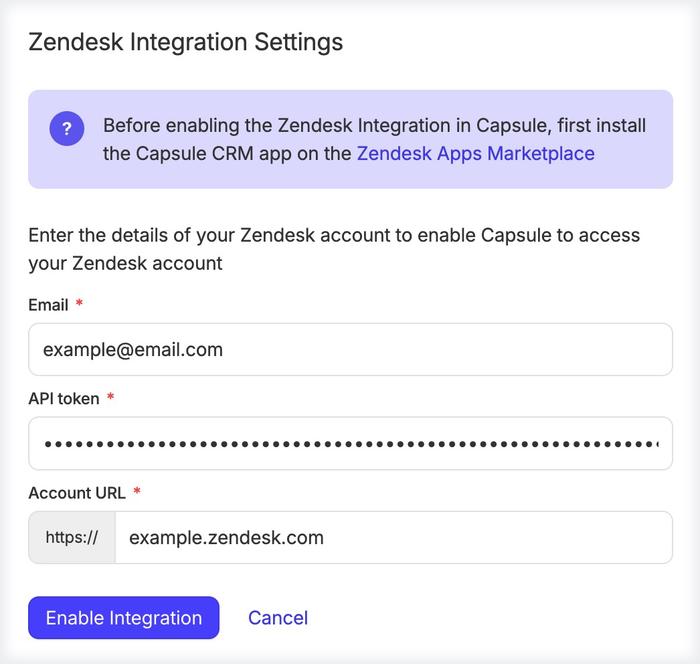
- Authorize Capsule CRM access within the tool’s integration settings.
- Map your contacts so WhatsApp messages sync with Capsule contacts.
- Enable message logging to record chats inside Capsule CRM.
- Test the connection by sending and receiving messages.
This setup ensures your WhatsApp conversations appear inside Capsule automatically.
Best Practices For Ensuring Data Synchronization And Security
- Regularly update your integration app and Capsule CRM to avoid bugs.
- Use strong passwords and two-factor authentication on all accounts.
- Backup your data often to prevent loss.
- Monitor sync logs to catch any missed messages or errors quickly.
- Limit access to sensitive data only to necessary team members.
- Comply with data protection laws relevant to your business location.
Tips For Training Your Team To Maximize Integration Benefits
Good training boosts team efficiency with WhatsApp and Capsule CRM integration.
- Host live demos showing how to use the integrated system.
- Share clear guides on accessing and updating customer chats.
- Explain the importance of logging conversations properly.
- Encourage regular use to build confidence and reduce errors.
- Set up Q&A sessions to resolve doubts quickly.
Resources And Support Channels
| Resource | Description | Link |
|---|---|---|
| Capsule CRM Help Center | Official guides and FAQs about Capsule features and integrations. | capsulecrm.com/support |
| Wati Support | Step-by-step help for WhatsApp integration and troubleshooting. | wati.io/support |
| CallBell Help Center | Guides and live chat support for WhatsApp syncing with Capsule. | callbell.eu/help |
| Community Forums | User discussions sharing tips and solutions on integration. | community.capsulecrm.com |
Conclusion: Boosting Sales With Seamless Messaging
Integrating WhatsApp with Capsule CRM creates a smooth messaging experience. It connects customer chats directly to the sales and contact database. This helps teams respond fast and keep all details in one place. Such integration makes sales processes simpler and more effective.
Summary Of Key Benefits And Features
- Centralized communication: WhatsApp chats sync automatically with Capsule contacts.
- Improved customer tracking: Messages and history appear under each customer profile.
- Faster responses: Teams reply quickly without switching apps.
- Clear sales data: Conversation logs help sales follow-ups and decisions.
- Easy setup: Integrations like Wati and CallBell connect WhatsApp to Capsule smoothly.
Long-term Impact On Sales And Customer Relationships
Consistent, fast messaging builds trust with customers. It shows reliability and attention to their needs. Over time, this strengthens relationships and encourages repeat business.
Sales teams gain better insights from complete chat records. They make smarter offers based on customer history. This leads to higher sales and improved customer satisfaction.
Encouragement To Adopt Integrated Communication Strategies
Businesses thrive by uniting sales tools and messaging platforms. Capsule CRM WhatsApp integration reduces errors and missed messages. It creates a single source of truth for customer data.
Start using integrated messaging now. It helps your team work smarter, not harder. Simplify customer contact and watch sales grow steadily.
Frequently Asked Questions
What Is Capsule Crm Whatsapp Integration?
Capsule CRM WhatsApp integration connects your WhatsApp Business with Capsule CRM. It syncs messages and contacts automatically, improving communication and data management. This integration helps streamline customer interactions and centralizes conversation records inside Capsule CRM for better sales and support workflows.
How Does Whatsapp Integration Benefit Capsule Crm Users?
WhatsApp integration enhances Capsule CRM by enabling real-time messaging within the platform. It increases customer engagement, speeds up response times, and logs conversations under relevant contacts. This boosts productivity, improves customer satisfaction, and keeps your sales team informed with up-to-date communication history.
Which Apps Support Capsule Crm Whatsapp Integration?
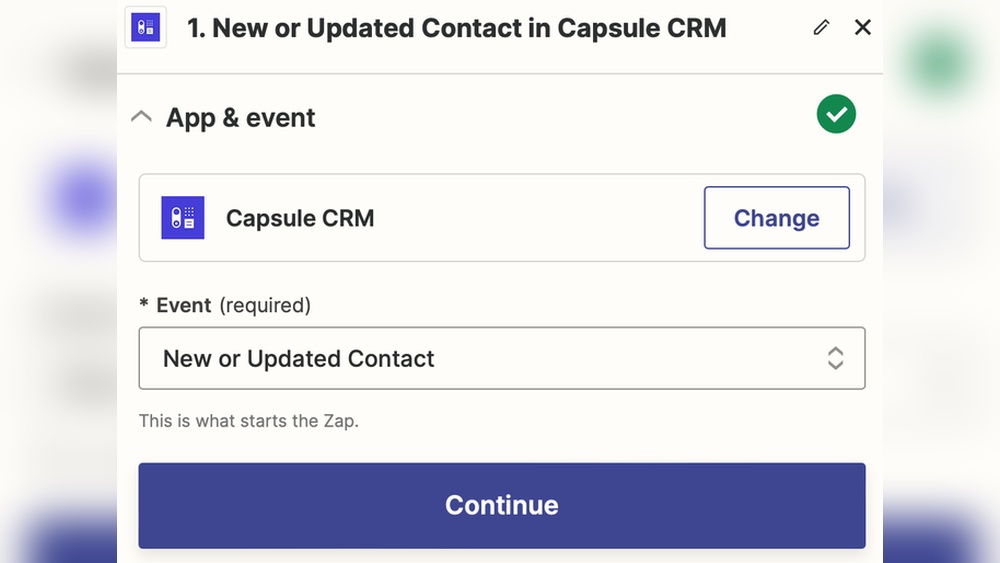
Popular apps like Wati, CallBell, and Zapier support Capsule CRM WhatsApp integration. They pull WhatsApp conversations directly into Capsule, automate messaging, and sync contact details. These integrations require minimal setup and provide seamless communication tools for businesses using Capsule CRM.
Can I Automate Whatsapp Messages Through Capsule Crm?
Yes, automation is possible using integrations like Integrately or Zapier. When tasks or events occur in Capsule CRM, automated WhatsApp messages can be sent instantly. This saves time, ensures timely follow-ups, and enhances customer relationship management without manual intervention.
Conclusion
Capsule CRM WhatsApp integration keeps all messages in one place. It helps you track customer chats easily. You avoid losing important information or contacts. Managing sales and support becomes simple and quick. This tool reduces confusion and saves time daily. Try Capsule today to organize your business better. Learn more and get started here: Capsule CRM WhatsApp Integration.

