
If you’re running a small business or startup, managing your sales and customer details can quickly become overwhelming. Scattered notes, endless spreadsheets, and lost information can cause stress and slow you down.
That’s where Capsule CRM comes in—a simple, user-friendly tool designed to bring all your sales, contacts, and projects into one clear, organized space. Imagine having your business brain working smoothly, with less panic and more control. In this Capsule CRM review, you’ll discover how its clean interface and essential features can help you keep track of what matters most without unnecessary complexity. Ready to see if Capsule fits your business needs? Check it out here: Capsule CRM. Keep reading to find out if this CRM is the right choice for you.
Introduction To Capsule Crm
Capsule CRM offers a simple, organized way to manage your business contacts, sales, and tasks.
It combines important customer information and sales activities into one clear platform. This helps reduce confusion and keeps your business running smoothly.
What Is Capsule Crm And Who Is It For?
Capsule CRM is a customer relationship management tool designed for small businesses and startups. It suits teams that want easy contact management and sales tracking without complex features.
This tool fits well for users who need a clean, simple interface to keep track of customers and sales pipelines. It works great with other tools like Google Workspace and Xero.
- Small business owners
- Startups
- Sales teams needing basic CRM functions
- Users valuing simplicity and clarity over advanced features
Overview Of Capsule Crm’s Purpose And Core Functions
The main goal of Capsule CRM is to put your sales, projects, and customer data in one place.
This system helps you keep clarity, calm, and control over your business activities. It avoids clutter from spreadsheets and notes scattered everywhere.
| Core Function | Description |
|---|---|
| Contact Management | Store and organize customer details in one place. |
| Sales Pipeline | Visual tracking of sales progress from lead to closing. |
| Task Management | Keep track of tasks and deadlines related to customers and sales. |
| Integration | Works smoothly with Google Workspace and Xero for better workflow. |
Users praise Capsule CRM for its intuitive design and ease of use. It avoids overwhelming users with unnecessary features.
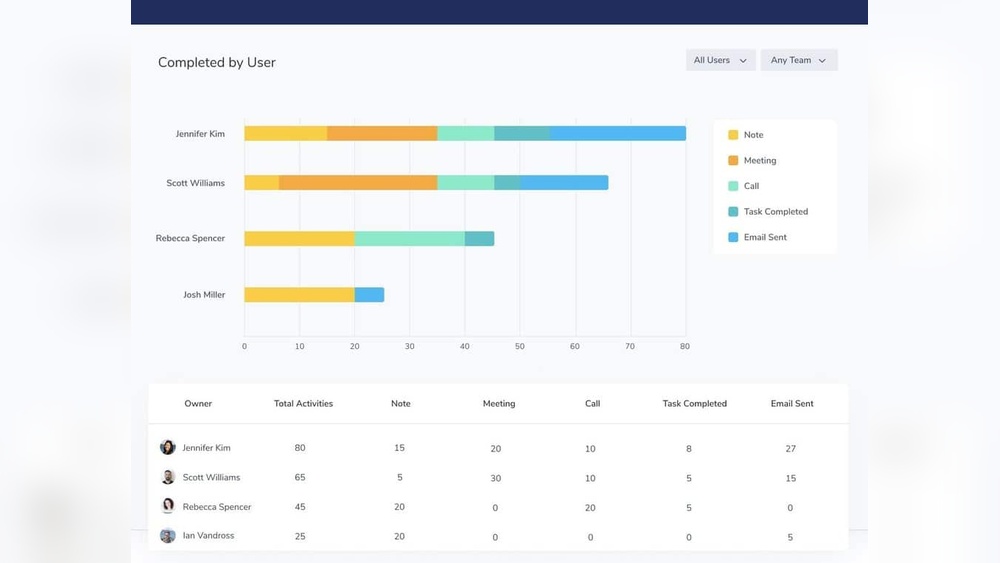
Some limits exist for larger businesses, as it lacks deep marketing automation and advanced analytics on lower plans.

Credit: www.stylefactoryproductions.com
Key Features That Make Capsule Crm Unique
Capsule CRM stands out for its simplicity and focused features. It combines essential tools in one place. This helps small businesses and startups manage sales, contacts, and tasks without confusion. The platform keeps everything clear and easy to use. Here are the key features that make Capsule CRM a top choice.
Intuitive And User-friendly Interface
Capsule CRM offers a clean and simple interface. Users find it easy to navigate and learn quickly. The dashboard shows all important information at a glance.
- Minimal clutter for better focus
- Clear menus and easy access to features
- Quick setup without steep learning curve
This design helps teams save time and avoid frustration.
Contact Management And Sales Pipeline Visualization
Manage all your contacts in one place. Capsule stores detailed customer info and interaction history. The sales pipeline view is visual and interactive.
| Feature | Benefit |
|---|---|
| Contact Profiles | Store notes, emails, and communication history |
| Sales Pipeline | Track deals through stages with drag-and-drop ease |
| Opportunity Management | Monitor potential sales and forecast revenue |
This helps teams focus on closing deals and building relationships.
Task And Basic Project Management Capabilities
Capsule includes simple task management. Assign tasks to team members and set deadlines. Users can track progress without extra software.
- Create and manage to-do lists
- Link tasks to contacts and sales opportunities
- Receive reminders for upcoming deadlines
This keeps projects organized and on schedule with minimal effort.
Seamless Integration With Google Workspace And Xero
Capsule connects smoothly with popular tools like Google Workspace and Xero. This integration saves time and reduces manual work.
- Sync contacts and calendars with Google Workspace
- Import financial data from Xero for accurate invoicing
- Work within familiar apps without switching platforms
These integrations enhance workflow and improve business efficiency.
Mobile App For On-the-go Access
The Capsule mobile app lets users access CRM data anytime, anywhere. It is designed for busy professionals who need information on the move.
- View contacts, tasks, and sales pipelines on mobile
- Add new information or update records instantly
- Stay connected with your team from any location
This flexibility supports productivity outside the office.
Pricing And Affordability Breakdown
Capsule CRM offers pricing plans designed to suit small businesses and startups. Its cost structure is simple and transparent, helping users pick what fits their needs without confusion. The focus is on delivering core CRM features with clear limits on each plan.
Free Plan Features And Limitations
The Free Plan provides essential tools for startups or very small teams. It includes:
- Up to 2 users
- 10 MB of storage
- Basic contact and sales pipeline management
- Tasks and calendar integration
Limitations of the free plan include:
- Restricted storage space
- No access to advanced reporting
- Limited integration options
- Basic support only
This plan is ideal for testing Capsule CRM or managing very small contact lists.
Paid Plans: What You Get And Their Cost
| Plan | Cost (per user/month) | Key Features | Storage | Users |
|---|---|---|---|---|
| Professional | $18 |
| Unlimited | Unlimited |
| Teams | $36 |
| Unlimited | Unlimited |
Both paid plans support unlimited storage and users. The Teams plan adds more control and support for growing teams.
Value Proposition For Small Businesses And Startups
Capsule CRM fits small businesses and startups by focusing on simplicity and essential features. It avoids complexity and steep learning curves.
Key benefits include:
- Easy setup and use
- Core CRM tools without extra clutter
- Affordable pricing starting from a free plan
- Good integration with popular tools like Google Workspace
- Scales with business growth via paid plans
This makes Capsule CRM a practical choice for teams managing contacts, sales pipelines, and tasks without extra overhead.

Credit: www.onepagecrm.com
Pros And Cons Based On Real-world Usage
Capsule CRM offers a clear and simple approach to managing sales and contacts. Real users find it practical for small businesses and startups. It brings sales, projects, and customer service into one place. Below, we explore the key advantages and drawbacks based on actual experience.
Advantages: Ease Of Use, Core Features, And Competitive Pricing
Ease of Use: Capsule CRM features a clean and minimalist interface. Users praise its intuitive design, making navigation quick and simple. The learning curve is low, helping teams get started fast without confusion.
Core Features: The platform covers essential CRM needs. It manages contacts, sales pipelines, and tasks effectively. Integrations with Google Workspace and Xero add value for daily business operations. Users appreciate having all customer information in one tidy place.
Competitive Pricing: Capsule offers good value for small businesses. Pricing plans are straightforward and affordable. This makes it accessible for startups and companies with limited budgets. Users feel they get essential tools without overspending.
Drawbacks: Limited Advanced Features And Email Sync Challenges
Limited Advanced Features: Capsule lacks some advanced CRM capabilities. Two-way email synchronization is not available in lower plans. Deep marketing automation and detailed analytics require higher-tier subscriptions or add-ons. Larger businesses may find these limits restrictive.
Email Sync Challenges: Users report difficulties with email syncing. The system does not fully support two-way email sync out of the box. This can slow communication workflows and create extra manual work for teams relying on email integration.
Performance And Scalability Considerations
Capsule CRM performs well for small teams and straightforward workflows. The system remains responsive and stable under typical usage. However, it may struggle with large volumes of data or complex processes.
Scaling up requires upgrading plans or adding third-party tools. The platform suits growing startups but might not meet demands of bigger enterprises. Thoughtful planning is needed to maintain performance as business needs expand.
Ideal Users And Use Cases For Capsule Crm
Capsule CRM suits businesses seeking a simple, effective way to manage sales and contacts. It works best for small teams wanting a tidy, clear system without complex features. The platform brings sales, projects, and customer info together in one place. This setup helps users stay calm and in control.
Best Suited For Startups, Freelancers, And Small Businesses
Capsule CRM fits startups, freelancers, and small businesses that need core CRM functions without clutter. It offers:
- Easy contact management
- Basic sales pipeline tracking
- Simple task management
- A clean, intuitive interface
These users benefit from Capsule’s straightforward design. It avoids overwhelming features and focuses on essential tools. This helps small teams stay organized and efficient.
Teams Integrated With Google Or Microsoft Ecosystems
Teams using Google Workspace or Microsoft 365 find Capsule CRM a natural fit. The platform integrates well with these ecosystems, enabling:
- Seamless syncing of contacts and calendars
- Easy sharing of information across apps
- Smooth collaboration within familiar tools
This integration reduces manual work and keeps communication clear. Users stay productive without switching between many apps.
When To Choose Capsule Crm Over More Complex Alternatives
Choose Capsule CRM if your business needs:
- A simple, user-friendly CRM without advanced features.
- Core contact and sales pipeline management.
- Minimal setup time and easy learning curve.
- Integration with Google or Microsoft tools.
Capsule is less suited for large businesses needing:
- Advanced marketing automation
- Two-way email sync
- Deep analytics and reporting
These features often require higher plans or add-ons in Capsule, or a more complex CRM platform.
When Capsule Crm May Not Be The Right Fit
Capsule CRM works well for small businesses and startups. It offers simple contact and sales pipeline management. The clean interface helps users avoid confusion. Yet, some business needs go beyond Capsule’s core features.
These needs often involve advanced marketing, email syncing, or deep analytics. Such requirements may not be fully met by Capsule. Understanding these limits can save time and frustration.
Limitations For Enterprises Needing Advanced Marketing Automation
Capsule CRM lacks built-in, advanced marketing automation tools. Enterprises aiming for:
- Automated multi-channel marketing campaigns
- Lead scoring and nurturing workflows
- Complex customer journey mapping
may find Capsule insufficient. It focuses more on sales and contact management than on marketing automation. Businesses requiring these features often need to look for specialized software or add-ons.
Businesses Requiring Robust Two-way Email Sync
Capsule supports email integration but does not offer full two-way email sync. This means:
- Emails sent or received outside Capsule may not sync automatically
- Tracking conversations across platforms can be difficult
- Sales teams might miss key email exchanges linked to contacts
Companies relying heavily on email communication and needing seamless sync should consider other CRM options. Capsule’s email features work best for basic syncing and manual updates.
Organizations Needing Extensive Analytics And Custom Workflows
Capsule provides basic reporting but lacks extensive analytics capabilities. It also has limited support for custom workflows. For organizations that want:
- Detailed sales and customer behavior analytics
- Custom automation of complex business processes
- Advanced data visualization tools
Capsule may not deliver enough depth. These businesses often require CRM platforms with robust analytics and flexible workflow engines to fit their unique needs.
Final Verdict: Is Capsule Crm The Best Choice To Boost Your Sales Fast?
Capsule CRM offers a simple, clean way to manage contacts and sales pipelines. It suits small businesses and startups that want to stay organized without confusion. This CRM puts your sales, projects, and customer details all in one place. The tool helps reduce stress by giving clarity and control.
Its design focuses on ease of use and essential functions. Capsule CRM speeds up sales by keeping everything tidy and easy to track. For businesses needing a straightforward CRM, Capsule is a strong candidate. Still, it may not fit larger companies or those needing advanced marketing tools.
Summary Of Capsule Crm’s Strengths And Weaknesses
| Strengths | Weaknesses |
|---|---|
|
|
How Capsule Crm Helps Small Businesses Accelerate Sales
Capsule CRM keeps all sales data and customer information in one place. This helps sales teams find details fast and follow up on leads without delay. The clear sales pipeline view shows what stage each deal is in, helping teams focus on the next steps.
Task management tools remind teams about calls, meetings, and deadlines. This reduces missed opportunities. Integration with tools like Google Workspace means teams work smoothly without switching apps. Small businesses gain control and calm by organizing their sales process simply.
Making The Decision: Is Capsule Crm Right For Your Business?
Choose Capsule CRM if your business:
- Needs an easy-to-use CRM without complex features
- Wants to manage contacts, sales, and tasks in one place
- Uses Google Workspace or Xero and wants smooth integration
- Has a small team or is a startup
Capsule CRM might not fit if your business:
- Requires advanced marketing automation or deep analytics
- Relies heavily on two-way email syncing
- Is a large enterprise with complex sales processes
Think about your business size and needs. Capsule CRM offers solid basics and easy control. It helps small teams focus on sales without distraction.

Credit: www.pcmag.com
Frequently Asked Questions
What Is Capsule Crm Used For?
Capsule CRM is designed for small businesses to manage contacts, sales pipelines, and tasks efficiently. It streamlines core customer management without complex features, making it ideal for startups and freelancers.
How Much Does Capsule Crm Cost?
Capsule CRM offers competitive pricing with a free plan available. Paid plans provide more contacts and advanced features, suitable for growing small teams and businesses.
Does Capsule Crm Integrate With Other Tools?
Yes, Capsule CRM integrates well with Google Workspace and Xero, enhancing productivity by syncing contacts, calendars, and financial data seamlessly.
Is Capsule Crm Suitable For Large Businesses?
Capsule CRM is best for small to medium businesses. Large enterprises may find it lacks advanced marketing automation and deep analytics needed for complex workflows.
Conclusion
Capsule offers a simple, clean CRM for small businesses. It helps organize contacts, sales, and tasks in one place. Users find it easy to use with a clear interface. It works well with Google Workspace and Xero. Some features like advanced automation need higher plans or add-ons. Email syncing is limited, which may matter to some users. Overall, Capsule suits startups and small teams needing basic CRM tools. Explore more about Capsule and see if it fits your needs here: Capsule CRM.

