
Choosing the right CRM can make or break your sales success. You want a tool that fits your workflow, helps you close deals faster, and keeps your leads organized without overwhelming you.
That’s why comparing Pipeliner and Pipedrive matters. Both promise powerful features, but they take very different approaches. Are you looking for simplicity and ease of use, or do you prefer detailed visual analytics and customization? By the end of this article, you’ll know exactly which CRM suits your needs and how it can boost your sales game.
Let’s dive into the key differences and help you make the smartest choice for your business.

Credit: pipelinecrm.com
Visual Pipeline Management
Visual pipeline management helps sales teams track deals clearly. It shows stages of each deal in a graphic way. This makes it easy to spot bottlenecks and progress quickly. Both Pipeliner and Pipedrive offer visual tools, but they focus on different styles. Understanding their approaches helps you pick the best fit.
Pipeliner’s Visual Analytics
Pipeliner uses rich visual analytics to display sales data. It offers colorful charts and graphs that update in real time. Users see detailed pipeline stages with drag-and-drop ease. The visuals include funnel views and activity heat maps. This helps sales reps understand trends and improve performance fast. Custom views allow teams to focus on what matters most. Pipeliner’s visuals support deep insights and strategic decisions.
Pipedrive’s Kanban Simplicity
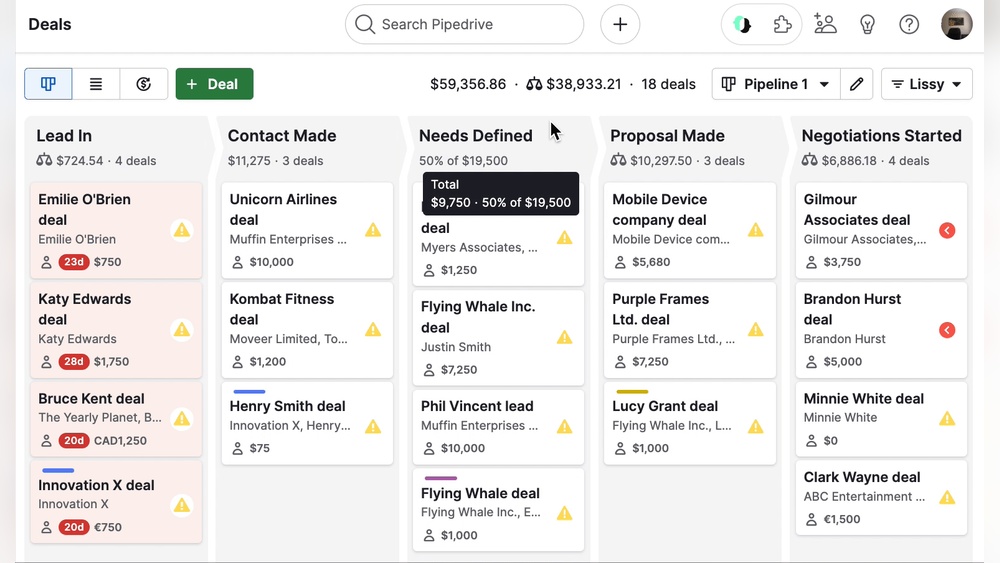
Pipedrive keeps visual pipeline management simple and user-friendly. It uses a clean Kanban board layout for deal stages. Users move deals across columns to update status quickly. This straightforward approach reduces learning time for new users. The interface is uncluttered and focuses on essential sales actions. Pipedrive’s simplicity helps teams stay organized without distractions. Visual cues and notifications keep pipelines up to date with minimal effort.
User Experience And Interface
User experience and interface play a key role in choosing the right CRM. Both Pipeliner and Pipedrive offer distinct designs and workflows. These differences affect how quickly users adopt the tools and how effectively they manage sales processes. Understanding these aspects helps businesses pick a CRM that fits their needs and skills.
Ease Of Setup And Learning
Pipedrive offers a simple setup with clear instructions. Users can start managing deals quickly. Its interface is intuitive, with drag-and-drop pipeline views. New users find it easy to learn without much help.
Pipeliner focuses on visual data and analytics. The setup requires more time to customize dashboards. It may take longer for new users to get comfortable. Training or tutorials might be needed for best use.
Customization Options
Pipeliner provides rich customization for workflows and reports. Users can tailor pipelines, fields, and dashboards deeply. This suits businesses needing detailed tracking and visual insights.
Pipedrive offers flexible but simpler customization. Users can adjust deal stages and add custom fields. The options support most small to medium business needs without complexity.
Lead And Sales Tracking
Tracking leads and sales is key for any business aiming to grow. Both Pipeliner and Pipedrive offer tools to manage these processes efficiently. Understanding their differences helps users pick the right CRM for their needs. The focus here is on how each platform handles lead and sales tracking.
Pipeliner’s Lead Management Features
Pipeliner provides a clear visual layout for managing leads. Users can easily see where each lead stands in the sales process. It offers customizable lead stages to fit different business models. The platform supports detailed lead profiles with contact info, notes, and history. Automated alerts remind sales reps to follow up on leads. Reports and analytics help track lead progress and conversion rates. These features help sales teams stay organized and focused on closing deals.
Pipedrive’s Sales Assistant Tools
Pipedrive offers a smart Sales Assistant that guides users on next steps. It analyzes sales activities and suggests actions to improve results. The assistant highlights overdue tasks and upcoming meetings. It also tracks communication with leads and clients in one place. Pipedrive’s visual pipeline makes it simple to move deals forward. Activity reminders ensure no sales opportunity is missed. The tool is designed to boost productivity and keep sales on track.
Integration And Reporting
Integration and reporting are vital for any CRM software. They help businesses track sales, analyze data, and connect different tools. Both Pipeliner and Pipedrive offer features for integration and reporting. Each platform serves these needs differently. This section compares their strengths in these areas.
Custom Reports In Pipedrive
Pipedrive provides easy-to-create custom reports. Users can select metrics that matter most. Reports can show sales performance, activities, and deal progress. Visual charts help in quick understanding. Reports update in real time for accurate insights. Export options allow sharing with teams or clients. This feature supports data-driven decisions without complexity.
Data Integration Capabilities
Pipeliner supports multiple integration options with popular tools. It connects well with email, marketing, and finance apps. The platform offers API access for advanced needs. Pipedrive also integrates with many third-party services. This ensures smooth data flow across platforms. Both CRMs help centralize data but differ in app variety. Choosing depends on your existing software ecosystem.
Pricing And Affordability
Choosing between Pipeliner and Pipedrive depends on pricing and affordability. Budget plays a key role for businesses picking a CRM. Both platforms offer different pricing plans. These plans suit various business sizes and needs.
Cost Comparison
Pipeliner’s pricing starts higher than Pipedrive’s basic plans. Pipedrive offers multiple tiers with affordable entry-level options. Its plans begin with essential features for small teams. Pipeliner includes more advanced analytics even in mid-level plans. This can increase costs for smaller businesses. Both platforms have custom pricing for large enterprises. Pipeliner’s pricing can be more flexible for bigger sales teams. Pipedrive’s transparent pricing helps small businesses manage costs easily.
Value For Small Vs Large Enterprises
Small businesses often find Pipedrive more budget-friendly. It provides easy-to-use features without high fees. Pipeliner suits larger enterprises needing detailed sales insights. Its visual tools and customization justify higher prices. Large teams benefit from Pipeliner’s advanced reporting capabilities. Pipedrive supports growth with scalable plans but fewer complex features. Small firms get faster ROI with Pipedrive’s simplicity. Big companies may prefer Pipeliner’s depth despite higher costs.
Credit: www.pipedrive.com
Customer Support And Resources
Customer support and resources play a crucial role in choosing a CRM platform. They ensure users get help fast and learn the system efficiently. Pipeliner and Pipedrive both offer support and training but differ in quality and availability. Understanding these differences helps businesses pick the right tool for their needs.
Support Quality And Availability
Pipedrive provides 24/7 customer support through chat and email. Their response times are quick, helping users solve issues fast. Pipeliner offers support mainly during business hours, with email and phone options. Its response can be slower compared to Pipedrive. Pipedrive’s global support suits businesses needing round-the-clock help. Pipeliner works well for users comfortable with standard office-hour support.
Training And Onboarding Materials
Pipedrive offers extensive training resources. These include video tutorials, webinars, and a detailed knowledge base. Users find onboarding smooth thanks to clear guides and step-by-step instructions. Pipeliner also provides training materials but fewer video tutorials. Its focus is on detailed documentation and live demos. Both platforms help new users learn quickly but Pipedrive’s materials are more varied and accessible.
Suitability For Business Types
Choosing the right CRM depends on your business size and needs. Both Pipeliner and Pipedrive serve different types of businesses effectively. Understanding which suits your company helps in making the best decision. This section explains their suitability for small businesses and large enterprises.
Best For Small Businesses
Pipedrive is ideal for small businesses. Its simple interface helps teams get started quickly. The visual sales pipeline shows deals clearly. Pipedrive offers affordable plans with essential features. It supports small sales teams with activity reminders and tracking. The setup requires minimal time and technical skills. Small businesses benefit from easy contact and lead management. Pipeliner can be complex for small teams. Pipedrive keeps things straightforward to save time and effort.
Best For Large Enterprises
Pipeliner fits large enterprises with complex sales processes. It offers advanced visual analytics and custom reports. Large teams can manage multiple pipelines and user roles. Pipeliner supports deep data integration with other software. It provides tools for strategic sales management and forecasting. Pipedrive also serves enterprises but focuses more on usability. Enterprises needing detailed customization and analytics may prefer Pipeliner. Both platforms scale well but differ in feature depth and complexity.
User Reviews And Ratings
User reviews and ratings offer valuable insights into how Pipeliner and Pipedrive perform in real-world use. They reveal what users appreciate and what challenges they face. These opinions help businesses decide which CRM suits their needs best.
Both platforms gather feedback from diverse users. This feedback highlights strengths and areas for improvement. It is essential to consider common themes found in reviews to get a clear picture.
Common Praises
Users often praise Pipedrive for its simple and intuitive interface. Many find its visual pipeline easy to understand and manage. The setup process is quick, making it accessible for new users. Customers like the affordability and good customer support. The tool’s activity tracking and sales assistant features also receive positive remarks.
Pipeliner wins points for its strong visual analytics and customization options. Users enjoy its detailed reports and ability to tailor dashboards. It appeals to businesses needing advanced sales data insights. Many appreciate its focus on relationship management and lead tracking. The visual sales pipeline in Pipeliner is also a popular feature.
Frequent Complaints
Some users mention that Pipedrive’s advanced features can be limited in lower pricing tiers. A few find the mobile app less polished than the desktop version. Occasional glitches and slow loading times appear in some reviews. Users sometimes want more integration options with third-party tools.
For Pipeliner, the learning curve is a common concern. New users may find it complex to navigate at first. Some reviews note that customization options can overwhelm beginners. The pricing is often seen as higher compared to similar CRMs. A few users report that customer support response times vary.

Credit: www.pipedrive.com
Frequently Asked Questions
What Are The Key Differences Between Pipeliner And Pipedrive?
Pipeliner focuses on visual analytics and customizable pipelines. Pipedrive offers simplicity with an easy-to-use Kanban interface. Both support sales tracking but differ in user experience and advanced features.
Which Crm Is Better For Sales Pipeline Management?
Pipedrive excels in sales pipeline management with its intuitive visual pipeline and activity tracking. Pipeliner provides more visual customization and analytics but has a steeper learning curve.
How Does Pricing Compare Between Pipeliner And Pipedrive?
Pipedrive is generally more affordable with flexible pricing tiers. Pipeliner tends to be pricier due to advanced customization and analytics. Pricing varies based on features and user count.
Which Crm Suits Small Businesses Best?
Pipedrive is ideal for small businesses due to its simplicity and ease of setup. Pipeliner is better suited for larger enterprises needing detailed analytics and customization.
Conclusion
Choosing between Pipeliner and Pipedrive depends on your needs. Pipedrive offers simple, user-friendly pipeline management. Pipeliner focuses on detailed visual analytics and customization. Both tools help track sales and leads efficiently. Think about ease of use versus advanced features. Budget and team size also matter in your decision.
Explore free trials to find the best fit. The right CRM can boost your sales process smoothly. Take time to compare features carefully before deciding.

