
Choosing the right CRM can make or break your sales success. You want a tool that fits your team’s style, boosts productivity, and grows with your business.
That’s why comparing Pipedrive vs Zoho CRM is a smart move before making a decision. Are you looking for a simple, sales-focused platform that helps you close deals faster? Or do you need an all-in-one system that connects sales, marketing, and support seamlessly?
You’ll discover the key differences, strengths, and ideal users for both Pipedrive and Zoho. By the end, you’ll know exactly which CRM matches your unique needs and helps you win more customers effortlessly. Keep reading to find the perfect fit for your business.

Credit: dignitas.digital
Sales Focus
Sales focus defines how a CRM supports your sales team’s daily work. It affects how easily reps manage leads and close deals. Pipedrive and Zoho offer different approaches to sales management. Each has unique strengths that fit different business needs and sales styles.
Pipedrive’s Visual Pipeline
Pipedrive uses a visual pipeline that shows deals clearly. Sales reps see every stage at a glance. This helps them prioritize tasks and move deals faster. The drag-and-drop interface makes updating deal status simple. It reduces time spent on data entry and boosts focus on selling.
Notifications and activity reminders keep reps on track. The pipeline view is clean and easy to understand. It suits teams that want a straightforward sales tool. Pipedrive’s design supports quick learning and smooth daily use. This focus helps reps close more deals efficiently.
Zoho’s Broad Business Suite
Zoho CRM sits inside a large business suite. It connects sales with marketing, support, and project management. This integration allows teams to share data easily across departments. Zoho offers deep customization and automation options. Businesses can create complex workflows to match their processes.
Sales teams benefit from tools like lead scoring, email campaigns, and analytics. Zoho supports businesses needing more than just sales tracking. It fits companies that want a full view of customer interactions. The system is powerful but may require more setup and training.
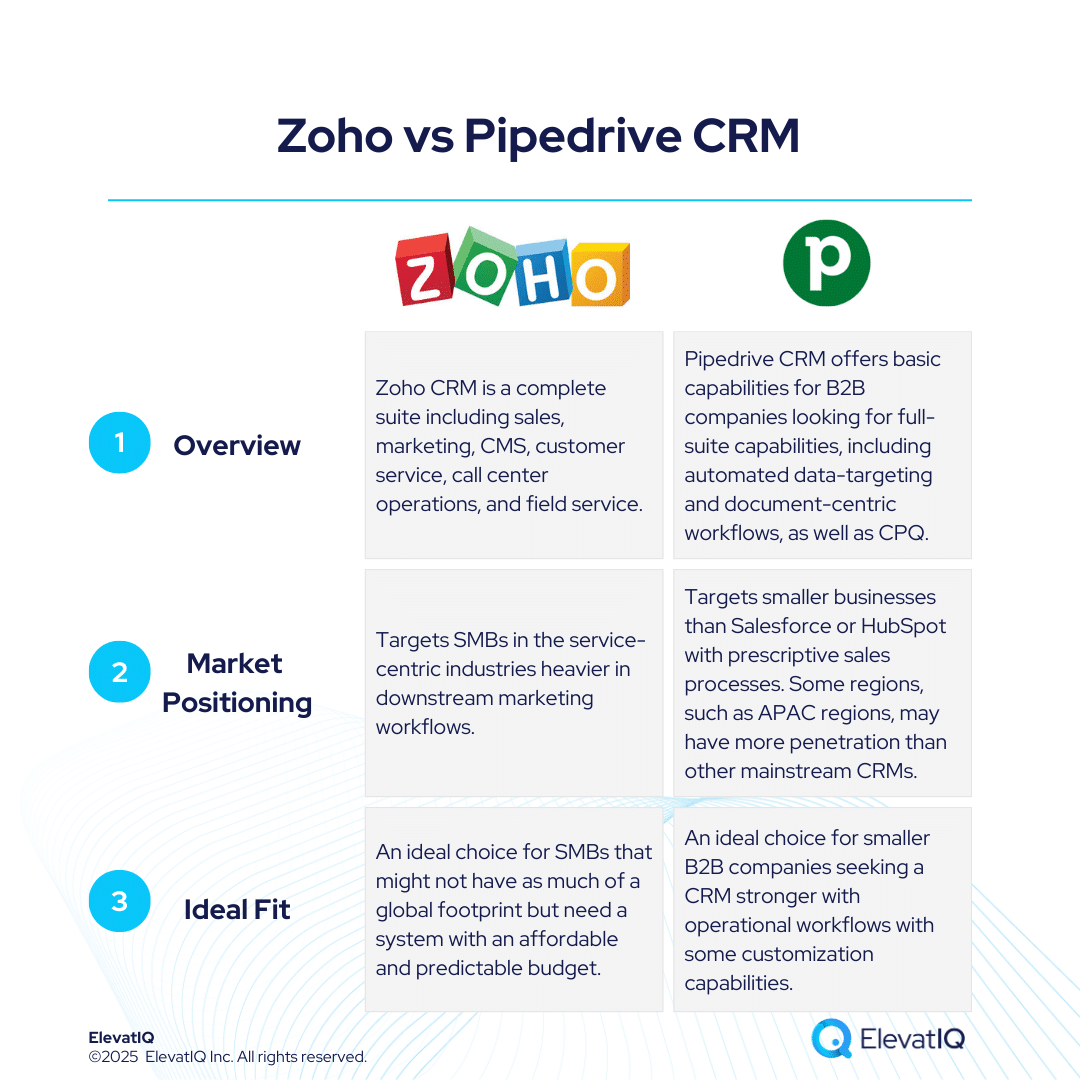
Credit: www.elevatiq.com
User Experience
User experience plays a key role in choosing the right CRM software. It affects how quickly teams can adopt and benefit from the tool. Both Pipedrive and Zoho offer unique experiences shaped by their design and features. Understanding their user experience helps businesses pick the best fit for their needs.
Ease Of Use In Pipedrive
Pipedrive is famous for its simple and clean interface. The visual pipeline clearly shows deal stages and progress. Users can drag and drop deals with ease, making sales tracking straightforward.
The layout avoids clutter, focusing on sales tasks only. This helps new users start without confusion or long training. Navigation is intuitive with clear menus and buttons. Overall, Pipedrive lets sales teams work faster and with less hassle.
Complexity And Learning Curve In Zoho
Zoho CRM offers many features beyond sales, including marketing and support. This adds complexity to its interface. The system has many menus, options, and settings to explore.
New users may feel overwhelmed at first due to the vast functionality. Learning to use Zoho effectively requires time and training. Customizing workflows and automation can be challenging for beginners.
Despite its complexity, Zoho suits businesses needing an all-in-one solution. The learning curve pays off with powerful tools for managing multiple departments.
Customization Options
Customization options play a vital role in choosing the right CRM for your business. They allow the software to fit your unique workflows and processes. Both Pipedrive and Zoho offer customization but focus on different areas. Understanding these differences helps you pick the best tool for your needs.
Sales Process Customization In Pipedrive
Pipedrive centers its customization around the sales pipeline. You can tailor each stage to match your sales steps. This makes tracking deals more intuitive and aligned with your team’s habits. The drag-and-drop interface lets users adjust pipelines quickly without tech help.
Custom fields can be added to capture specific customer details. This personalization helps sales reps focus on the most relevant information. Automation rules in Pipedrive streamline routine tasks like follow-up reminders. These features ensure the sales process stays efficient and clear.
Business-wide Customization In Zoho
Zoho offers a broader range of customization across the entire business. You can modify modules beyond sales, including marketing, support, and finance. Zoho’s workflow builder allows complex automation across departments. This supports smoother collaboration and data flow.
Custom dashboards and reports provide insights tailored to different teams. Zoho’s flexibility extends to user roles and permissions, ensuring secure access. Integration with other Zoho apps creates a unified system. This deep customization suits businesses needing more than just sales management.
Integration And Ecosystem
Integrations and ecosystem play a vital role in choosing a CRM platform. They determine how well the software connects with other tools and services. This impacts your workflow and data management. Both Pipedrive and Zoho offer various integration options but differ in scope and depth. Understanding their ecosystems helps in selecting the right CRM for your business needs.
Pipedrive’s Core Sales Integrations
Pipedrive focuses on essential sales tools integration. It connects smoothly with email providers like Gmail and Outlook. This allows easy tracking of communications within the CRM. It also integrates with popular calendar apps for scheduling meetings.
The platform supports connections with payment gateways such as Stripe and PayPal. This helps in managing deals and payments in one place. Pipedrive’s integration with marketing tools like Mailchimp enables simple email campaigns.
Zapier integration extends Pipedrive’s reach to hundreds of other apps. This flexibility helps automate repetitive tasks. Pipedrive keeps the ecosystem lean but effective for sales teams.
Zoho’s Extensive App Ecosystem
Zoho offers a broad and diverse app ecosystem. It includes over 40 business applications covering sales, marketing, customer support, and finance. All Zoho apps connect seamlessly within the ecosystem.
This integration allows data to flow freely between apps. For example, leads from Zoho MarketingHub can move directly into Zoho CRM. Zoho Books handles invoices and payments linked to CRM deals.
Zoho Marketplace provides hundreds of third-party integrations. These apps cover various business needs and industries. Zoho’s ecosystem supports complex workflows and deep automation.
The platform also offers API access for custom integrations. This flexibility suits businesses with unique or advanced requirements.
Automation And Ai
Automation and artificial intelligence (AI) are reshaping how sales teams work. These tools save time, reduce errors, and help close deals faster. Both Pipedrive and Zoho use automation and AI but in different ways. Understanding their features helps you pick the best CRM for your business needs.
Pipedrive’s Automation Features
Pipedrive offers simple automation to streamline sales tasks. It automates repetitive actions like sending follow-up emails and updating deal stages. The visual workflow builder lets users create custom automation easily. This reduces manual work and keeps the sales pipeline moving smoothly.
Pipedrive also supports integration with many apps. This helps connect sales data with other tools like calendars and email. The automation triggers are easy to set up, even for beginners. This makes Pipedrive a great choice for small sales teams wanting quick, effective automation.
Zoho’s Advanced Ai Tools
Zoho CRM uses AI to provide deep insights and smarter automation. Its AI assistant, Zia, analyzes data to predict sales trends and suggest next actions. Zia can detect anomalies and alert sales reps about important changes.
Zoho also offers AI-powered chatbots to engage customers automatically. The system uses AI to score leads and prioritize the best opportunities. Complex workflows can be created with drag-and-drop tools, automating many business processes across sales, marketing, and support.
This makes Zoho suitable for businesses needing a powerful AI system that handles multiple tasks beyond sales.
Credit: fitsmallbusiness.com
Support And Customer Service
Support and customer service play key roles in choosing the right CRM tool. Good support helps users solve problems quickly. It ensures smooth operation and less downtime. Both Pipedrive and Zoho offer customer service, but their quality differs. Understanding these differences helps you pick the best option for your business needs.
Pipedrive Support Quality
Pipedrive provides fast and reliable customer support. Their team responds quickly through chat and email. Users often praise the helpful and friendly service. The support covers technical issues and product guidance. Pipedrive also offers a comprehensive help center with guides and tutorials. This makes it easier for new users to learn the platform. Support is available in multiple languages for global users. Pipedrive focuses on keeping customers satisfied and productive.
Zoho Support Challenges
Zoho’s customer service can sometimes be slow, especially for lower-tier plans. Users report delays in response times during busy periods. The support system is complex because Zoho offers many integrated products. This can cause confusion when seeking help for specific issues. Zoho provides email, phone, and chat support, but quality varies. The extensive features require more detailed assistance, which may take longer. Some users find the support less personal than Pipedrive’s. Zoho is improving its service but still has room to grow.
Pricing And Plans
Choosing the right CRM depends heavily on pricing and plans. Both Pipedrive and Zoho offer tiered options to suit different business needs. Their pricing structures reflect distinct approaches to sales and customer management.
Understanding these plans helps businesses pick the best fit for budgets and required features. Let’s explore the pricing details of each platform.
Pipedrive Pricing Structure
Pipedrive offers four main pricing tiers. These range from basic to advanced, each adding more features and capabilities. The plans start with an Essential package, designed for small teams needing core CRM functions.
The Advanced plan adds email automation and workflows. Professional includes revenue projections and team management tools. The highest tier, Enterprise, offers custom solutions and dedicated support.
All plans come with a 14-day free trial. Pricing is per user, billed monthly or annually. Discounts apply for yearly payments, making it more cost-effective for long-term users.
Zoho Crm Pricing Options
Zoho CRM provides five pricing plans. These cater to businesses of all sizes and industries. The Standard plan covers basics like lead and contact management.
The Professional package adds workflow automation and email integration. The Enterprise plan offers advanced customization and AI features. The Ultimate edition includes premium support and analytics.
Zoho also has a Free tier for up to three users, good for startups. Pricing is per user per month, with discounts for annual subscriptions. Each plan supports multiple integrations within the Zoho suite.
Ideal Users
Choosing the right CRM depends on your business needs and user preferences. Both Pipedrive and Zoho serve different audiences. Understanding who fits each platform helps make a better choice.
Who Should Choose Pipedrive
Pipedrive suits small to mid-sized sales teams. It fits businesses that want a simple and clear sales pipeline. Teams with fast sales cycles benefit from Pipedrive’s visual layout.
The platform focuses on ease of use and quick setup. Sales reps can track deals and activities without complex steps. Pipedrive works best for companies needing a straightforward, sales-only CRM.
Startups and teams with limited CRM experience find Pipedrive friendly. It reduces distractions by focusing purely on sales tasks. This CRM also helps teams that want to improve sales efficiency quickly.
Who Should Choose Zoho
Zoho CRM targets businesses needing a full-featured system. It fits companies wanting to combine sales, marketing, and customer support. Zoho’s strength lies in its deep customization and automation options.
Medium to large businesses benefit from Zoho’s wide range of tools. Teams that manage complex workflows and require detailed reports will find Zoho useful. It suits companies ready to invest time in setup and learning.
Zoho also appeals to businesses that want an integrated suite. It supports departments beyond sales, including marketing and service teams. Organizations needing a scalable CRM with many features should consider Zoho.
Key Differences
Understanding the key differences between Pipedrive and Zoho CRM helps businesses pick the right tool. Both platforms serve customer relationship management but in distinct ways. Each has unique strengths that suit different business needs and workflows. This section breaks down those differences clearly.
Specialized Vs Generalized Crm
Pipedrive is a specialized CRM focused mainly on sales. It offers a simple, visual pipeline that helps sales teams track deals easily. The design is straightforward and minimizes distractions. This makes it ideal for teams that want to focus on closing deals quickly.
Zoho CRM is a generalized CRM platform. It covers sales, marketing, customer support, and more. Zoho provides extensive tools for managing various business functions in one place. This suits companies that need a complete system rather than a sales-only tool.
Implementation Speed Vs Feature Depth
Pipedrive shines with fast implementation. Teams can set it up quickly and start using it without much training. Its user-friendly interface helps users adopt it swiftly. This speeds up the sales process and reduces downtime.
Zoho CRM offers deep feature sets and customization options. It requires more time to configure due to its complexity. Zoho suits businesses that need tailored workflows and advanced automation. The trade-off is a longer setup but more powerful capabilities.
Choosing The Right Crm
Choosing the right CRM is crucial for any business. The right tool can boost your sales and improve customer relations. Both Pipedrive and Zoho offer great solutions but serve different needs. Understanding their strengths helps you pick the best fit. The choice depends on your business size, sales process, and required features.
When To Pick Pipedrive
Pipedrive suits small to mid-sized sales teams. It offers a simple, visual pipeline that is easy to use. Sales reps can track deals and activities without hassle. Setup is quick, making it ideal for teams needing fast adoption. Its design focuses on helping salespeople close deals faster. If your team wants a tool that stays out of the way, Pipedrive is a strong choice.
When To Pick Zoho
Zoho fits businesses wanting an all-in-one CRM solution. It combines sales, marketing, and customer support in one platform. Customization options are deep, allowing complex workflows and automation. Larger teams with varied needs benefit from Zoho’s wide feature set. It integrates well with other Zoho apps, creating a unified system. Choose Zoho if you want more than just sales management.
Frequently Asked Questions
What Is The Difference Between Pipedrive And Zoho?
Pipedrive focuses on sales with a simple, visual pipeline for quick setup. Zoho offers a broad, customizable CRM with integrated sales, marketing, and support features. Choose Pipedrive for ease and sales efficiency; pick Zoho for all-in-one business management and deeper automation.
What Are The Negatives Of Zoho?
Zoho can have slow customer support response times, especially for lower-tier plans. Its email integration may feel less seamless than dedicated tools. The platform’s complexity leads to a steep learning curve for new users. Some users find customization overwhelming without technical expertise.
Is Zoho A Chinese Company?
Zoho is not a Chinese company. It is an Indian multinational technology firm specializing in cloud-based business software.
Is Pipedrive A Unicorn?
Yes, Pipedrive is a unicorn. It achieved a billion-dollar valuation, making it a notable CRM success story.
Conclusion
Both Pipedrive and Zoho offer strong CRM solutions for different needs. Pipedrive suits sales teams wanting a simple, clear pipeline tool. Zoho fits businesses that need a broad system with many features. Consider your team size, workflow, and integration needs carefully.
Choosing the right CRM helps improve sales and customer management. Test each platform to see which feels easier and fits your budget. The best choice depends on your business goals and daily operations. Take time to pick a CRM that grows with your company.

