
Are you wondering if Pipedrive is the right CRM for your business? Choosing the best CRM can feel overwhelming, especially when you want a tool that truly simplifies your sales process and helps you close more deals.
Pipedrive promises an easy-to-use platform designed to keep your pipeline organized and your team focused. But does it deliver on that promise? You’ll discover the real strengths and weaknesses of Pipedrive, so you can decide if it matches your needs and helps your business grow.
Keep reading to find out if Pipedrive is the CRM solution you’ve been searching for.

Credit: pipelinecrm.com
Pipedrive Overview
Pipedrive is a popular CRM designed to help sales teams manage deals and contacts efficiently. It focuses on simplicity and ease of use. This makes it a good option for businesses wanting clear sales pipelines.
The platform offers tools that support sales tracking, communication, and reporting. Users can customize their workflows to fit their sales process. Pipedrive also integrates with many other business apps.
Core Features
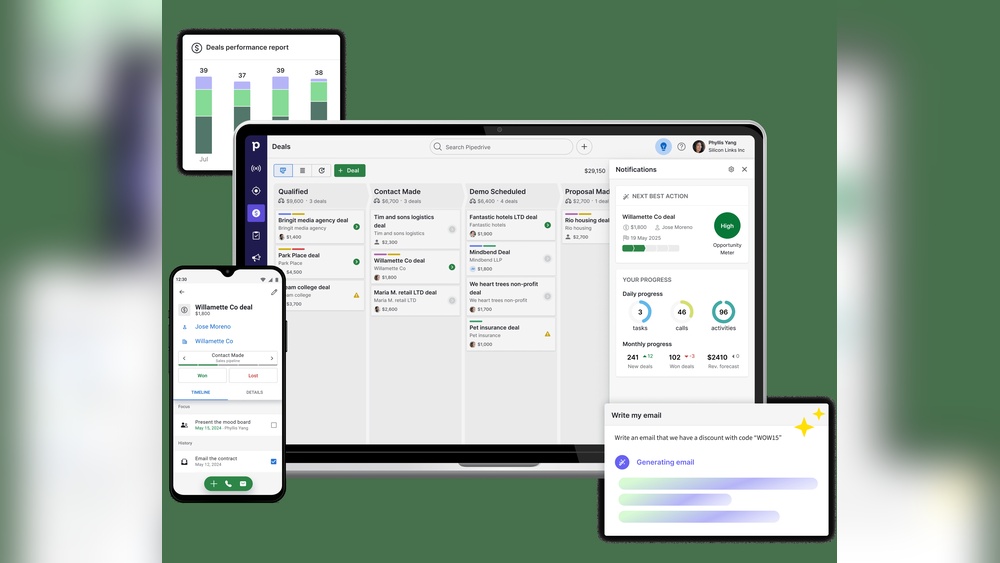
Pipedrive offers a visual sales pipeline to track deals at every stage. It has contact and lead management to organize customer information. Automated reminders help users follow up on tasks and meetings.
Reports and dashboards provide insights into sales performance. Email integration allows sending and receiving messages within the CRM. Mobile apps keep sales teams connected on the go.
Target Audience
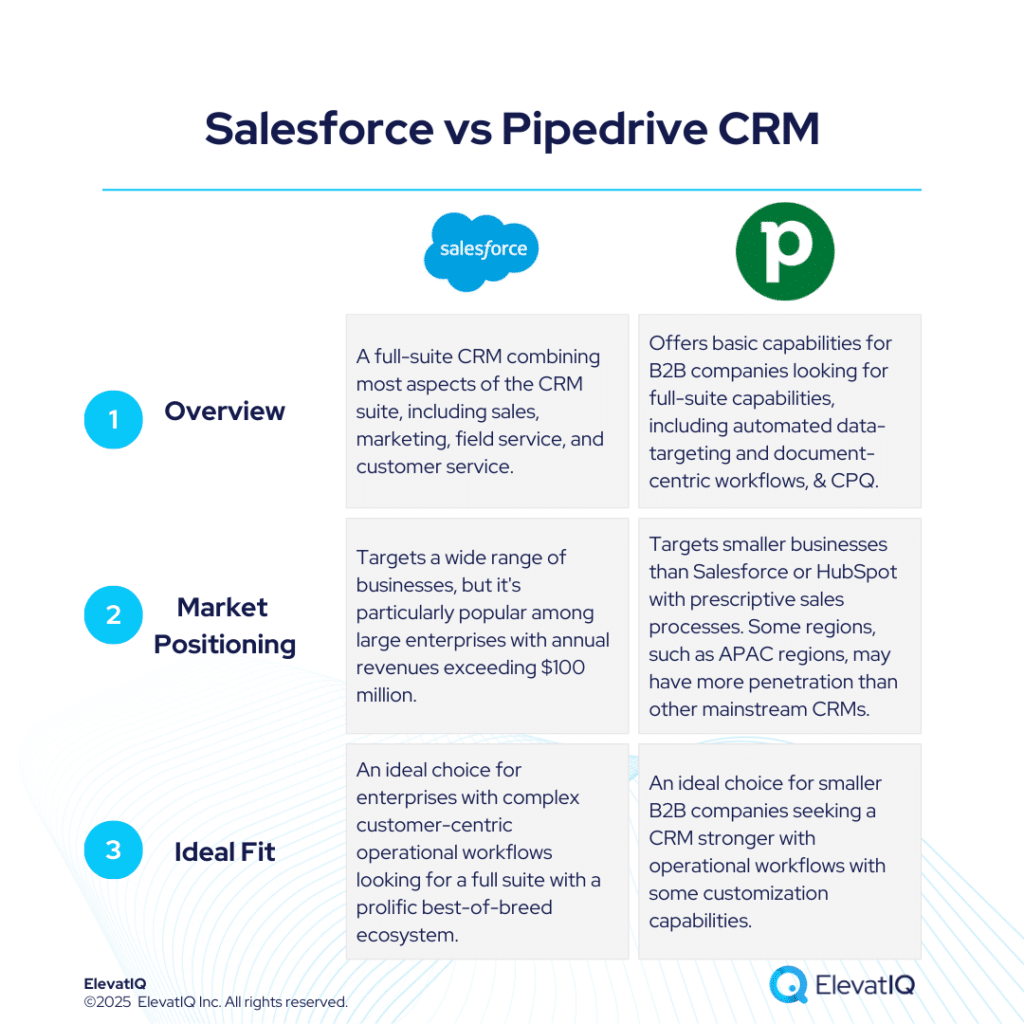
Pipedrive suits small to medium-sized businesses well. It works best for sales teams needing a clear overview of their deals. Teams wanting a simple, straightforward CRM benefit most from Pipedrive.
Industries like real estate, retail, and technology often use Pipedrive. It helps businesses with active sales pipelines stay organized and focused.
User Interface
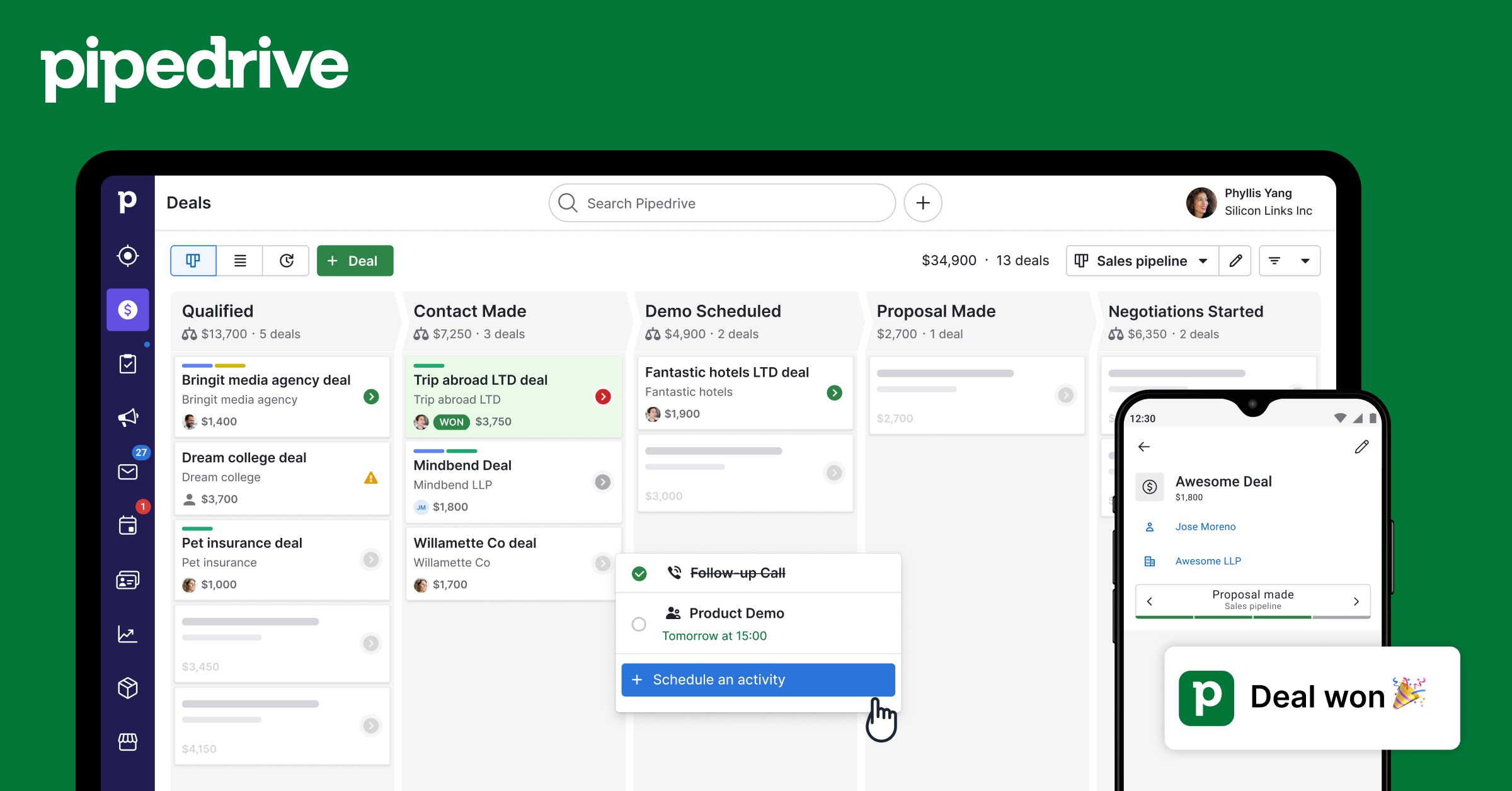
The user interface is clean and easy to navigate. Visual pipeline boards show deals clearly in different stages. Drag-and-drop functionality allows quick updates to deal status.
Menus are simple and labels use common sales terms. This reduces confusion for new users. Overall, the design helps users spend less time learning and more time selling.
Sales Pipeline Management
Sales pipeline management is key to keeping sales organized and moving forward. It shows every step a deal takes from start to finish. A clear pipeline helps sales teams focus on what matters most. Pipedrive offers tools to manage this pipeline with ease and clarity.
Visual Pipeline
Pipedrive uses a visual pipeline to display deals clearly. Each deal appears as a card in columns. These columns show different sales stages. Drag and drop lets users move deals between stages quickly. This visual setup makes it easy to see progress at a glance.
Deal Tracking
Tracking deals is simple in Pipedrive. Every deal has details like contact info, value, and expected close date. Users can add notes and activities to keep all information in one place. Notifications remind users about follow-ups. This helps avoid missed opportunities.
Customizable Stages
Pipedrive lets users create pipeline stages that fit their sales process. Stages can be renamed, added, or removed as needed. This flexibility suits businesses of all types. Custom stages help sales teams track deals in a way that makes sense to them.
Automation Capabilities
Pipedrive offers solid automation capabilities that help teams save time and reduce manual work. Its automation tools streamline daily tasks and keep sales processes moving smoothly. The platform focuses on simplicity, making it easy to set up and use automation even for beginners.
Automation features in Pipedrive help users focus more on selling and less on repetitive activities. The system supports various functions like workflow automation, task reminders, and email integration. These tools improve productivity and help maintain better customer relationships.
Workflow Automation
Pipedrive allows users to create custom workflows that trigger actions automatically. For example, it can move deals to the next stage when a task is completed. This reduces manual updates and keeps the sales pipeline accurate.
Users can set conditions and actions easily using a visual editor. Automations can send notifications, create new tasks, or update deal information. This helps keep everyone on the team informed and aligned with the sales process.
Task Reminders
Task reminders in Pipedrive help salespeople stay on top of their daily duties. Automated alerts notify users about upcoming calls, meetings, or deadlines. This prevents important activities from being forgotten or delayed.
Reminders can be set to pop up on the dashboard or sent via email. Users can also customize how and when they receive these notifications. This feature supports better time management and follow-up with customers.
Email Integration
Pipedrive integrates well with popular email services like Gmail and Outlook. This allows users to send, receive, and track emails directly inside the CRM. Automation can link emails to specific deals or contacts automatically.
Users can set up templates and automated email sequences to nurture leads efficiently. The system can also log email opens and clicks for better insight. This integration keeps communication organized and saves time switching between apps.
Ease Of Use
Pipedrive is known for its focus on simplicity and user-friendly design. Ease of use is a key factor for businesses choosing a CRM. A system that is easy to navigate helps teams adopt it quickly and work more efficiently. Let’s explore how Pipedrive performs in terms of ease of use.
Learning Curve
Pipedrive offers a gentle learning curve. The interface is clean and intuitive. Users can find tools and features without confusion. Training time is short, even for beginners. Clear visuals guide users through sales stages. This helps teams focus on selling, not on figuring out the software.
Setup Process
Setting up Pipedrive is straightforward. The platform provides step-by-step instructions. Users can import contacts and sales data easily. Integration with email and calendar apps is smooth. Customization options are simple to apply. Businesses can start managing deals quickly without delays.
Mobile Accessibility
Pipedrive’s mobile app keeps users connected on the go. It works well on both iOS and Android devices. The app offers full access to contacts, deals, and communication tools. Notifications help users stay updated in real time. Mobile accessibility supports sales teams working outside the office.
Pricing And Value
Pricing and value are key when choosing a CRM. Pipedrive offers flexible pricing plans that suit various business sizes and budgets. Understanding these plans helps you decide if Pipedrive meets your needs and offers good value for money.
Subscription Plans
Pipedrive has several subscription options. The plans include Essential, Advanced, Professional, and Enterprise. Each plan offers more features than the last. You start with basic sales tools and move up to automation and analytics. Monthly and yearly billing are available. Yearly plans come with discounts.
Cost Comparison
Compared to other CRMs, Pipedrive is affordable. Its pricing is lower than many top competitors. Some CRMs charge more for similar features. Pipedrive’s simple pricing structure makes it easy to understand. Small and medium businesses find it budget-friendly. The cost matches the features provided.
Return On Investment
Pipedrive can increase sales efficiency and team productivity. Its pipeline management helps track deals and close sales faster. The automation tools save time on repetitive tasks. These benefits lead to higher revenue. Businesses often see a quick return on their investment. The value gained outweighs the subscription cost.
Integrations And Extensions
Pipedrive offers a variety of options to connect with other tools and services. These integrations and extensions help businesses customize their CRM experience. They allow users to streamline workflows and improve productivity.
Integrations make Pipedrive more flexible. Users can easily link sales data with other platforms. This connection reduces manual work and keeps information synced across systems.
Third-party Apps
Pipedrive supports many third-party apps. These apps cover email, marketing, customer support, and more. They help users manage contacts, automate tasks, and track campaigns. Popular apps include Mailchimp, Slack, and Trello. Installing these apps enhances daily sales activities and team communication.
Api Access
Pipedrive provides API access for developers. This feature allows custom integrations tailored to specific needs. Companies can build unique tools or connect with internal software. API access ensures data flows smoothly between platforms. It also supports automation and advanced reporting functions.
Marketplace Add-ons
The Pipedrive Marketplace hosts many add-ons. These add-ons extend CRM features without coding. Users can find tools for analytics, lead generation, and more. Marketplace add-ons help businesses adapt Pipedrive to their sales process. They make it easy to add new capabilities quickly.
Customer Support
Customer support plays a crucial role in choosing the right CRM software. Pipedrive offers a range of support options to help users solve issues quickly. Understanding how Pipedrive supports its customers can guide your decision.
Support Channels
Pipedrive provides multiple ways to get help. Users can contact support via live chat, email, or phone. There is also a detailed knowledge base with articles and tutorials. This variety ensures users find help in a way that suits them best.
Response Times
Pipedrive aims to reply to inquiries promptly. Most questions receive answers within a few hours. Paid plans often get faster responses than free or trial users. Fast replies reduce downtime and keep sales moving.
User Community
Pipedrive has an active user community online. Users share tips and solutions on forums and social media. This community support adds value by offering real-world advice. New users often find answers from experienced peers quickly.
Credit: www.pipedrive.com
Pipedrive Vs Competitors
Pipedrive is a popular CRM choice for many businesses. It competes with well-known CRM platforms. Comparing Pipedrive with its competitors helps to see which one suits your needs best.
Comparison With Salesforce
Salesforce offers many advanced features. It works well for large enterprises. Pipedrive is simpler and easier to use. Small and medium businesses often prefer Pipedrive. Salesforce requires more setup and training. Pipedrive focuses on sales pipeline management. Salesforce has more tools for marketing and service.
Comparison With Hubspot
HubSpot provides a free CRM version. It includes marketing and customer service tools. Pipedrive is mainly for sales teams. HubSpot’s interface is user-friendly but more complex. Pipedrive offers straightforward pipeline tracking. HubSpot integrates well with many apps. Pipedrive is less expensive for small teams.
Comparison With Monday Crm
Monday CRM is part of Monday.com’s platform. It is flexible and customizable. Pipedrive is specialized in sales pipelines. Monday CRM suits project management needs too. Pipedrive is easier to set up. Monday CRM offers more visual workflows. Pipedrive has stronger sales automation features.
Pros And Cons
Understanding the pros and cons of Pipedrive helps decide if it suits your business needs. This section breaks down its strengths and limitations clearly. You get a balanced view of what Pipedrive offers and where it may fall short.
Strengths
- Pipedrive has an intuitive and user-friendly interface.
- It offers strong sales pipeline management features.
- Automation tools reduce manual tasks effectively.
- Integration with many popular apps is seamless.
- Mobile app allows managing sales on the go.
- Good customization options to fit different workflows.
- Affordable pricing plans for small to medium businesses.
- Visual sales pipelines help track deals easily.
Limitations
- Lacks advanced marketing automation capabilities.
- Reporting features are basic compared to competitors.
- Customer support can be slow during peak times.
- Limited options for complex sales processes.
- No built-in customer service ticketing system.
- Some features require higher-tier plans to access.
- Not ideal for very large enterprises with complex needs.
- Learning curve exists for users new to CRM software.
Ideal Use Cases
Pipedrive is designed to fit specific business needs. It serves best in focused environments where sales processes need clear structure. Its simplicity and features suit different types of users and industries.
Understanding ideal use cases helps decide if Pipedrive matches your business goals. Here are key areas where Pipedrive performs well.
Small To Medium Businesses
Pipedrive offers an easy setup process for smaller teams. It keeps sales organized without complex features. Businesses with limited IT support find it accessible. The software scales as the business grows. It helps manage contacts, deals, and sales pipelines efficiently.
Sales Teams
Sales professionals benefit from Pipedrive’s clear visual pipeline. It tracks deals from start to finish. The tool supports task reminders and follow-ups. Sales teams stay focused on closing deals. Reporting features provide insights to improve strategies.
Industry Applications
Pipedrive fits industries like real estate, consulting, and retail. It adapts to various sales cycles and customer interactions. The software supports customization to match industry needs. Teams can automate repetitive tasks to save time. It also integrates with tools common in different sectors.
Credit: www.elevatiq.com
Frequently Asked Questions
Is Pipedrive Better Than Salesforce?
Pipedrive excels in ease of use and pipeline management, ideal for small to midsize businesses. Salesforce offers advanced features suited for larger enterprises with complex needs. Choose Pipedrive for simplicity and scalability; opt for Salesforce for robust customization and extensive integrations.
Which Is No 1 Crm?
Salesforce is widely recognized as the number one CRM for its robust features and scalability. It suits businesses of all sizes.
Which Is Better, Hubspot Or Pipedrive?
HubSpot excels in marketing automation and scalability for larger businesses. Pipedrive offers user-friendly sales pipeline management ideal for small to midsize teams. Choose based on your business size and CRM needs for sales or marketing focus.
What Is Pipedrive Best For?
Pipedrive excels at managing sales pipelines and automating tasks for small to midsize sales teams. It boosts deal closures efficiently.
Conclusion
Pipedrive offers a simple and clear way to manage sales pipelines. It fits well with small and medium businesses. Users find it easy to learn and use daily. The tool helps track deals and customer contacts efficiently. While it may lack some advanced features, it covers the basics well.
Its affordable pricing suits teams with limited budgets. Overall, Pipedrive provides solid CRM functions without overwhelming complexity. It can support business growth with straightforward sales management. Consider your needs to decide if it matches your goals.

