
If you’re looking for the right CRM to boost your business, you’ve probably come across both Folk and HubSpot. But which one fits your needs better?
Whether you’re a freelancer, a startup founder, or part of a growing team, choosing the right tool can make all the difference in managing your contacts, tracking deals, and staying organized. Folk offers a simple, user-friendly approach that blends the ease of Notion with useful sales features, while HubSpot is known for its powerful automation and advanced analytics.
You’ll discover the key differences, strengths, and weaknesses of Folk vs HubSpot—so you can decide which CRM will truly help you grow your business without wasting time or money. Keep reading to find out which one matches your style and goals perfectly.

Credit: www.youtube.com
Folk Crm Features
Folk CRM offers a simple yet effective set of features designed for individuals and small teams. It focuses on making relationship management easy and efficient. The platform combines essential tools with a clean, user-friendly design.
Its features help users manage contacts, collaborate, and integrate smoothly with everyday tools. This makes it ideal for users who want straightforward CRM functionality without complex setups.
User-friendly Interface
Folk CRM has a clean and intuitive interface. It looks like a spreadsheet, which many users find familiar. The simple layout helps users add and track contacts quickly. New users can start without a steep learning curve.
Contact Enrichment
Folk automatically gathers extra information about contacts. It pulls data from websites and social media. This saves time and provides detailed profiles. Users can see updated contact details without manual entry.
Google Workspace Integration
Folk works smoothly with Google Workspace apps like Gmail and Calendar. This allows users to sync emails and meetings directly. The integration keeps all communication and schedules connected in one place.
Collaboration Tools
Teams can share contacts, notes, and tasks easily. Folk promotes teamwork by allowing simple updates and shared views. This keeps everyone on the same page without extra effort.
Focus On Relationship Management
Folk CRM centers on building and maintaining strong relationships. It helps users track interactions and follow-ups. The tool supports personal and professional connections with ease.
Folk Crm Limitations
Folk CRM offers a simple and intuitive platform for small teams and individuals. It focuses on ease of use and essential contact management features. Despite its benefits, Folk CRM has several limitations that may affect growing businesses.
These limitations include restricted automation, lack of a mobile app, basic reporting tools, and limited deal management options. Understanding these drawbacks helps users decide if Folk CRM fits their needs.
Limited Automation Capabilities
Folk CRM lacks advanced automation features. It does not support complex workflows or triggers. Users cannot automate repetitive tasks fully. This slows down processes for teams needing efficiency. Basic email tracking and reminders are available, but deeper automation is missing.
No Native Mobile App
Folk CRM does not offer a native mobile app yet. Accessing the CRM on mobile devices requires a web browser. This can reduce usability for users on the go. Mobile access is important for sales and support teams working remotely. The absence of an app limits real-time updates and quick actions.
Basic Analytics And Reporting
Folk CRM provides only simple analytics and reporting tools. It lacks detailed insights and customizable reports. Users cannot easily track complex sales metrics or team performance. This makes it difficult to measure progress accurately. Businesses needing robust analytics may find Folk insufficient.
Deal And Pipeline Management
Deal and pipeline management in Folk CRM is quite basic. It does not support advanced sales pipeline features. Custom stages, automation, and forecasting tools are limited or absent. Teams requiring detailed sales tracking may struggle. Folk suits simple pipelines but not complex sales processes.
Hubspot Features
HubSpot offers a wide range of features designed to support marketing, sales, and customer service teams. These features help businesses automate tasks, track leads, analyze data, and maintain strong customer relationships. HubSpot’s tools work together in one platform, making it easier for teams to stay organized and efficient.
Comprehensive Marketing Automation
HubSpot provides tools to automate email campaigns, social media posts, and lead nurturing. Users can set up workflows that trigger actions based on customer behavior. This saves time and ensures consistent communication with prospects and customers. Marketing teams can also create personalized content to improve engagement.
Robust Sales Pipeline Tools
HubSpot helps sales teams manage deals and track progress through the sales funnel. The platform offers visual pipelines that show each stage of a deal. Users can assign tasks, schedule follow-ups, and get reminders. This keeps sales processes organized and helps close deals faster.
Advanced Analytics And Reporting
HubSpot provides detailed reports on marketing and sales performance. Users can track website traffic, email open rates, and conversion rates. The data helps teams understand what works and where to improve. Custom reports allow businesses to focus on key metrics that matter most.
Mobile App Accessibility
HubSpot’s mobile app lets users access contacts, deals, and tasks on the go. Sales reps can update deal information and communicate with customers from their phones. The app supports notifications and quick access to important data, making it easier to stay productive outside the office.
Integration Ecosystem
HubSpot connects with many popular tools like Gmail, Outlook, Salesforce, and Shopify. These integrations help sync data across platforms and reduce manual entry. Businesses can build a customized tech stack that fits their needs. The app marketplace offers hundreds of options to expand HubSpot’s capabilities.
Hubspot Limitations
HubSpot is a popular CRM platform with many features. It serves businesses of various sizes. Despite its strengths, HubSpot has some limitations that users should consider. These constraints can impact small teams and startups in particular. Understanding these drawbacks helps in choosing the right tool for your needs.
Complexity For Small Teams
HubSpot offers many tools and options. This can overwhelm small teams with limited resources. Managing all features requires time and effort. Some users may find the platform too complex for simple needs. This complexity can slow down daily operations.
Cost Considerations
HubSpot’s pricing can rise quickly as you add features. Small businesses may find it expensive. The free plan has limits on contacts and tools. Upgrading to paid plans is often necessary. These costs may not fit tight budgets.
Learning Curve
HubSpot requires time to learn properly. New users need training to use it well. The interface has many functions to explore. Beginners might struggle at first. This learning curve can delay productivity.
Comparison Of User Experience
User experience plays a big role in choosing between Folk and HubSpot. Both platforms offer tools to manage contacts and sales. Their design and features impact how easily users can work and collaborate. This section compares their user experience in three key areas.
Ease Of Setup And Use
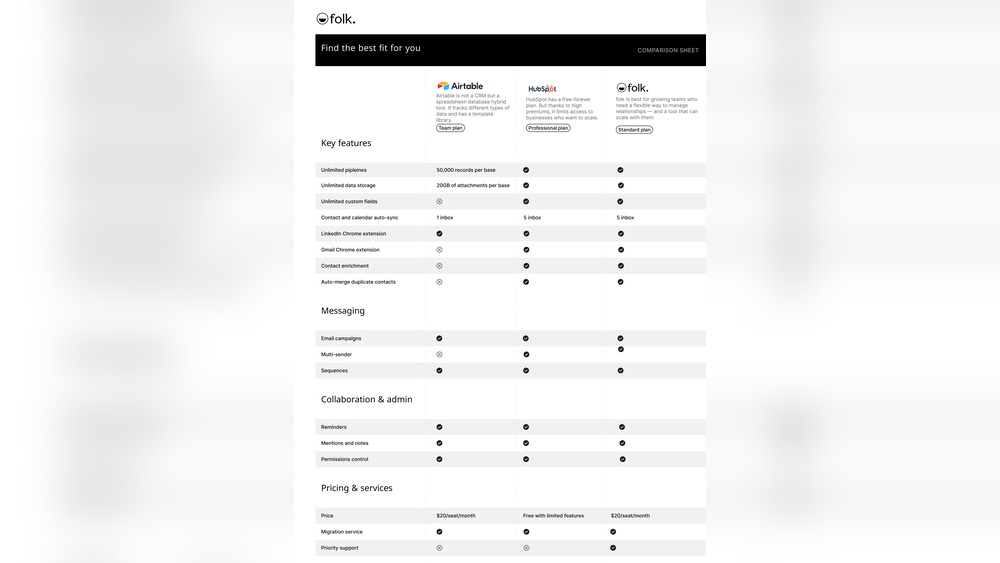
Folk stands out for its simple setup. Users can start quickly with little training. Its interface looks like a spreadsheet, which many find familiar. HubSpot offers more features but takes longer to set up. New users may need time to learn its dashboard and tools. Both platforms provide tutorials, but Folk is better for fast onboarding.
Customization Options
HubSpot allows deep customization of workflows, fields, and reports. Users can tailor the system to fit complex business needs. Folk keeps customization basic but effective. It focuses on core contact management and task tracking. This suits small teams and freelancers who want less clutter. HubSpot fits businesses needing advanced control and automation options.
Collaboration And Team Management
Both platforms support team collaboration but in different ways. Folk makes it easy to share contacts and notes within small groups. Its design encourages relationship-focused teamwork. HubSpot provides robust team management features. It supports roles, permissions, and large team workflows. HubSpot is ideal for growing companies with multiple departments.

Credit: www.amitsarda.xyz
Pricing And Value
Choosing the right CRM depends heavily on pricing and value. Both Folk and HubSpot offer various plans to suit different business needs. Understanding their pricing models and the features you get helps make a better decision. This section compares their costs and what you receive for your investment.
Folk Crm Pricing Model
Folk offers a straightforward pricing model. It usually has a single paid plan after a free trial. This plan includes core features like contact management, email tracking, and calendar sync. Pricing is affordable, targeting small teams and freelancers. There are no complex tiers or add-ons, which keeps costs clear and simple.
Hubspot Pricing Tiers
HubSpot uses a tiered pricing system with free and paid options. The free plan covers basic CRM tools, enough for startups. Paid plans increase in price and features, from Starter to Enterprise. Each tier adds advanced marketing, sales, and service tools. HubSpot’s pricing can grow quickly as you add users and functions.
Cost Vs Features Analysis
Folk’s pricing is low and ideal for small teams wanting simplicity. It covers essential CRM needs without extra costs. HubSpot offers more features but at higher prices. Larger businesses benefit from HubSpot’s automation and analytics. Small teams may find Folk more budget-friendly and easier to use. The choice depends on budget and feature needs.
Best Use Cases
Choosing the right CRM depends on your business needs and team size. Both Folk and HubSpot serve distinct purposes and users. Understanding their best use cases helps pick the right tool for smoother operations.
Ideal Users For Folk Crm
Folk CRM suits freelancers and small teams well. It works best for users who prefer simple, easy-to-use tools. People moving from spreadsheets or Notion find it familiar. It fits professionals managing personal and small professional networks. Google Workspace users benefit from its deep integration. Teams needing quick contact enrichment and email tracking find value. Folk CRM users do not require complex automation or analytics.
Ideal Users For Hubspot
HubSpot is great for growing businesses and larger teams. It fits those needing strong marketing, sales, and service tools in one place. Companies wanting detailed automation and reporting will benefit. Users requiring scalable solutions and many integrations prefer HubSpot. Teams focused on inbound marketing and lead nurturing find it effective. HubSpot suits businesses with complex sales pipelines and customer journeys. It supports both small startups and enterprises.
Scenarios Favoring Each Platform
Choose Folk CRM when you want fast setup and simplicity. It works best for managing contacts and small sales processes. Use Folk for teams relying on Google apps daily. HubSpot fits when your business needs full marketing automation. It excels in handling large contact databases and multiple teams. Pick HubSpot if advanced reporting and lead scoring matter. Folk is ideal for lightweight, relationship-focused workflows. HubSpot shines in complex, multi-channel marketing environments.
Integrations And Extensions
Integrations and extensions are key to extending CRM functionality. They help teams connect their tools and automate tasks smoothly. Choosing between Folk and HubSpot involves understanding their integration capabilities. This section breaks down their options.
Folk Crm Integrations
Folk CRM works well with Google Workspace tools like Gmail and Calendar. It syncs contacts and emails effortlessly. Outlook users find basic support for calendar and mail syncing. Folk also connects to LinkedIn through a browser extension. This helps enrich contacts with social data. The integrations focus on ease and quick setup. They suit small teams and freelancers who use common apps daily.
Hubspot Integration Options
HubSpot offers a broad range of native integrations. It connects with major email providers, marketing tools, and e-commerce platforms. Sales teams can link HubSpot with Salesforce, Shopify, and Zoom. It supports social media platforms and customer support apps. The platform also provides API access for custom integrations. This makes HubSpot flexible for various business needs. Large teams benefit from its extensive ecosystem.
Third-party Extensions
Both Folk and HubSpot support third-party extensions. HubSpot’s marketplace features hundreds of apps for marketing, sales, and service. Users can add chatbots, analytics, and workflow automation tools. Folk’s smaller ecosystem has fewer extensions but includes helpful productivity add-ons. Third-party tools help customize CRM functionality. They improve team collaboration and data management. Extensions make CRMs adaptable to different workflows.
Customer Support And Resources
Customer support and available resources play a vital role in choosing the right CRM software. Efficient support ensures users solve issues quickly. Comprehensive resources help users learn and maximize CRM features. Both Folk and HubSpot offer unique support channels and learning materials. Understanding these differences guides businesses in picking the best fit.
Folk Crm Support Channels
Folk CRM provides support mainly through email and chat. Users can expect timely responses during business hours. The platform also offers a help center with articles and guides. This support suits small teams and individual users. Direct phone support is not available, which may limit immediate assistance.
Hubspot Customer Service
HubSpot delivers multi-channel customer service, including phone, email, and live chat. Users gain access to 24/7 support depending on their subscription. HubSpot’s support team is known for quick and helpful responses. This broad support benefits businesses of all sizes. HubSpot also provides dedicated account managers for premium plans.
Training And Community Resources
Folk CRM offers basic tutorials and a growing knowledge base. These resources focus on getting users started fast. HubSpot excels with extensive training options, including free courses and certifications. Its vibrant community forum allows users to share tips and solve problems. HubSpot Academy stands out as a rich learning platform for all skill levels.

Credit: mpiresolutions.com
Making The Right Choice
Choosing between Folk and HubSpot requires careful thought. Each platform serves different business needs and goals. Making the right choice means matching features to your unique requirements. Focus on what fits your current setup and future plans. This section breaks down key points to guide your decision.
Assessing Business Needs
Start by listing your core business tasks. Consider your sales process, customer interactions, and team size. Folk suits small teams needing simple contact management. HubSpot works well for larger teams needing advanced marketing tools. Identify must-have features like automation, reporting, or integrations. Match those with what each platform offers. Think about ease of use and learning time too.
Scalability Considerations
Plan for growth beyond today’s needs. Folk is great for startups and small groups but may lack advanced options later. HubSpot scales well for growing businesses with complex workflows. Check if the platform can handle more contacts, users, and data over time. Consider pricing changes as you add features or users. Pick a system that grows smoothly without costly migrations.
Long-term Growth Planning
Think about where your business will be in 3-5 years. Will you need stronger marketing automation or sales pipelines? HubSpot offers extensive tools for long-term growth. Folk may require switching platforms if needs expand significantly. Evaluate support, training, and community resources for each platform. A good CRM should support your evolving strategy and team growth without disruption.
Frequently Asked Questions
Who Is Hubspot’s Biggest Competitor?
Salesforce is HubSpot’s biggest competitor, offering comprehensive CRM and marketing automation for businesses of all sizes.
Is Folk Crm Good?
Folk CRM offers an intuitive, user-friendly interface ideal for freelancers and small teams. It integrates well with Google Workspace but lacks advanced automation and mobile app features. It suits users needing simple contact management rather than complex sales pipeline tools.
What Crm Is Better Than Hubspot?
Salesforce, Zoho CRM, and Pipedrive often outperform HubSpot in advanced automation and customization. Folk CRM suits small teams seeking simplicity. Choose based on your business size and feature needs.
What Are The Downsides Of Hubspot?
HubSpot can be expensive for small businesses and has a steep learning curve. Some advanced features require costly upgrades. Customization options are limited compared to competitors. Users report occasional slow loading times and complex reporting tools. Integration with non-HubSpot apps may need extra effort.
Conclusion
Choosing between Folk and HubSpot depends on your business needs. Folk suits small teams and freelancers seeking simple contact management. HubSpot offers more advanced features for larger businesses and complex sales processes. Both tools improve customer relationships but differ in automation and analytics.
Consider your team size and feature requirements carefully. Test each platform to find what fits your workflow best. This way, you ensure smooth operations and better customer management.

