

Are you wondering if Pipedrive integrates with Mailchimp to boost your sales and marketing efforts? If you rely on Pipedrive to manage your deals and Mailchimp to handle your email campaigns, connecting the two could save you time and help you reach your audience more effectively.
But how seamless is this integration? Can you easily sync your contacts and automate your communication without juggling multiple tools? Keep reading to discover exactly how Pipedrive and Mailchimp work together, what benefits you can expect, and how to set up this powerful connection to grow your business smarter and faster.
Pipedrive And Mailchimp Integration
The integration between Pipedrive and Mailchimp connects sales and marketing efforts smoothly. It helps teams keep customer data synced for better email campaigns. This link between the two platforms saves time and improves communication with leads and clients.
Users can export their contact lists from Pipedrive directly to Mailchimp. This allows for targeted email marketing based on real sales data. The integration supports syncing contacts automatically, reducing manual work and errors.
Key Features
- Automatic syncing of contacts between Pipedrive and Mailchimp
- Creation of segmented email lists from Pipedrive data
- Bidirectional data flow keeps both platforms updated
- Tracking of email campaign results within Pipedrive
- Ability to trigger email sequences based on sales activities
Benefits For Sales Teams
- Improved targeting with up-to-date customer lists
- Better follow-up through automated email campaigns
- More effective communication tailored to customer needs
- Time saved by reducing manual data entry
- Clear insights into campaign success and customer engagement

Credit: www.pipedrive.com
Setting Up The Integration
Setting up the integration between Pipedrive and Mailchimp is a straightforward process. This connection helps you manage your contacts and email campaigns efficiently. The setup involves linking your accounts and syncing your contact lists. Each step ensures smooth data flow between the two platforms. Follow the guide below to get started quickly and without hassle.
Connecting Accounts
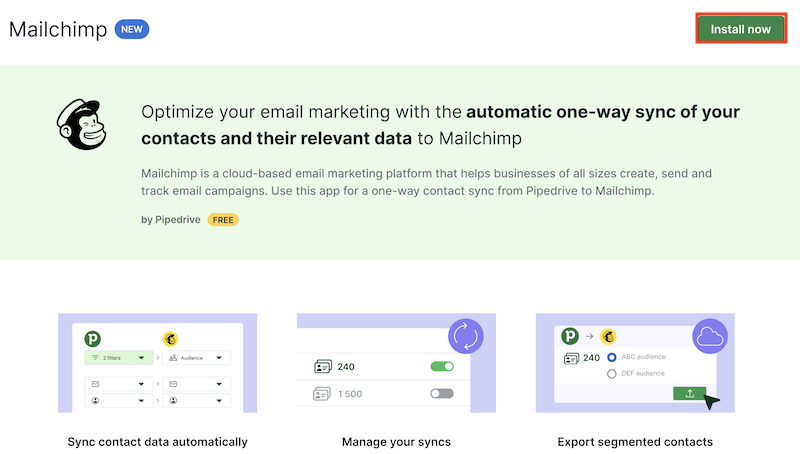
Start by logging into your Pipedrive account. Go to the Marketplace and find the Mailchimp integration. Click “Install” to begin the connection process. You will be asked to log into your Mailchimp account. Enter your credentials to authorize access. Once connected, the two accounts will share data securely. This link allows you to use Mailchimp’s email tools with your Pipedrive contacts.
Syncing Contacts And Lists
After connecting accounts, set up your contact sync. Choose which Pipedrive contacts you want in Mailchimp. You can select specific lists or groups based on your sales pipeline. Decide the sync direction: from Pipedrive to Mailchimp, Mailchimp to Pipedrive, or both ways. This setup keeps your contact information updated on both platforms. Regular syncing prevents errors and duplicate entries. You can adjust sync settings anytime to fit your needs.
Automation Capabilities
Pipedrive’s integration with Mailchimp offers strong automation capabilities. These features help save time and improve communication. Automations link your sales and email marketing smoothly.
You can set up actions in Pipedrive that trigger emails in Mailchimp automatically. This makes your campaigns more timely and relevant.
Triggering Emails From Pipedrive
Pipedrive can send automated emails through Mailchimp based on sales activities. For example, moving a deal to a new stage can trigger a welcome email. This keeps customers informed without manual work.
You create triggers in Pipedrive that start email campaigns in Mailchimp. This connection reduces errors and delays. It also ensures the right message reaches the right contact at the right time.
Using Templates And Delays
Mailchimp templates work well with Pipedrive automations. You can choose a template for each email type. This keeps your messages consistent and professional.
Adding delays between emails is simple. You set wait times to space out messages. This prevents overwhelming your contacts and improves engagement.
Automated sequences with templates and delays make follow-ups easier. Your marketing feels natural and timely. This keeps leads interested and nurtures relationships smoothly.

Credit: www.youtube.com
Managing Contact Sync
Managing contact sync between Pipedrive and Mailchimp is key for smooth marketing and sales efforts. Syncing contacts ensures your email lists stay updated without manual work. It helps keep customer data accurate and ready for campaigns.
Understanding how the sync works can save time and prevent mistakes. Syncing contacts can happen in different ways depending on your needs and settings. Let’s explore the main options for syncing contacts and how updates are handled.
One-way Vs Two-way Sync
One-way sync sends data in a single direction only. For example, Pipedrive contacts can move to Mailchimp, but not back. This method keeps your email list current without risking data conflicts.
Two-way sync shares updates in both directions. Changes in Mailchimp or Pipedrive update the other system automatically. This keeps both platforms perfectly aligned but requires careful setup to avoid overwriting important information.
Handling Updates And Changes
When contacts change, syncing updates keeps records consistent. New contacts added in Pipedrive can appear in Mailchimp automatically. Edits like email or phone number changes also transfer during sync.
Deleted contacts may be removed or marked inactive depending on settings. It’s important to choose rules that fit your workflow. Regular sync checks help catch errors and keep lists clean and useful.
Using Third-party Tools
Using third-party tools to connect Pipedrive with Mailchimp offers flexible options. These tools bridge the gap between the two platforms. They allow data sharing without complex coding or manual exports. This way, you can automate workflows and keep your marketing and sales aligned. Third-party tools help you sync contacts, track campaigns, and manage leads efficiently.
Zapier Integration
Zapier is a popular automation platform that links Pipedrive and Mailchimp. It uses “Zaps” to automate tasks between apps. For example, when you add a new contact in Pipedrive, Zapier can add that contact to a Mailchimp list automatically. This saves time and reduces errors. You can customize workflows without needing technical skills. Zapier supports multiple triggers and actions, making it a flexible choice for syncing data.
Outfunnel As An Alternative
Outfunnel is another tool that connects Pipedrive with Mailchimp. It focuses on simple, reliable syncing of contacts and deals. Outfunnel keeps your email marketing lists updated without manual work. It also tracks email engagement and sends data back to Pipedrive. This helps sales teams follow up effectively. Outfunnel works well for businesses wanting a straightforward integration with clear reporting.
Best Practices For Campaigns
Creating effective email campaigns is crucial for businesses using Pipedrive and Mailchimp together. Following best practices helps increase engagement and improve results. Focus on targeting the right audience and making your messages relevant. This approach saves time and reduces unsubscribes. Below are key strategies to enhance your campaigns.
Segmenting Audiences
Divide your email list into smaller groups based on shared traits. Use data from Pipedrive like location, purchase history, or deal stage. This makes it easier to send focused messages that match each group’s needs. Segmenting leads to higher open rates and better responses. It also helps avoid sending irrelevant emails.
Personalizing Email Content
Tailor your emails to speak directly to each recipient. Use their name and reference past interactions from Pipedrive. Personalization builds trust and shows you understand their interests. Include offers or information that fits their profile. Simple personal touches can boost click rates and customer loyalty.
Troubleshooting Common Issues
Troubleshooting common issues helps keep your Pipedrive and Mailchimp integration smooth. Problems can slow down your workflow and reduce email campaign effectiveness. Identifying issues early saves time and effort.
Below are two frequent problems users face and simple ways to fix them.
Sync Errors
Sync errors occur when data between Pipedrive and Mailchimp does not update correctly. This can happen due to network issues or incorrect settings.
Check your internet connection first. Make sure both apps have permission to share data. Verify that the fields in Pipedrive match those in Mailchimp exactly. Mismatched fields often cause sync failures.
Clear any duplicate contacts in Pipedrive to avoid conflicts during syncing. Restart the integration by disconnecting and reconnecting the accounts.
Email Delivery Problems
Email delivery problems mean your Mailchimp campaigns do not reach the intended recipients. This issue can reduce your engagement and campaign success.
Check your email list for invalid or inactive addresses. Remove bounced emails to keep your list clean. Ensure your Mailchimp account is not paused or restricted due to policy violations.
Review your email content for spam triggers like excessive links or all caps. Use Mailchimp’s preview and test email features to catch issues before sending.
Credit: support.pipedrive.com
Frequently Asked Questions
Does Mailchimp Integrate With Pipedrive?
Yes, Mailchimp integrates with Pipedrive easily. It syncs contacts and segments for targeted email campaigns, boosting engagement.
What Crm Works Best With Mailchimp?
Pipedrive, HubSpot, Zoho CRM, and BIGContacts work best with Mailchimp. They offer seamless integration for sales, marketing, and email campaigns.
How To Connect Crm To Mailchimp?
Connect your CRM to Mailchimp by selecting a CRM marketing list, then choose sync direction: CRM to Mailchimp, Mailchimp to CRM, or bidirectional. Authorize the integration and map fields to sync contacts and data seamlessly. This enables efficient email campaigns and customer management.
Can Pipedrive Send Automated Emails?
Yes, Pipedrive can send automated emails by creating custom workflows that trigger emails based on specific actions.
Conclusion
Pipedrive integrates well with Mailchimp to boost your email campaigns. You can easily sync contacts and create targeted lists. This helps send personalized emails that engage customers better. The connection saves time by automating data sharing between platforms. Using both tools together makes managing sales and marketing smoother.
This integration suits small teams wanting simple, effective communication. Try syncing your Pipedrive contacts with Mailchimp to see the benefits. It’s a practical way to improve your outreach without extra hassle.

