
Are you wondering if Pipedrive integrates with LinkedIn to supercharge your sales efforts? You’re not alone.
Many sales professionals want to know if they can connect these two powerful tools to save time, keep their contacts organized, and close deals faster. Imagine having your LinkedIn leads and messages flow seamlessly into your Pipedrive CRM without extra work.
Wouldn’t that make your daily routine easier and more productive? You’ll discover whether Pipedrive and LinkedIn work together, what options you have, and how to make the most of any available integrations to boost your sales game. Keep reading to unlock the secrets to smarter selling!
Pipedrive And Linkedin Connection
Pipedrive and LinkedIn serve different but complementary roles in sales and networking. Connecting these two platforms can streamline how you manage leads and contacts. Understanding the connection helps businesses use both tools more effectively.
Integration Possibilities
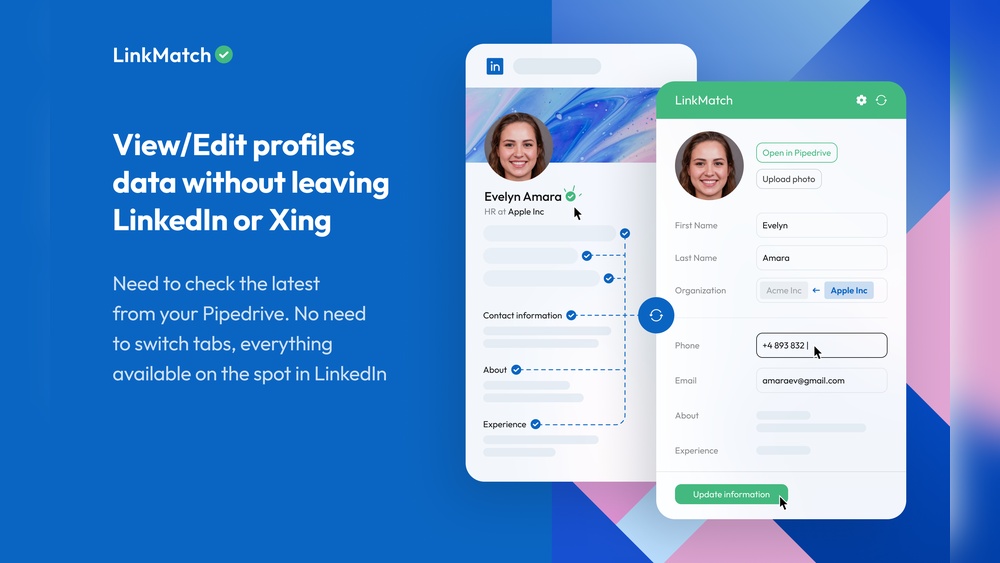
Pipedrive can connect to LinkedIn through third-party apps and browser extensions. These tools allow syncing LinkedIn contacts with your Pipedrive CRM. You can view LinkedIn profiles inside Pipedrive, making it easy to update contact details. Some integrations enable sending LinkedIn messages directly from Pipedrive. These features help sales teams keep their data organized and accessible.
LinkMatch is a popular app for this purpose. It matches LinkedIn profiles with existing Pipedrive contacts. This avoids duplicate entries and keeps information consistent. Sales Navigator for CRM also offers some integration by embedding LinkedIn profile data within Pipedrive. These options support better lead management and outreach.
Limitations Of Direct Integration
Pipedrive does not provide a native, full LinkedIn integration. Direct syncing of all LinkedIn activity is not possible. LinkedIn restricts data access, which limits what third-party apps can do. For example, automatic syncing of LinkedIn messages to Pipedrive is often incomplete. Some features require extra subscriptions, like LinkedIn Sales Navigator.
Users must rely on external tools and manual updates for full LinkedIn data in Pipedrive. The connection depends on the quality and features of third-party integrations. These may sometimes face delays or errors in data syncing. Understanding these limits helps set realistic expectations when linking the two platforms.
Credit: blog.skyvia.com
Popular Integration Tools
Integrating Pipedrive with LinkedIn enhances your sales and lead management efforts. Various tools help connect these platforms smoothly. These popular integration tools simplify syncing contacts, tracking leads, and automating tasks. They save time and improve data accuracy. Below are some well-known tools used for Pipedrive and LinkedIn integration.
Linkmatch Overview
LinkMatch connects LinkedIn profiles directly to Pipedrive contacts. It shows matching records inside your LinkedIn account. You can create new contacts or update existing ones easily. This tool reduces manual data entry and errors. It works as a browser extension for quick access. LinkMatch keeps your CRM data fresh and aligned with LinkedIn.
Leadcrm Features
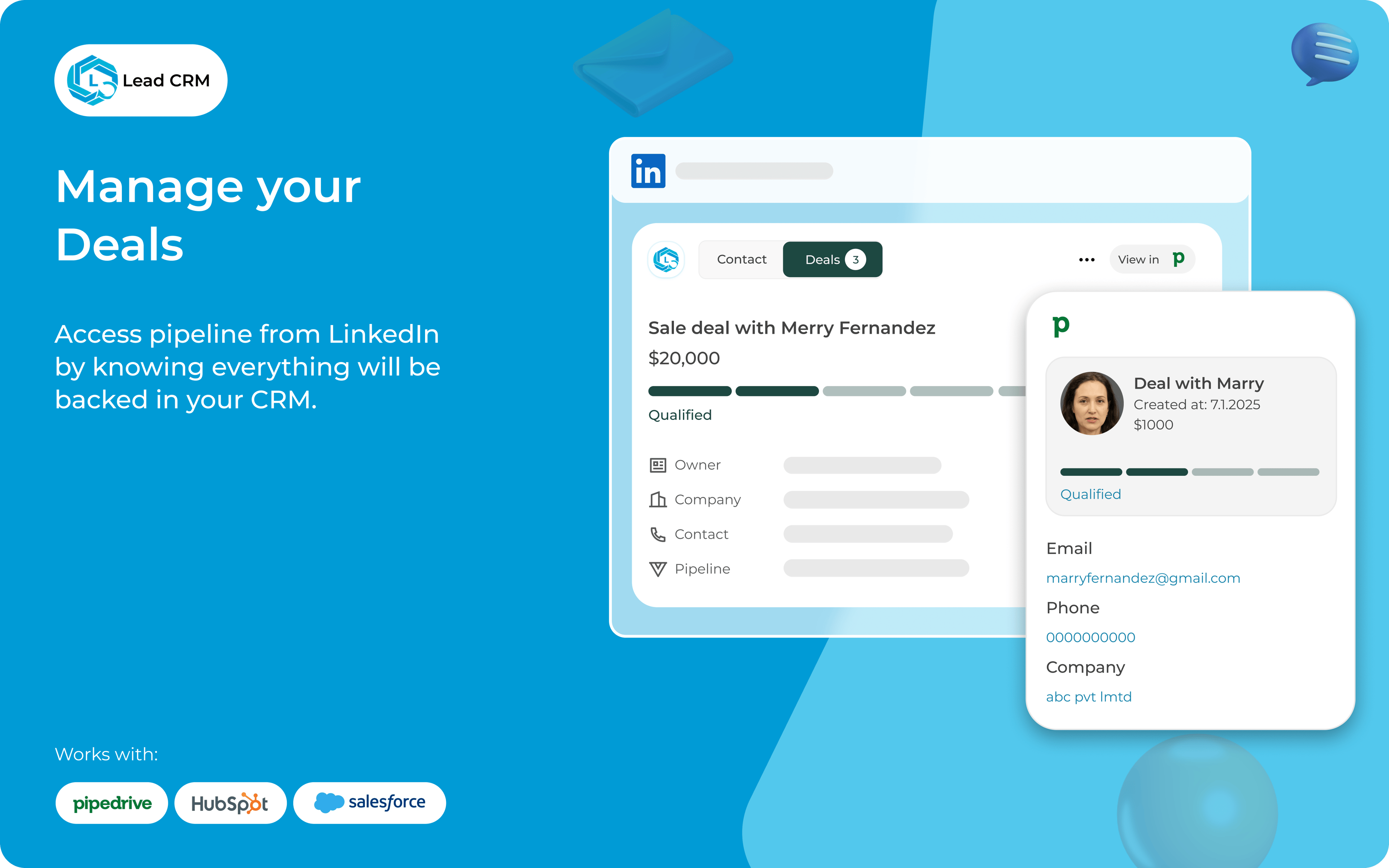
LeadCRM focuses on capturing leads from LinkedIn into Pipedrive automatically. It extracts contact information and sends it to your CRM. You can set filters to target specific types of leads. The tool also tracks interactions and communication history. This helps keep all lead details in one place. LeadCRM boosts your ability to follow up and close deals.
Zapier Automation
Zapier connects Pipedrive and LinkedIn through automated workflows called Zaps. It moves data between apps without coding. You can create triggers like new LinkedIn leads to add contacts in Pipedrive. Zapier supports many custom actions and filters. It helps automate repetitive tasks, saving time. This tool is ideal for flexible and scalable integration setups.
Setup Steps For Integration
Integrating Pipedrive with LinkedIn can boost your sales efforts by combining CRM power with professional networking. The setup process involves a few clear steps. This guide breaks down the integration into manageable parts. Follow these steps to connect your accounts smoothly.
Preparing Pipedrive Account
Start by logging into your Pipedrive account. Check that your subscription plan supports integrations. Update your profile and contact details for accuracy. Organize your sales pipeline to fit LinkedIn data. Enable API access in your settings if required.
Configuring Linkedin Settings
Log into your LinkedIn account next. Visit the LinkedIn Sales Navigator page if you use it. Adjust privacy and data-sharing settings to allow CRM access. Confirm permissions for syncing contacts and messages. Refresh your browser to apply new settings.
Using Third-party Apps
Choose a third-party app like LinkMatch or Surfe for easy integration. Install the app from Pipedrive’s marketplace or the browser extension store. Connect your LinkedIn and Pipedrive accounts inside the app. Customize sync options such as contact fields and message history. Test the connection by importing a contact or lead.

Credit: www.pipedrive.com
Data Sync And Management
Managing data between Pipedrive and LinkedIn helps keep sales information accurate and up-to-date. This connection allows users to sync contacts, track LinkedIn actions, and log communications easily. It reduces manual entry and saves time.
Data sync and management create a smoother workflow for sales teams. It keeps all relevant details in one place. Let’s explore how this integration handles profiles, activity tracking, and message logging.
Syncing Profiles And Contacts
Pipedrive can import LinkedIn profiles directly into its contact database. It matches LinkedIn users with existing contacts to avoid duplicates. New profiles added from LinkedIn appear automatically in Pipedrive. This keeps your contact list fresh and complete.
Tracking Linkedin Activity In Pipedrive
LinkedIn actions like profile views and connection requests can be tracked inside Pipedrive. This data shows how prospects engage with your LinkedIn content. Sales reps see the latest interactions without switching apps. It helps to prioritize follow-ups based on recent activity.
Message Logging And Task Creation
Messages sent through LinkedIn can be logged in Pipedrive automatically. This creates a clear history of conversations with each contact. You can also set tasks and reminders based on LinkedIn messages. It keeps the sales process organized and on schedule.
Benefits Of Integration
Integrating Pipedrive with LinkedIn brings many benefits that improve how sales teams work. It helps connect your CRM with the largest professional network. This connection makes it easier to find, manage, and follow up with leads.
By combining these two tools, you save time and reduce manual tasks. Your sales process becomes smoother and more efficient. Data stays accurate and up to date, helping you make better decisions. Here are some key benefits of this integration.
Enhanced Lead Generation
Integration allows you to find new leads directly from LinkedIn inside Pipedrive. You can view LinkedIn profiles without leaving your CRM. This helps identify the right people faster.
Leads are automatically added to your pipeline with detailed information. This reduces data entry and speeds up prospecting. You can target leads based on their job title, company, and location.
Improved Sales Workflow
Sales teams can track LinkedIn interactions alongside emails and calls. This keeps all communication in one place. Tasks and follow-ups are easier to manage with automated reminders.
By syncing data, you avoid switching between platforms. Your sales process becomes more organized. This leads to faster responses and better customer engagement.
Centralized Contact Management
Contacts from LinkedIn and Pipedrive are combined in one database. This makes it simple to update information and see the full history. No more duplicate entries or missing details.
Teams can share notes and updates on each contact. This improves collaboration and keeps everyone informed. Centralized contact management saves time and reduces errors.
Common Challenges
Integrating Pipedrive with LinkedIn can improve your sales process. Still, users often face some common challenges. These issues affect how smoothly the two platforms work together. Understanding these challenges helps you prepare and find solutions quickly.
Data Privacy Concerns
Data privacy is a major concern for many users. Sharing LinkedIn data with Pipedrive raises questions about who can see it. Both platforms have strict privacy rules, but syncing data can cause risks. Users worry about sensitive information leaking or being misused. Always check privacy policies before integration.
Syncing Errors
Syncing data between Pipedrive and LinkedIn is not always perfect. Sometimes, contact details or messages do not sync correctly. This can cause missing or duplicated data in your CRM. Syncing errors slow down work and confuse sales teams. Regular checks and updates can reduce these errors.
Feature Limitations
Not all LinkedIn features work inside Pipedrive. Some LinkedIn data cannot be imported or viewed in the CRM. This limits how much you can manage LinkedIn contacts through Pipedrive. Also, some integrations require extra apps or subscriptions. Knowing these limits helps set clear expectations.
Best Practices For Use
Using Pipedrive with LinkedIn can boost your sales efforts. Following best practices ensures smooth integration and better results. Focus on smart strategies to get the most from both tools. Here are key tips for effective use.
Optimizing Linkedin Targeting
Define your ideal customer profile clearly. Use LinkedIn filters to find prospects matching this profile. Focus on job titles, industries, and locations relevant to your product. Save filtered searches for quick access. Regularly update your target list based on new insights. This keeps your outreach precise and relevant.
Maintaining Data Accuracy
Regularly sync LinkedIn data with Pipedrive to avoid errors. Verify contact details before adding them to your pipeline. Remove duplicate entries to keep your CRM clean. Use notes and tags to add context to each contact. Accurate data saves time and improves follow-up success.
Maximizing Tool Capabilities
Take advantage of Pipedrive’s automation features for LinkedIn activities. Automate task creation after LinkedIn interactions. Use email templates linked to LinkedIn messages to speed communication. Track deal progress with custom stages reflecting LinkedIn engagement. Explore apps like LinkMatch for deeper integration and smoother workflows.
Credit: www.pipedrive.com
Frequently Asked Questions
How To Connect Linkedin With Pipedrive?
Log in to your Pipedrive account and open LinkedIn. Use apps like LinkMatch or LeadCRM to sync profiles and messages. Configure sync settings in Pipedrive for seamless LinkedIn integration.
How To Integrate Linkedin With Crm?
Integrate LinkedIn with your CRM using LinkedIn Sales Navigator or third-party apps like LinkMatch. Connect accounts, sync profiles, and track interactions within your CRM dashboard. This streamlines lead management and boosts sales efficiency.
Can You Use Linkedin As A Crm?
Yes, LinkedIn can function as a basic CRM by organizing contacts with tags, notes, tasks, and reminders.
How To Generate Sales Leads Through Linkedin?
Use LinkedIn’s advanced filters to target ideal prospects. Share relevant content and engage actively. Leverage LinkedIn Sales Navigator for deeper insights and personalized outreach. Build relationships by commenting and messaging genuinely. Track interactions to nurture leads efficiently.
Conclusion
Pipedrive and LinkedIn can work well together through various integration tools. These connections help you manage contacts and sales more smoothly. You can sync LinkedIn profiles and messages directly into Pipedrive. This saves time and keeps all your information in one place.
Using these integrations can improve how you track leads and follow up. Choose the option that fits your workflow best. With the right setup, managing your sales process becomes easier and more organized.

