Are you looking for a CRM that adapts perfectly to your unique business needs? You might be wondering if Airtable can step in as your go-to customer relationship management tool.
The good news is—it can. Airtable offers a flexible, easy-to-customize platform that lets you manage contacts, track deals, and automate workflows all in one place. While it may not have every advanced feature found in traditional CRMs, its simplicity and versatility make it a strong contender for teams who want control without complexity.
Ready to discover how Airtable can transform your CRM experience? Keep reading to find out the pros, setup tips, and whether it fits your business perfectly.
Why Choose Airtable For Crm
Airtable stands out as a strong choice for customer relationship management (CRM). It blends the simplicity of a spreadsheet with the power of a database. This combination allows businesses to manage contacts, track deals, and organize tasks in one place. Its flexibility suits small teams and growing companies alike.
Many CRM tools can feel rigid. Airtable, however, offers freedom to shape workflows exactly as needed. Its features support clear data connections and easy visual tracking. Users enjoy a tool that adapts to their style rather than forcing them into fixed methods.
Customizable Workflows
Airtable lets users design workflows that fit their processes. You can create custom fields, statuses, and stages. This helps track sales pipelines or customer support cases with clarity. Automations can trigger emails or reminders based on specific actions. Teams stay organized without juggling multiple apps.
Relational Database Features
Airtable’s core strength lies in its relational database capabilities. It links contacts to companies, deals, or projects effortlessly. This connection avoids data duplication and keeps information consistent. Users can view related records in one place. It simplifies managing complex customer details and interactions.
Visual And User-friendly Interface
The interface is clean and easy to navigate. Different views like grid, calendar, and kanban provide visual clarity. Drag-and-drop features make reordering simple and quick. Even non-technical users can master Airtable with little training. This reduces the learning curve and boosts team adoption.
Credit: fitsmallbusiness.com
Setting Up Airtable As A Crm
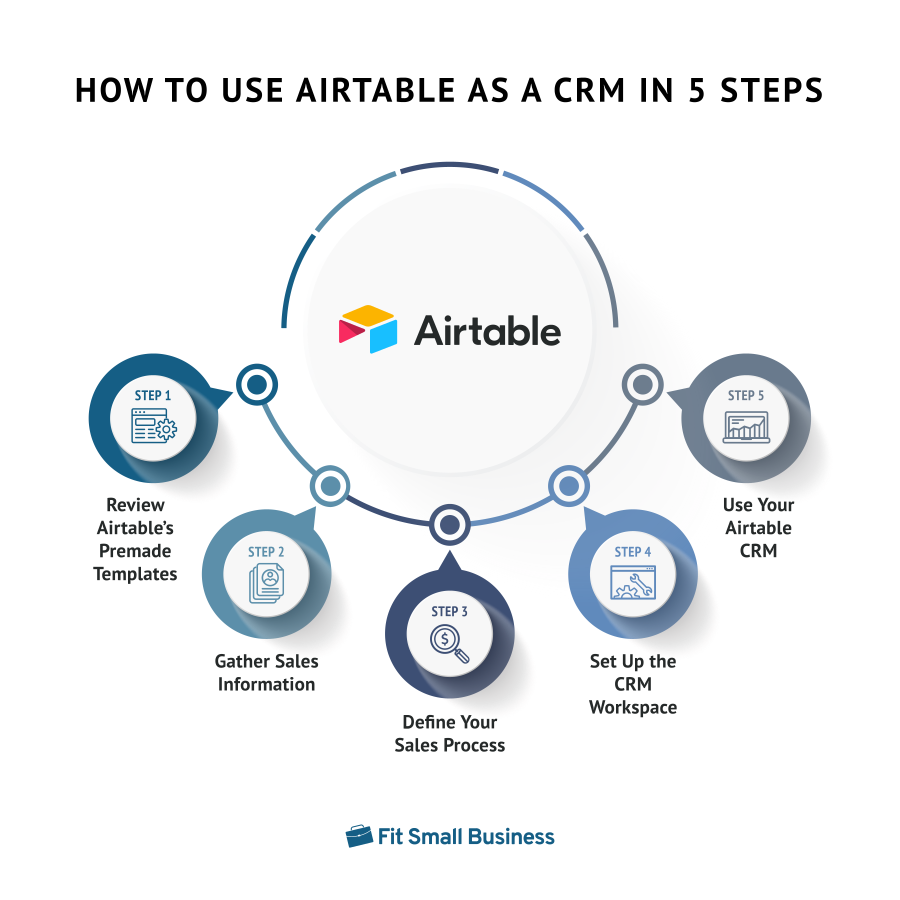
Setting up Airtable as a CRM is simple and flexible. This tool adapts to your business needs easily. It helps you track customers, deals, and tasks all in one place. The setup process starts with choosing the right structure and organizing your data well. Linking different records creates a clear view of your sales pipeline.
Selecting The Right Template
Airtable offers many CRM templates to start quickly. Pick one that fits your business size and type. Templates come with pre-built tables for contacts, companies, and deals. This saves time and reduces setup errors. You can customize any template later to match your workflow. Choose a template that feels easy to use and understand.
Importing And Organizing Data
Bring your existing customer data into Airtable by importing CSV files. Organize data into clear tables such as contacts, companies, and sales. Use fields like name, email, phone, and deal status. Clean and format your data before importing to avoid mistakes. Keep your tables simple and focused. This helps you find information fast and stay organized.
Linking Contacts, Deals, And Tasks
Connect related records using Airtable’s linked fields. Link contacts to their companies and associated deals. Attach tasks or follow-ups to each deal for better tracking. This creates a relational database that shows all customer interactions. Linked records help you see the full story of each sale. Use this setup to manage your sales pipeline and customer relationships clearly.
Key Crm Features In Airtable
Airtable offers several key features that make it a solid choice for CRM needs. Its flexible design helps teams manage customer data clearly. Users can organize contacts, track deals, and automate tasks with ease. The platform adapts to various business processes without complex setups.
These core CRM features in Airtable support smooth workflows. They ensure no detail gets missed in customer management. Let’s explore the main functions that make Airtable work well as a CRM tool.
Contact And Account Management
Airtable allows easy storage of contact information and company details. Users can link contacts to accounts, creating clear relationships. This helps keep all customer data in one place. Notes and communication history can be added for quick reference. The system supports custom fields for specific business needs. It keeps contact lists organized and accessible.
Deal Tracking And Sales Pipelines
Track every stage of your sales process with Airtable’s flexible tables. Create pipelines that show deal progress from start to finish. Visual views like Kanban boards make it easy to see status. Users can assign deals to team members and set priorities. This feature helps manage opportunities and close sales on time. It supports revenue tracking and forecasting.
Task Automation And Reminders
Airtable includes automation tools to reduce repetitive work. Set reminders for follow-ups, meetings, or deadlines. Automated notifications keep your team on track without manual effort. Custom workflows can trigger emails or update records automatically. This saves time and improves team productivity. It ensures important tasks never get overlooked.
Integrations To Enhance Crm Functions
Integrations significantly expand Airtable’s CRM capabilities. They connect Airtable with other apps, creating a smooth workflow. This helps manage customer data, communication, and tasks more efficiently.
Integrations automate repetitive work and improve data accuracy. They save time and keep your CRM updated without manual input. Many tools work well with Airtable to enhance CRM functions.
Using Zapier For Automation
Zapier links Airtable with over 3,000 apps. It automates tasks like adding new contacts or updating deals. You can set triggers to start actions automatically. For example, when a new email arrives, Zapier adds the contact to Airtable. This reduces errors and speeds up work.
Email Tracking And Communication Tools
Email tools integrate with Airtable to track customer conversations. They log emails, schedule follow-ups, and manage campaigns. This keeps all communication in one place. Teams stay informed and respond faster to clients.
Form Integration For Data Capture
Forms collect customer data directly into Airtable. This includes contact info, feedback, or orders. Integration with tools like Typeform or Google Forms makes it easy. Data flows automatically, reducing manual entry. Your CRM stays current with fresh information.
Comparing Airtable With Traditional Crms
Comparing Airtable with traditional CRMs reveals key differences in how each handles customer data and workflows. Airtable offers a unique blend of spreadsheet simplicity and database power. Traditional CRMs focus on structured sales and customer management processes. Understanding these distinctions helps decide which tool suits your business needs.
Flexibility Vs. Complexity
Airtable stands out for its flexibility. Users can customize tables, views, and fields without coding skills. It adapts easily to various business models and workflows. Traditional CRMs often come with predefined processes. This can add complexity but ensures best practices are built-in. Airtable lets you start simple and add features as needed. Traditional CRMs require learning their specific system and may limit customization.
Scalability Considerations
Airtable works well for small to medium teams. It handles moderate data volumes and user counts efficiently. For larger enterprises, traditional CRMs offer better scalability. They support complex sales pipelines, automation, and integrations at scale. Airtable’s simplicity might cause performance slowdowns with huge data sets. Traditional CRMs are designed to grow with your business demands.
When To Choose Dedicated Crm Solutions
Choose a dedicated CRM if your business needs advanced sales tracking. Features like lead scoring, forecasting, and marketing automation are essential. Traditional CRMs provide robust reporting and compliance tools. Airtable suits teams needing a flexible, lightweight CRM or project tracker. It also works well when you want a tool beyond just CRM, like inventory or event management.

Credit: blog.airtable.com
Tips To Boost Sales Using Airtable Crm
Boosting sales with Airtable CRM requires smart strategies. You can organize your sales process clearly and work faster. Use Airtable’s features to keep track of leads, automate tasks, and analyze your sales data. These tips help you get more from Airtable and improve your sales results.
Streamlining Lead Management
Organize all leads in one place using Airtable tables. Assign each lead a status like new, contacted, or won. Use filters and views to focus on priority leads. Link contacts to their companies and sales deals for easy access. This clear structure saves time and reduces errors.
Automating Follow-ups And Notifications
Set up automatic reminders for follow-up emails or calls. Use Airtable’s automation to send notifications when a lead moves stages. Automate tasks like sending thank-you notes after meetings. These actions keep your sales team on track without manual effort. Timely follow-ups increase chances of closing deals.
Custom Reports And Sales Insights
Create custom reports to track sales performance easily. Use charts and graphs to visualize monthly sales or lead sources. Identify trends and spot bottlenecks in your sales process. Share reports with your team to improve collaboration. Insights from data help make smarter sales decisions.
Common Challenges And Solutions
Using Airtable as a CRM brings many benefits but also some common challenges. These challenges can affect how smoothly your CRM runs and how well it supports your business. Understanding these issues helps you find practical solutions. Here are some key challenges and ways to handle them effectively.
Handling Large Data Volumes
Airtable works best with small to medium-sized datasets. Large data volumes can slow down performance and cause delays. To manage this, split data into smaller, linked tables. Archive old or less-used records outside the main base. Use filters and views to display only the data you need at a time. This keeps your workspace fast and responsive.
Integrating Advanced Features
Airtable offers many built-in tools but lacks some advanced CRM functions. Features like deep automation or complex reporting may need extra tools. Use Airtable’s API or connect with third-party apps like Zapier for automation. This lets you link Airtable to email platforms, calendars, and more. Custom scripts can add tailored functionality. These integrations extend Airtable’s CRM capabilities without losing simplicity.
Maintaining Data Accuracy
Accurate data is crucial for any CRM system. Manual entry can lead to mistakes and inconsistencies. Use Airtable forms to standardize data input and reduce errors. Set up validation rules to check data formats. Regularly review and clean your data to remove duplicates or outdated entries. Clear guidelines for users also help keep data reliable and useful.

Credit: efficient.app
Frequently Asked Questions
Can An Airtable Be Used For Crm?
Yes, Airtable works well as a customizable CRM. It offers templates, linked records, and automation to manage contacts and deals efficiently.
How To Make A Crm In Airtable?
Create tables for contacts, deals, and tasks in Airtable. Link records to connect data. Use customizable CRM templates. Automate workflows with Airtable’s built-in tools or Zapier. Capture data via forms. Regularly update and refine your CRM to fit your business needs.
Can Airtable Replace Salesforce?
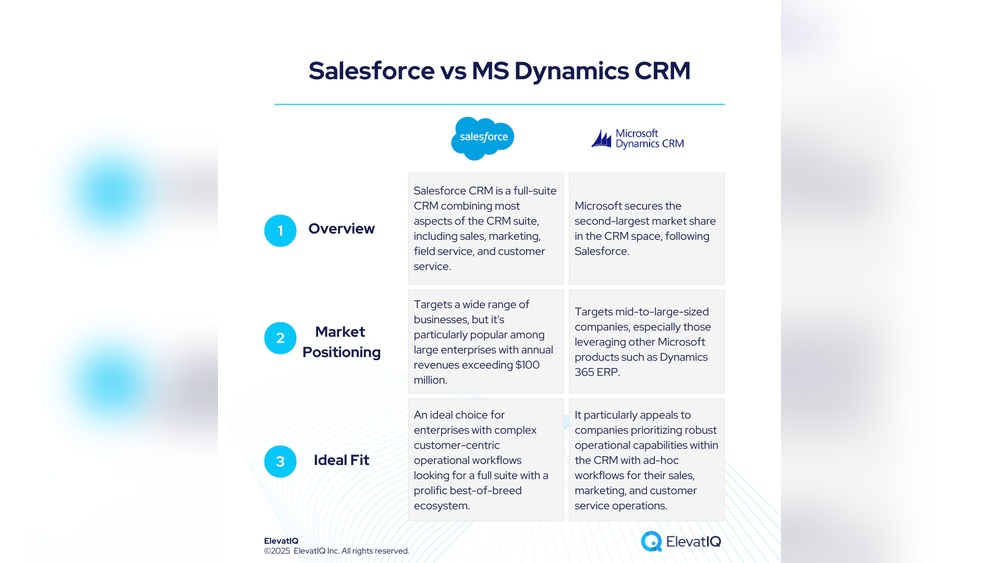
Airtable offers flexible, customizable CRM solutions ideal for small to mid-sized teams. It lacks Salesforce’s advanced enterprise features. Airtable suits simple workflows, while Salesforce excels in complex, large-scale CRM needs. Choose based on your business size, customization, and scalability requirements.
Can An Airtable Be Used As A Cms?
Yes, Airtable can serve as a CMS to manage content, SEO, and site structure with easy updates. It supports fast, customizable static websites using tools like Next. js.
Conclusion
Airtable can serve as a simple, flexible CRM for many businesses. It helps organize contacts, deals, and tasks in one place. Customizable templates make setup quick and easy. Small teams benefit from its user-friendly design and basic automation. Yet, it may lack advanced features needed by large companies.
Consider your business size and needs before choosing Airtable as your CRM. It offers a good starting point for managing customer relationships effectively.