
Choosing the right tool to manage your business can feel overwhelming, especially when you’re deciding between two popular platforms like HubSpot and HoneyBook. You want a system that fits your unique needs, saves you time, and helps grow your business without unnecessary hassle.
But which one truly delivers on these promises? You’ll discover the key differences between HubSpot and HoneyBook, so you can make a clear, confident choice for your business. Stay with us to find out which platform aligns best with your goals and how it can simplify your daily operations.
Hubspot Features
HubSpot offers a wide range of features designed to help businesses grow. Its tools cover sales, marketing, and customer management. These features work together to improve efficiency and customer relationships.
HubSpot suits companies of all sizes. It provides easy-to-use tools that help track leads and automate tasks. The platform’s flexibility makes it a popular choice in many industries.
Crm Capabilities
HubSpot’s CRM is free and simple to use. It helps store and organize customer data in one place. Users can track interactions, deals, and customer history easily. The CRM also supports contact management and pipeline tracking. It gives a clear view of all sales activities.
Sales And Marketing Tools
HubSpot includes email marketing, lead capture, and content management tools. Sales teams can use email templates and meeting scheduling features. Marketing tools help create campaigns and track their success. Analytics show which strategies bring the best results.
Automation Options
Automation saves time by handling repetitive tasks. HubSpot lets users create workflows to automate emails and notifications. It can assign leads and update records automatically. These options help teams focus on high-value activities.
Integration Ecosystem
HubSpot connects with many popular apps and platforms. It supports integrations with email, social media, and e-commerce tools. This ecosystem allows data to flow smoothly between systems. Users can customize their setup to fit their needs.

Credit: arissainternational.com
Honeybook Features
HoneyBook offers a set of features designed for small businesses and freelancers. Its tools help manage clients, projects, and finances in one place. The platform aims to simplify daily business tasks. This focus makes it easier to stay organized and professional.
Below are some key HoneyBook features that stand out for users who want smooth business operations.
Client Management
HoneyBook keeps all client information in one spot. It stores contact details, notes, and communication history. This helps you track conversations and follow-ups easily. You can also send proposals and contracts through the platform. It streamlines client onboarding and keeps everything organized.
Financial Tracking
The platform helps track expenses and income clearly. You can view payments received and pending invoices. It simplifies budget management for projects and overall business. Reports show financial health and cash flow at a glance. This feature reduces the need for separate accounting software.
Project Workflow
HoneyBook guides projects from start to finish. You can set tasks, deadlines, and reminders for each job. The workflow feature keeps everyone on the same page. It ensures projects move forward without missing steps. Collaboration with clients and team members becomes smoother.
Payment Processing
HoneyBook supports online payments directly through the platform. Clients can pay invoices with credit cards or bank transfers. This speeds up the payment cycle and reduces delays. The system also sends payment reminders automatically. It helps maintain steady cash flow without extra effort.
Pricing Comparison
Understanding the pricing of HubSpot and HoneyBook helps in choosing the right tool for your needs. Both platforms offer different plans and cost structures. Knowing these details aids in making a smart investment for your business.
Let’s break down the pricing plans for each platform and explore how costs can grow with your business.
Hubspot Pricing Plans
HubSpot provides a free plan with basic features to start. Paid plans include Starter, Professional, and Enterprise tiers. Prices rise as you add more users and advanced features. The Starter plan begins at $45 per month. Professional plans start around $800 per month. Enterprise packages can exceed $3,200 monthly. Each plan offers more tools for marketing, sales, and service automation.
Honeybook Pricing Structure
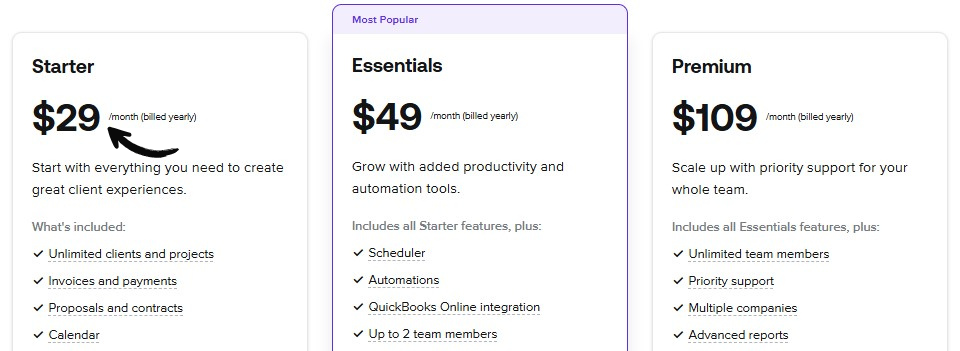
HoneyBook has a simpler pricing model with one main plan. It costs $9 per month when billed annually. Monthly billing is $12 per month. This plan includes all features like project management, contracts, and invoicing. HoneyBook charges no extra for additional users. It’s designed to support small teams and freelancers with straightforward pricing.
Cost Factors And Scalability
HubSpot’s cost depends on user count and add-ons. It suits growing companies needing advanced CRM features. Costs can increase quickly with more contacts and tools. HoneyBook offers fixed pricing, making budgets easier to manage. It fits small businesses with fewer users and simpler needs. Both platforms scale differently, so consider your business size and growth plans.
User Experience
User experience plays a key role in choosing the right software for your business. HubSpot and HoneyBook each offer unique experiences designed to help users manage their tasks efficiently. Understanding how easy these platforms are to use, how smooth the onboarding process is, and the quality of customer support can guide your decision.
Ease Of Use
HubSpot features a clean interface with clear menus and simple navigation. Users can find tools quickly and complete tasks without hassle. HoneyBook has a more streamlined design focused on creative professionals and small businesses. Its dashboard is intuitive, making daily workflows easier to manage. Both platforms avoid clutter, but HubSpot suits those who want more features in one place. HoneyBook appeals to users who prefer simplicity and speed.
Onboarding Process
HubSpot offers guided tutorials and step-by-step instructions for new users. This helps beginners understand the platform’s many features. HoneyBook provides a quick start setup with helpful prompts to get projects running fast. The onboarding is straightforward and requires less time compared to HubSpot. Users of both platforms can access video guides and knowledge bases. HubSpot’s onboarding is more detailed, while HoneyBook’s is faster and easier for first-time users.
Customer Support
HubSpot provides 24/7 customer support via chat, email, and phone. Their team is known for quick and helpful responses. HoneyBook offers support through email and live chat during business hours. They focus on personal assistance to solve user issues. Both platforms maintain active user communities for peer help. HubSpot’s support is more extensive, but HoneyBook ensures users get dedicated attention during working hours.
Business Growth Impact
Business growth depends on many factors. Choosing the right tool can make a big difference. HubSpot and HoneyBook offer features that impact growth in unique ways. Understanding their effects helps businesses pick the best fit.
Lead Management Efficiency
HubSpot excels in organizing and tracking leads throughout the sales process. It automates lead capture and scoring to focus on high-potential clients. HoneyBook simplifies lead intake but has fewer automation options. Efficient lead management saves time and increases conversion rates, fueling growth.
Client Relationship Building
Building strong client relationships drives repeat business and referrals. HubSpot provides tools for personalized communication and timely follow-ups. HoneyBook focuses on project workflows and client collaboration. Both improve relationships, but HubSpot offers more options for ongoing engagement.
Revenue Tracking And Reporting
Tracking income and expenses clearly shows business health. HubSpot offers detailed revenue reports and sales analytics for deeper insights. HoneyBook provides simple financial tracking suited for small projects. Accurate reporting helps businesses make informed decisions to grow steadily.

Credit: www.fahimai.com
Customization And Flexibility
Customization and flexibility are key factors when choosing the right CRM or business management tool. Both HubSpot and HoneyBook offer options to tailor the platform to fit unique business needs. Understanding their customization features helps users decide which tool aligns better with their workflows.
Hubspot Custom Objects
HubSpot allows users to create custom objects beyond standard contacts and deals. This feature helps businesses track specific data unique to their operations. Custom objects enable a more personalized CRM experience. Users can link these objects to contacts, companies, or deals. It creates a flexible data structure that adapts to various industries. HubSpot’s drag-and-drop editor also aids in customizing forms and dashboards easily.
Honeybook Workflow Customization
HoneyBook offers workflow customization focused on project management and client interaction. Users can design automated workflows for booking, invoicing, and task tracking. The platform supports custom templates for emails, contracts, and proposals. It helps maintain a consistent brand voice. HoneyBook’s calendar and scheduling tools integrate smoothly into workflows. This system simplifies managing client projects from start to finish.
Limitations And Constraints
HubSpot’s customization can require technical skills for advanced setups. Some features may need higher-tier subscriptions. HoneyBook’s customization focuses more on creative businesses and service providers. It may lack complex CRM features for larger sales teams. Both platforms have limits on automation steps and data storage. Users should assess these constraints against their business scale and needs. Choosing the right tool means balancing flexibility with ease of use.
Integration And Compatibility
Integration and compatibility play a vital role in choosing between HubSpot and HoneyBook. Both platforms offer tools to connect with other software. This ensures smooth workflows and efficient data sharing. Understanding their integration options helps businesses pick the right fit.
Third-party App Support
HubSpot supports a wide range of third-party apps. It connects with marketing, sales, and customer service tools easily. HoneyBook offers fewer app integrations. It mainly focuses on apps useful for freelancers and small businesses. HubSpot’s extensive network suits larger teams needing many app connections.
Api Access
HubSpot provides robust API access. Developers can build custom integrations to match business needs. HoneyBook offers limited API capabilities. This limits deep customization but keeps the platform simple. HubSpot’s open API allows more flexibility for tech-savvy users.
Platform Ecosystem
HubSpot has a large platform ecosystem. It includes marketing, sales, service, and CMS hubs. Users can expand features as their business grows. HoneyBook focuses on project management and client communications. Its ecosystem is smaller but tailored for creative professionals and service providers.
Credit: www.fahimai.com
Suitability For Business Types
Choosing the right tool depends on your business type. HubSpot and HoneyBook serve different needs. Each platform fits certain business categories better. Understanding which suits your business helps make the best choice.
Let’s explore how both tools align with small businesses, freelancers, creatives, and growing enterprises.
Small Businesses
Small businesses need simple and efficient tools. HoneyBook offers easy project management and invoicing features. It helps manage client work without complexity. HubSpot provides more advanced marketing and sales tools. It suits small businesses planning to grow quickly. Both tools support basic CRM needs. But HoneyBook focuses more on service delivery.
Freelancers And Creatives
Freelancers and creatives require flexible and straightforward systems. HoneyBook fits well by handling contracts and payments smoothly. It keeps projects organized in one place. HubSpot’s strength lies in tracking leads and customer interactions. Freelancers with many clients may benefit from HubSpot’s detailed CRM. HoneyBook’s design is simpler for solo professionals.
Growing Enterprises
Growing enterprises need scalable and powerful platforms. HubSpot offers extensive automation and reporting tools. It supports complex sales pipelines and marketing campaigns. HoneyBook may lack advanced features for large teams. Enterprises with expanding customer bases often choose HubSpot. It integrates well with other business software. HubSpot suits businesses aiming for long-term growth.
Pros And Cons
Choosing the right tool for your business means weighing the pros and cons carefully. Both HubSpot and HoneyBook offer unique features that serve different business needs. Understanding their strengths and weaknesses helps you pick the best fit.
Hubspot Strengths And Weaknesses
HubSpot provides a robust CRM with many marketing and sales features. Its interface is user-friendly and easy to navigate. The platform supports extensive integrations, making it flexible for various business types.
HubSpot offers free tools, which is great for small businesses. Automation options help save time on repetitive tasks. Reporting and analytics features allow better decision-making based on data.
On the downside, HubSpot can get expensive as you grow. Some advanced features are only available in higher-priced plans. The learning curve may be steep for beginners without technical skills.
Customer support can be slow during peak times. The platform may feel overwhelming due to its many functions. Customization options are sometimes limited without coding knowledge.
Honeybook Advantages And Drawbacks
HoneyBook excels in managing client projects and payments. It offers simple tools for contracts, invoices, and scheduling. This platform is designed mainly for freelancers and small service businesses.
The interface is clean and easy to use, reducing setup time. HoneyBook helps track business income and expenses effectively. It also supports automation for client communication and follow-ups.
However, HoneyBook lacks some advanced CRM features found in HubSpot. It may not suit larger teams needing complex workflows. Reporting and analytics are basic compared to more comprehensive platforms.
Pricing can be high for solo entrepreneurs on a tight budget. Integration options are more limited than HubSpot’s. The mobile app has fewer features than the desktop version.
Frequently Asked Questions
Are Hubspot And Honeybook The Same?
HubSpot and HoneyBook are different. HubSpot offers a full CRM for customer management. HoneyBook focuses on managing business expenses and income.
Is There Anything Better Than Hubspot?
Some alternatives like ActiveCampaign and Freshsales offer strong automations and ease of use. HubSpot excels in CRM features but can be costly as you grow. The best choice depends on your specific business needs and budget.
What Are The Downsides Of Hubspot?
HubSpot can become costly as your business grows. It has mandatory onboarding fees and long contract terms. Some key features, like custom objects, require expensive upgrades. The all-in-one design may limit flexibility for specific needs.
How Much Does Hubspot Cost Per Month?
HubSpot offers a free CRM plan. Paid plans start at $45/month for Starter, $800/month for Professional, and $3,200/month for Enterprise. Pricing varies by hubs, users, and contacts.
Conclusion
Choosing between HubSpot and HoneyBook depends on your business needs. HubSpot suits those needing strong CRM and marketing tools. HoneyBook fits freelancers or small businesses managing projects and payments. Both offer user-friendly features but vary in pricing and focus. Think about your priorities—automation, client management, or invoicing.
Test each platform’s free trial to see what feels right. The best choice helps your business run smoothly and grow steadily.

