

Choosing the right tool to grow your business can feel overwhelming, especially when you’re deciding between ZoomInfo and HubSpot. Both promise to boost your lead generation and sales efforts, but which one truly fits your needs?
If you want to save time, avoid costly mistakes, and get the most out of your investment, this comparison will give you clear answers. By the end of this article, you’ll know exactly how ZoomInfo and HubSpot stack up against each other—and which one can take your sales and marketing to the next level.
Ready to find your perfect match? Let’s dive in.
Credit: swordfish.ai
Feature Comparison
Comparing Zoominfo and HubSpot means looking closely at their features. Both tools serve sales and marketing teams but have different strengths. This section breaks down the main features. It helps you see which tool fits your needs better.
Lead Generation Capabilities
Zoominfo focuses heavily on lead generation. It offers a large database of contacts and companies. Users can filter leads by industry, role, and location. HubSpot also provides lead generation tools but within a broader marketing platform. HubSpot uses forms, landing pages, and ads to capture leads.
Crm Functionality
HubSpot includes a full CRM system. It tracks contacts, deals, and customer interactions. The CRM is easy to use and integrates with other HubSpot tools. Zoominfo is not a traditional CRM. It connects with CRMs like Salesforce or HubSpot. Zoominfo mainly enriches CRM data with accurate contact info.
Sales Automation Tools
HubSpot offers built-in sales automation. It helps automate follow-up emails and task reminders. Zoominfo provides some automation but focuses more on data delivery. HubSpot’s automation is better suited for managing sales pipelines and workflows directly.
Email Tracking And Automation
HubSpot excels in email tracking and automation. It notifies you when a lead opens an email or clicks a link. HubSpot also allows personalized email sequences. Zoominfo offers email data but lacks deep tracking features. HubSpot is stronger for managing email campaigns.
Data Accuracy And Enrichment
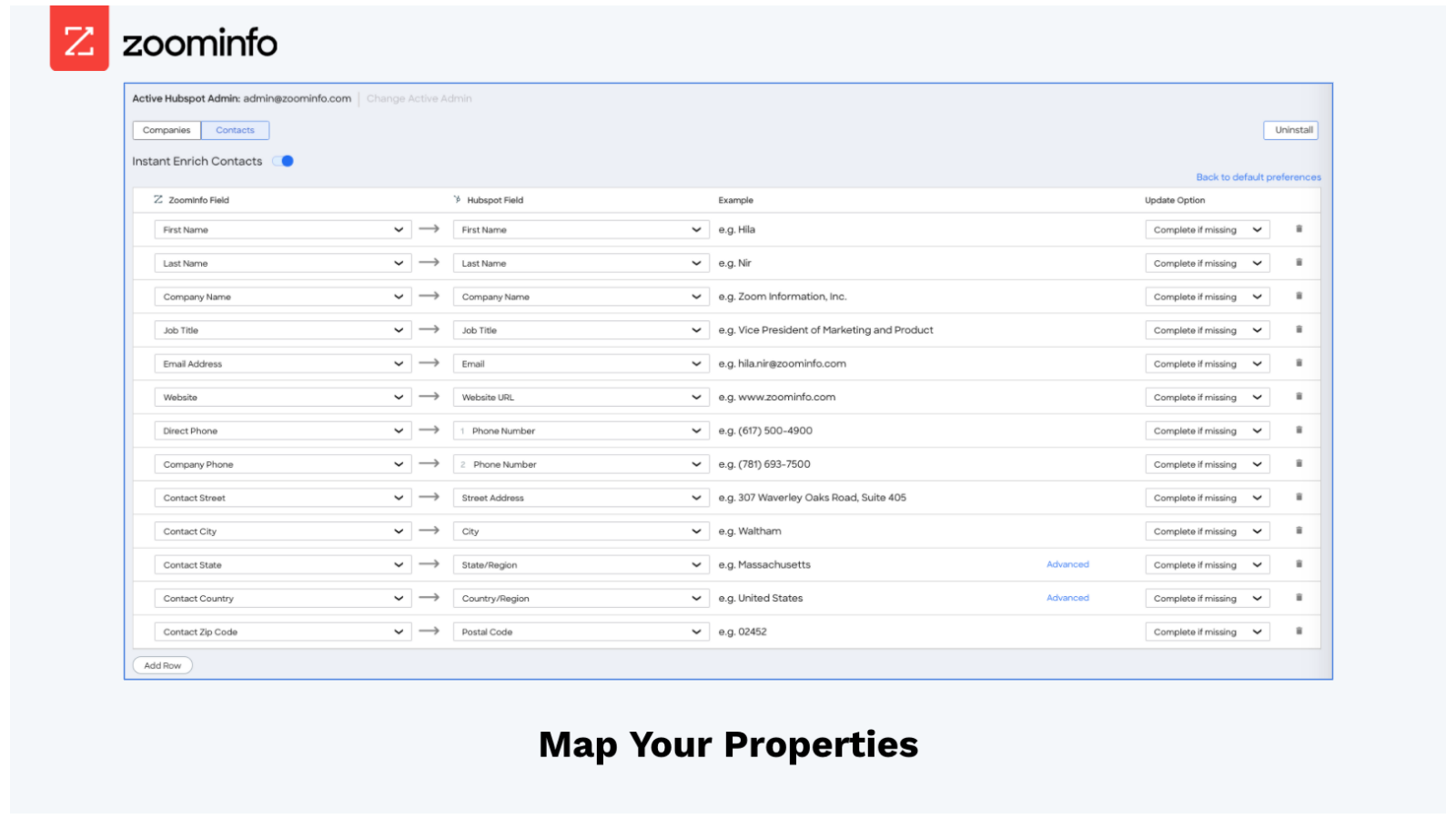
Zoominfo is known for its data accuracy and regular updates. It enriches existing CRM records with fresh contact details. HubSpot has data enrichment features but depends more on integrations. Zoominfo’s database is more extensive and focused on business contacts.
Credit: ecosystem.hubspot.com
Pricing Models
Choosing between ZoomInfo and HubSpot often depends on their pricing models. Both platforms offer different plans tailored to various business needs. Understanding these pricing structures helps businesses decide which tool fits their budget and goals.
Subscription Plans
ZoomInfo offers subscription plans based on data access and user seats. Their pricing is custom and not publicly listed. HubSpot provides clear subscription tiers: Starter, Professional, and Enterprise. Each plan includes specific features and limits.
Cost For Small To Medium Businesses
HubSpot’s Starter plan begins at a low monthly rate, ideal for small teams. It includes basic CRM and marketing tools. ZoomInfo’s plans may be pricier for small businesses due to extensive data services. Small businesses should assess their needs carefully before choosing.
Enterprise Pricing
ZoomInfo’s enterprise pricing targets large organizations with advanced data needs. Pricing depends on the number of users and data volume. HubSpot’s Enterprise plan offers comprehensive CRM and automation features. It comes with a higher price but suits large sales teams well.
Value For Money
HubSpot delivers good value for businesses needing an all-in-one CRM and marketing solution. Its transparent pricing helps avoid surprises. ZoomInfo excels in providing rich data for lead generation but can be costly. Companies must balance data needs against budget.
Integration Options
Integration options play a key role in choosing between ZoomInfo and HubSpot. Both platforms offer ways to connect with other tools. This helps businesses streamline workflows and improve sales efforts. Understanding their integration capabilities helps pick the right fit for your needs.
Third-party Integrations
ZoomInfo supports many third-party integrations. It connects with popular CRMs like Salesforce and Microsoft Dynamics. These integrations allow smooth data transfer and lead enrichment. HubSpot offers a vast app marketplace. Users can integrate marketing, sales, and service apps easily. It includes tools for email, chat, and social media. HubSpot’s integrations often come with built-in automation features.
Compatibility With Other Sales Tools
ZoomInfo works well with various sales tools. It enhances lead generation and prospecting processes. Sales teams can use ZoomInfo alongside outreach and dialing software. HubSpot provides an all-in-one platform. It combines CRM, marketing, and sales tools in one place. HubSpot’s sales tools include pipeline management, email sequences, and meeting scheduling. Compatibility is seamless within its ecosystem.
Api Access
ZoomInfo offers API access for custom integrations. Developers can extract and update data directly. This helps build tailored workflows and applications. HubSpot also provides robust API support. It allows deep integration with external systems. Businesses can automate tasks and sync data efficiently. Both platforms support API use but differ in flexibility and complexity.
User Experience
User experience plays a crucial role in choosing the right CRM tool. It affects how quickly users can adapt and how efficiently they complete tasks. Both ZoomInfo and HubSpot offer unique experiences. This section breaks down their user experience into key areas.
Ease Of Use
ZoomInfo offers powerful data tools but can feel complex to new users. Some features require a learning curve. HubSpot focuses on simplicity. It provides guided workflows and clear instructions. Users often find HubSpot easier to start with. However, ZoomInfo’s advanced features benefit experienced users.
User Interface Design
HubSpot uses a clean, modern interface with intuitive navigation. Its dashboard is customizable and visually organized. ZoomInfo’s interface is data-heavy and detail-oriented. It suits users who need deep insights at a glance. Both platforms update their designs regularly to improve usability.
Customer Support
HubSpot offers extensive support options including live chat, phone, and a large knowledge base. Its support team responds quickly. ZoomInfo provides dedicated account managers and training sessions. Support quality can vary based on subscription level. Both companies aim to help users solve problems fast.
Pros And Cons
Choosing between ZoomInfo and HubSpot requires understanding their strengths and weaknesses. Both tools offer unique features that serve different business needs. Knowing the pros and cons helps in making an informed decision. Below, we explore the advantages and common limitations of each platform.
Advantages Of Zoominfo
- Provides extensive and accurate contact data for sales teams.
- Offers advanced search filters to find specific leads quickly.
- Integrates well with many CRM systems for seamless data flow.
- Includes real-time data updates to keep information current.
- Supports outbound marketing with detailed company insights.
Advantages Of Hubspot
- Combines marketing, sales, and customer service in one platform.
- Offers an intuitive interface that is easy for beginners.
- Includes free tools for email marketing and lead capture.
- Automates workflows to save time on repetitive tasks.
- Provides built-in analytics to measure campaign performance.
Common Limitations
- ZoomInfo can be costly for small businesses with tight budgets.
- HubSpot’s pricing rises sharply as you upgrade plans.
- Both platforms require time to learn and implement effectively.
- ZoomInfo focuses mostly on data, lacking full CRM features.
- HubSpot’s advanced features may need all-in-one usage for best results.
Use Case Scenarios
Understanding the use case scenarios for ZoomInfo and HubSpot helps businesses choose the right tool. Each platform has unique strengths that fit different needs. Knowing these scenarios guides better decision-making.
Best For Lead Generation
ZoomInfo excels in providing detailed contact and company data. It helps users find accurate leads quickly. Sales and marketing teams benefit from its large database. The tool supports targeted outreach with verified emails and phone numbers. This focus makes ZoomInfo ideal for building new lead lists fast.
Best For Sales Management
HubSpot offers a complete sales management system. It tracks deals, manages pipelines, and automates follow-ups. Its CRM integrates marketing, sales, and customer service in one place. Teams use it to organize contacts and monitor progress easily. HubSpot works well for nurturing leads and closing deals.
Combining Both Platforms
Some companies combine ZoomInfo and HubSpot for better results. ZoomInfo finds and verifies leads, then exports them to HubSpot. HubSpot manages these leads through the sales process. This approach uses ZoomInfo’s data strength and HubSpot’s management tools. It creates a smooth workflow from lead generation to sales closure.
Market Position
The market position of ZoomInfo and HubSpot reflects their unique strengths in sales and marketing technology. Both platforms target businesses aiming to improve lead generation and customer relationship management. Their roles overlap but cater to different needs within the sales funnel. Understanding their market stance helps businesses choose the right tool for growth.
Competitive Landscape
ZoomInfo leads in providing detailed company and contact data. It excels at supplying accurate, up-to-date information for sales prospecting. HubSpot focuses on marketing automation and CRM with a user-friendly interface. It offers tools that support inbound marketing and customer engagement. Both compete with other platforms but maintain strong positions in their niches.
Top Alternatives
Several alternatives challenge ZoomInfo and HubSpot in the market. For ZoomInfo, competitors include DiscoverOrg and Clearbit, which also focus on data intelligence. HubSpot faces competition from Salesforce, Zoho CRM, and Freshsales, known for CRM and marketing automation. Choosing alternatives depends on specific business needs and budget constraints.
Industry Adoption
HubSpot is widely adopted by small to mid-sized businesses for its ease of use. It suits companies seeking an all-in-one marketing and sales platform. ZoomInfo is popular among enterprises and B2B companies needing deep data insights. Its adoption grows in sectors like technology, finance, and manufacturing. Both platforms demonstrate strong industry trust and continuous growth.

Credit: swordfish.ai
Frequently Asked Questions
What Is The Difference Between Hubspot And Zoominfo?
HubSpot offers all-in-one CRM and marketing automation. ZoomInfo specializes in detailed B2B contact data and lead intelligence. HubSpot nurtures leads; ZoomInfo provides accurate prospect information. Combining both boosts sales and marketing efficiency.
Who Is Hubspot’s Biggest Competitor?
HubSpot’s biggest competitor is Salesforce, offering comprehensive CRM and marketing automation solutions for businesses of all sizes.
Is Zoominfo Outdated?
ZoomInfo stays current by regularly updating its extensive B2B database. It remains a reliable tool for lead generation and sales intelligence.
What Are The Downsides Of Hubspot?
HubSpot can become costly quickly, with mandatory annual contracts. It lacks A/B testing and custom reporting in lower-tier plans. Limited email template options and less effectiveness if not used as an all-in-one tool are other downsides.
Conclusion
Choosing between ZoomInfo and HubSpot depends on your business needs. ZoomInfo offers detailed contact data for lead generation. HubSpot provides a wide range of CRM and marketing tools. Both have strengths in different areas like automation and data accuracy. Consider your budget, team size, and goals before deciding.
Sometimes, using both can improve sales and marketing efforts. Take time to test each platform’s features. The right choice will support your business growth efficiently.

