
Looking for a CRM that truly works for you without breaking the bank? Understanding Folk CRM pricing can help you decide if this simple yet powerful tool fits your budget and business needs.
Whether you’re a solo entrepreneur or part of a growing team, you want a CRM that captures every detail of your relationships and automates the busywork that slows you down. Folk CRM offers plans designed to match your unique workflow, from free options to premium features powered by AI assistants. Curious about what you get at each price point and how to choose the right plan? Dive into this guide to explore Folk CRM pricing, discover hidden costs to watch out for, and find out how Folk stands out among other CRM options. Ready to take control of your contacts and save time? Check out Folk CRM here and keep reading to get the full scoop on pricing and features tailored just for you.
Credit: salesdorado.com
Introduction To Folk Crm And Its Purpose
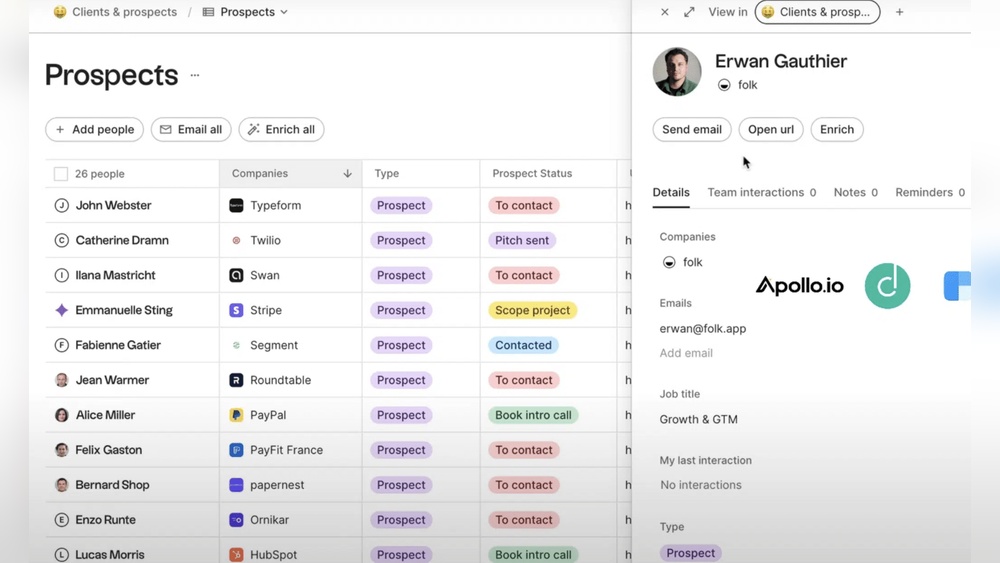
Folk CRM is a simple and smart tool designed to help manage relationships. It collects all details about your contacts in one place. This makes it easier to stay connected and organized. The software uses AI Assistants to handle routine tasks automatically.
This CRM focuses on saving time and reducing busywork. It helps users focus on what matters most — building and maintaining relationships. Folk CRM is built to fit smoothly into daily workflows without complexity.
What Is Folk Crm?
Folk CRM is a contact management system that centralizes relationship data. It captures the full context of your interactions and stores it in an easy-to-use platform.
- Simple interface for quick access to contact info
- AI-powered assistants automate repetitive tasks
- Designed to support personal and professional relationships
- Accessible via desktop and mobile devices
Who Is Folk Crm Designed For?
Folk CRM suits small to medium teams and individuals who want better contact management. It works well for:
- Sales professionals tracking leads and clients
- Customer support teams managing relationships
- Business owners wanting a clear view of contacts
- Anyone needing a simple CRM without complexity
The tool adapts to users who prefer minimal setup but want powerful features.
Core Objectives And Benefits Of Using Folk Crm
Folk CRM aims to simplify relationship management and improve productivity. Key benefits include:
- Centralized contact data: All information in one place.
- Automation: AI assistants reduce manual work.
- Improved organization: Track conversations and follow-ups easily.
- Time-saving: Focus on relationships, not data entry.
- Scalability: Grows with your business needs.
These features help users build stronger connections efficiently.

Credit: www.folk.app
Key Features Of Folk Crm And Their Benefits
Folk CRM offers a set of powerful features designed to simplify customer relationship management. Its tools help teams stay organized, save time, and improve communication. Each feature focuses on making daily tasks easier and boosting overall productivity.
Contact Management: Simplifying Relationship Tracking
Folk CRM centralizes all your contacts in one easy-to-use platform. It captures full details about each person and company, keeping everything organized.
- Automatic updates: Contact information syncs and updates automatically.
- Context storage: Notes, emails, and interactions are stored for quick reference.
- Search and filter: Find contacts quickly using filters and search tools.
This helps teams build better relationships by always having the right information at hand.
Sales Pipeline Automation: Streamlining Sales Processes
Folk CRM automates many sales tasks to speed up the pipeline. It tracks deals through stages and reminds users of important follow-ups.
- Deal tracking: Visual pipelines show the status of each opportunity.
- Task automation: Automatic reminders and task creation reduce manual work.
- Performance insights: Reports highlight areas that need attention.
Sales teams close deals faster and spend less time on repetitive tasks.
Integration Capabilities: Enhancing Workflow Efficiency
Folk CRM connects with popular apps to keep your workflow smooth. Data flows seamlessly between tools, eliminating double entry.
- Email integration: Sync emails to keep communication in one place.
- Calendar sync: Meetings and events update automatically.
- Third-party apps: Connect with tools like Slack, Google Workspace, and more.
Teams save time and avoid errors by working within familiar applications.
Mobile App Accessibility: Managing Crm On The Go
The Folk CRM mobile app lets users manage contacts and sales from anywhere. It keeps teams connected and responsive outside the office.
- Full access: View and update contacts and deals on your phone.
- Real-time sync: Changes appear instantly across devices.
- Notifications: Get alerts for important updates and tasks.
Field teams and remote workers stay productive without needing a desktop.
Communication Tools: Centralizing Customer Interactions
Folk CRM brings emails, calls, and notes into one place. This central hub ensures every team member sees the full history.
- Email tracking: Send and receive emails within the CRM.
- Call logging: Record call details and outcomes.
- Shared notes: Collaborate on customer information easily.
Teams maintain clear, consistent communication with customers and each other.
Folk Crm Pricing Plans And Affordability
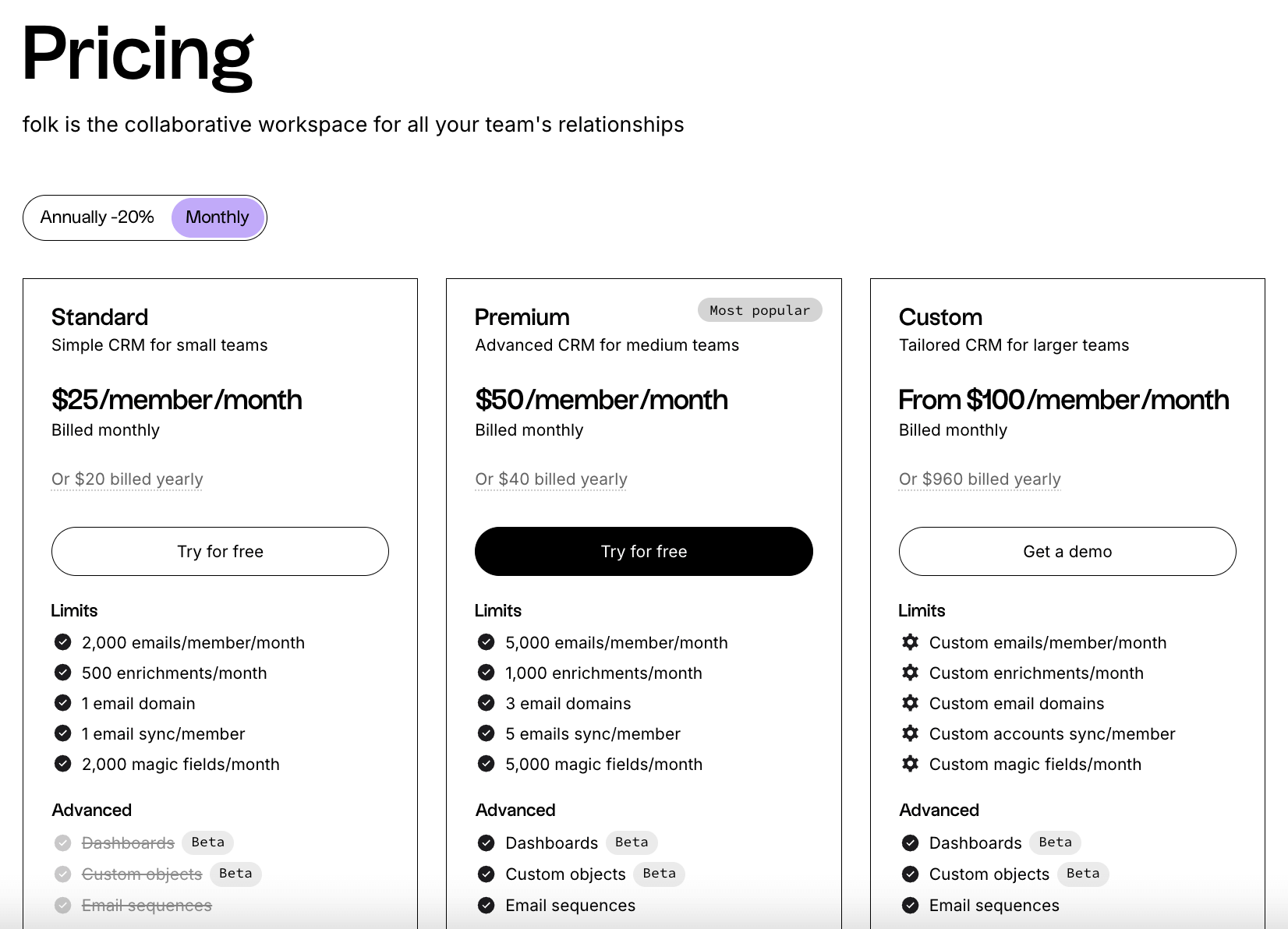
Folk CRM offers pricing plans designed to fit businesses of all sizes. The plans focus on simplicity, helping users manage relationships without extra hassle. Each plan provides a different level of features and support. This section breaks down Folk CRM pricing to help you choose the right plan for your needs.
Overview Of Pricing Tiers: Free, Standard, And Premium
Folk CRM has three main pricing tiers:
- Free Plan: Ideal for individuals or small teams. It includes basic contact management and limited sales tracking.
- Standard Plan: Suits growing businesses. It adds automation, better reporting, and integration options.
- Premium Plan: Designed for large teams. Offers advanced analytics, AI features, and deep customization.
Each tier builds on the previous one, giving more tools and support as your needs grow.
Cost Breakdown Per User And Billing Options
| Plan | Price per User/Month | Billing Options |
|---|---|---|
| Free | $0 | Monthly only |
| Standard | $12 | Monthly or Annual (discount on annual) |
| Premium | Custom pricing | Annual billing preferred |
Monthly billing offers flexibility. Annual billing saves money if you commit long-term.
Additional Expenses: Implementation, Training, And Add-ons
Aside from subscription fees, some costs can appear:
- Implementation: Setting up the system and importing data may require fees.
- Training: Extra charges may apply for team training or onboarding sessions.
- Add-Ons: Extra tools or integrations might cost more depending on your needs.
Planning for these costs helps avoid surprises and ensures smooth adoption.
Comparison With Competitors’ Pricing
| CRM | Starting Price (per user/month) | Key Features |
|---|---|---|
| Folk CRM | Free / $12 | Simple CRM, AI automation, contact management |
| HubSpot CRM | ₹1,277 (~$15) | Marketing tools, sales tracking, free tier |
| Bitrix24 | ₹1,590 (~$18) | Collaboration, CRM, project management |
| Monday Sales CRM | $12 | Sales pipelines, automation, integrations |
Folk CRM matches or beats many competitors on price. Its free and standard plans offer good value for small to medium teams.
Pros And Cons Based On Real-world Usage
Folk CRM offers a unique approach to managing relationships with a simple, clean interface. Users appreciate its ease of use and smart automation. The system learns from data to reduce busywork. Like any tool, Folk CRM has both strong points and drawbacks. Here is a breakdown based on real-world feedback.
Advantages: User-friendly Interface And Integration
Folk CRM stands out for its intuitive design. The interface is clean and easy to navigate, even for new users. It focuses on capturing the full context of relationships without overwhelming complexity.
- Simple contact management: Quickly add and update contacts.
- Seamless integration: Connects well with email and calendar apps.
- AI-powered automation: Reduces repetitive tasks by learning user patterns.
- Collaboration tools: Teams can work together smoothly within the platform.
These features help small to mid-sized businesses stay organized and save time.
Limitations: Feature Gaps And Scalability Concerns
Some users note missing features that limit Folk CRM’s use for larger or more complex teams. The platform currently lacks certain advanced sales tools common in other CRMs.
- Limited custom fields: Users cannot fully tailor data to specific needs.
- Basic reporting: Advanced analytics options are minimal or absent.
- Scalability issues: Handling many users or complex workflows can be challenging.
- Automation limits: AI assists but does not cover all process automation.
Businesses with high customization or growth needs might find these gaps restrictive.
Customer Support And Community Feedback
Support quality receives mixed reviews. Folk CRM offers standard help channels like email and knowledge bases. Response times vary based on issue complexity.
| Aspect | User Feedback |
|---|---|
| Response speed | Generally prompt for common questions |
| Technical support | Slower for complex problems |
| User community | Small but growing, active in sharing tips |
Community forums help users troubleshoot and share best practices.
Performance Insights And Reliability
Most users report stable performance and minimal downtime. Folk CRM is built to handle everyday business needs smoothly.
- Fast load times: Pages and data sync quickly.
- Data security: Basic protections are in place, meeting industry standards.
- Mobile access: Mobile app works well for on-the-go updates.
- Occasional bugs: Minor glitches appear but get fixed in updates.
Reliability suits small teams focused on contact management and sales tracking.
Who Should Choose Folk Crm?
Folk CRM suits those who want a simple, effective way to manage relationships. It captures all contact details in one place and uses AI to reduce repetitive tasks. This CRM fits users needing easy contact management without complex features.
Ideal Users: Individuals, Small Teams, And Service Businesses
Individuals benefit from Folk CRM by organizing personal and professional contacts clearly.
Small teams find it useful for shared access to client info and straightforward collaboration.
Service businesses like consultants, freelancers, and agencies can track clients and tasks simply.
- Easy setup without technical skills
- Cost-effective plans for small budgets
- AI tools to save time on busywork
Best Use Cases: Contact Management And Simple Sales Tracking
Folk CRM works well for keeping detailed contact records and tracking sales progress. It helps users:
- Store client details with notes and history
- Track sales pipelines without complex dashboards
- Automate reminders and follow-ups using AI
- Manage communications in one place
This CRM is ideal when sales processes are straightforward and teams need quick access to contact info.
When To Consider Alternative Crm Solutions
Choose another CRM if business needs include:
- Advanced sales analytics and forecasting
- Complex workflows requiring deep customization
- Large teams needing extensive user roles and permissions
- Integration with many external software tools
Folk CRM focuses on simplicity and ease, so it may lack features for highly complex operations.
Final Thoughts: Is Folk Crm Worth The Investment In 2026?
Folk CRM offers a simple yet powerful way to manage relationships. It combines contact management with AI to reduce repetitive tasks. The pricing reflects options suitable for small businesses to enterprises. Evaluating its value in 2026 requires looking at cost, features, and growth support.
Summarizing Value For Money
Folk CRM pricing fits various business sizes and needs. Here is a quick overview:
| Plan Level | Target User | Key Features | Price Range (per user/month) |
|---|---|---|---|
| Basic | Small businesses | Core contact management, sales tracking | Free to Low-cost |
| Mid-range | Growing businesses | Automation, reporting, integrations | Moderate pricing |
| Enterprise | Large teams | Advanced analytics, AI, deep customization | Premium pricing |
Monthly and annual billing options exist, with discounts for longer contracts. Users should consider extra costs like training or add-ons.
How Folk Crm Supports Business Growth
- AI Assistants automate routine tasks, saving time.
- Centralizes all relationship data in one place.
- Improves sales tracking and follow-up efficiency.
- Offers integrations that connect with existing tools.
- Scales with business needs through tiered plans.
This support helps businesses focus on building stronger connections and closing more deals. Folk CRM adapts as teams grow and workflows become complex.
Future Outlook And Upcoming Features
Folk CRM plans to expand AI capabilities for deeper automation. Expect enhanced data insights and customizable workflows. The team aims to improve user experience with simpler interfaces.
New integrations with popular business apps are also in development. These updates will help users streamline operations further.
Investing in Folk CRM means access to evolving tools designed to match future business demands.

Credit: www.folk.app
Frequently Asked Questions
How Much Does Folk Crm Cost?
Folk CRM offers a free plan for basic use. Paid plans start at $12 per user monthly, with advanced features available.
Does Folk Crm Have A Free Version?
Yes, Folk CRM offers a free version with basic contact management features for individuals and small teams.
How Much Does Crm Cost Per Month?
CRM costs typically range from free to $12+ per user monthly. Prices vary by features, users, and contract terms. Basic plans suit small businesses; advanced plans add automation and analytics. Always consider implementation and training fees when budgeting CRM expenses.
Which Is The Cheapest Crm?
Folk CRM offers affordable plans starting with a free basic version. Bitrix24 and HubSpot CRM also provide low-cost options. Prices vary by features and users. Choose based on your business needs for the cheapest effective CRM.
Conclusion
Folk CRM offers pricing plans fit for different business sizes. You can start with a free basic plan to manage contacts easily. Growing teams may choose plans with automation and better reporting. Larger businesses find value in advanced features and AI tools. Costs depend on users, features, and contract length. Remember to consider extra fees like training and data migration. Explore Folk CRM pricing to find the best fit for your needs. Learn more about Folk CRM pricing here.

