
Are you struggling to decide between using Lists or Tags in ActiveCampaign? You’re not alone.
Both tools help you organize your contacts, but they do it in very different ways—and choosing the right one can make your marketing automation smoother and more effective. Imagine having a system that not only keeps your contacts neat but also powers up your automated campaigns with laser-focused precision. That’s exactly what mastering Lists and Tags in ActiveCampaign can do for you. You’ll discover the key differences between ActiveCampaign Lists and Tags, how to use each one strategically, and why combining them might be the secret to unlocking unstoppable marketing success. Ready to take control of your marketing automation and boost your results? Let’s dive in and get you set up for success with ActiveCampaign’s powerful features. Get started now with ActiveCampaign and watch your marketing efforts transform.
Introduction To Activecampaign Lists And Tags
ActiveCampaign offers powerful tools for managing your contacts and crafting targeted marketing campaigns. Two core features are Lists and Tags. Each helps organize contacts but serves different purposes. Understanding how Lists and Tags work can improve your marketing strategy and communication with your audience.
Both features help segment your contacts but in distinct ways. Using them smartly allows precise targeting and better engagement. Below, we explore what Lists and Tags are and why choosing between them matters.
Understanding The Purpose Of Lists In Activecampaign
Lists are groups of contacts who have opted in to receive specific types of emails. They act like mailing lists for newsletters, promotions, or updates.
- Lists organize contacts based on communication type.
- They help manage consent and subscription preferences.
- Contacts can belong to multiple Lists if they opt in for different content.
Lists ensure you send the right message to the right audience. They are essential for compliance and clear communication.
What Are Tags And How Do They Work?
Tags are labels you apply to contacts to mark specific traits, behaviors, or interests.
- Tags provide detailed information about each contact.
- They help identify groups within or across Lists.
- Tags can be added or removed automatically by actions or manually by you.
For example, a tag might identify contacts as “Webinar Attendee” or “VIP Customer”. Tags offer flexibility in segmenting your audience beyond Lists.
Why Choosing Between Lists And Tags Matters For Your Marketing
Choosing between Lists and Tags affects how you organize contacts and send emails.
| Feature | Lists | Tags |
|---|---|---|
| Purpose | Group contacts by subscription type | Label contacts by behavior or traits |
| Contact Overlap | Contacts can be in multiple Lists | Tags can be added or removed anytime |
| Use Case | Manage consent and communication | Segment for personalized automation |
| Flexibility | Less flexible, more structured | Highly flexible and dynamic |
Using Lists for broad communication and Tags for detailed targeting improves marketing results. This choice impacts how you build campaigns and automate messages.
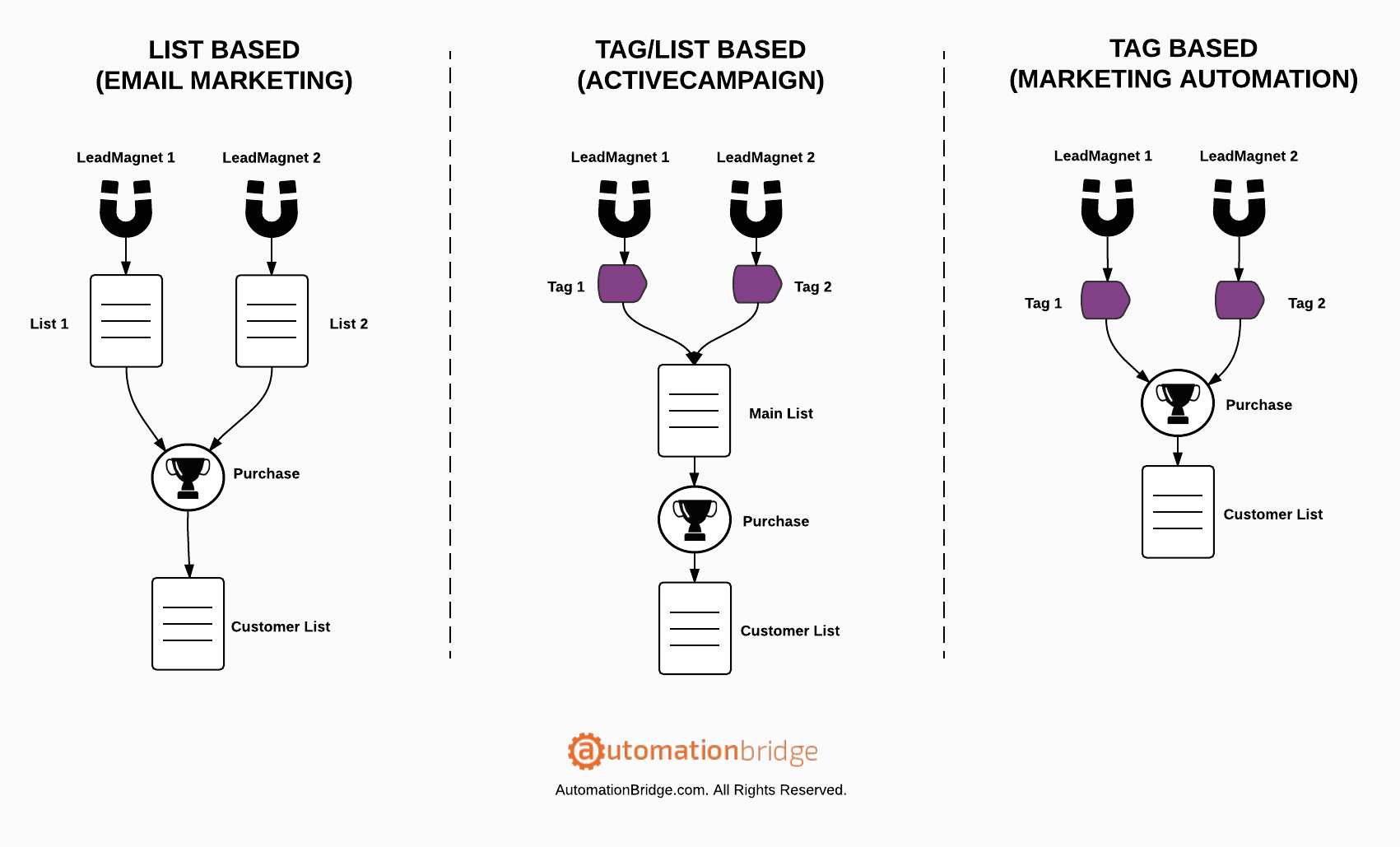
Credit: automationbridge.com
Key Features Of Activecampaign Lists
ActiveCampaign Lists are essential tools to organize contacts efficiently. They help manage communication consent and group subscribers based on their preferences. Lists form the backbone of your email marketing strategy by defining who receives specific messages. This structure ensures clear communication channels and compliance with consent laws.
How Lists Organize Contacts Based On Communication Consent
Lists group contacts who have opted in to receive particular types of emails. Each list represents a clear consent category, such as newsletters, promotions, or updates. This separation helps respect subscribers’ choices and keeps your campaigns compliant with legal standards.
- Contacts join a list after giving explicit permission.
- Lists prevent sending unwanted emails to uninterested subscribers.
- Consent management becomes straightforward and transparent.
Benefits Of Using Lists For Targeted Email Campaigns
Using lists allows marketers to send emails that match subscribers’ interests and needs. Targeted campaigns improve engagement rates and reduce unsubscribe numbers. Lists also simplify campaign setup by grouping contacts with similar preferences.
| Benefit | Description |
|---|---|
| Improved Engagement | Emails reach only interested contacts, boosting open and click rates. |
| Reduced Spam Complaints | Sending relevant content lowers the chance of being marked as spam. |
| Efficient Campaign Management | Organizing contacts by list saves time during campaign creation. |
Managing Communication Types And Subscriber Preferences With Lists
Lists help control different communication types, such as marketing, transactional, or informational emails. Subscribers can be placed on multiple lists based on their preferences. This setup respects their choices and improves their experience.
- Define lists for each communication type.
- Assign contacts to lists matching their subscription preferences.
- Send tailored content per list to meet subscriber expectations.
ActiveCampaign Lists simplify managing subscriber preferences and ensure your messages align with what contacts want to receive.
Key Features Of Activecampaign Tags
ActiveCampaign tags offer a powerful way to organize and interact with your contacts. Tags work as labels that mark contacts based on their behavior, preferences, or status. Unlike lists, which group contacts by opt-in status or communication type, tags provide a more detailed and flexible way to segment and personalize your marketing efforts.
Tags help marketers target the right audience with precise content, automate workflows, and gain deep insights into contact history. Their versatility makes them essential for any effective email marketing strategy.
Flexibility Of Tags For Contact Segmentation And Personalization
Tags allow you to classify contacts with specific details such as interests, purchase history, or engagement level. This flexibility enables:
- Granular segmentation: Create narrow groups based on multiple tags combined.
- Personalized messaging: Send tailored emails by checking for certain tags.
- Easy updates: Add or remove tags anytime to reflect changing contact status.
For example, a contact tagged with Webinar Attendee and Interested in Product A can receive targeted follow-ups specific to their interests.
Using Tags To Trigger Automations And Dynamic Content
Tags can act as triggers in automation workflows. This means certain actions happen automatically when a tag is added or removed. Key uses include:
- Starting automation sequences: Add a tag to enroll contacts in welcome or nurture series.
- Sending dynamic content: Show different email content blocks based on tags.
- Conditional branching: Create paths inside workflows depending on tags.
This approach saves time and improves contact experience by delivering relevant content at the right moment.
How Tags Provide Historical Data And Detailed Contact Insights
Tags track the history of contact interactions over time. This historical data helps you:
- Understand contact behavior patterns.
- Identify engagement trends and preferences.
- Make data-driven marketing decisions.
ActiveCampaign stores tag changes with timestamps, letting you see when and why tags were applied or removed. This detailed insight aids in refining segmentation and automation strategies.
Credit: www.youtube.com
Comparing Lists And Tags: Benefits And Use Cases
ActiveCampaign offers two main ways to organize contacts: Lists and Tags. Both help manage your audience but serve different purposes. Understanding their benefits and use cases helps improve your marketing strategy. This section breaks down when to use each and how to combine them for better results.
When Lists Are More Effective For Your Marketing Strategy
Lists group contacts who share a similar consent or communication preference. They act as the foundation for sending newsletters, promotions, or updates.
- Clear communication channels: Lists ensure contacts receive only relevant email types.
- Consent management: Contacts on a list have explicitly opted in for specific content.
- Organizing broad groups: Use lists to separate customers, leads, or partners.
Lists work best when you want to maintain strict control over what each group receives. They are ideal for permission-based marketing and basic segmentation.
Ideal Scenarios For Using Tags To Enhance Contact Management
Tags are labels that add details about contacts’ actions, interests, or status. They provide flexible ways to track and segment contacts inside lists.
- Behavior tracking: Tag contacts based on website visits, purchases, or email clicks.
- Personalization: Use tags to tailor messages to interests or stage in the sales funnel.
- Dynamic segmentation: Tags allow grouping contacts across multiple lists for targeted campaigns.
Tags suit marketers needing detailed, adaptable contact information. They enhance contact profiles beyond the basic list structure.
Combining Lists And Tags For Maximum Marketing Impact
Use lists and tags together for precise and efficient marketing.
| Feature | Lists | Tags | Combined Use |
|---|---|---|---|
| Purpose | Group by consent or communication type | Label by behavior or interest | Segment contacts in lists for targeted messaging |
| Flexibility | Static groups | Dynamic and multi-dimensional | Use tags to refine lists dynamically |
| Marketing Focus | Broad campaigns, newsletters | Personalized automation, follow-ups | Combine broad reach with personalization |
| Consent & Compliance | Ensures legal opt-in | Does not replace consent management | Keep compliance with lists; enrich with tags |
Combining lists with tags improves segmentation and boosts engagement. Use lists to organize contacts by permission. Then apply tags to track actions and customize communication. This approach maximizes marketing results.
Pricing And Affordability Breakdown
Understanding how ActiveCampaign Lists and Tags impact pricing is essential. Both tools help organize contacts but affect costs differently. This section breaks down the pricing and affordability of Lists versus Tags. It guides on using them efficiently without overspending.
How Lists And Tags Affect Your Activecampaign Plan Costs
ActiveCampaign pricing depends on the total number of contacts. Lists and Tags influence this in unique ways:
- Lists: Contacts on multiple lists are counted multiple times. This increases your bill.
- Tags: Tags do not increase contact count. One contact with many tags still counts as one.
This means managing contacts with many lists can quickly raise your plan costs. Tags help avoid this by organizing contacts without duplicating them.
Cost Efficiency Of Using Tags Vs. Multiple Lists
| Feature | Using Lists | Using Tags |
|---|---|---|
| Contact Counting | Duplicates contacts if on multiple lists | Counts each contact once regardless of tags |
| Pricing Impact | Higher costs with more lists | Lower costs by avoiding duplicates |
| Organization | Good for separate communication types | Better for detailed segmentation |
| Ease of Use | Simple but can get expensive | Flexible and cost-effective |
Tags offer a cost-efficient way to segment contacts. Lists may suit if clear separation of groups is needed.
Maximizing Value: Choosing The Right Approach For Your Budget
To keep costs low, use this approach:
- Limit the number of lists. Use lists only for major groups or communication types.
- Use tags for detailed contact info. Tags help track behaviors, preferences, and actions.
- Review contact duplicates. Avoid placing the same contact on many lists.
- Monitor your contact count regularly. This prevents unexpected price hikes.
This hybrid method balances organization and affordability. It ensures your ActiveCampaign plan fits your budget.

Credit: automationbridge.com
Pros And Cons Based On Real-world Usage
ActiveCampaign offers two main ways to organize contacts: Lists and Tags. Each has strengths and weaknesses depending on your marketing needs. Understanding how they work in practice helps choose the right method. Below, we explore their pros and cons from actual user experiences.
Advantages Of Lists: Simplicity And Compliance Benefits
Lists in ActiveCampaign group contacts who opted in for specific emails. This structure keeps communication clear and organized.
- Easy to manage: Each list represents a distinct communication channel.
- Consent tracking: Lists help show which contacts agreed to receive certain emails.
- Compliance friendly: Using lists aligns well with GDPR and CAN-SPAM rules.
- Clear unsubscribe process: Subscribers can leave a list without affecting others.
This simplicity makes lists ideal for straightforward email campaigns and legal compliance.
Challenges And Limitations Of Managing Multiple Lists
Using many lists can cause organizational headaches and limit marketing flexibility.
- Contact duplication: The same person may appear on multiple lists, inflating counts.
- Higher costs: Duplicate contacts can increase subscription fees.
- Complex segmentation: Combining lists to target specific groups is less efficient.
- Harder automation: Automations across lists require extra setup and care.
Managing many lists demands more effort and may slow down marketing processes.
Strengths Of Tags: Flexibility And Automation Potential
Tags label contacts with detailed information, allowing dynamic and precise targeting.
- Highly flexible: Apply multiple tags to a single contact for rich data.
- Advanced segmentation: Easily build segments based on tag combinations.
- Powerful automation: Trigger workflows and personalized emails using tag actions.
- Cost-effective: Avoid contact duplication since tags don’t create separate lists.
Tags enable marketers to build smart, automated campaigns tailored to individual behaviors.
Potential Drawbacks Of Overusing Tags And How To Avoid Them
Over-tagging can create confusion and reduce marketing clarity.
- Tag overload: Too many tags make it hard to track and manage contacts.
- Inconsistent naming: Poor tag naming leads to duplicate or unclear tags.
- Slower automation: Complex tag setups can slow down campaign execution.
Best practices to avoid issues:
- Keep tags simple and descriptive.
- Regularly audit and clean unused tags.
- Use a standard naming system for tags.
- Limit tag use to essential data points only.
Proper tag management ensures flexibility without chaos or inefficiency.
Specific Recommendations For Ideal Users And Scenarios
Choosing between ActiveCampaign Lists and Tags depends on business size, goals, and contact volume. Each method has unique strengths. Understanding who benefits most from each helps create a clear marketing strategy. This section highlights ideal users and scenarios for optimal use of Lists and Tags.
Best Practices For Small Businesses And Startups
Small businesses and startups often have limited contacts and resources. Lists provide a simple way to group contacts based on basic criteria like newsletter subscribers or customers. Tags offer more detailed categorization without cluttering the contact base.
- Use Lists to separate major communication types (e.g., prospects, customers).
- Use Tags for tracking behaviors, interests, or product preferences.
- Keep Lists minimal to avoid complex management.
- Leverage Tags for personalized email campaigns and automation triggers.
This approach keeps contact management straightforward and scalable.
How Agencies And Large Enterprises Can Leverage Tags And Lists
Agencies and large enterprises handle high contact volumes and diverse clients. Tags help segment contacts with precision across multiple campaigns and services. Lists maintain clear consent records and broad audience categories.
| Use Case | Recommended Approach |
|---|---|
| Managing multiple clients or brands | Separate Lists by client or brand for clear boundaries |
| Detailed segmentation within each client | Apply Tags for preferences, behavior, and campaign responses |
| Automation at scale | Use Tags as triggers within automation workflows |
| Compliance and opt-in management | Use Lists to store consent data and communication types |
Tips For Migrating From Other Platforms Using Lists Or Tags
Migrating contacts requires careful planning to preserve segmentation and consent. Lists map well to communication preferences and opt-in groups. Tags transfer detailed attributes and engagement history.
- Export contacts grouped by communication type to create Lists.
- Import behavioral and attribute data as Tags.
- Review overlapping contacts to avoid duplicates across Lists.
- Test automation workflows post-migration to ensure tag triggers work.
- Clean tags regularly to maintain relevance and accuracy.
Tailoring Your Strategy Based On Marketing Goals And Contact Volume
Marketing goals and contact volume shape the use of Lists and Tags. Small contact bases benefit from simple Lists plus selective tagging. Large volumes require robust tagging systems for precise targeting.
- Goal: Broad communication – Use Lists to group by communication types like newsletters or offers.
- Goal: Personalized marketing – Use Tags to identify interests, purchase history, and engagement.
- Low contact volume – Limit Lists to essential groups and use Tags sparingly.
- High contact volume – Combine multiple Tags for detailed segmentation and automation.
Adjust the balance between Lists and Tags as your database and goals evolve.
Conclusion: Choosing The Right Approach To Boost Your Marketing
Choosing between ActiveCampaign Lists and Tags shapes your marketing success. Both tools organize contacts but serve different purposes. Lists manage communication consent and group contacts by email type. Tags track detailed customer actions and preferences. Using them wisely improves targeting and engagement.
Summary Of Key Differences And Benefits
| Feature | Lists | Tags |
|---|---|---|
| Purpose | Group contacts by communication type and consent | Label contacts with specific traits or actions |
| Contact Management | One contact per list; duplicates possible across lists | No duplicates; multiple tags per contact allowed |
| Use Case | Manage newsletters, promotions, and opt-ins | Track behaviors, interests, and customer journey |
| Segmentation | Basic segmentation by list membership | Advanced segmentation using multiple tag combinations |
Final Advice On Integrating Lists And Tags Effectively
Combine lists and tags for best results. Use lists to manage consent and broad communication categories. Use tags to personalize messages and track actions.
- Create lists for each email type: newsletters, promotions, updates.
- Assign tags for interests, purchase history, or engagement levels.
- Keep lists clean to avoid duplicates and unsubscribes.
- Use tags to build detailed segments and automate workflows.
This approach keeps your contacts organized and marketing targeted.
Next Steps To Optimize Your Activecampaign Contact Management
- Review your current contact groups and map them to lists.
- Define key customer traits to track with tags.
- Set up automation triggers based on tag actions.
- Regularly clean your lists and update tags for accuracy.
- Test campaigns targeting both lists and tagged segments.
Consistent management improves engagement and campaign success.
Frequently Asked Questions
What Are Lists In Activecampaign?
Lists in ActiveCampaign are groups of contacts who consent to receive your emails. They help manage communication types and permissions.
What Is A Tag In Activecampaign?
A tag in ActiveCampaign is a label that categorizes contacts based on actions or characteristics. Tags help segment and personalize marketing efforts. They trigger automations and track contact behavior, enabling targeted communication and better organization within your account.
What Is The Difference Between Segments And Tags In Kit?
Segments group contacts based on specific tag combinations or criteria. Tags label individual contacts with specific attributes or actions. Segments organize contacts dynamically, while tags provide fixed, detailed identifiers. Together, they help target and personalize marketing efforts efficiently in Kit.
What Is The Difference Between Topics And Tags?
Topics organize content around broad themes, while tags label specific details for personalized categorization and easier search.
Conclusion
Choosing between ActiveCampaign lists and tags depends on your needs. Lists help manage broad groups of contacts. Tags offer detailed, flexible labeling for each contact. Using both together creates a powerful system. This method improves your email marketing and audience targeting. Explore how ActiveCampaign can fit your strategy by visiting ActiveCampaign. Start organizing smarter, not harder.

